Acceptance criteria for AI coding agents: write what the agent can prove
A coding agent will tell you it is done. The acceptance criteria decide whether that means anything. Here is how to write criteria an agent can turn into proof, and where to keep them so every agent reads the same ones.

“Done” is the most expensive word in agent work
Your coding agent finishes in eleven minutes. The tests pass, the diff looks tidy and the summary says the feature is complete. Then the reviewer opens the app and finds the empty state missing, the export limited to the current page and an error message nobody approved.
The agent did not lie. It met the bar it was given, and the bar was a one-line ticket. In 2026, Claude Code and Codex write code faster than most teams can review it. The bottleneck has moved to the definition of done. That definition is what turns an agent’s confident summary into something a person can check in minutes.
Acceptance criteria are that definition. They are not new; product teams have written them in Jira for fifteen years. What has changed is the reader. A human developer fills the gaps in a vague criterion with judgement and a quick question in Slack. An agent fills them with its most likely guess, at speed, and then writes tests that confirm the guess.
This guide covers how to write criteria an agent can prove, where to keep them so that every agent and every reviewer reads the same version, and how Sydla turns them into evidence-backed review without adding another AI meter to your stack.
Why agents need sharper criteria than people
Three habits of coding agents make loose criteria expensive.
- They take words literally. “Users can export invoices” passes when one invoice exports as a CSV. Whether that means all invoices, the filtered list or a PDF is your decision, not the agent’s.
- They mark their own homework. When the same session writes the code and the tests, the tests describe what the code does, not what you wanted. A green suite proves consistency, not correctness.
- They work from what they can reach. If the approved screen states sit in Figma, the edge cases in a Confluence page and the agreed flow on a Miro board, the agent sees only what its connectors and credit allowances let it fetch. Everything else is silently out of scope.
Spec-driven tools have noticed. Kiro expands a prompt into user stories with criteria written in EARS notation, such as “WHEN the user submits the form THE SYSTEM SHALL…”. GitHub Spec Kit keeps a spec file next to the code. Atlassian’s Rovo Dev code reviewer can check a pull request against criteria in the linked Jira work item, as long as they sit under a heading such as “Acceptance Criteria” and are written in English. The direction is clear: criteria are becoming the contract between people and agents.
Where your criteria live today, and what reading them costs
On a typical lean-team stack, the pieces of “done” are spread across six subscriptions. The criteria may be in Jira, the edge cases in Confluence and the states in Figma, and each tool runs its own AI allowance. Prices are USD list prices for one paid seat, billed monthly, before tax.
| Tool and plan | Seat / month | Part of “done” it holds | AI allowance or limit in 2026 |
|---|---|---|---|
| Jira Standard | $9.70 | The ticket and its acceptance criteria, as text in the description | 25 Rovo credits per user per month, pooled; MCP calls use credits |
| Confluence Standard | $7.15 | The spec, edge cases and decisions | The same pooled Rovo allowance |
| Notion Plus | $12.00 | Research and customer quotes | Custom Agents need Business or Enterprise, then $10 per 1,000 credits |
| Figma Professional, Full seat | $20.00 | Approved screens: empty, loading, error, success | 3,000 AI credits per Full seat; MCP server capped at 200 calls a day |
| Miro Starter | $10.00 | The user flow agreed in the workshop | 25 AI credits per member per month |
| Canva Business | $25.00 | Release notes and launch copy | Premium AI allowance with fair-use limits |
| Sydla | $19.00 | Brief, UX Studio states, Given/When/Then criteria and their results with proof, in one initiative | No Sydla AI credits. Your Claude Code or Codex plan runs the agent, with no token markup |
One seat in each of the six selected plans costs $83.85 per person per month. Sydla costs $19, which is $64.85 less. The bigger saving is in review time: when criteria, states and proof sit in one place, nobody has to rebuild the definition of done from four tabs before approving a merge request. The pricing breakdown lists every plan and source, and the full comparison covers the trade-offs workflow by workflow.
Six rules for criteria an agent can prove
Good criteria for agents are the same as good criteria for people, with less room for interpretation. These six rules cover most of the gap.
- One behaviour per criterion. “Export works and is fast” is two criteria. Split them, so that one can pass while the other fails, and the review says which.
- Use Given / When / Then with real data. “Given a workspace with 1,200 invoices filtered to March, when the owner clicks Export, then a CSV with 214 rows downloads.” Concrete numbers turn into test fixtures; adjectives do not. EARS works too; pick one notation and keep it.
- Name the state the reviewer will look at. Link each visible behaviour to a screen state: empty, loading, error or success. If the state is not designed, the agent will design it for you.
- Say how it will be proven. A unit test, an end-to-end scenario, a command and its output, or a screenshot of a named state. A criterion with no possible proof is a wish, and the agent will mark it as met anyway.
- Write the negative case and the non-goals. “A member without billing rights does not see Export” and “PDF export is out of scope” stop the agent from under-building one side and over-building the other.
- Keep criteria outside the agent’s instruction file. CLAUDE.md and AGENTS.md are for repository conventions that rarely change. Criteria change in review, so they belong with the ticket, where the reviewer edits them and every agent reads the latest version.
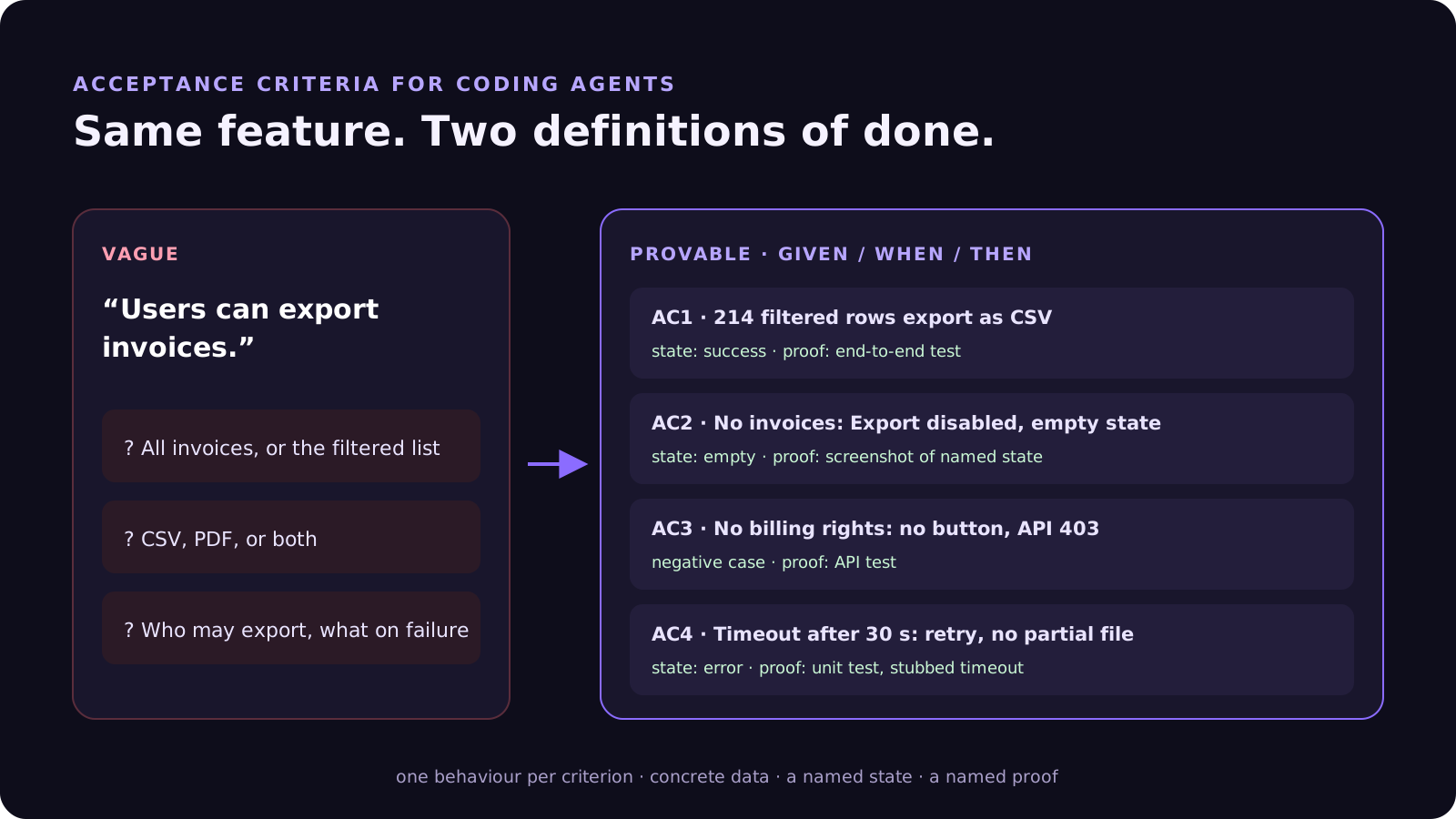
A worked example: the billing export
Take the billing export from our customer-request walkthrough. The original ticket said “Let owners export invoices.” Here are the four criteria the team agreed after ten minutes of review:
- AC1, filtered export. Given 1,200 invoices filtered to March (214 rows), when the owner clicks Export, then a CSV with 214 rows and the columns date, number, customer, amount and status downloads. Proof: end-to-end test.
- AC2, empty state. Given a filter with no invoices, when the page loads, then Export is disabled and the empty state from UX Studio is shown. Proof: screenshot of the named state.
- AC3, permissions. Given a member without billing rights, when they open Billing, then no Export button is rendered and the export endpoint returns 403. Proof: API test.
- AC4, failure. Given the export takes longer than 30 seconds, when it times out, then the error state offers a retry and no partial file downloads. Proof: unit test with a stubbed timeout.
None of this is clever. It is just specific enough that Claude Code or Codex cannot satisfy it with the wrong feature, and specific enough that a second session can check it without asking the first.
From criteria to evidence in Sydla Desktop
Sydla does not ship its own coding agent. It gives the agent you already pay for a single place to read the criteria from, and a single place to record what proved them. A typical loop looks like this:
- Write the brief and the ticket in Sydla. The goal, scope and decisions live in Sydla Docs; the ticket carries its Given/When/Then criteria, inside the same initiative and plan.
- Design the states in UX Studio. Add the empty, loading, error and success screens your criteria name. The UX handoff is linked to the same initiative, so “the empty state from UX Studio” points at something real.
- Connect your agent once. Running sydla login signs you in and installs the Sydla plugin in Claude Code and Codex. Both reach the brief, the states and the criteria through Sydla’s MCP tools, with no per-tool connector and no extra AI credits.
- Open a Desktop thread and frame first. Sydla Desktop starts the Claude Code or Codex CLI installed on your machine, under your own Anthropic or OpenAI account. Start read-only and ask the agent to map each criterion to the test or state that will prove it, then allow edits.
- Verify in a separate session. A fresh thread, or the other agent, runs the proofs against the same criteria and records each result with its evidence: the test, the command output or the screenshot. The agent that wrote the code does not grade it.
- A person decides. The reviewer sees each criterion next to its result, its proof, the diff and the commands kept in the thread. Ship it, or edit a criterion and send the work back to the same brief.
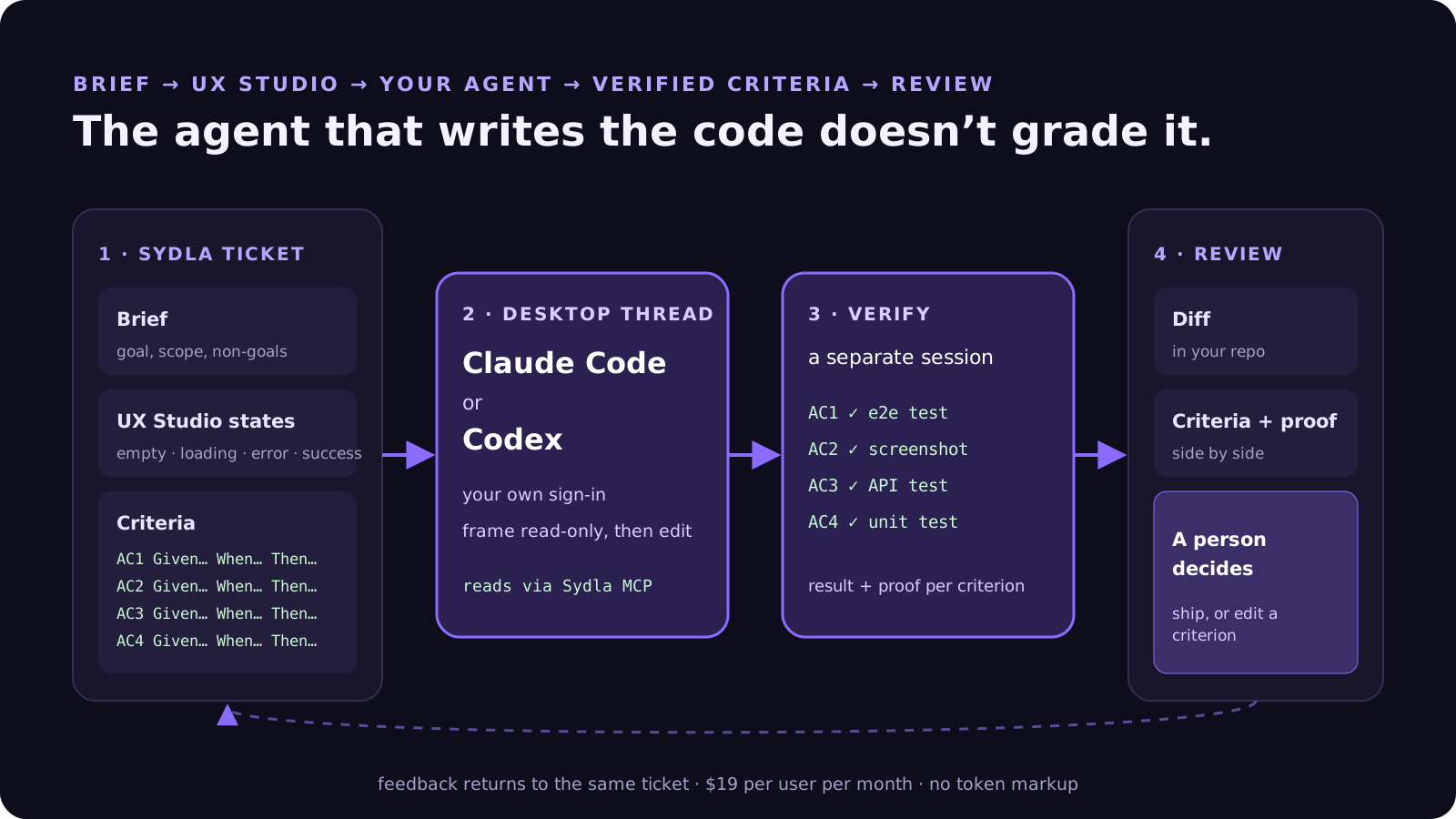
Your Anthropic or OpenAI plan still decides the model, the limits and the spend. Sydla’s $19 covers the workspace: docs, planning, UX Studio, Desktop threads and review. Nothing is committed or pushed until you decide. If you have not set up a thread yet, start with Bring your coding agent into Sydla Desktop, and see Claude Code vs Codex for product teams for running both agents on one brief.
Where specialist tools still win
If you run a large programme with many teams, compliance workflows and dozens of Jira projects, Jira’s criteria fields, automation and Rovo’s reviewer fit that scale; our Jira comparison says so plainly. Deep design-system work still belongs in Figma, and brand-heavy campaigns in Canva.
For solopreneurs, indie hackers, founding engineers and lean product teams, the problem is different. You do not need more AI features in each tool. You need one definition of done that your agent, your reviewer and your future self all read. Our earlier pieces on AI credit fatigue and built-in agents like Rovo and Figma Make cover the cost side of that choice.
Try it on your next ticket
Pick one ticket from this week’s plan. Rewrite its criteria with the six rules, link each visible behaviour to a UX Studio state and name the proof. Then hand it to the agent you already use and verify it in a second session. Count how long the review takes compared with the last ticket.
Start your Sydla workspace for $19 per user per month and keep your Claude Code and Codex accounts exactly as they are.
Frequently asked questions
How do you write acceptance criteria for an AI coding agent?
Write one behaviour per criterion in Given / When / Then form with concrete data, name the screen state the reviewer will check, say how the criterion will be proven (a test, a command or a screenshot), and add the negative case and the non-goals. Keep the criteria with the ticket, not in CLAUDE.md or AGENTS.md, so every agent reads the latest version.
Should acceptance criteria go in CLAUDE.md or AGENTS.md?
No. CLAUDE.md and AGENTS.md are best for repository conventions that rarely change, such as build commands and code style. Acceptance criteria change during review, so keep them on the ticket in a shared workspace the agent reads through MCP, and point the instruction file at that workspace.
Is Given / When / Then better than EARS for coding agents?
Both work. Given / When / Then maps naturally to test fixtures and end-to-end scenarios. EARS, used by Kiro, phrases requirements as “WHEN trigger THE SYSTEM SHALL response”. Neither makes criteria executable on its own: what matters is concrete data, one behaviour per criterion and a named proof for each.
Can the same agent write the code and verify the acceptance criteria?
It can, but it should not be the only check. A session that wrote the code tends to write tests that confirm its own choices. Verify in a separate session, or with a second agent such as Codex reviewing Claude Code’s work, against the same criteria, and let a person make the final decision.
How much does Sydla cost compared with Jira, Confluence and Figma?
Sydla costs $19 USD per user per month and covers docs, planning, criteria, UX Studio, agent threads and review. One paid seat each of Jira Standard, Confluence Standard, Notion Plus, Figma Professional, Miro Starter and Canva Business costs $83.85 per month. Sydla sells no AI credits: you bring your own Claude Code or Codex account, with no token markup.












