Rovo, Figma Make or your own Claude Code: which agent should do the work?
Every tool in the product stack now ships an agent. Each one sees a single tool and draws on its own credits. Here is what each agent can do, what it can reach, and how to give the coding agent you already pay for the whole brief instead.

Every tool shipped an agent this year
In 2026, every tool in a typical product stack gained an agent. Jira can now assign work items to Rovo agents and hand them to a coding agent that opens a draft pull request. Figma Make turns a prompt into a working React prototype. Notion Custom Agents run on schedules and triggers. Miro has Sidekicks and Flows, and Canva has Canva Code. Each one is impressive in a demo.
Each one also arrives with two limits. The first is a meter: Rovo credits, Figma AI credits, Notion credits, Miro credits and Canva’s Premium AI allowance. We covered that side in AI credit fatigue: six tools, six meters, one workspace. The second limit gets less attention: each agent can only see the tool it ships in.
Meanwhile, the engineers on the team already pay for Claude Code or Codex. That agent writes the code that ships, but it usually starts from whatever someone pasted into a terminal. This article compares the built-in agents by what they can reach, then shows how Sydla gives your own coding agent the brief, the screens and the acceptance criteria in one place.
What each built-in agent does in 2026
The table lists each vendor agent, the plans that include it and how it is metered. Seat prices are USD list prices for one paid seat, monthly billing, before tax. Agent terms change often, so the sources are listed at the end of the article.
| Tool and plan | Seat / month | Built-in agent and what it does | How it is metered | Writes to your repository? |
|---|---|---|---|---|
| Jira Standard | $9.70 | Rovo agents and the Jira Coding Agent: take assigned work items, join workflow steps and turn a work item into code and tests in a cloud sandbox | Pooled Rovo credits: 25 per user per month on Standard, 70 on Premium, 150 on Enterprise; extra credits at $0.01 each | A draft pull request on GitHub Cloud or Bitbucket Cloud |
| Confluence Standard | $7.15 | Rovo agents: search, draft and summarise pages and specs | The same pooled Rovo allowance | No |
| Notion Plus | $12.00 | Custom Agents: run scheduled or triggered tasks such as Q&A, routing and status updates | Business or Enterprise plan required, then $10 per 1,000 Notion credits | No |
| Figma Professional, Full seat | $20.00 | Figma Make: turns a prompt into a working prototype or web app built as React code | 3,000 AI credits per Full seat per month; credits per prompt vary | Exports a zip or pushes to a new GitHub repository |
| Miro Starter | $10.00 | Sidekicks and Flows: board-level chat agents and multi-step AI automations | Business plan or higher; 50 credits per member per month, pooled | No |
| Canva Business | $25.00 | Canva Code: generates interactive designs and mini-apps from a prompt | Premium AI allowance with fair-use limits | No |
| Sydla | $19.00 | Your Claude Code or Codex: reads the brief, UX states and criteria through Sydla’s MCP tools, then edits and tests your local repository | No Sydla credits. Your Anthropic or OpenAI plan covers the agent, with no token markup | Yes, locally; the commit stays your decision |
Two rows stand out. Notion Custom Agents and Miro’s Sidekicks and Flows aren’t included in the plans of our example stack: Notion needs Business or Enterprise, and Miro needs Business or higher. Adding agents can mean upgrading the seat before you buy the first credit.
The Atlassian row is the most ambitious. A Jira work item can now become a draft pull request without leaving Atlassian. That is useful if your planning lives entirely in Jira and your code lives on GitHub Cloud or Bitbucket Cloud. It also means paying for implementation work in Rovo credits on top of the coding-agent subscription your engineers already have.
Reach matters more than raw intelligence
The models behind these agents are strong. What limits them is what they can see before they start. Rovo knows the ticket and the Confluence spec but not the Figma frames. Figma Make knows the frames but not the acceptance criteria. Notion’s agent knows the research notes but not the board where the team agreed on the user flow.
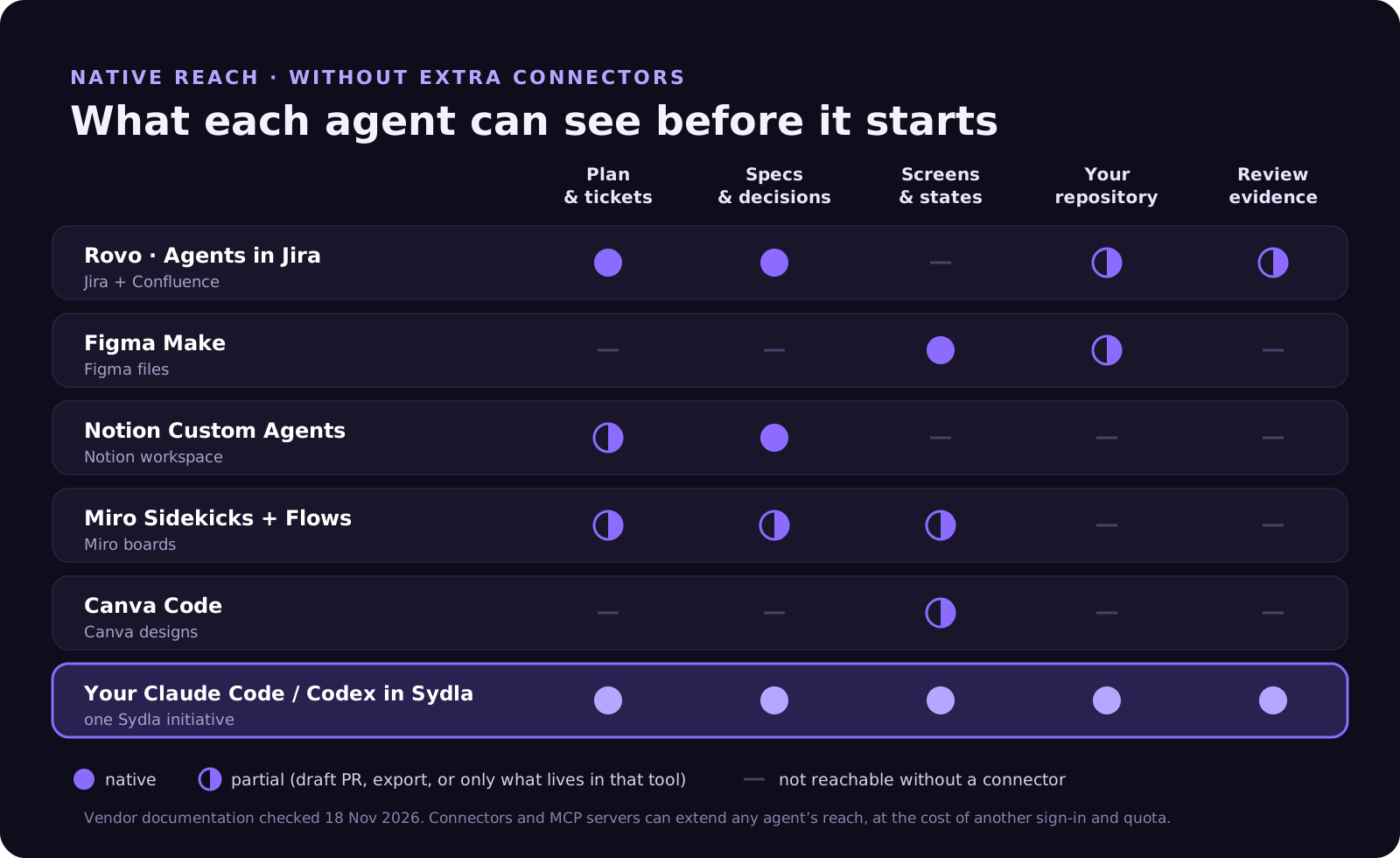
Connectors close some of those gaps, but each one has a price. Atlassian counts most enriched context requests through its Rovo MCP server against Rovo credits, typically 1 to 10 credits per call. Figma’s MCP server allows 200 calls a day on a Professional Full seat, and Figma says its write-to-canvas tools will become a usage-based paid feature after the beta. Every hop adds a sign-in, a rate limit and a summary that loses detail.
The quieter cost is drift. When the ticket, the spec and the screens are maintained by three agents in three tools, they diverge within a week. The coding agent implements the version it fetched, and the reviewer checks against the version they remember. No credit meter shows that cost, but the team pays it in rework.
Two bills for the same work
Claude Code is included in Anthropic’s Pro plan at $20 per month and in the Max plans at $100 and $200. Codex is included in ChatGPT plans. If your engineers already hold one of these subscriptions, you are paying for a capable coding agent whether or not your other tools use it.
Built-in agents add a second bill for overlapping work. Rovo credits pay for implementation in Jira. Figma credits pay for prototype code in Make. Notion credits pay for agent runs in your docs. None of that spend makes your Claude Code or Codex subscription any more useful, because that agent still can’t see the context.
The seat cost runs the same way. One paid seat in each of the six selected plans costs $83.85 per person per month. Sydla costs $19, a difference of $64.85, and it adds no AI credits of its own. The pricing breakdown lists every plan and source, and the full comparison explains the trade-offs workflow by workflow.
How Sydla Desktop gives your agent the whole brief
Sydla takes the opposite approach to built-in agents. The agent is already paid for, so the workspace gives it context instead of reselling it tokens. Here is a session for the billing-export feature from our customer-request walkthrough:
- Write the brief in Sydla Docs. The goal, the scope, the decisions taken and the acceptance criteria live in one initiative, next to the plan and its tickets.
- Add the states in UX Studio. Design the screens a reviewer will check: empty, loading, error and success. The UX handoff is linked to the same initiative.
- Open a thread in Sydla Desktop. Desktop starts the Claude Code or Codex CLI already installed on your machine, signed in with your own Anthropic or OpenAI account. Choose read-only to frame the change, or allow edits to implement it.
- Let the agent read the initiative. Through one Sydla MCP connection and one sign-in, the agent opens the brief, the UX handoff and the criteria. Nobody copies a ticket into a prompt.
- Review the evidence and decide. The thread keeps the commands, the changed files and the test output. Compare the diff with the criteria and the states, then ship it or send feedback back to the same brief.
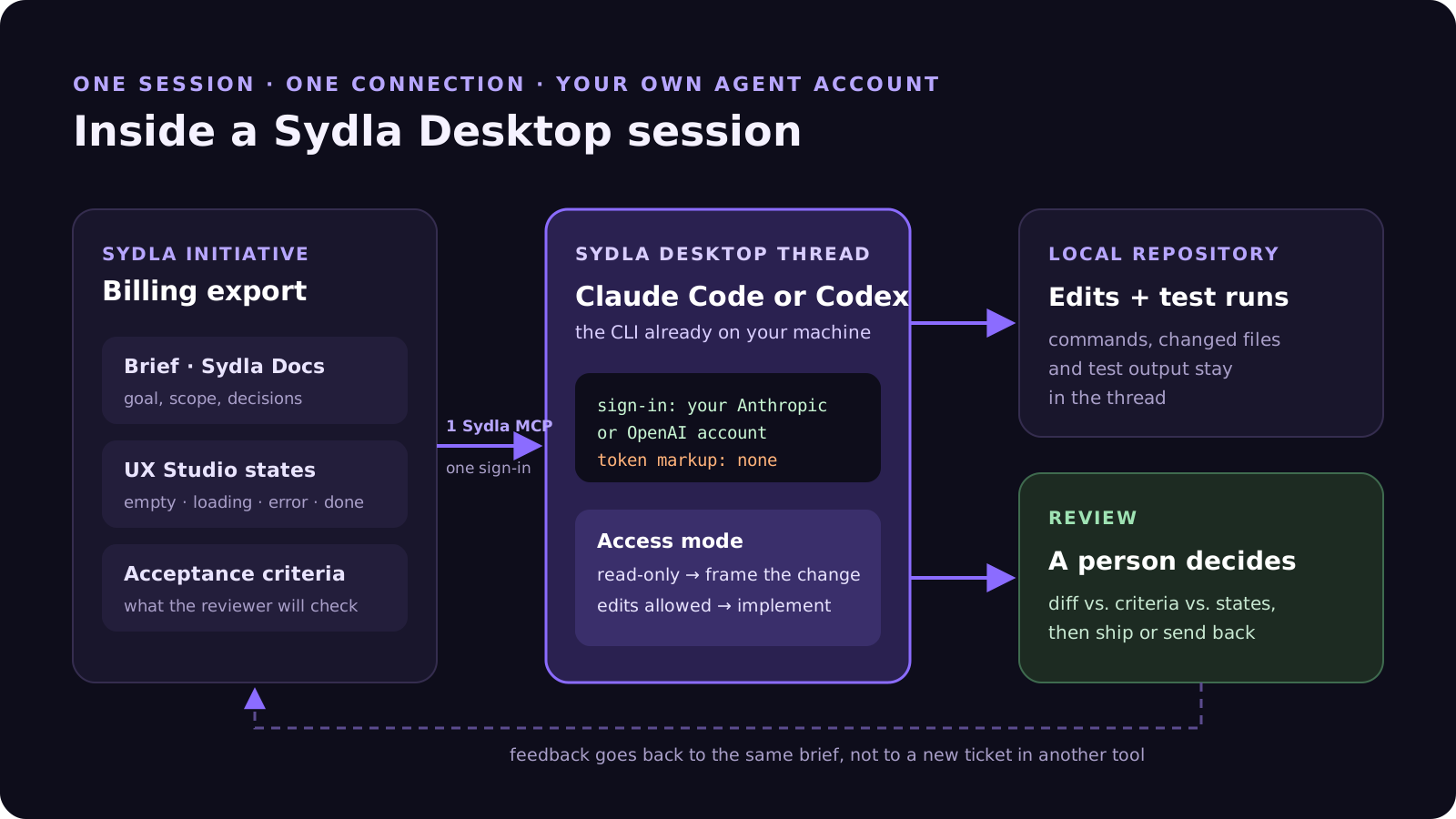
Because the agent runs under your own provider account, your Anthropic or OpenAI plan still sets model choice, rate limits and spend. Sydla’s $19 covers the workspace: docs, planning, UX Studio, threads and review.
Setting it up takes a few minutes. Bring your coding agent into Sydla Desktop covers the first session, from sign-in to a reviewed diff.
When a built-in agent is the better call
Built-in agents are a good fit when the work never leaves the tool. Rovo is well placed to triage a large Jira backlog or answer questions across thousands of Confluence pages. Figma Make is a quick way for a designer to test an interaction without waiting for engineering. A marketing team with a large Canva brand kit gets real value from Canva’s AI inside that kit.
The case for your own coding agent is strongest when the work crosses tools: a feature that starts as a customer request, becomes a brief and a set of screens, and has to end as reviewed code. Solopreneurs, indie hackers, founding engineers and lean product teams do this every week. For them, one context and one agent usually beat five partial agents. Each comparison page says where the specialist tool still wins: Jira, Confluence, Notion, Figma, Miro and Canva.
Try it on one feature
You don’t need to switch off any built-in agent to test this. Pick one feature for this week. Write its brief and acceptance criteria in Sydla, sketch the states in UX Studio and hand the initiative to the Claude Code or Codex account you already use. Then compare the review with the last feature that went through five tools.
If the diff matches the brief on the first pass, you have your answer. Start your Sydla workspace for $19 per user per month and keep your Claude Code and Codex accounts exactly as they are.
Frequently asked questions
What is the difference between Rovo agents and Claude Code?
Rovo agents are Atlassian’s built-in agents. They work inside Jira and Confluence and draw on pooled Rovo credits: 25 per user per month on Standard, 70 on Premium and 150 on Enterprise. Claude Code is Anthropic’s coding agent, included in Claude Pro and Max plans. It works in your own repository. With Sydla, Claude Code can also read the brief, UX states and acceptance criteria of a project.
Can Figma Make replace a coding agent like Claude Code or Codex?
Figma Make turns a prompt into a working React prototype or web app, and you can export it as a zip or push it to a new GitHub repository. It does not open changes against your existing codebase. For production work in an existing repository, a coding agent such as Claude Code or Codex is the better fit, ideally working from the same screens and criteria the designer approved.
How much do Notion Custom Agents cost in 2026?
Notion Custom Agents require a Business or Enterprise plan. Since 4 May 2026 they run on Notion credits, sold at $10 per 1,000 credits on monthly billing. They are not included in the Plus plan.
Can I use my own Claude Code or Codex subscription with Sydla?
Yes. Sydla Desktop runs the Claude Code or Codex CLI installed on your machine, with your existing sign-in. Sydla costs $19 USD per user per month, sells no AI credits and adds no markup to tokens. Your provider subscription stays separate.
How does a coding agent read Sydla project context?
Through Sydla’s MCP tools. In a Sydla Desktop thread, Claude Code or Codex opens the initiative’s brief, UX Studio handoff and acceptance criteria through one connection and one sign-in. The thread then records the commands, changed files and test output, and a person makes the review decision.












