Sprint planning with AI coding agents: plan the work, not the hours
When an AI coding agent writes most of the code, velocity stops measuring what limits your team. Here is how to plan a sprint around briefs, states and review capacity instead, what Rovo and the other built-in planners do in 2026, and how one workspace keeps the plan and the agent in the same context.

Your velocity chart is measuring the wrong thing
Sprint planning was designed for a world where typing the code was the slow part. A team estimated how long each story would take to build, added up the points and stopped when the sprint was full. In 2026 a Claude Code or Codex session can implement a well-specified ticket in the time it takes to read it. The points still go on the board, but they no longer describe what limits the team.
What limits the team now sits on either side of the agent. Before it: a brief clear enough to build from, screens with every state designed, and criteria a reviewer can prove. After it: a human who reads the diff, runs the change and decides whether it ships. A sprint that ignores those two queues fills up with tickets the agent finished on Tuesday and nobody reviewed by Friday.
Planning tools have noticed. Jira now ships planning agents, Notion sells Custom Agents and almost every tool in the stack has an AI that can write tickets. Most of them meter that AI separately and none of them runs the agent that writes your code. This guide covers how to plan a sprint when your own coding agent does the build, and how to keep the plan and the agent in one place.
What changes when an agent writes the code
Three assumptions behind classic sprint planning stop holding once an agent is on the team.
- Build effort is no longer the main estimate. A ticket that took a developer two days may take an agent twenty minutes, while a one-line ticket can take an afternoon if the brief is vague. Estimate the specification and the review, not the typing.
- Review is the new constraint. Every agent run produces a diff, tests and claims about what it did. Someone has to check them against the criteria. If one engineer can review six substantial changes a day, that number caps the sprint, whatever the agents can produce.
- Readiness decides throughput. An agent cannot ask the designer what the empty state looks like over coffee. A ticket without designed states and provable acceptance criteria produces a confident guess, then a rework loop that costs more than the build.
The practical result: plan the sprint around ready tickets and review slots. Story points can stay as a rough size signal, but the commitment is how many changes the team can specify and verify properly.
A five-step sprint plan for agent-built work
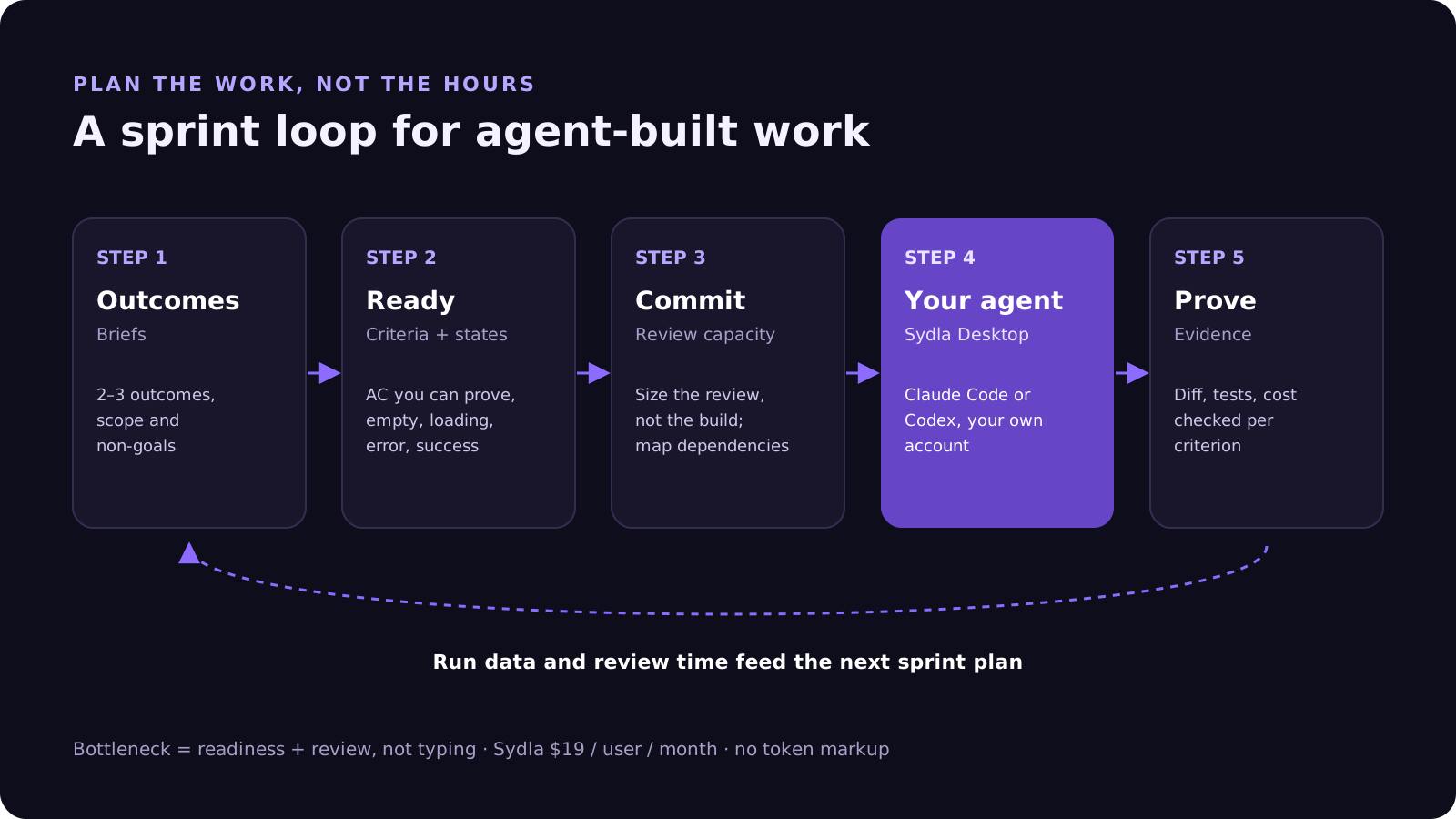
This is the planning loop we use at Sydla. It works with Claude Code, Codex or both, and it fits a one-week or two-week cadence.
- 1. Start from outcomes, not tickets. Pick the two or three outcomes the sprint should deliver, such as "customers can export their billing history". Each outcome becomes an initiative with a short brief: the problem, the scope and what is out of scope.
- 2. Make every ticket ready before the sprint starts. A ready ticket has a brief, three or four acceptance criteria written as checkable facts and, for anything with a UI, screens with their empty, loading, error and success states. If a ticket is not ready, it is design work for this sprint, not build work.
- 3. Size the review, not the build. For each ready ticket, estimate how long a human needs to verify it: small (read the diff, run the tests), medium (run the feature, check each state) or large (migration, security or billing logic). Add those up against the reviewers' available hours.
- 4. Map dependencies and pick a doer for each piece. Order the epics that wait for others, then decide per piece whether an agent builds it, a person builds it or a person pairs with an agent. A person makes that call; the agent never assigns itself work.
- 5. Close the loop with evidence. Each agent run should leave its commands, changed files, test output and cost attached to the ticket. At the review you check evidence against criteria rather than rereading code from scratch, and the retrospective uses real run data instead of points burned.
What built-in AI planners do in 2026
The big planning tools have moved quickly. Agents in Jira reached general availability at Atlassian's Team '26 in May 2026: Rovo can break a goal into proposed work items, a readiness checker agent scores tickets against a team's definition of ready, and a planning agent can split a ticket into subtasks when it is mentioned. Every change an agent proposes still needs a human to approve it, which is the right default.
The catch is the same one we described in AI credit fatigue: each tool plans with its own meter and its own slice of context. Rovo sees Jira and Confluence but not your Figma states. Notion's agents see Notion. None of them run the coding agent that does the work, so the plan and the build live in different places, and someone copies between them.
| Tool and plan | Seat / month | Planning AI in 2026 | What its planner can't see | In Sydla |
|---|---|---|---|---|
| Jira Standard | $9.70 | Rovo work breakdown and readiness agents; 25 credits per user per month, pooled | Screens, states and the code run | Initiatives, epics, tickets and plan of work |
| Confluence Standard | $7.15 | Same pooled Rovo allowance | Tickets outside Atlassian, design states | Docs and briefs linked to tickets |
| Notion Plus | $12.00 | Custom Agents need Business or Enterprise; $10 per 1,000 credits | Your backlog if it lives in Jira | Docs spaces |
| Figma Professional, Full seat | $20.00 | 3,000 AI credits per Full seat per month | The ticket and its criteria | UX Studio screens and states |
| Miro Starter | $10.00 | 25 AI credits per member per month | Everything after the workshop | UX transitions and diagrams |
| Canva Business | $25.00 | Monthly AI usage per member | The release it is announcing | Sydla Studio creatives |
| Six-tool total | $83.85 | Six meters, six partial views | ||
| Sydla | $19.00 | No Sydla AI credits: your Claude Code or Codex plans and builds against one context | One workspace |
For a team of five, that is $64.85 a month per person, or $3,891 a year, before you count the time spent moving context between six tools. The comparison page breaks down each tool and the pricing section shows the source for every price.
The cost of planning in one tool and building in another
The most expensive moment in an agent-built sprint is the hand-off between the plan and the run. The ticket says "add CSV export". The criteria are in Confluence, the states are in Figma and the edge case someone raised in the planning meeting is in a Miro sticky note. The engineer pastes what they remember into a Claude Code prompt, and the agent builds exactly that.
MCP servers let the agent reach each tool, but six tools still mean six connections, six sign-ins and six rate limits, and the meters reach MCP too: Atlassian counts context requested through its Rovo MCP server against Rovo credits, and Figma limits MCP calls by seat type. The sprint plan is only as good as the context the agent actually reads at build time.
How sprint planning works in Sydla
In Sydla, the plan and the build share one context. An initiative holds the brief, its epics and their tickets, and each ticket moves along one line: backlog, spec, design, build, prove, ship and done. The "spec" and "design" columns are where readiness happens, and "prove" is the review queue you plan capacity for.
Each initiative also has a plan of work: the pieces that need doing, their dependencies and who does each one. An agent can propose a piece, forecast what its run will cost and flag that one epic waits for another. It cannot choose the doer or launch the work. A person does that, which keeps the commitment human while the agent does the legwork of breaking the work down.
- Plan. Write the brief in Sydla Docs and break it into epics and tickets. Ask your agent to propose the plan of work; accept, edit or reject each piece.
- Make it ready. Add acceptance criteria to each ticket and draw its screens and states in UX Studio. Our design-to-code handoff guide explains why states beat screenshots.
- Launch a piece. Open a thread in Sydla Desktop. Desktop starts the Claude Code or Codex CLI on your machine, signed in with your own Anthropic or OpenAI account, and the agent reads the ticket, the brief, the UX handoff and the criteria through one Sydla MCP connection.
- Prove it. The run records its commands, changed files, test results and cost against the work item. The reviewer marks each criterion as met or not, with the evidence beside it.
- Retro with real data. At the end of the sprint, look at run costs, review time and rework per ticket rather than points burned. Those numbers tell you whether to invest in better briefs or more review capacity.
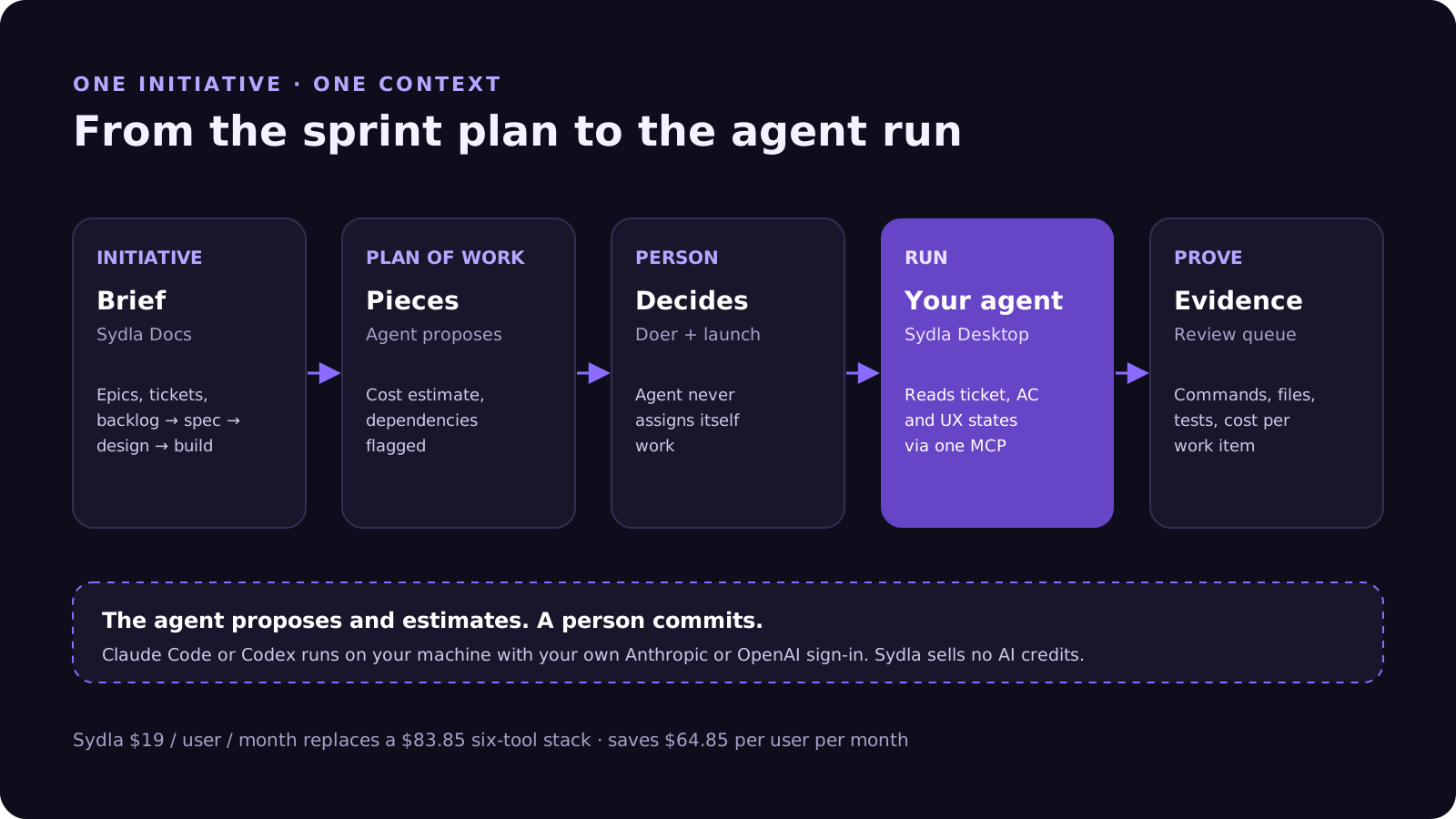
None of this uses a Sydla AI credit. Your provider plan sets the model, the limits and the spend; Sydla's $19 pays for the workspace around the agent. If your team is choosing between agents, read Claude Code vs Codex for product teams.
When to keep your current planning tool
If your company runs portfolio planning across dozens of Jira projects, or your customers file tickets straight into Jira Service Management, keep Jira for that layer and use Sydla for the initiatives your team builds with agents. The question to ask is where the agent reads its context at build time. If it is one place, your sprint plan will survive contact with the agent. If it is six, the plan is a suggestion.
Frequently asked questions
How do you do sprint planning with AI coding agents?
Plan around ready tickets and review capacity rather than build effort. Start from two or three outcomes, make each ticket ready with a brief, checkable acceptance criteria and designed states, size the human review each change needs, map dependencies, pick a doer for each piece, and close each ticket with evidence from the agent run.
Do story points still work when Claude Code or Codex writes the code?
Only as a rough size signal. Agents compress build time unevenly, so points stop predicting delivery. The constraints that remain are how fast the team can specify work clearly and how fast people can verify the result, so commit to ready tickets and review slots instead.
Can Jira Rovo plan sprints in 2026?
Partly. Since Agents in Jira reached general availability at Team '26 in May 2026, Rovo can propose work breakdowns, score ticket readiness and split tickets into subtasks, with human approval for every change. It uses pooled Rovo credits and does not run the coding agent that builds the work.
Can an AI agent assign sprint work to itself in Sydla?
No. In Sydla an agent can propose pieces of work, estimate their cost and flag dependencies, but a person chooses who does each piece and launches it. The agent then runs in Sydla Desktop with your own Claude Code or Codex account and records its run as evidence.
How much does Sydla cost compared with Jira, Confluence, Notion, Figma, Miro and Canva?
Sydla costs $19 per user per month. One paid seat each of Jira Standard, Confluence Standard, Notion Plus, Figma Professional Full, Miro Starter and Canva Business costs $83.85 per user per month in USD before tax, so Sydla saves $64.85 per user per month. Sydla sells no AI credits and adds no token markup.












