Claude Code vs Codex for product teams: pick an agent, keep one brief
Claude Code and Codex now cost the same to start and support the same building blocks. The choice matters less than what the agent reads before it starts. Here is how they compare in 2026, and how to give either one the whole brief.

The wrong question for a small team
Ask a founding engineer which coding agent to buy in 2026 and you will get a strong opinion. Some swear by Claude Code in the terminal. Others run Codex in the CLI, the IDE and the cloud. Both camps ship real features every week, and both tools improve every month.
For a lean product team, the more expensive problem sits upstream. The agent starts from a ticket in Jira, a spec in Confluence, research in Notion, frames in Figma, a flow on a Miro board and launch assets in Canva. Each tool has its own AI meter, and each hop to fetch context through a connector costs a sign-in, a rate limit or a credit. We called this AI credit fatigue, and it hits whichever agent you choose.
This guide compares Claude Code and Codex on the points that matter to a product team: plans, usage limits, where they run, how they read project instructions and how they connect to other tools. Then it shows how Sydla lets you keep either one, or both, working from the same brief.
Claude Code vs Codex at a glance
The two agents now start at the same price and share the same building blocks: a terminal CLI, IDE extensions, a desktop app, MCP support and a project instructions file. The differences lie in how usage is measured and in the defaults. Prices are USD list prices for one person, before tax.
| Point of comparison | Edge | Claude Code (Anthropic) | Codex (OpenAI) |
|---|---|---|---|
| Cheapest plan with the agent | Tie at $20 | Claude Pro, $20 a month billed monthly ($17 with annual billing). Not on Free | ChatGPT Plus, $20 a month. Light Codex use is also included on Free and on Go at $8 |
| Heavier individual plans | Codex: more tiers | Max at $100 (5× Pro usage) and Ultra at $200 (10× Pro weekly usage, no 5-hour limit for verified accounts) | Pro at $100, $200 or $500 a month; Pro currently has no five-hour limit |
| Team plans | Tie at $25 | Team standard seat at $25 monthly ($20 annual); premium seat at $125 monthly with 5× more usage | Business at $25 per user monthly ($20 annual); extra usage through ChatGPT credits |
| How usage is measured | Both opaque | A 5-hour window and a weekly limit, scaled by plan; Anthropic does not publish message counts | Estimated local messages per five hours, which vary by model; cloud tasks draw on the same allowance and weekly limits may apply |
| Where it runs | Codex adds cloud | Terminal, VS Code, JetBrains, the Claude desktop app, the web and mobile | Codex CLI, IDE extension, ChatGPT desktop app, the web and Codex cloud tasks |
| Project instructions | Claude reads both | CLAUDE.md; Claude Code can also read AGENTS.md | AGENTS.md, read from the repository root down to the working folder (32 KiB by default) |
| Control over edits | Claude Code finer | Permission modes: manual approval, accept edits, plan only, and auto with background safety checks | Sandbox modes from read-only to workspace-write, with approval requests by default |
| Connects to other tools | Tie | MCP servers, shared across the CLI, IDE and desktop app | MCP servers over stdio or HTTP, set up with codex mcp add |
On paper, it’s close to a tie. Claude Code has the more granular permission modes and a long track record in the terminal. Codex has the wider plan ladder, from Free to a $500 Pro tier, and cloud tasks that run while your laptop is closed. For most teams, the honest answer is to use the one your engineers already pay for and like.
What neither subscription includes is your product context. Both agents read the repository and whatever you put in CLAUDE.md or AGENTS.md. Neither one knows which screens design approved yesterday or which acceptance criterion changed in this morning’s review, unless something hands them that context.
Context costs more than the agent
A $20 coding-agent plan is the cheapest line in most product budgets. The context the agent needs usually sits in six other subscriptions, each with its own allowance for AI and for connector traffic. The table shows what one paid seat costs, which AI allowance it comes with and what your coding agent would have to fetch from it.
| Tool and plan | Seat / month | AI allowance in 2026 | What your coding agent needs from it |
|---|---|---|---|
| Jira Standard | $9.70 | 25 Rovo credits per user per month, pooled; Rovo MCP calls typically use 1 to 10 credits | The ticket, its status and linked work |
| Confluence Standard | $7.15 | The same pooled Rovo allowance | The spec and the decisions behind it |
| Notion Plus | $12.00 | Custom Agents need Business or Enterprise, then $10 per 1,000 credits | Research notes and team knowledge |
| Figma Professional, Full seat | $20.00 | 3,000 AI credits per Full seat; MCP server capped at 200 calls a day | The approved screens and their states |
| Miro Starter | $10.00 | 25 AI credits per member per month (50 on Business) | The user flow agreed in the workshop |
| Canva Business | $25.00 | Premium AI allowance per member, with fair-use limits | Launch assets and brand copy |
| Sydla | $19.00 | No Sydla AI credits. Your Claude Code or Codex plan covers the agent, with no token markup | Brief, plan, UX Studio states and criteria in one initiative, through one MCP connection |
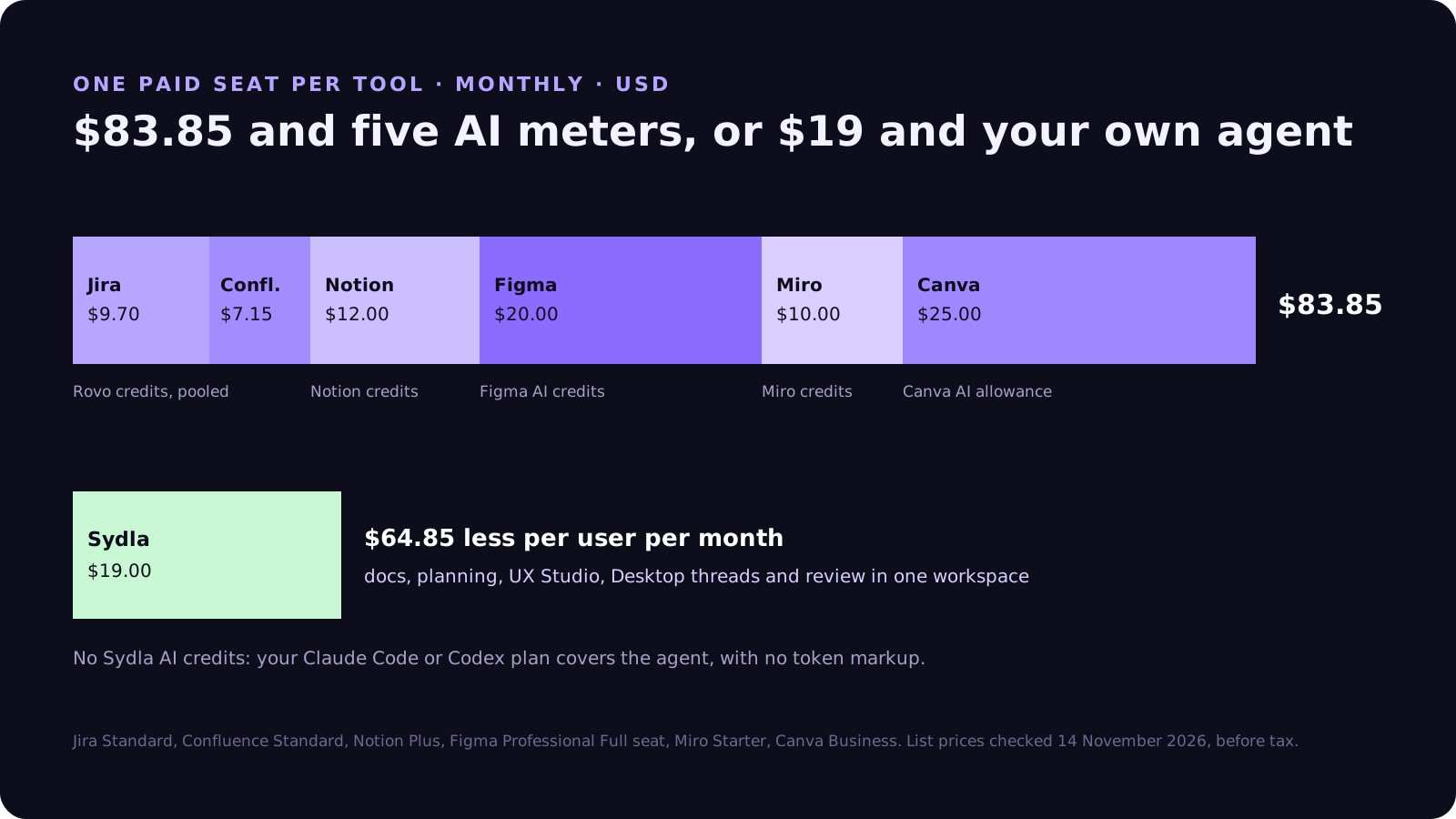
One seat in each of the six selected plans costs $83.85 per person per month. Sydla costs $19, which is $64.85 less, and it sells no AI credits on top. The pricing breakdown lists every plan and source, and the full comparison covers the trade-offs workflow by workflow.
How Sydla Desktop connects Claude Code or Codex to the brief
Sydla does not ship its own coding agent. It gives the agent you already pay for a single place to read from. Here is a typical session for a small feature, such as the billing export from our customer-request walkthrough:
- Write the brief in Sydla Docs. The goal, the scope, the decisions and the acceptance criteria live in one initiative, next to its plan and tickets.
- Design the states in UX Studio. Add the screens a reviewer will check: empty, loading, error and success. The UX handoff is linked to the same initiative.
- Connect your agent once. Running sydla login signs you in and installs the Sydla plugin in your coding tools. Claude Code and Codex then reach the workspace through Sydla’s MCP tools, with no extra connector per tool.
- Open a thread in Sydla Desktop and pick the provider. Desktop starts the Claude Code or Codex CLI already installed on your machine, signed in with your own Anthropic or OpenAI account. Start read-only to frame the change, then allow edits to implement it.
- Let the agent read the initiative. It opens the brief, the UX handoff and the criteria directly. Your CLAUDE.md or AGENTS.md can stay short, with repository conventions and a pointer to the initiative rather than a pasted spec.
- Review the evidence and decide. The thread keeps the commands, the changed files and the test output. Compare the diff with the criteria and the states, then ship it or send feedback to the same brief.
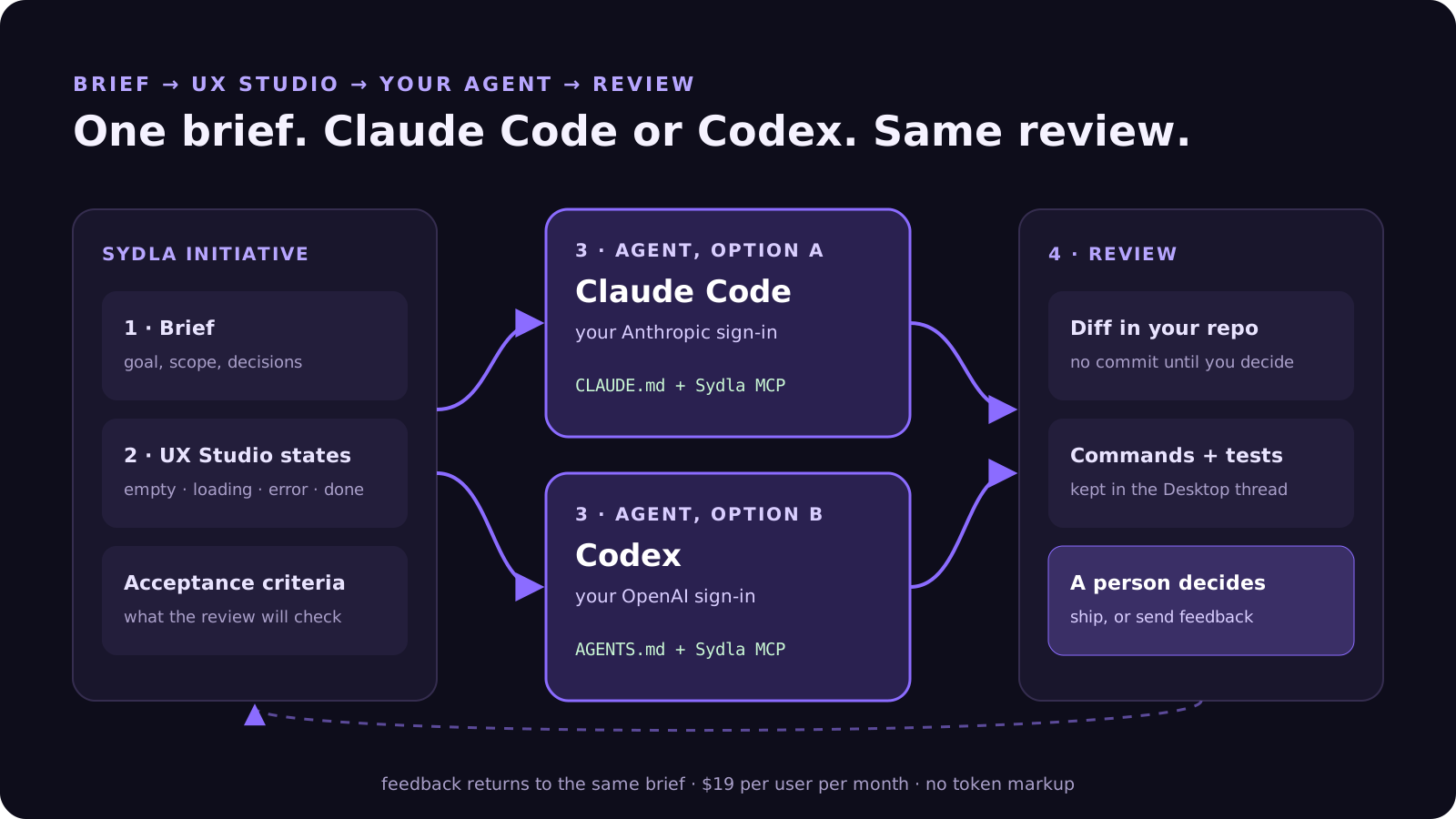
Because the agent runs under your provider account, your Anthropic or OpenAI plan still decides the model, the limits and the spend. Sydla’s $19 covers the workspace: docs, planning, UX Studio, Desktop threads and review. Nothing is committed or pushed until you decide. The first session is covered step by step in Bring your coding agent into Sydla Desktop.
When to pick Claude Code, Codex, or both
Pick Claude Code when your team lives in the terminal and wants fine control over what the agent may do without asking. Plan mode is a good way to have the agent read a brief and propose an approach before it edits anything. It also suits teams that already pay for Claude for writing and research.
Pick Codex when your team already pays for ChatGPT, or when you want cloud tasks that keep running in the background. The Free and Go plans also make it cheap to let a designer or product manager try small changes before buying a bigger plan.
Use both when different people prefer different tools, or when you want a second opinion. A common pattern is to let one agent implement and ask the other to review the diff against the same acceptance criteria. That only works if both read the same brief. With two separate context stacks, they argue about different versions of the feature.
Either way, the specialist tools still have their place. Each comparison page says where they still win: Jira for large cross-team programmes, Figma for deep design-system work, Canva for brand-heavy marketing. For solopreneurs, indie hackers, founding engineers and lean product teams, one context usually beats six. Our look at built-in agents like Rovo and Figma Make covers the other side of that choice.
Try it on your next feature
You don’t need to switch agents or cancel anything to test this. Pick one feature for this week. Write its brief and acceptance criteria in Sydla, sketch the states in UX Studio and open a Desktop thread with the agent you already use. If you have both, run the same initiative through Claude Code and Codex and compare the diffs.
Start your Sydla workspace for $19 per user per month and keep your Claude Code and Codex accounts exactly as they are.
Frequently asked questions
Is Claude Code or Codex better for a small product team?
Both are strong in 2026 and start at $20 a month: Claude Code with Claude Pro, Codex with ChatGPT Plus. Claude Code offers more granular permission modes in the terminal. Codex adds cloud tasks and lighter Free and Go options. For most teams, the agent the engineers already pay for is the right choice. The bigger gain comes from giving that agent the shared brief, UX states and acceptance criteria.
How much do Claude Code and Codex cost in 2026?
Claude Code is included in Claude Pro ($20 a month billed monthly), Max ($100), Ultra ($200) and Team seats ($25 standard, $125 premium, billed monthly). Codex is included in ChatGPT Free, Go ($8), Plus ($20), Pro ($100 to $500) and Business ($25 per user billed monthly). Both measure usage in five-hour and weekly windows rather than per task.
What is the difference between CLAUDE.md and AGENTS.md?
Both are project instruction files that a coding agent reads at the start of a session. Codex reads AGENTS.md from the repository root down to the current folder, up to 32 KiB by default. Claude Code reads CLAUDE.md and can also read AGENTS.md. Keep conventions in the file, and keep the brief and acceptance criteria in a shared workspace the agent reads through MCP.
Can I use Claude Code and Codex in the same Sydla workspace?
Yes. Sydla Desktop runs the Claude Code or Codex CLI installed on your machine with your own sign-in, and you choose the provider for each thread. Both read the same initiative through Sydla’s MCP tools. Sydla costs $19 USD per user per month, sells no AI credits and adds no markup to tokens.
Do I still need Jira, Confluence or Figma with a coding agent?
Not for the core loop of a lean team. Sydla covers planning, docs, UX Studio, agent threads and review in one workspace for $19 per user per month, against $83.85 for one seat each of Jira, Confluence, Notion, Figma, Miro and Canva. Specialist tools still win for some needs, such as large cross-team programmes or deep design systems.












