Release notes from AI agent runs: how to write changelogs when Claude Code and Codex ship the code
When agents write most of the commits, the git log turns into a record of how the code changed, not why it shipped. Here is what Jira, GitHub and GitLab generate in 2026, what each AI layer charges to draft notes, and a five-step way to write release notes from the brief, the published UX states and the reviewed agent run.

The changelog nobody can write any more
It is release day. Forty merge requests went in since the last tag, and Claude Code or Codex wrote most of them. The commit messages are tidy and accurate: fix chunked export, refactor billing service, bump dependencies. None of them tells a customer what changed for them, and nobody on the team remembers all forty.
That is the new release-notes problem. When people wrote the code, the person who merged a change could explain it. When an agent writes it, the reason lives somewhere else: in the ticket, the spec page, the design file, the review thread. In a typical 2026 stack that means Jira, Confluence or Notion, Figma, a Miro board from discovery and a Canva graphic for the announcement. Six tools, six sign-ins, and often six AI meters.
This guide shows what the built-in generators do today, where they stop, and how to write notes from the record your team already keeps when agents do the building: the brief, the published UX states and the reviewed run.
What the generators actually read
Every mainstream generator works from one source. That is fine for a changelog read by engineers and thin for notes read by customers.
- Jira releases. Jira builds release notes from all the work items in a version, grouped by work type, and can save them to the version's Related work section or create a Confluence page. With Rovo enabled and Confluence active on the site, a Create with Rovo toggle drafts the notes for you. Media such as images and video are not yet supported.
- Rovo Release Notes Drafter. Atlassian's agent groups up to 20 Jira issues into themes, writes each in a problem-and-solution format and drafts the result in Confluence. It runs on Rovo, so it draws on your site's pooled Rovo credits.
- GitHub. Automatically generated release notes list the merged pull requests, the contributors and a link to the full changelog. A .github/release.yml file sorts pull requests into categories by label and can exclude labels or authors, such as bots.
- GitLab. The changelog API and glab changelog generate include only commits that carry a Changelog Git trailer, with categories such as added, fixed, changed, deprecated, removed, security and performance.
Each one reads either the tickets or the commits. None of them reads the design that defines what the user sees, the acceptance criteria that say what was proven, or the review that decided it was safe to ship. When an agent wrote the code, those three are where the real story is.
Why agent-written commits make it worse
Agent commits are usually better than human ones: well formed, scoped, often following Conventional Commits because you asked for it in CLAUDE.md or AGENTS.md. The trouble is who they are written for. A coding agent describes the diff for the reviewer. It does not know that the chunked export exists because a customer with 40,000 invoices could not close their books.
Three more things change when agents ship:
- Volume. An agent can open several merge requests a day. Our sprint planning guide argues that review capacity, not typing speed, is now the bottleneck. The release notes inherit the same bottleneck.
- Fragmented intent. One feature can span a ticket, a spec page, a frame and three runs. A generator that reads one of them misses the rest.
- Claims you cannot back. If a release note says large invoices no longer time out, someone should be able to point at the test or criterion that proved it. That proof sits in the review, not in the commit.
Keep a Changelog put the principle well years ago: changelogs are for humans, not machines, so do not dump git logs into them. With agents writing the log, that advice matters more, not less.
Six tools, six meters: drafting one release in 2026
Here is one paid seat per tool, what each contributes to a release note, and how its AI layer bills you for drafting. Sydla appears last for comparison.
| Tool and plan | Seat / month | Part of the release story it holds | AI drafting | Handoff to the notes |
|---|---|---|---|---|
| Jira Standard | $9.70 | Tickets in a version | Create with Rovo, Release Notes Drafter (20 issues) on pooled Rovo credits | Version page or Confluence draft |
| Confluence Standard | $7.15 | Specs, release-notes page | Same Rovo layer and credits | Published page |
| Notion Plus | $12.00 | Specs and roadmap for teams on Notion | Notion AI and agents on Notion credits | Copy into the changelog |
| Figma Professional, Full seat | $20.00 | The screens users will see | Figma AI credits per seat | Export a screenshot by hand |
| Miro Starter | $10.00 | Discovery notes, the original why | Miro AI credits per member | Rarely reaches the notes |
| Canva Business | $25.00 | Announcement graphics | Canva AI usage per member | Separate design task |
| Six-tool total | $83.85 | Intent, design and proof in six places | Up to six AI meters | Assembled by hand |
| Sydla | $19.00 | Brief, criteria, UX states, runs and review in one workspace | None billed: your own Claude Code or Codex | Release record with Markdown notes |
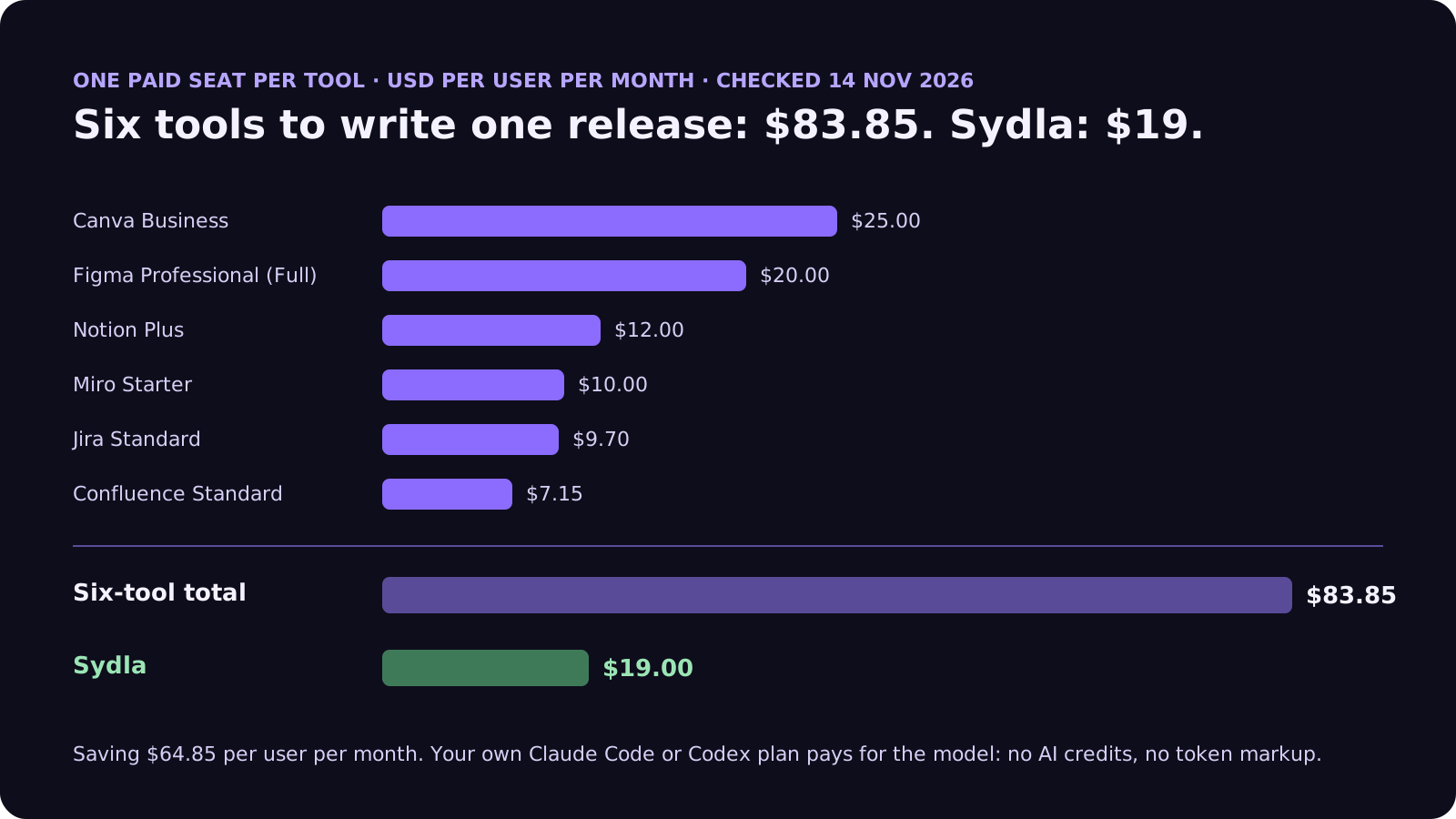
Switching saves $64.85 per person per month on seats before any credit pack. The comparison overview covers each tool and the pricing section lists every source. Our AI credit fatigue post covers the meters in detail.
Five steps to release notes from agent runs
The fix is not a smarter generator. It is writing the notes from the records that already explain each change, and making the agent draft from those records instead of the diff.
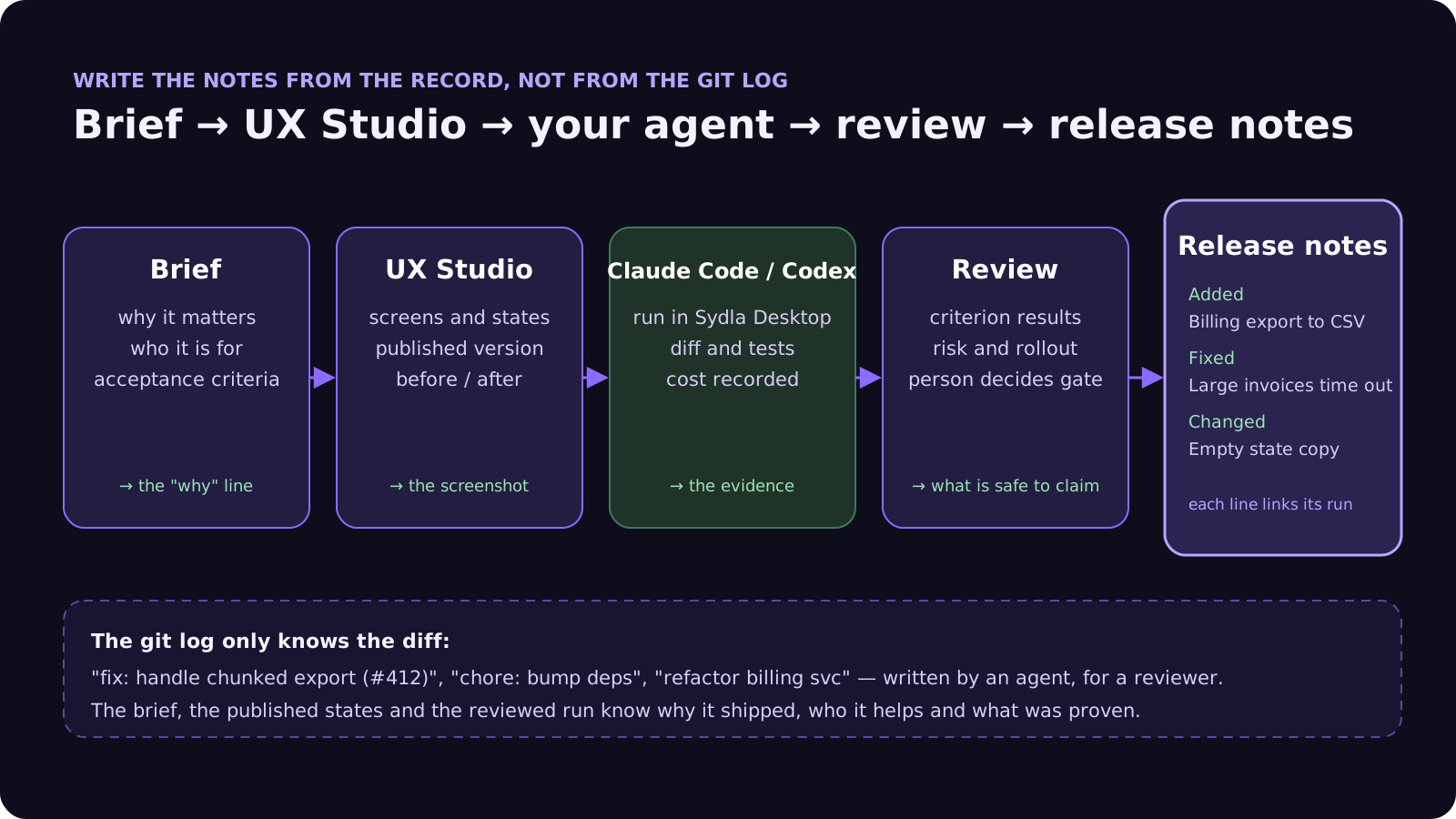
- 1. Put the why in the brief, in one customer sentence. Before any agent runs, the brief states who the change is for and what problem it solves. That sentence becomes the release line almost word for word. Our acceptance criteria guide shows how to write the criteria under it.
- 2. Publish the states, not just the frames. The UX handoff the agent builds from also gives you the before-and-after for the notes. See design-to-code handoff for AI coding agents.
- 3. Make the agent record the run. Ask Claude Code or Codex to record what it worked on, which criteria it checked and what it cost, linked to the ticket. Keep a Conventional Commits or Changelog trailer convention for the engineers' changelog, written in your CLAUDE.md or AGENTS.md.
- 4. Only claim what review proved. A line goes into the customer notes only if its ticket passed review and its criteria passed. The four-pass review checklist gives the reviewer the evidence to decide.
- 5. Let the agent draft, let a person publish. At release time an agent groups the shipped tickets into Added, Changed, Fixed and Security, writes each line from the brief, links the run, and a person edits and publishes.
Two changelogs, two readers
Keep the engineers' changelog generated from commits or trailers, as GitHub and GitLab do it. Write the customers' release notes from intent and evidence. Trying to make one artifact serve both readers is how you end up with notes that say refactor billing service.
How it works in Sydla
Sydla keeps the brief, the acceptance criteria, the UX states, the tickets, the runs and the review in one workspace, so the material for a release note is already in one place when you tag.
- Brief and criteria in Sydla Docs. Each ticket links its brief and its acceptance criteria. The why line is written before the code exists.
- UX Studio publications. Screens and their states are published as a versioned handoff the agent reads, and the same publication shows what changed for users.
- Your agent in Sydla Desktop. Desktop starts the Claude Code or Codex CLI you already use, signed in with your own Anthropic or OpenAI account. The agent reads the ticket, brief, criteria and handoff through one Sydla MCP connection and records its run, cost and criterion results against the work item. The Desktop guide covers the first run.
- Review and gates. Agents can request a gate; only a person decides it. Tickets reach ship only after their review gates pass.
- A release record. A Sydla release groups shipped tickets under a version with Markdown release notes and is published once the Git release exists, so the notes only cover reviewed work. Your agent can draft the notes from the linked briefs and runs, and a person publishes them.
There are no Sydla AI credits and no token markup: your Claude or ChatGPT plan pays for the model and $19 pays for the workspace. For agent choice, see Claude Code vs Codex for product teams.
Where to start on your next release
Pick the next release and try one rule: no line in the customer notes unless you can link the brief it came from and the review that passed it. If finding those links means opening six tools, that is the real cost of your stack, and it is the problem Sydla was built to remove. The solo founder stack post runs the same maths for a team of one.
Frequently asked questions
Can Claude Code or Codex write release notes?
Yes, but only as well as their input. From the git log alone they summarize diffs for engineers. Give them the brief, the acceptance criteria and the review result for each shipped ticket and they can draft customer-facing notes grouped into Added, Changed, Fixed and Security, which a person then edits and publishes.
Does Jira generate release notes with AI?
Yes. Jira builds release notes from all work items in a version, grouped by work type. With Rovo enabled and Confluence active on the site, a Create with Rovo toggle drafts them, and Atlassian's Rovo Release Notes Drafter agent turns up to 20 issues into themed notes in Confluence, using your Rovo credits.
What is the difference between a changelog and release notes?
A changelog is a complete, versioned list of changes for engineers, often generated from commits, pull requests or Git trailers. Release notes are written for customers: what changed for them, why it matters and what to do. When agents write the commits, keep the changelog generated and write the release notes from briefs and reviewed evidence.
How do I generate a changelog in GitHub or GitLab?
In GitHub, choose Generate release notes when drafting a release; a .github/release.yml file sorts pull requests into categories by label. In GitLab, add a Changelog trailer such as Changelog: added to commits, then call the changelog API or run glab changelog generate for the version.
How much does Sydla cost compared with Jira, Confluence, Notion, Figma, Miro and Canva?
Sydla costs $19 per user per month. One paid seat each of Jira Standard, Confluence Standard, Notion Plus, Figma Professional Full, Miro Starter and Canva Business costs $83.85 per user per month in USD before tax, so Sydla saves $64.85 per user per month. Your own Claude Code or Codex does the drafting, with no AI credits and no token markup.












