MCP servers for product teams: connecting Claude Code and Codex to Jira, Figma and Notion
Every tool in the product stack now ships an MCP server, so your coding agent can read the ticket, the spec and the frames. Here is what the Atlassian, Figma, Notion, Miro and Canva servers do in 2026, what they limit or meter, how to set them up safely in Claude Code and Codex, and when one workspace connection beats five.

The feature that needed five servers
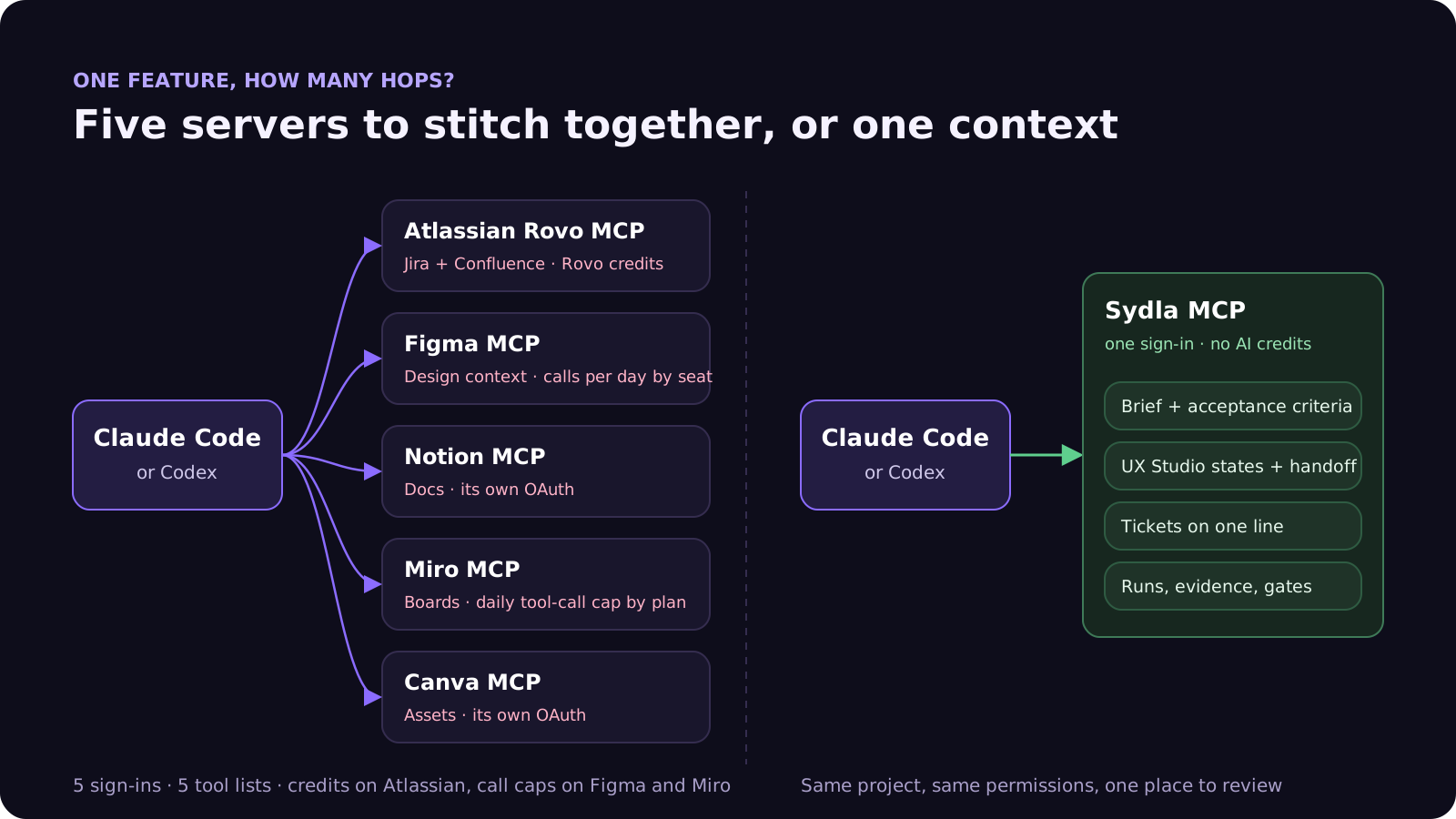
Ask Claude Code or Codex to build one screen in a typical 2026 product team and watch where it has to look. The ticket is in Jira. The spec and acceptance criteria are in Confluence. The decision log is in Notion. The frames are in Figma, the edge cases from the workshop are on a Miro board, and the launch asset is in Canva. Every one of those products now offers a Model Context Protocol (MCP) server, so the agent can, in principle, read all of it.
In practice that means five servers, five sign-ins, five tool lists and three different ways of counting usage: Rovo credits at Atlassian, calls per day by seat at Figma, and daily tool-call caps by plan at Miro. That is the MCP side of AI credit fatigue. Each hop costs a sign-in, a quota and some of the agent's attention, and none of them knows what the others hold.
This guide is practical. It covers what each server does, what it limits, how to wire it into Claude Code and Codex without flooding the agent's context, and when it is simpler to keep the product context in one place. It builds on our posts on AI credit fatigue and Claude Code vs built-in AI agents.
What each product-stack MCP server does in 2026
All five vendors now run a hosted (remote) server that Claude Code and Codex reach over streamable HTTP and sign into with OAuth. The differences are in reach, limits and billing.
- Atlassian Rovo MCP server (Jira, Confluence, Compass). The v2 endpoint, mcp.atlassian.com/v2/mcp, exposes Jira and Confluence read, write and search tools behind a few meta-tools (discover, executeRead, executeWrite, executeDestructive), with delete and admin tools off by default. Sign-in is OAuth 2.1; an API token works only if an organisation admin enables it. v1 connections are switched to v2 tools on 1 March 2027, and v1 credentials do not carry over.
- Figma MCP server. The remote server at mcp.figma.com/mcp is the recommended one. Read tools such as get_design_context, get_screenshot, get_metadata and get_variable_defs turn a frame into code context. Write-to-canvas tools are in beta, free during the beta and due to become a usage-based paid feature.
- Notion MCP. The hosted server at mcp.notion.com/mcp works on every plan for workspace members, with OAuth by default. Some tools, such as connector search, need Business or Enterprise with Notion AI, and request limits are higher on those plans. Running a Notion agent through a connected app uses Notion credits.
- Miro MCP server. Available on every plan, including free teams, with OAuth 2.1. Tool calls are capped per day by plan and reset at midnight UTC.
- Canva AI connector. Canva offers a connector so AI assistants can search, create and export designs. Its plan requirements and limits sit in Canva's help centre; check them for your plan before you depend on it in an agent run.
Each server is good at its own product. What none of them does is connect a Jira ticket to the Figma state it needs, or to the Confluence criterion it must pass. The agent does that join itself, every run, from whatever it managed to fetch.
Seat prices, AI allowances and MCP limits side by side
Here is one paid seat per tool, with the AI allowance and the MCP limit that apply to it. These are the numbers a team actually hits when an agent reads the stack.
| Tool and plan | Seat / month | AI allowance in 2026 | MCP server limit | In Sydla |
|---|---|---|---|---|
| Jira Standard | $9.70 | 25 Rovo credits per user per month, pooled; $0.01 per extra credit, billed from 3 December 2026 | Enriched cross-product calls cost 1 to 10 Rovo credits; writes and single-product reads are free | Tickets on one line: spec, design, build, prove, ship |
| Confluence Standard | $7.15 | Same pooled Rovo allowance | Same Rovo MCP server and meter | Docs and briefs linked to tickets |
| Notion Plus | $12.00 | Agents run on Notion credits; Custom Agents need Business or Enterprise | Works on every plan; higher request limits on Business and Enterprise | Docs spaces |
| Figma Professional, Full seat | $20.00 | 3,000 AI credits per Full seat per month | 200 calls a day and 10 a minute; View and Collab seats get 20 calls a month | UX Studio screens and states |
| Miro Starter | $10.00 | 25 AI credits per member per month | 500 tool calls a day on Starter (100 on Free) | UX transitions and diagrams |
| Canva Business | $25.00 | Monthly AI usage per member | AI connector, plan-dependent | Sydla Studio creatives |
| Six-tool total | $83.85 | Six allowances to watch | Five servers, five sign-ins | |
| Sydla | $19.00 | No Sydla AI credits: your own Claude Code or Codex does the work | One MCP server, one sign-in | One workspace |
The seat gap is $64.85 per person per month. The comparison overview covers each tool, and the pricing section lists the source for every price. Note the trap in the Figma row: a developer on a View or Collab seat gets 20 MCP calls a month, which one afternoon of agent work can use up.
The hidden costs of five MCP servers
The prices above are only the visible part. Running several vendor servers in a coding agent has four other costs that show up within the first week.
- Sign-ins and tokens. Five OAuth grants per developer, each with its own expiry, scopes and admin approval. When one lapses mid-run, the agent quietly works without that context.
- Meters that move. Atlassian charges enriched Teamwork Graph calls, such as unified search across Jira and Confluence, at 1 to 10 Rovo credits each, pooled across the organisation, with pay-as-you-go on by default from 3 December 2026. Figma's write tools will become paid after the beta. Usage that is free in a pilot can become a line item at scale.
- Context. Claude Code now defers MCP tools by default: only tool names and server instructions load at the start, and full definitions are fetched on demand. That makes many servers cheaper than they were. Tool results still land in context, though, and Claude Code warns at 10,000 tokens and caps a result at 25,000 by default. A large Confluence page plus a design context dump can take a big share of the window before the agent writes a line.
- Trust. Every server is a source of text the model will read. Anthropic's docs warn that servers fetching external content expose you to prompt injection, and the MCP specification says a person should always be able to deny a tool call and that tool annotations from untrusted servers must be treated as untrusted. Five servers means five places to audit.
If you keep vendor servers, set them up like this
Plenty of teams will keep Jira or Figma for years, and their MCP servers are worth connecting. Six habits keep them cheap and safe.
- Share the config per project. In Claude Code, add remote servers with claude mcp add --transport http and the project scope, which writes a .mcp.json at the repository root that the team reviews like code. In Codex, declare each server under mcp_servers in ~/.codex/config.toml and sign in with codex mcp login.
- Expose only the tools the job needs. Codex supports enabled_tools and disabled_tools per server, plus an approval mode per tool. Atlassian keeps delete and admin tools off by default; leave them off for coding agents.
- Read by default, write with approval. Let agents read tickets, pages and frames freely. Require a person to approve anything that changes a ticket status, a page or a canvas.
- Put a ceiling on the meters. Track Rovo credit use in Atlassian Administration before pay-as-you-go billing starts, and give developers who rely on Figma MCP a Full or Dev seat rather than a View seat.
- Migrate Atlassian to v2 now. v2 needs a fresh sign-in, so do it on your schedule rather than on 1 March 2027.
- Write down where things live. Your CLAUDE.md or AGENTS.md should say which server holds the ticket, the criteria and the designs, so the agent does not search all five. Our Claude Code vs Codex guide compares the two instruction files.
The context gap is the real cost
An agent connected to five servers can fetch five things. It still has to guess how they fit together: which frame belongs to which ticket, which criterion was changed in last week's comment, which state the workshop added. That guess is where agent work goes wrong, and it is the part no MCP server can fix.
One MCP connection: how Sydla Desktop wires your agent in
Sydla puts the brief, the UX states, the tickets and the review in one workspace, so the agent reads one joined-up context through one MCP server instead of stitching five. You keep your own agent and your own provider plan.
- Write the brief once. The problem, scope and acceptance criteria live in Sydla Docs, linked to the ticket. Our acceptance criteria guide shows how to make them checkable.
- Design the states. UX Studio holds each screen's empty, loading, error and success states and publishes a handoff the agent reads as structure, not as a screenshot. See design-to-code handoff for AI coding agents.
- Start a thread in Sydla Desktop. It runs the Claude Code or Codex CLI installed on your machine, signed in with your own Anthropic or OpenAI account, and connects it to the Sydla MCP server with your workspace sign-in. The Desktop guide walks through the first run.
- Or connect any agent by hand. From the MCP server page in your dashboard, add https://sydla.com/mcp as an HTTP server: in Claude Code with claude mcp add --transport http sydla and an Authorization header carrying your license key, in Codex with an mcp_servers.sydla entry whose url is the same endpoint and whose http_headers carry the same bearer key.
- Let the agent read, then report. Through that one connection the agent opens the ticket, brief, criteria and UX handoff, edits and tests your local repository, then records its run, cost and criterion results against the work item.
- Review and decide. A person checks each criterion against the run's evidence and decides the gate. Agents can request a gate; only a person decides it.
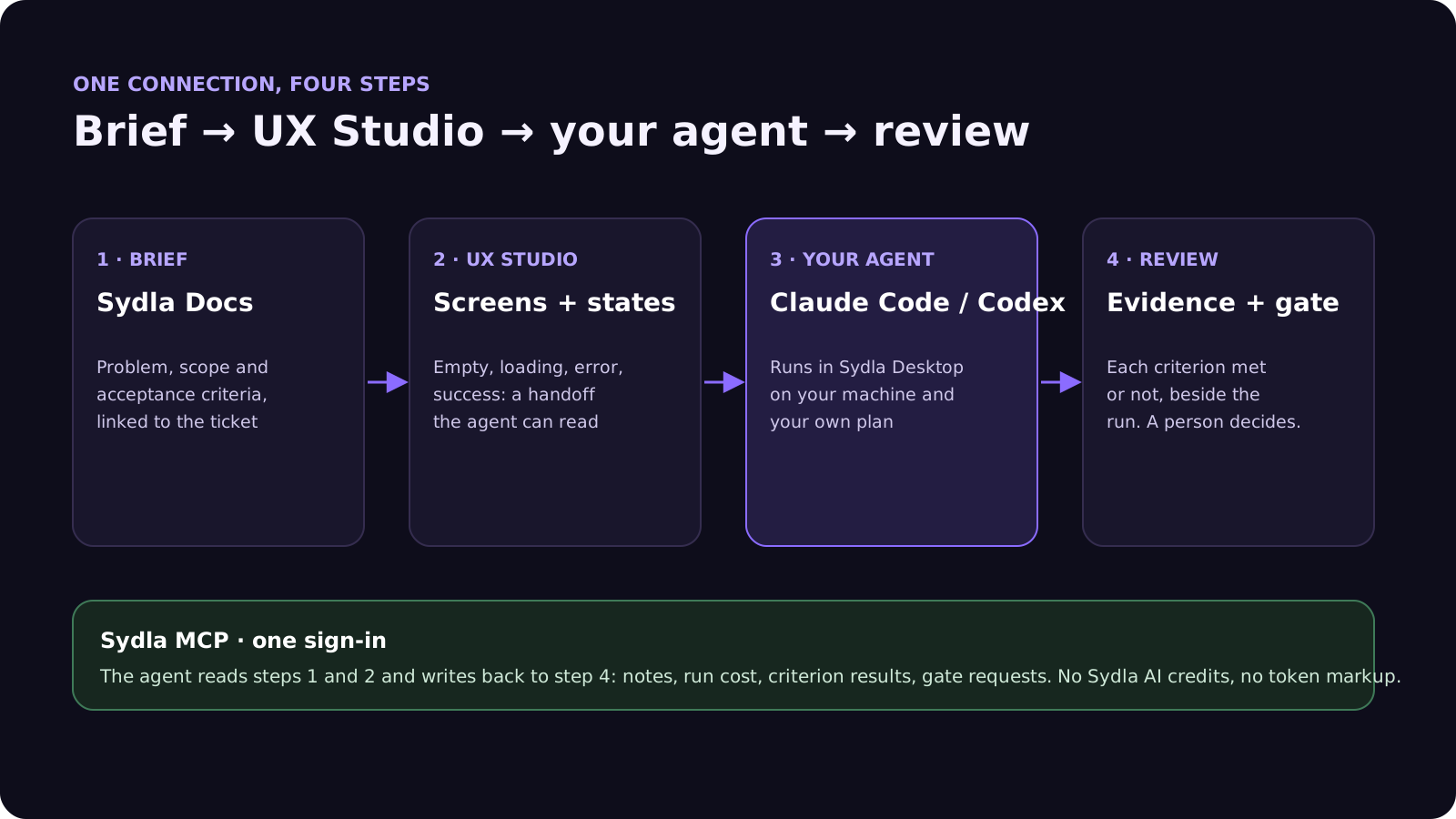
None of this uses a Sydla AI credit, and there is no token markup: your Claude or ChatGPT plan pays for the model, and Sydla's $19 pays for the workspace. If you still need a vendor server, for example Figma during a migration, add it beside Sydla's; the agent's instructions then say which source wins.
When vendor MCP servers are still the right call
If your team lives in Jira and Figma and is not moving, connect their servers with the habits above; they are a real improvement on pasting tickets into prompts. If you are a solo founder or a lean team choosing a stack now, the cheaper path is to keep the context in one place and give the agent one door into it. Our solo founder software stack post runs that maths for a single person, and sprint planning with AI coding agents shows the weekly loop.
Frequently asked questions
Is there an official Jira MCP server?
Yes. Atlassian's Rovo MCP server covers Jira, Confluence and Compass. The v2 endpoint is mcp.atlassian.com/v2/mcp, it signs in with OAuth 2.1, and v1 connections switch to v2 tools on 1 March 2027. Writes and single-product reads are free; enriched cross-product calls cost 1 to 10 Rovo credits each.
What are the Figma MCP server rate limits?
On a Professional plan, Full and Dev seats get 200 calls a day and 10 a minute; Organization allows 200 a day and 15 a minute, Enterprise 600 a day and 20 a minute. View and Collab seats get 20 calls a month on every plan. Write-to-canvas tools are free during the beta and will become a paid, usage-based feature.
How do I add an MCP server to Claude Code?
Run claude mcp add --transport http with a name and the server URL, then sign in when prompted or pass an Authorization header. Use the project scope to write a shared .mcp.json in the repository. Claude Code defers MCP tool definitions by default, so adding servers has little effect on the context window until a tool is used.
How do I add an MCP server to Codex?
Add a table under mcp_servers in ~/.codex/config.toml with the server's url, plus http_headers or bearer_token_env_var for a token, then run codex mcp login with the server name for OAuth servers. You can limit a server with enabled_tools or disabled_tools and set an approval mode per tool.
How much does Sydla cost compared with Jira, Confluence, Notion, Figma, Miro and Canva?
Sydla costs $19 per user per month. One paid seat each of Jira Standard, Confluence Standard, Notion Plus, Figma Professional Full, Miro Starter and Canva Business costs $83.85 per user per month in USD before tax, so Sydla saves $64.85 per user per month. Your coding agent reads the whole workspace through one Sydla MCP connection, with no AI credits and no token markup.












