The solo founder software stack in 2026: one workspace, your own coding agent
When you are the product manager, the designer and the engineering team, every seat and every AI meter is yours. Here is what the 2026 stack costs one person, where the free tiers stop, and a one-week loop that ships with the coding agent you already pay for.

Every seat is your seat
A team of twelve can argue about who really needs a Figma Full seat. A solo founder can't. You are the product manager who writes the brief, the designer who draws the empty state, the engineer who ships it and the marketer who makes the launch image. Every subscription in the stack has exactly one user, and that user is also the person who pays.
In 2026 that stack has a second bill hidden inside the first. Jira and Confluence ship Rovo. Figma ships Make. Notion ships Custom Agents. Miro and Canva ship their own AI. Each has an allowance, a reset date and an upgrade prompt. Meanwhile you already pay for Claude Code or Codex, which is the agent that actually writes your product, and it can't see most of the context that lives in the other five tools.
This guide looks at the stack from the solo founder's side of the desk: what it costs one person, where the free tiers stop being free, and how to run a week of product work in Sydla with the coding agent you already have. If you want the team-sized version of the math, read AI credit fatigue: six tools, six meters, one workspace first.
The free tier trap
Most solo founders start on free plans, and that is the right call on day one. The trap is that the free tiers are now designed around AI limits rather than features. The product works for free. The agent inside it runs out.
- Figma Starter gives Figma Make a small AI allowance, reported by Figma's community support team as 500 credits a month with a daily cap of 150, and no way to buy more on the free plan. The first busy prototyping afternoon ends with an upgrade prompt.
- Jira and Confluence include Rovo on paid plans, with an allowance pooled across the site: 25 credits per user per month on Standard, 70 on Premium, and $10 per 1,000 credits beyond it.
- Notion's Custom Agents need a Business or Enterprise plan, so the agent is not available on Free or Plus at all, and extra usage is sold at $10 per 1,000 Notion credits.
- Miro and Canva meter their AI per member each month. Canva sells an AI add-on on top of Pro and Business, and Miro sells credit packs on top of Starter and Business.
None of these limits is unreasonable for the vendor. The problem is cumulative. A solo founder who uses five tools seriously hits five ceilings on five different days, and each ceiling is solved the same way: move to a paid seat. That is how a free stack turns into the $83.85 stack below without anybody deciding it should.
What the 2026 stack costs one person
The table uses one paid seat in each tool, monthly billing, USD, before tax. It is our example stack, not a claim that every founder needs all six. The right-hand column is the one to read: each tool owns one hand-off in shipping a feature, and each meters AI only inside its own walls.
| Tool and plan | Seat / month | AI allowance in 2026 | Hand-off it owns | In Sydla |
|---|---|---|---|---|
| Jira Standard | $9.70 | Rovo: 25 credits per user per month, pooled; $10 per 1,000 beyond it | Backlog and delivery | Initiatives, epics and tickets |
| Confluence Standard | $7.15 | Same pooled Rovo allowance | Specs and decisions | Docs and briefs |
| Notion Plus | $12.00 | Custom Agents need Business or Enterprise; $10 per 1,000 credits | Notes and research | Docs spaces |
| Figma Professional, Full seat | $20.00 | 3,000 AI credits per Full seat per month, enforced per seat | Screens and prototypes | UX Studio screens and states |
| Miro Starter | $10.00 | 25 AI credits per member per month (50 on Business) | Flows and workshops | UX transitions and diagrams |
| Canva Business | $25.00 | Monthly AI usage per member; AI add-on sold separately | Launch assets | Sydla Studio creatives |
| Six-tool total | $83.85 | Six allowances, six reset dates | Six hand-offs | |
| Sydla | $19.00 | No Sydla AI credits: your Claude Code or Codex subscription does the agent work | Brief → UX → code → review | One workspace |
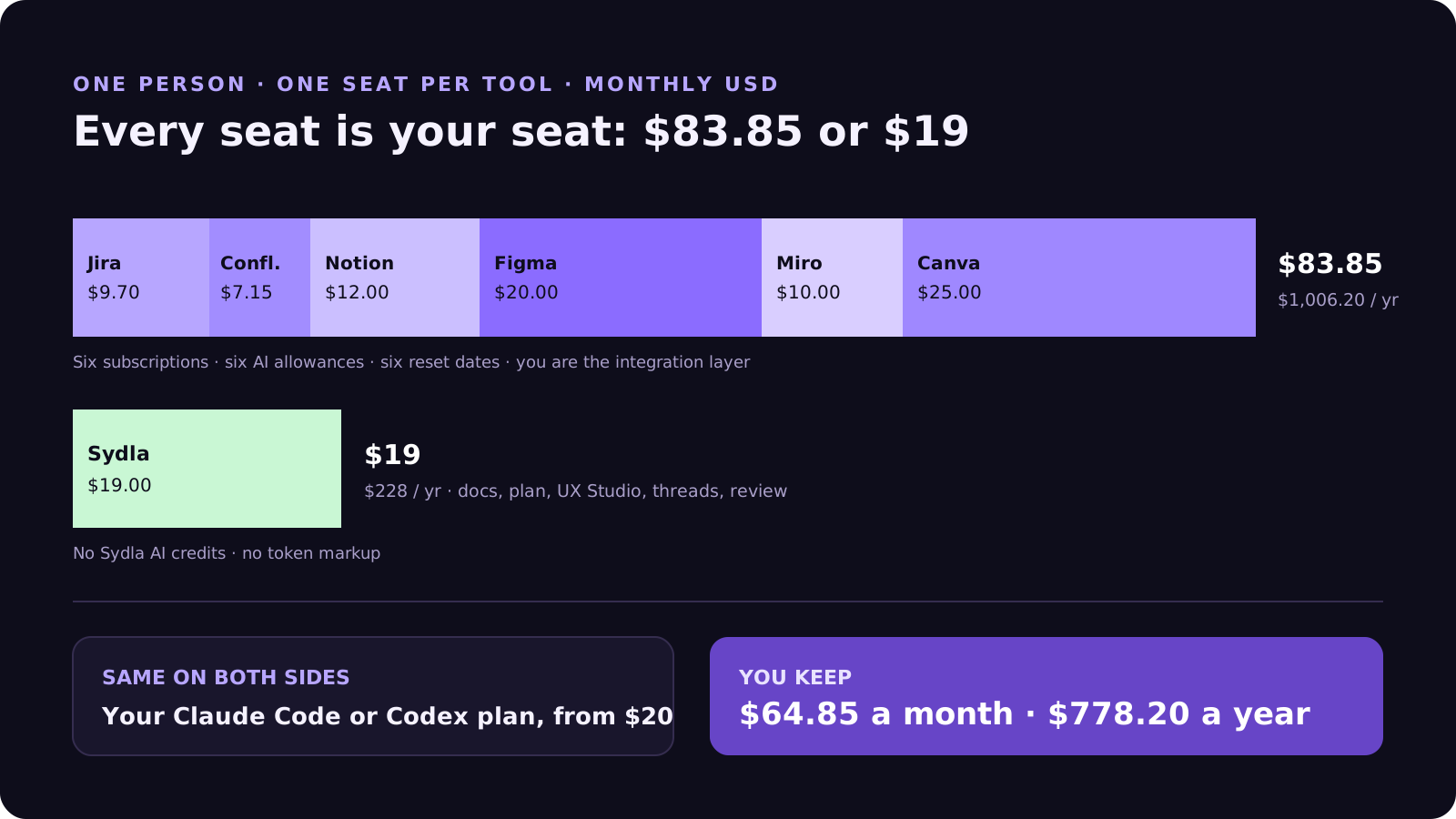
For one person, the difference is $64.85 a month, or $778.20 a year: $1,006.20 for the six seats against $228 for Sydla. Your coding agent is a constant on both sides. Claude Pro and ChatGPT Plus both start at $20 a month, so the realistic comparison is about $103.85 against $39 with the agent included.
A fair reading also counts what you would not buy. Many solo founders never pay for Confluence, or use Figma's free tier for longer than they should. Even a lean three-tool version (Jira, Notion and Figma) costs $41.70 a month and still leaves three AI meters and no link between the brief, the design and the code. The comparison page breaks down each tool individually, and the pricing section shows the source for every row.
The real cost for one person is switching
Subscriptions are the visible part. The bigger cost for a solo founder is that you are the integration layer. On a team, the designer hands the screen to the engineer. When you are both, you hand it to yourself, which means re-reading the brief in Notion, opening the frame in Figma, copying the ticket from Jira and pasting all three into a Claude Code prompt.
Each paste is a summary, and every summary loses detail. The empty state you designed on Tuesday is not in the screenshot you pasted on Thursday. The acceptance criterion you wrote in the brief never made it into the prompt. The agent builds what it was shown, writes tests that confirm its guess and says it is done. You find the gap in production, usually from a user.
MCP servers help an agent reach each tool directly, but they do not remove the hops. Five tools still mean five connections, five sign-ins and five rate limits, and the meters are reaching MCP too: Atlassian counts Teamwork Graph context requested through its Rovo MCP server against Rovo credits, and Figma limits MCP calls by seat type. For a team, that is overhead. For one person, it is the evening you were going to spend on the product.
A solo founder's week in one workspace
Here is the same work, a billing-history export that a customer asked for, run in one Sydla initiative. Each step reads from and writes to the same context, so nothing is pasted between tools.
- Monday: write the brief. In Sydla Docs, write the outcome, the scope and three or four acceptance criteria. A product agent can challenge the brief, but you agree the scope. Our guide to acceptance criteria for AI coding agents explains what makes a criterion provable.
- Tuesday: design the states. In UX Studio, draw the export screen with its empty, loading, error and success states, using the project's tokens. Link each state to the criterion it answers. You can skip the Figma seat; this is the handoff the agent will read.
- Wednesday: let your agent build it. Open a thread in Sydla Desktop. Desktop starts the Claude Code or Codex CLI installed on your machine, signed in with your own Anthropic or OpenAI account. Through one Sydla MCP connection the agent reads the brief, the UX handoff and the criteria, then edits and tests your local repository.
- Thursday: review the evidence. The thread keeps the commands, the changed files and the test output. Check the diff against each criterion and each designed state. Verifying in a separate session catches the guesses the building session confirmed.
- Friday: ship and announce. Merge, tag the release and make the launch image in Sydla Studio from the same brief, without opening Canva.
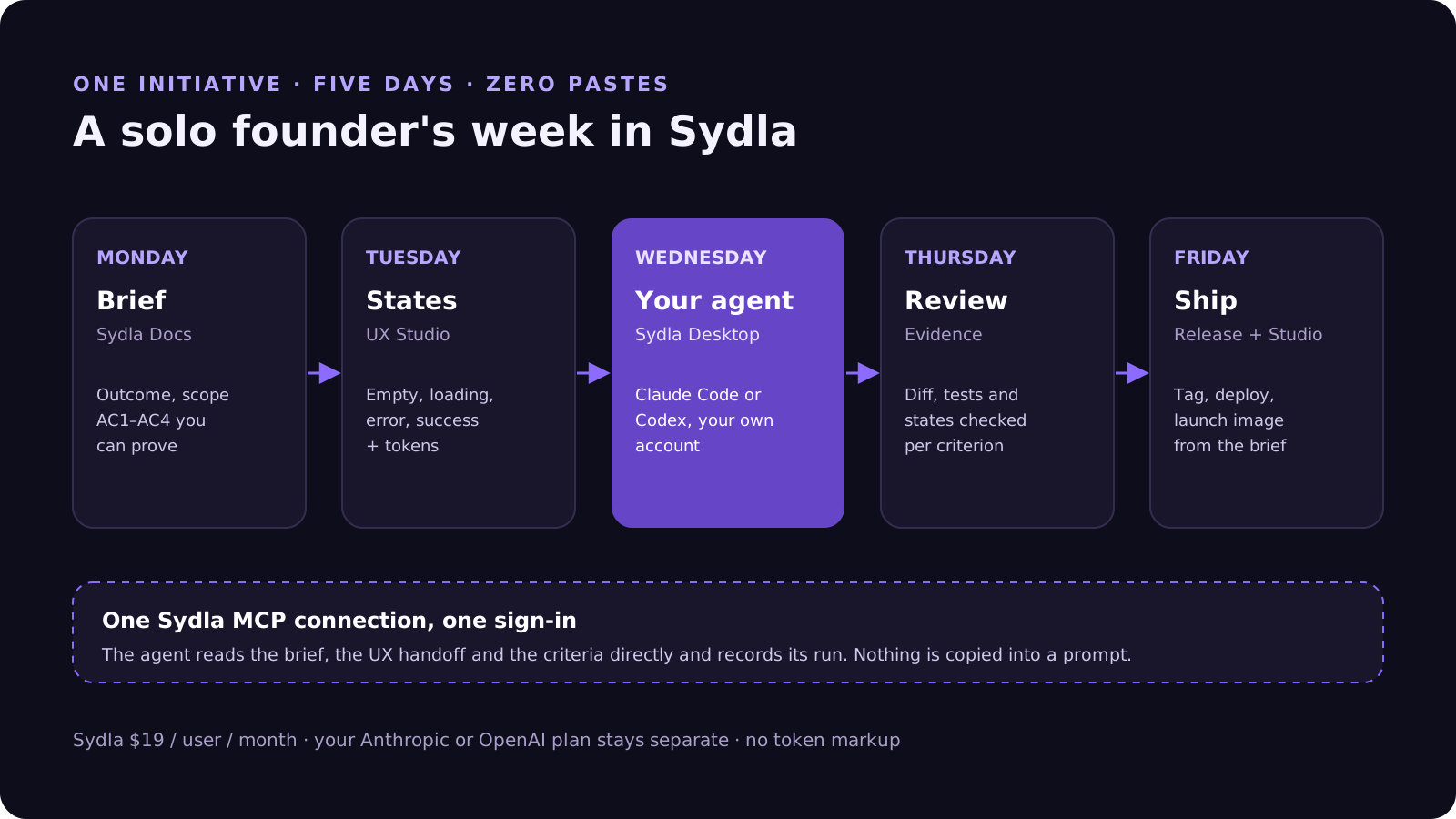
Nothing in that loop requires a Sydla AI credit. Your provider plan still sets the model, the rate limits and the spend. Sydla's $19 pays for the workspace around the agent: docs, planning, UX Studio, threads and review.
How the agent reads your context
Technically, the difference is where the agent's context comes from. In a six-tool stack, the context is whatever you paste. In Sydla, the agent opens the initiative itself through Sydla's MCP tools: it reads the brief, fetches the UX handoff with every state and token, and records its run against the work item, so the next session starts where this one ended.
That is also why the choice of agent stays yours. Claude Code reads CLAUDE.md and Codex reads AGENTS.md, but both read the same Sydla initiative. If you switch providers next quarter, the brief, the screens and the review history stay where they are. Our comparison of Claude Code and Codex for product teams covers how to pick, and why your own agent beats the built-in ones covers when a built-in agent is still the better call.
When a single workspace is not the right call
Consolidation is not free of trade-offs, and a solo founder should know them before moving. If your product is design-led and you live in Figma's prototyping and plugin ecosystem, keep Figma and use Sydla for the brief, the plan and the agent loop. If you sell to enterprises that require Jira integration on day one, keep a Jira project for the customer-facing side.
The test is simple. List the hand-offs you do every week: brief, plan, screen, build, review, launch. Count how many tools each one crosses and how many AI meters it touches. If the answer is one or two, your stack is fine. If it is five, you are paying for the seats and for the switching, and a single workspace with your own agent will give you the evenings back.
Frequently asked questions
What is the best software stack for a solo founder in 2026?
The smallest stack that covers brief, plan, design, build, review and launch without pasting context between tools. For a solo founder who builds with Claude Code or Codex, that is one workspace such as Sydla at $19 a month plus the coding-agent subscription they already pay for, instead of six separate seats that cost $83.85 a month together.
How much does Jira, Notion, Figma, Miro and Canva cost for one person?
One paid seat each of Jira Standard ($9.70), Confluence Standard ($7.15), Notion Plus ($12.00), Figma Professional Full ($20.00), Miro Starter ($10.00) and Canva Business ($25.00) costs $83.85 a month, or $1,006.20 a year, in USD before tax. Sydla costs $19 a month, or $228 a year, a saving of $778.20 a year.
Can I use my own Claude Code or Codex subscription with Sydla?
Yes. Sydla Desktop runs the Claude Code or Codex CLI installed on your machine with your existing sign-in. Sydla sells no AI credits and adds no token markup; your Anthropic or OpenAI subscription stays separate and sets the model, limits and spend.
Are free plans enough for a solo founder in 2026?
Usually for the first weeks, not for long. Free and entry plans now limit AI use rather than features: Figma Starter caps Figma Make credits, Notion's Custom Agents need a Business or Enterprise plan, and Rovo, Miro and Canva meter AI per user each month. Each limit is solved by a paid seat.
Does Sydla replace Figma for a solo developer?
For most product screens, yes. UX Studio holds screens, their empty, loading, error and success states, tokens and transitions, and your coding agent reads that handoff through Sydla's MCP tools. Design-led products that depend on Figma's prototyping or plugin ecosystem can keep Figma and use Sydla for the brief, plan and agent loop.












