AI credit fatigue: six tools, six meters, one workspace
Every tool in the 2026 software stack now ships an agent and a meter to go with it. Here is what each one counts, what a context hop costs, and how to run the work with the coding agent you already pay for.

The new line item nobody budgeted
In 2026, every tool in a typical software stack shipped an agent. Jira and Confluence have Rovo. Figma has Make and a design agent. Notion has Custom Agents. Miro and Canva have their own AI features. Each comes with its own allowance, its own reset date and its own overage price. Each one is reasonable on its own. Together they produce a new kind of tiredness: AI credit fatigue.
The symptoms are easy to recognise. Someone checks a usage dashboard before starting a prototype. A design review waits because a seat’s credits ran out on the 20th. A product manager asks whether the team is on the plan that includes agents. Meanwhile, the developers already pay for Claude Code or Codex, the most capable agent in the building, and it cannot see most of the context it needs.
This article sets out what each of the six tools in our example stack meters today and where the real cost hides: in the hand-offs between them. Then it shows how Sydla runs the same work from a brief to reviewed code with the agent account you already have.
What each tool meters in 2026
The table compares the monthly list price for one paid seat with each vendor’s published AI allowance. Prices are USD, monthly billing, before tax. AI allowances change often, so the sources are listed at the end of the article.
| Tool and plan | Seat / month | AI allowance | Beyond the allowance | Hand-off it owns |
|---|---|---|---|---|
| Jira Standard | $9.70 | Rovo: 25 credits per user per month, pooled across the organisation (70 on Premium, 150 on Enterprise) | Extra usage at $0.01 per credit ($10 per 1,000) | Backlog and delivery |
| Confluence Standard | $7.15 | The same pooled Rovo allowance | Same Rovo credit price | Specs and decisions |
| Notion Plus | $12.00 | Custom Agents require Business or Enterprise | $10 per 1,000 Notion credits, billed monthly | Team knowledge |
| Figma Professional, Full seat | $20.00 | 3,000 AI credits per Full seat per month, enforced per seat since March 2026 | The seat cap is fixed; admins can buy extra credits at the plan level | Screens and prototypes |
| Miro Starter | $10.00 | A monthly AI credit allowance per member (25 on Starter, 50 on Business) | Additional credit packs | Workshops and flows |
| Canva Business | $25.00 | AI usage per member; allowances are not pooled across the team | Wait for the monthly reset or buy an add-on | Launch assets |
| Sydla | $19.00 | No Sydla AI credits: your Claude Code or Codex subscription does the agent work | No token markup | Brief → UX → code → review |
Look at the column on the right rather than the prices. Each tool owns one hand-off in the delivery of a feature, and each meters AI only for the work inside its own walls. A five-step feature touches five allowances. None of them knows about the others.
Three details make budgeting harder than the table suggests. Rovo credits are pooled, so one busy team can drain the allowance for everyone. Figma’s credits are tied to the seat, so a designer who runs out can’t borrow from a quiet colleague. Notion’s Custom Agents require a Business or Enterprise plan, which means a higher seat price before the first credit is spent.
The hidden cost is the context hop
Most teams now connect their coding agent to these tools through MCP servers. That helps, but it does not remove the hops. To implement one screen, an agent may pull the ticket from Jira, the spec from Confluence, the research notes from Notion, the frames from Figma and the user flow from Miro. That means five connections, five sign-ins, five rate limits and, increasingly, five meters.
The meters are starting to reach MCP itself. Atlassian counts enriched Teamwork Graph context requested through its Rovo MCP server against Rovo credits. Figma’s write-to-canvas tools are free during the beta, and Figma’s developer documentation says they will become a usage-based paid feature. Neither change is unreasonable. But every hop that gets a price also adds latency, and every summary the agent writes loses detail.
The less visible cost is drift. When the brief lives in one tool and the screens in another, they disagree within a week. The agent implements the version it fetched. The reviewer checks against the version they remember. Nobody pays a credit for that mismatch, but the team pays for it in rework.
Do the math for a five-person team
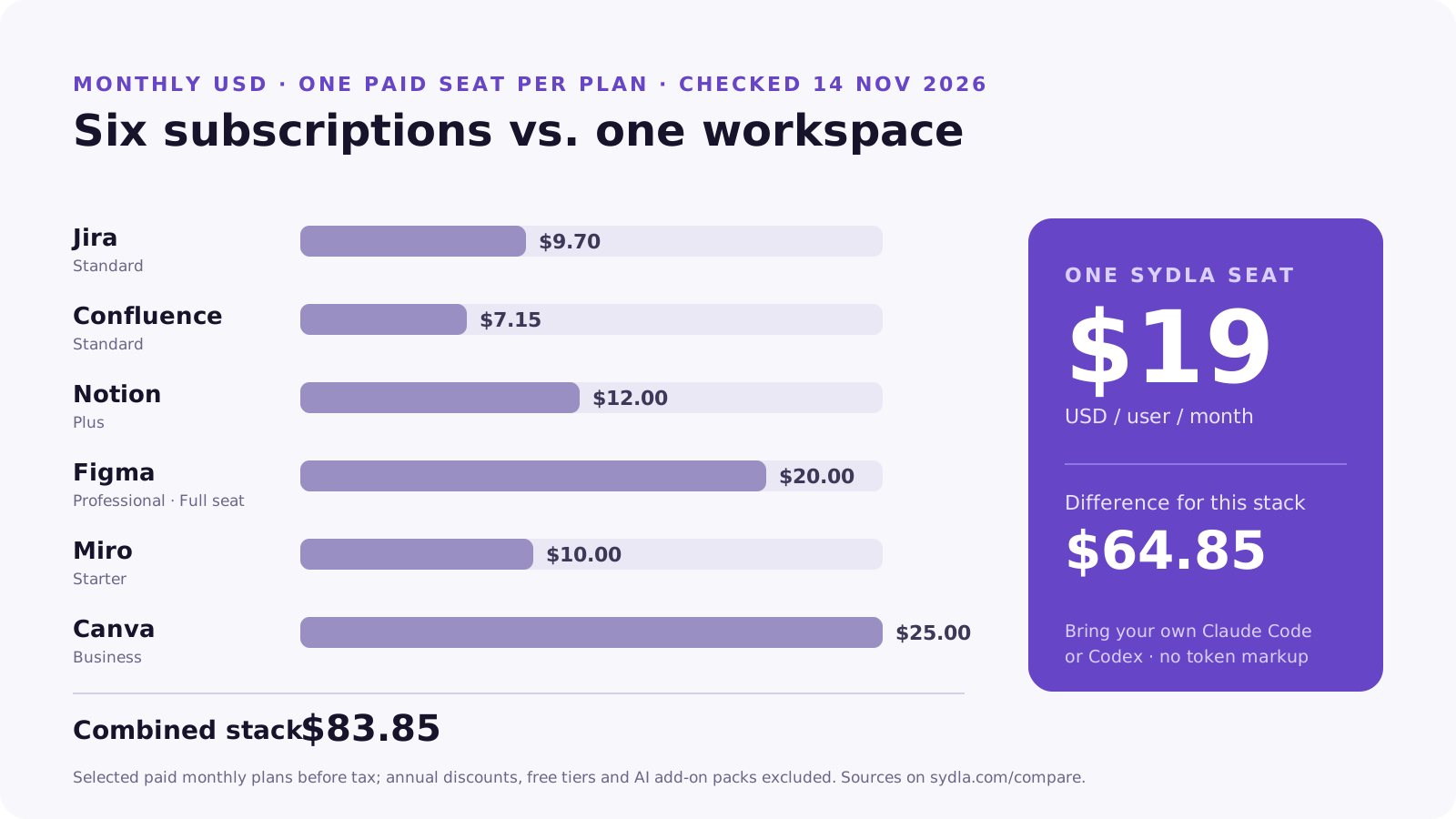
Take a small product team: one product manager, one designer and three engineers. If every person holds a seat in all six selected plans, the stack costs $83.85 per person per month, or $419.25 for the team. The same five people on Sydla cost $95 per month. That is a difference of $324.25 per month, or $3,891 per year, before anyone buys an extra credit pack.
Most teams don’t buy every seat for every person, and a fair comparison shouldn’t pretend they do. Engineers may only view Figma. A designer may never open Jira. Our article on what your software-tool stack really costs explains how to count the seats you actually buy. Even a lean version of the stack usually lands well above $19 per person, and it still has five separate AI meters.
In both cases the coding-agent subscription is a separate line. If your engineers already pay for Claude Code or Codex, that cost exists whether you use Sydla or not. The difference is whether those agents can work from the team’s shared context or only from whatever someone pastes into the terminal. The pricing breakdown and the full comparison show the plans and sources line by line.
How Sydla Desktop connects your own agent to the brief
Sydla is built around the opposite assumption: the agent is already paid for, so the workspace should give it context rather than resell it tokens. Here is the path a feature takes, using the billing-export example from our customer-request walkthrough.
- Write the brief once. The initiative’s goal, scope and acceptance criteria live in Sydla Docs, next to the plan. This is the source the agent reads, not a copy pasted into a chat.
- Design the states in UX Studio. Add the screens and the states a reviewer will check: empty, loading, error and success. Each screen is linked to the same initiative.
- Start a thread in Sydla Desktop. Desktop runs the Claude Code or Codex CLI installed on your machine, with its existing sign-in. Choose the provider and an access mode: read-only to frame the change, or edits allowed to implement it.
- Let the agent read the workspace through MCP. Through Sydla’s MCP tools, the agent opens the brief, the UX handoff and the acceptance criteria. It reaches all of them through one connection, with one sign-in, in the same project.
- Review the evidence, then decide. The thread keeps the commands, the changed files and the test output. Open Changes, compare the diff with the criteria and record the decision. The person, not the agent, decides what ships.
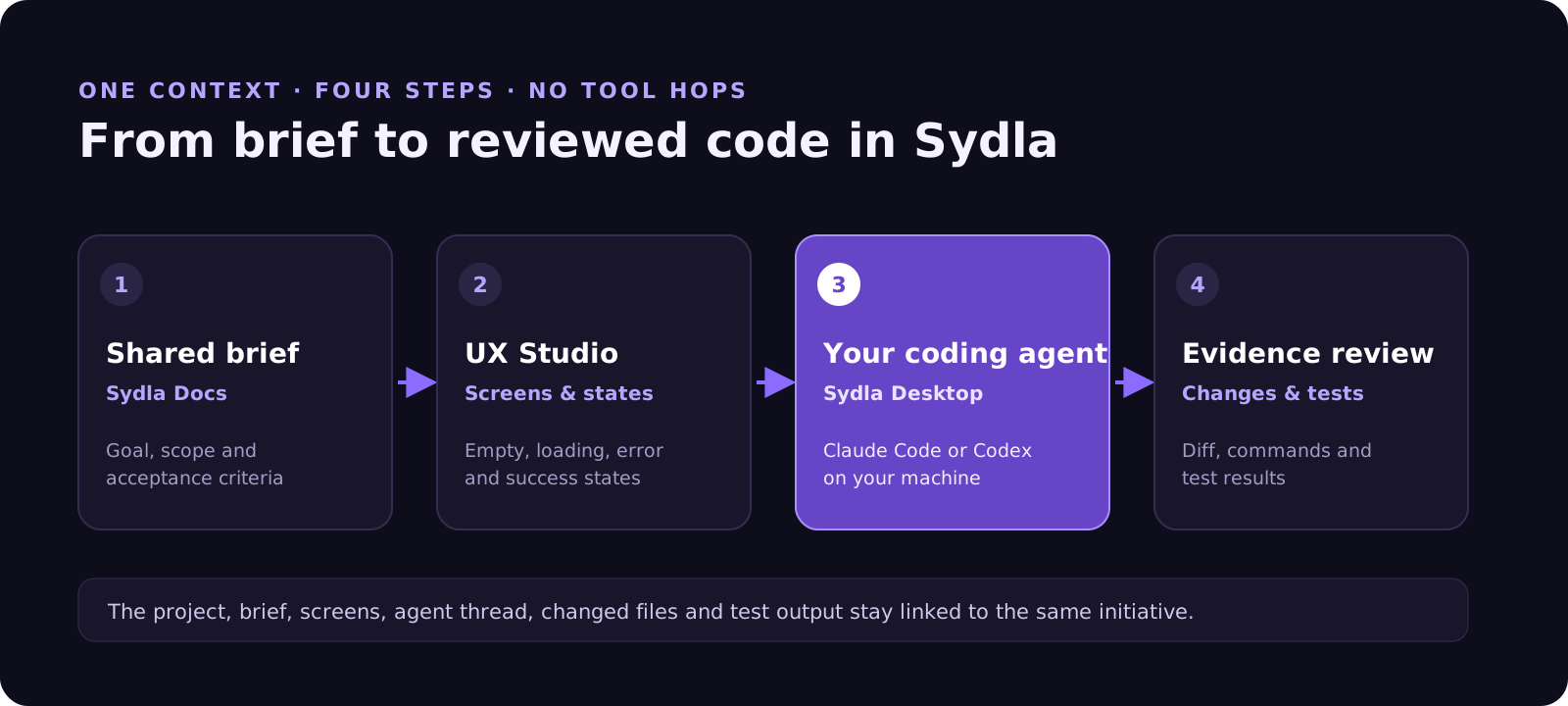
Since the agent runs under your own provider account, Sydla never sees a token bill to mark up. Your Anthropic or OpenAI plan governs model choice, rate limits and spend, exactly as it does in your terminal today. Sydla’s $19 covers the workspace: docs, planning, UX Studio, threads and review.
If you have not set up Desktop yet, bring your coding agent into Sydla Desktop walks through the first session, from sign-in to a reviewed diff.
When the six-tool stack still makes sense
Consolidation isn’t right for every team. If your organisation runs hundreds of Jira projects with custom workflows and compliance reporting, that investment matters. A large design team with a mature Figma library and plugins depends on more than a canvas. A marketing team producing thousands of on-brand assets a month may need Canva’s template library at scale.
The useful question is narrower: which hand-offs does your product team repeat every week, and how many meters sit between them? For solopreneurs, indie hackers, founding engineers and lean product teams, the answer is usually all of them, and the work rarely needs six specialist tools. Each comparison page sets out where the specialist tool still fits better: Jira, Confluence, Notion, Figma, Miro and Canva.
Run one feature through a single workspace
You don’t need to migrate a whole company to test the idea. Pick one real feature. Write its brief in Sydla, sketch its states in UX Studio and hand it to the Claude Code or Codex account you already use. Then compare the review with the last feature you shipped across six tools.
If the review is clearer and the meters are quieter, you have your answer. Create a Sydla workspace for $19 per user per month and keep your agent subscription exactly as it is.
Frequently asked questions
What is AI credit fatigue?
AI credit fatigue is the overhead of tracking separate AI allowances in every tool a team uses. Jira and Confluence draw on Rovo credits, Figma counts credits per seat, Notion sells Custom Agent credits, and Miro and Canva meter their own AI features. Teams end up rationing AI by tool instead of using it where the work needs it.
How many Rovo credits do Jira and Confluence include in 2026?
Atlassian publishes a monthly allowance of 25 Rovo credits per user on Standard, 70 on Premium and 150 on Enterprise, pooled across the organisation. Extra usage is listed at $0.01 per credit, or $10 per 1,000 credits. Check Atlassian’s Rovo usage page for current terms.
Does Sydla charge for AI tokens or credits?
No. Sydla costs $19 USD per user per month, billed monthly. Coding work runs on your own Claude Code or Codex subscription through Sydla Desktop, so Sydla does not sell AI credits or add a markup to tokens. Your provider subscription remains separate.
Can I use Claude Code and Codex with Sydla?
Yes. Sydla Desktop runs the Claude Code or Codex CLI installed on your machine with its existing sign-in. The agent reads the project brief, UX handoff and acceptance criteria through Sydla’s MCP tools, and the thread records its commands, changed files and test results for review.
How much can a team save by replacing Jira, Confluence, Notion, Figma, Miro and Canva with Sydla?
One paid seat in each selected plan (Jira Standard, Confluence Standard, Notion Plus, Figma Professional Full, Miro Starter and Canva Business) costs $83.85 per user per month at monthly list prices. Sydla costs $19, a difference of $64.85 per user per month, or $324.25 per month for a five-person team, before AI add-on packs.












