Design-to-code handoff for AI coding agents: hand over states, not screenshots
Coding agents build exactly the screen you show them and invent the rest. Here is how to hand over the empty, loading, error and success states, the tokens and the flow, so the agent builds what was designed.

The agent built the screenshot, not the screen
You paste a frame into Claude Code and ask for the invoices page. Twelve minutes later it looks right: same layout, same spacing, roughly the same blue. Then you filter to a month with no invoices and get a blank table. You disconnect the network and get an infinite spinner. The error message is one the agent wrote itself.
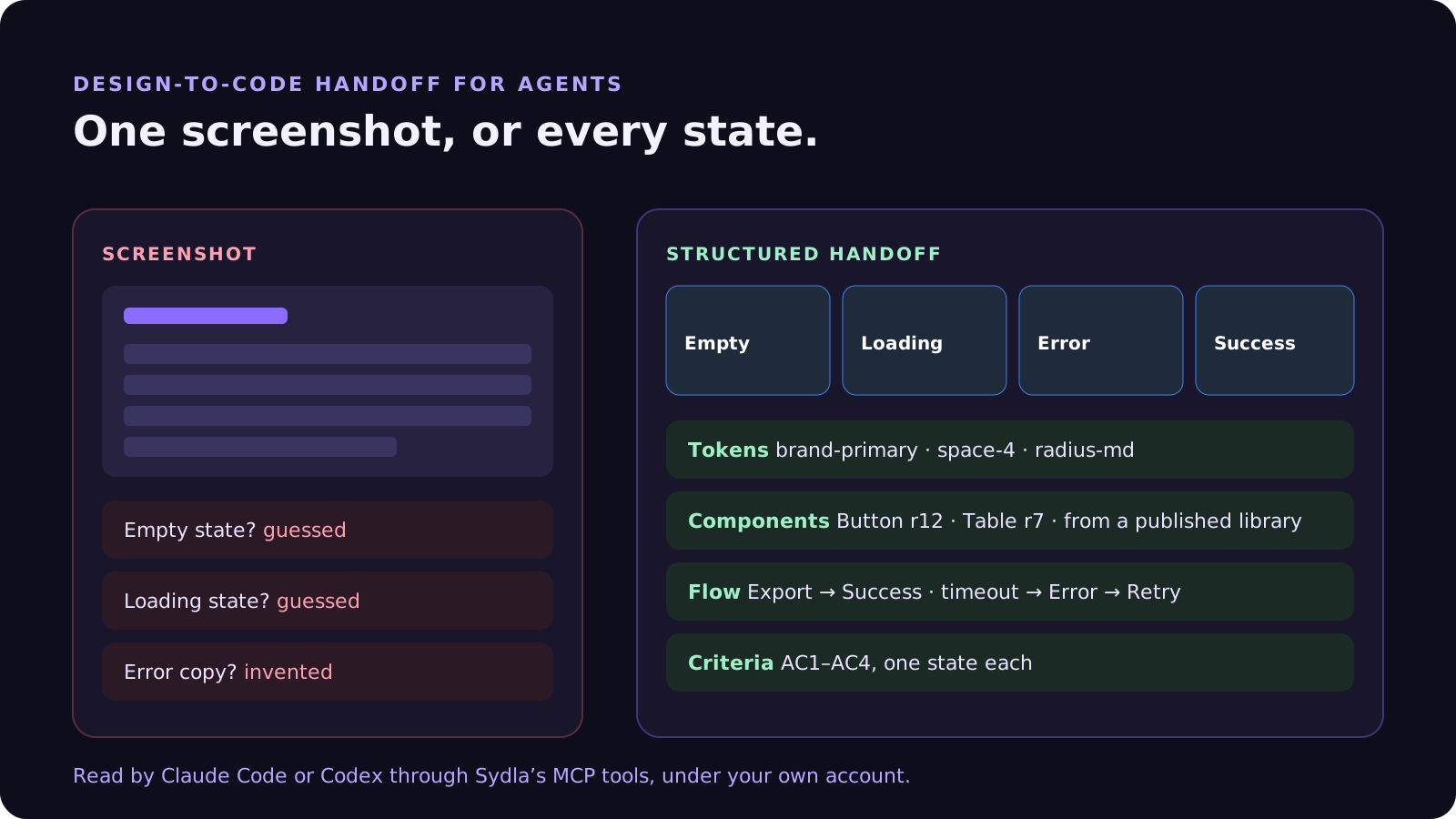
That is not a model problem. A screenshot is one state of one screen. The empty, loading, error and permission states, the tokens behind the colours and the flow to the next screen were never handed over, so the agent filled them in with its best guess.
In 2026 the design-to-code handoff has a new reader. A front-end developer asks the designer when something is missing. An agent does not ask. It guesses quickly, writes tests that confirm the guess and reports that it is done. Good handoff used to be a courtesy. With an agent it is the spec.
This guide covers what an agent needs from a design, what reaching it costs on a typical six-tool stack, and how Sydla hands the states, tokens and flow to the Claude Code or Codex account you already pay for.
What an agent needs from a design
A coding agent can read pixels, but it builds better from structure. A useful handoff has five parts:
- Every state, not just the happy path. Empty, loading, error, success and “no permission” are separate screens. If a state is not designed, the agent designs it.
- Tokens, not hex codes. Colour, spacing, radius and type tokens map to the variables already in your codebase. A screenshot gives the agent a raw colour value; a token gives it brand-primary, and your theme stays consistent.
- Components with versions. The agent should reuse your Button and Table, at the version that was approved, rather than rebuild them inline.
- The flow between screens. What happens after Export, after Cancel, after a timeout? Transitions turn a set of pictures into behaviour the agent can test.
- A link to the criteria. Each state should answer an acceptance criterion, so the reviewer can check the build against both. Our guide to acceptance criteria for AI coding agents covers that side.
What reaching the design costs on a six-tool stack
On a typical lean-team stack, the parts of a handoff live in different tools, and each one meters its own AI and MCP access. Prices are USD list prices for one paid seat, billed monthly, before tax.
| Tool and plan | Seat / month | Part of the handoff it holds | Agent access in 2026 |
|---|---|---|---|
| Figma Professional, Full seat | $20.00 | Frames, variables, components | MCP server: 200 calls a day and 10 a minute on Full or Dev seats; View and Collab seats get 20 calls a month. Write to canvas is in beta and will become usage-based |
| Miro Starter | $10.00 | The user flow agreed in the workshop | 25 AI credits per member per month |
| Jira Standard | $9.70 | The ticket and its acceptance criteria | 25 Rovo credits per user per month, pooled; MCP calls use credits |
| Confluence Standard | $7.15 | Edge cases, copy and decisions | The same pooled Rovo allowance |
| Notion Plus | $12.00 | Research and user quotes behind the design | Custom Agents need Business or Enterprise, then $10 per 1,000 credits |
| Canva Business | $25.00 | Marketing visuals and launch assets | Premium AI allowance with fair-use limits |
| Sydla | $19.00 | Brief, criteria, UX Studio screens with every state, tokens, components and transitions, in one initiative | No Sydla AI credits. Your Claude Code or Codex plan runs the agent, with no token markup |
One seat in each of the six selected plans costs $83.85 per person per month. Sydla costs $19, which is $64.85 less. The limits matter more than the prices for agent work. One implementation pass that reads a screen, its variables, its components and their code mappings can use dozens of Figma MCP calls, and agents retry. A team running two or three agent sessions a day can hit 200 calls before lunch. The pricing breakdown lists every plan and source, and the full comparison goes workflow by workflow.
Five habits of a handoff agents can build from
Whatever tool you design in, these habits close most of the gap between “looks right” and “is right”.
- Design the unhappy states first. Empty, error and no-permission screens are where agents invent the most. Ten minutes on them saves a review round.
- Name states the way your criteria do. If AC2 says “the empty state is shown”, the screen should be called Invoices / Empty. The agent and the reviewer then point at the same thing.
- Publish before you hand over. Hand over a fixed version of the library, not the live file. If the design changes during the build, the agent should not be chasing a moving target.
- Hand over tokens, not values. Map design tokens to the CSS variables or theme keys already in the repository, and tell the agent in CLAUDE.md or AGENTS.md to use them.
- Review against the state, not the screenshot. The verifying session should open each named state in the running app and compare it with the design, then attach the screenshot as proof.
The handoff loop in Sydla UX Studio and Sydla Desktop
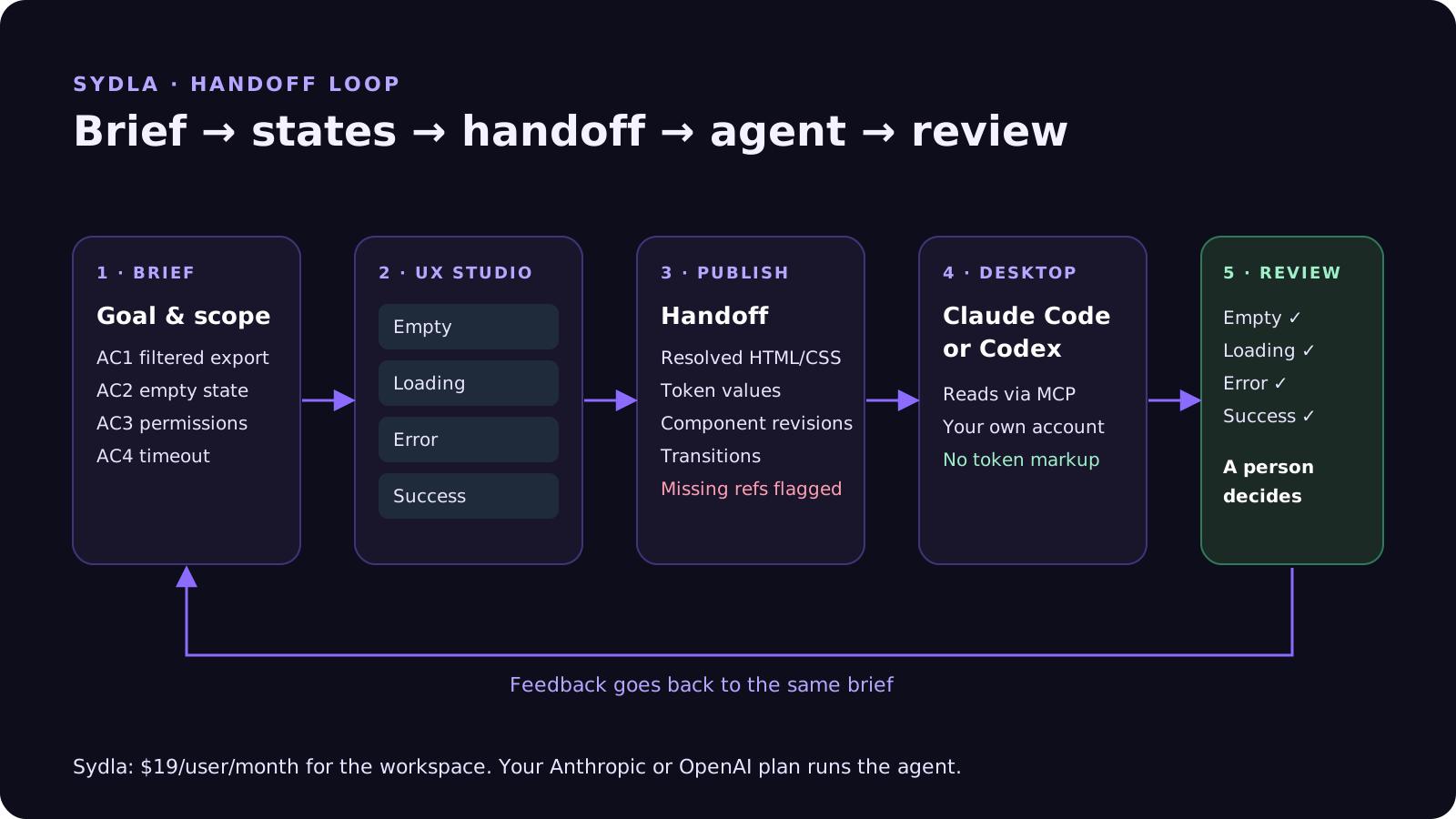
Sydla does not ship its own coding agent. It keeps the design next to the brief and the criteria, and gives the agent you already use one structured handoff to read. The loop looks like this:
- Start from the brief. The goal, scope and acceptance criteria live in Sydla Docs and on the ticket, inside the same initiative.
- Design every state in UX Studio. Each screen gets its empty, loading, error and success states, built from your workspace’s tokens and components. Transitions link the screens into a flow, so “after Export” has an answer.
- Publish the library. A publication freezes the components and tokens. The developer handoff resolves the saved screen against that version: HTML, CSS, the token values and the revision of every component, with any missing component flagged.
- Connect your agent once. Running sydla login installs the Sydla plugin in Claude Code and Codex. The agent reads the handoff, the transitions and the criteria through Sydla’s MCP tools, with no per-seat design licence and no AI credits.
- Build in a Sydla Desktop thread. Desktop starts the Claude Code or Codex CLI on your machine, under your own Anthropic or OpenAI account. Ask it first to map each state to a component and each criterion to a test, then allow edits.
- Verify in a separate session. A fresh thread, or the other agent, opens each named state in the running app, compares it with the design and records a screenshot as proof against the criterion. A person reviews the states side by side and decides.
Your Anthropic or OpenAI plan still decides the model, the limits and the spend. Sydla’s $19 covers the workspace: docs, planning, UX Studio, Desktop threads and review. If you have not connected an agent yet, start with Bring your coding agent into Sydla Desktop. To run both agents on one design, see Claude Code vs Codex for product teams.
When Figma is still the right tool
If you maintain a large design system across many teams, rely on Figma’s plugins and community files, or have designers who live in it all day, keep it. Figma’s MCP server and Code Connect are a real step forward for agent handoff, and our Figma comparison says where Figma is stronger. Brand-heavy campaigns still fit Canva.
For solopreneurs, indie hackers, founding engineers and lean product teams, the question is different. You need screens that are good enough to ship, every state of them, and an agent that can read them without a daily call limit or a second AI bill. Our earlier pieces on AI credit fatigue and built-in agents like Figma Make cover the cost side of that choice.
Try it on one screen
Pick the next screen on your plan. Design its empty, loading, error and success states, name them after your criteria, publish, and hand the result to the agent you already use. Then verify each state in a second session and compare the review with your last screenshot-driven build.
Start your Sydla workspace for $19 per user per month and keep your Claude Code and Codex accounts exactly as they are.
Frequently asked questions
What should a design handoff to an AI coding agent include?
Every state of each screen (empty, loading, error, success and no permission), design tokens rather than raw values, the components to reuse at a fixed version, the flow between screens and a link to the acceptance criteria each state answers. A single screenshot covers only one state, so the agent guesses the rest.
What are the Figma MCP server limits in 2026?
According to Figma’s developer documentation, Full and Dev seats on the Professional plan get up to 200 MCP calls a day and 10 a minute; Organization allows 15 a minute and Enterprise 600 a day and 20 a minute. View and Collab seats get up to 20 calls a month, and Starter Full or Dev seats have no MCP access. Writing to the canvas is free during its beta and will become usage-based.
Can Claude Code or Codex build UI without Figma?
Yes. Both agents can build from any structured source they can read through MCP or files. In Sydla, UX Studio screens, states, tokens and transitions are exposed through Sydla’s MCP tools, so Claude Code and Codex read the handoff directly with your own Anthropic or OpenAI account and no extra AI credits.
How do you check that an agent built the design correctly?
Verify in a separate session. Open each named state in the running app, compare it with the designed state, and attach a screenshot as proof against the matching acceptance criterion. The session that wrote the code should not be the only check, and a person makes the final decision.
How much does Sydla cost compared with Figma, Jira and Confluence?
Sydla costs $19 USD per user per month and covers docs, planning, UX Studio, agent threads and review. One paid seat each of Jira Standard, Confluence Standard, Notion Plus, Figma Professional, Miro Starter and Canva Business costs $83.85 per month. Sydla sells no AI credits: you bring your own Claude Code or Codex account, with no token markup.












