Sprint retrospectives with AI coding agents: run the retro on evidence, not memory
When agents write most of the code, the people in the retro only remember part of the sprint. Here is what Jira, Confluence and Miro offer for retrospectives in 2026, what their AI layers charge, and a five-signal way to run the retro on agent run data: rework, review load, criteria that failed, briefs that changed and cost per shipped ticket.

The retro that only remembers half the sprint
Friday, retro time. The board fills with the usual notes: reviews were slow, the spec changed late, CI was flaky. Everyone nods. Nobody mentions that the agent rewrote the export service three times because the brief never said how large an invoice could get, because nobody in the room watched it happen.
That is the new retrospective problem. A retro runs on memory, and when Claude Code or Codex does most of the building, the people in the room only remember the parts they touched: the review, the merge, the incident. The rest of the sprint, dozens of runs, retries and abandoned branches, never reaches the board.
Meanwhile the evidence is scattered across a typical 2026 stack: tickets in Jira, specs in Confluence or Notion, screens in Figma, the retro board itself in Miro and the team update in Canva. Six tools, six sign-ins, often six AI meters, and not one of them records what the agent actually did. This guide shows how to run the retro on that missing record.
Why agents change what a retro should look at
Google Cloud's 2025 DORA report, based on nearly 5,000 technology professionals, found that 90% of respondents use AI at work. It also found a positive relationship between AI adoption and delivery throughput, and a continuing negative relationship with delivery stability. Its headline: AI does not fix a team, it amplifies what is already there. And 30% of respondents reported little or no trust in AI-generated code.
Throughput up, stability down, trust low: that is exactly what a retrospective exists to examine. But the classic questions, what went well, what did not, what will we change, assume people did the work and remember it. With agents in the loop, three things shift:
- The bottleneck moves to review. Our sprint planning guide argues that review capacity, not typing speed, limits what a team ships. The retro should measure that queue, not just complain about it.
- Rework hides in runs. A ticket can look done on the first try in Jira while the agent took four attempts to pass its criteria. That waste never shows on a burndown chart.
- Root causes sit upstream. Most agent failures trace back to a vague brief, missing states in the design or untestable criteria, not to the model. A retro that only looks at the code blames the wrong step.
What retro tools offer in 2026, and what they cannot see
Every mainstream retro tool now has an AI layer. Each one works on what people type into it.
- Atlassian. The Team Playbook retrospective is a 60-minute play: set the tone, gather feedback, turn it into insights, create action items, conclude. It suggests Rovo Search to pull relevant pages and tickets for context and Rovo Chat to distill feedback into patterns. Confluence whiteboards ship retro templates, and Rovo can group sticky notes, summarize the board and turn notes into Jira work items. All of it runs on your site's Rovo credits.
- Miro. Create with AI generates sticky notes and prompts from a description of your retro focus, and AI clustering groups feedback by theme, sentiment and category. Miro says it is available on all plans, with credit-based usage.
- Marketplace agents. Several Jira apps now offer Rovo agents that summarize sprint health against previous sprints and draft a retro brief, again consuming Rovo credits.
All of these organize opinions well. None of them reads the agent's runs: how many attempts a ticket took, which acceptance criteria failed first, how long a merge request waited for a person, or what the sprint cost in model usage. Clustering a hundred sticky notes faster does not tell you why the agent rewrote the export service three times.
Six tools, six meters: the cost of one retro
Here is one paid seat per tool, what each holds of the sprint's story, and how its AI layer bills you. Sydla appears last for comparison.
| Tool and plan | Seat / month | Part of the sprint it holds | AI for the retro | Sees agent runs? |
|---|---|---|---|---|
| Jira Standard | $9.70 | Tickets, sprint and velocity reports | Rovo agents on pooled Rovo credits | No |
| Confluence Standard | $7.15 | Specs, retro whiteboard and page | Rovo grouping and summaries on the same credits | No |
| Notion Plus | $12.00 | Specs and retro notes for teams on Notion | Notion AI and agents on Notion credits | No |
| Figma Professional, Full seat | $20.00 | The screens and states that changed | Figma AI credits per seat | No |
| Miro Starter | $10.00 | The retro board | Create with AI and clustering on Miro credits | No |
| Canva Business | $25.00 | The sprint update for stakeholders | Canva AI usage per member | No |
| Six-tool total | $83.85 | The sprint split across six places | Up to six AI meters | Pasted in by hand |
| Sydla | $19.00 | Brief, criteria, UX states, runs, review and costs in one workspace | None billed: your own Claude Code or Codex | Yes, recorded per work item |
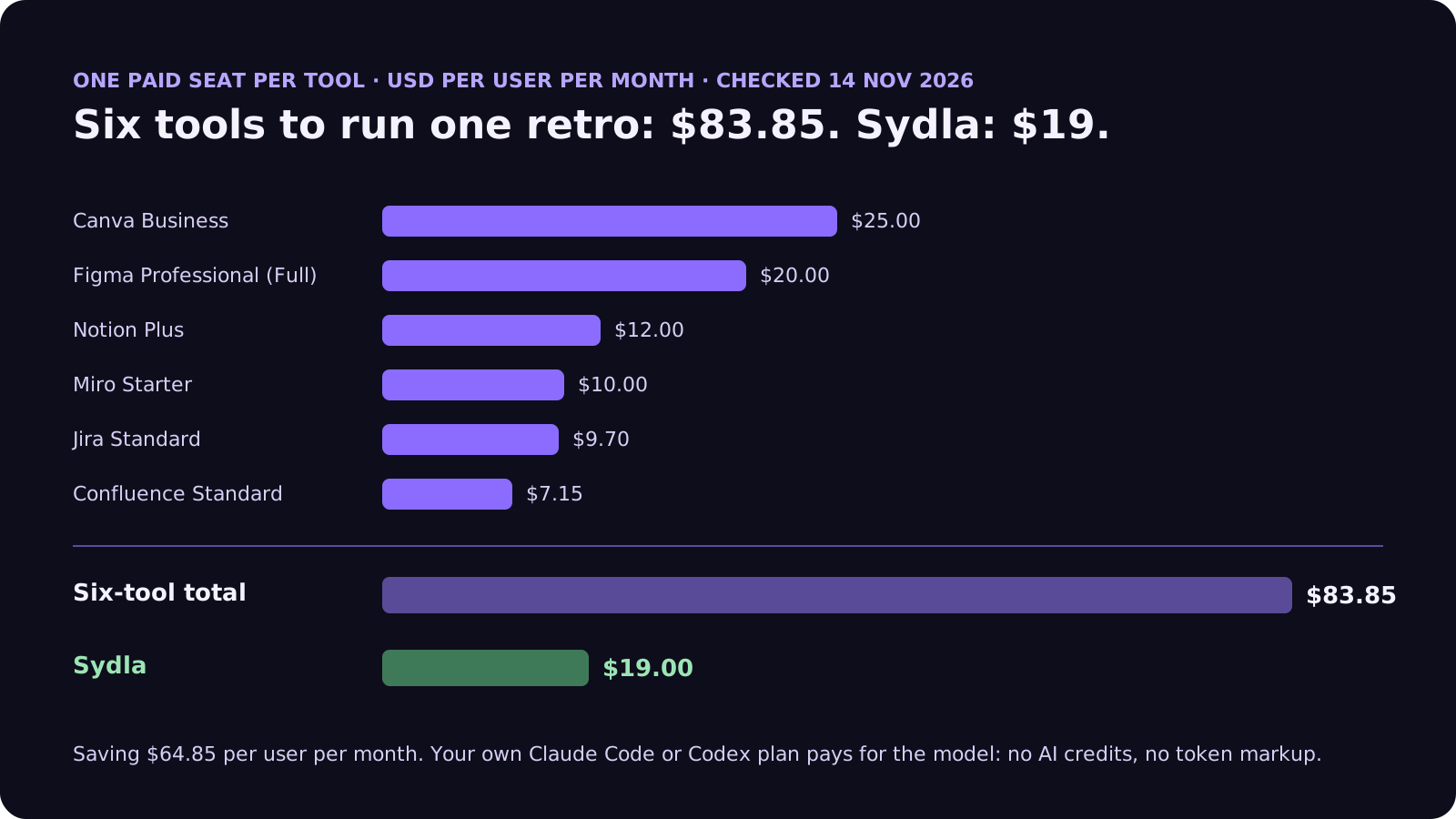
Switching saves $64.85 per person per month on seats, before any credit pack. The comparison overview covers each tool and the pricing section lists every source. Our AI credit fatigue post covers the meters in detail.
Five signals to bring to every retro
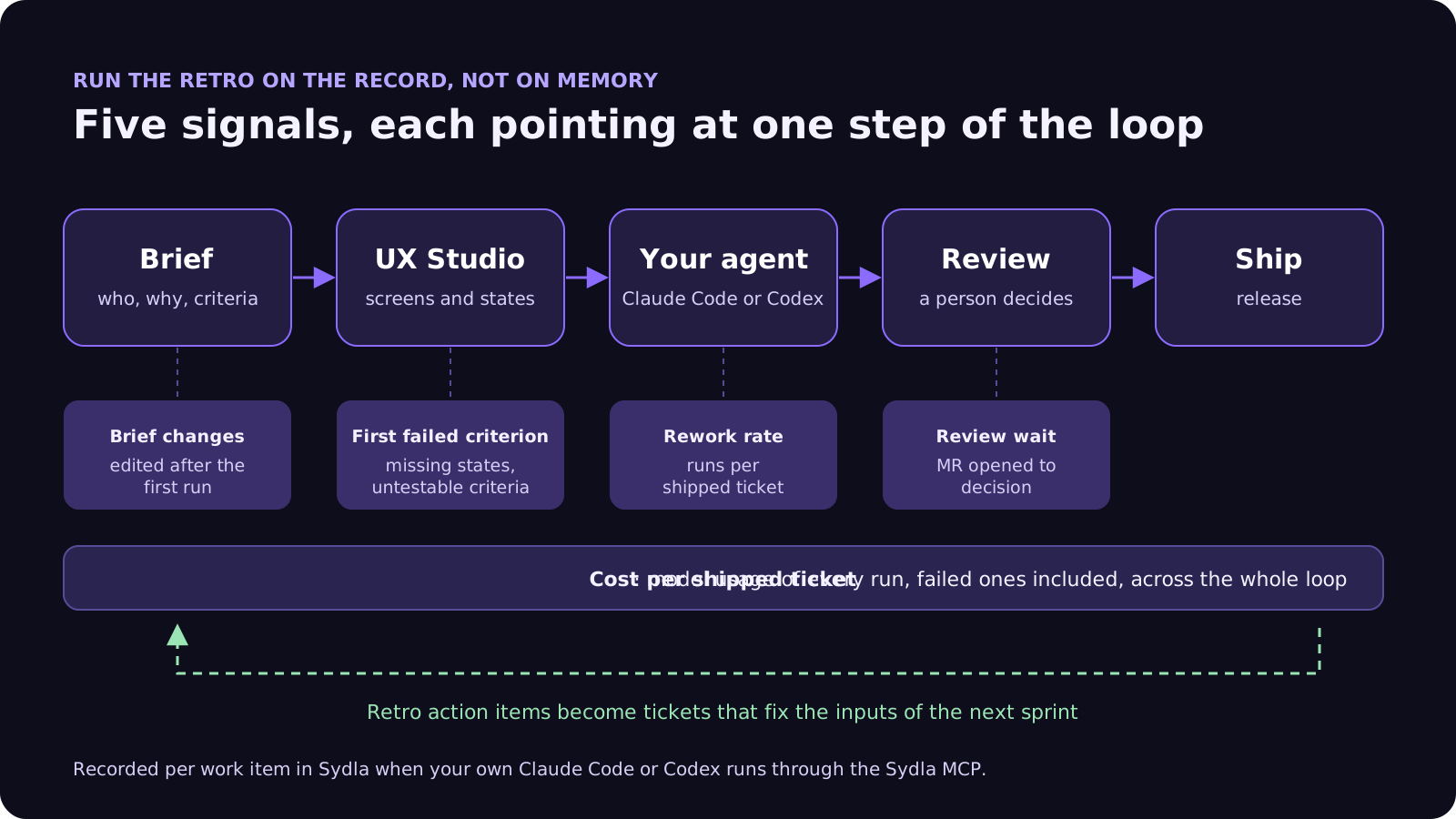
Keep the human part of the retro: how people felt, what blocked them, what they want to try. Then put five numbers from the agent runs next to the sticky notes. Each one points at a step of the delivery loop, so each one suggests where to act.
- 1. Rework rate: runs per shipped ticket. One run per ticket is rare and fine. Four runs on the same ticket means the agent was guessing. Look at the brief first, not the model.
- 2. First criterion to fail. When a run fails, which acceptance criterion broke? If the same kind keeps failing, such as error states or limits, your criteria template is missing something. Our acceptance criteria guide lists six rules that prevent most of these.
- 3. Review wait. Time from the agent opening a merge request to a person deciding it. If this grows sprint after sprint, the team is producing faster than it can review. Plan fewer agent tickets, not more reviewers on Friday. The four-pass review checklist shortens each review.
- 4. Brief changes after the first run. Count the briefs or designs edited after an agent had already started. Each one is a decision that was not made before the build, which is the most expensive time to make it. See design-to-code handoff for AI coding agents.
- 5. Cost per shipped ticket. The model usage of every run on a ticket, including failed ones, divided by what shipped. It turns vague worries about agent spend into a number you can watch, and it shows which kinds of work are cheap to delegate and which are not.
Fix the input, not the agent
When a run goes wrong, the tempting action item is to switch models or add another rule to CLAUDE.md. Sometimes that is right. More often the retro finds a brief without a who-and-why sentence, a screen without its empty or error state, or a criterion nobody could test. Fix those and every future run improves, whichever agent you use.
A 60-minute retro agenda for agent-heavy sprints
This keeps the shape of Atlassian's playbook and changes what goes in each slot.
- Before the meeting (agent, 10 minutes). Ask Claude Code or Codex to pull the sprint's work items, runs, criterion results, review times and costs, and draft a one-page summary with the five signals and the three tickets with the most rework. A person checks it before it is shared.
- Set the tone (5 minutes). Remind the team that the numbers describe the system, not people. A ticket with six runs is a question about the brief, not about who wrote it.
- Gather feedback (15 minutes). Sticky notes as usual: what helped, what hurt. People add what the data cannot see, such as context switching, unclear ownership or a stressful incident.
- Match notes to evidence (15 minutes). Put each cluster of notes next to the signal that confirms or contradicts it. Reviews were slow either matches the review-wait number or it does not. That is where opinions turn into findings.
- Decide action items (15 minutes). One or two changes, each attached to a step: rewrite the brief template, add an error-state rule to the criteria, cap agent tickets per reviewer. Write each one as a ticket with its own acceptance criteria.
- Close (no more than 5 minutes). Agree which signal should move next sprint, and check it at the next retro.
How it works in Sydla
Sydla keeps the brief, the criteria, the UX states, the tickets, the runs and the reviews in one workspace, so the retro data is already there when the sprint ends.
- Briefs and criteria in Sydla Docs. Each ticket links its brief and its acceptance criteria, with version history, so you can see which briefs changed after the build started.
- UX Studio publications. Screens and their states are published as a versioned handoff, so a missing state shows up as a gap in the publication, not as a surprise in review.
- Your agent in Sydla Desktop. Desktop starts the Claude Code or Codex CLI you already use, signed in with your own Anthropic or OpenAI account. Through one Sydla MCP connection the agent reads the ticket, brief, criteria and handoff, then records its run, cost and criterion results against the work item. The Desktop guide covers the first run.
- Review and gates. Agents can request a gate; only a person decides it. Review times come from the same record.
- Retro prep from the record. Because runs, criterion results and costs sit on each work item, your agent can draft the five-signal summary for the sprint and file the action items as tickets, which a person then reviews.
There are no Sydla AI credits and no token markup: your Claude or ChatGPT plan pays for the model and $19 pays for the workspace. Choosing between agents? See Claude Code vs Codex for product teams. Writing up what shipped? See release notes from AI agent runs.
Start with your next retro
Try one rule at your next retrospective: every sticky note about delivery gets matched to a number from the agent runs, or marked as a feeling worth discussing. If collecting those numbers means opening six tools and exporting three reports, that is the real cost of your stack, and it is the problem Sydla was built to remove. The solo founder stack post runs the same maths for a team of one.
Frequently asked questions
How do you run a sprint retrospective when AI agents write the code?
Keep the human part, how people felt and what blocked them, and add five signals from the agent runs: rework rate (runs per shipped ticket), the first acceptance criterion to fail, review wait, briefs changed after the first run and cost per shipped ticket. Match each sticky-note cluster to a signal, then pick one or two action items that fix an input such as the brief, the design states or the criteria.
Can Claude Code or Codex prepare a retrospective?
Yes, if they can read the sprint's record. Given access to work items, runs, criterion results, review times and costs, either agent can draft a one-page summary with the main signals and the tickets with the most rework. A person should check it before the meeting, and the team still runs the discussion.
Does Jira or Confluence have an AI retrospective feature?
Atlassian's retrospective play suggests Rovo Search to gather relevant pages and tickets and Rovo Chat to distill feedback into patterns. Confluence whiteboards include retro templates, and Rovo can group sticky notes, summarize the board and turn notes into Jira work items, using your site's Rovo credits. Marketplace apps add Rovo agents that summarize sprint health.
What metrics should an agile retrospective track for AI-assisted teams?
Alongside the usual delivery measures, track rework rate, the acceptance criteria that fail most often, time merge requests wait for review, how often briefs or designs change after an agent starts, and model cost per shipped ticket. The 2025 DORA report found AI adoption raises throughput but still hurts stability, and these signals show where that instability comes from.
How much does Sydla cost compared with Jira, Confluence, Notion, Figma, Miro and Canva?
Sydla costs $19 per user per month. One paid seat each of Jira Standard, Confluence Standard, Notion Plus, Figma Professional Full, Miro Starter and Canva Business costs $83.85 per user per month in USD before tax, so Sydla saves $64.85 per user per month. Your own Claude Code or Codex does the work, with no AI credits and no token markup.














