How to onboard a new engineer with AI coding agents in 2026
Claude Code and Codex can explain a codebase on day one. They cannot explain why the product works the way it does, because that lives in briefs, decisions and design states spread across six tools. Here is a five-day onboarding plan that gives a new engineer both, and ships a first change by Friday.

Day one used to be about access. Now it is about context
A new engineer's first week still starts with access requests. A Jira seat for the board, Confluence for the specs, Notion for the team wiki, Figma for the screens, Miro for the workshop boards, Canva for the launch assets. Six logins, six permission models, and in 2026, up to six AI meters, each with its own credits and its own idea of what the new hire is allowed to ask.
Then the coding agent arrives. Claude Code or Codex can read the repository and answer questions about it within minutes, which is a real change: the slowest part of onboarding used to be finding someone with time to explain the code. The new bottleneck is different. The agent explains how the code works. Nobody explains why it works that way, because the why lives in tickets, pages, frames and sticky notes the agent cannot see without six separate connections.
This guide is a five-day plan that closes that gap. It works with the coding agent the engineer already uses, and it ends with a merged change on Friday.
What the coding agents now do for a new hire
Both major coding agents now document onboarding as a first-class use case:
- Claude Code: codebase Q&A. Anthropic's common workflows page starts with a codebase overview: open Claude Code in the project root, ask for an overview, then narrow down to architecture patterns, key data models and how authentication is handled. It also suggests asking for a glossary of project-specific terms.
- Claude Code: /team-onboarding. This command reads the last 30 days of your Claude Code usage, including commands and MCP servers, and writes a markdown guide a teammate can paste as their first message. On Team and Enterprise plans it also returns a share link that opens in Claude Code.
- Claude Code: Explanatory and Learning output styles. Explanatory adds short insight blocks explaining each choice. Learning goes further: at real design decisions it leaves a TODO(human) marker and asks the person to write that piece. Both produce longer answers, so they use more output tokens.
- Codex: understand large codebases. OpenAI's Codex use case, written for new engineers joining a repo or service, suggests tracing a request through the system, asking which modules own business logic, persistence and UI, where validation and side effects happen, and ending with the files to read next and the tests to run.
Anthropic's April 2026 post by Brendan MacLean puts the principle well. His lab maintains more than 700,000 lines of C# built over 17 years, and he writes that you wouldn't hand a new hire that codebase and expect results on day one. The fix was a short CLAUDE.md as the lay of the land, plus skills for debugging and version control. Our CLAUDE.md vs AGENTS.md guide covers how to keep that file short.
The context a coding agent cannot find in the repo
Ask an agent why the export page only offers CSV, and it will tell you what the code does. It cannot tell you that a customer asked for Excel, the team decided against it in a review three months ago, and the decision is in a comment on a Confluence page. For a new engineer, these are the questions that matter most in week one:
- What problem does this feature solve, and for whom? That is the brief, usually a Confluence or Notion page.
- What does done mean for my first ticket? That is the acceptance criteria, often a few lines in a Jira description.
- What should every state look like? That is the design, in Figma frames, sometimes with a Miro board explaining the flow.
- What did we already try? That is the history of runs, reviews and decisions, usually nowhere at all.
Built-in agents try to answer these from inside each tool. Atlassian's August 2026 post on Confluence agents cites Sprout Social's onboarding agent, which the company says answers roughly 80% of new-hire questions. That is useful for policy and process. It still answers from one tool's pages, on Rovo credits, and it does not hand anything to the coding agent the engineer actually builds with. We compared the two models in Claude Code vs built-in AI agents.
What a new hire's day one costs in 2026
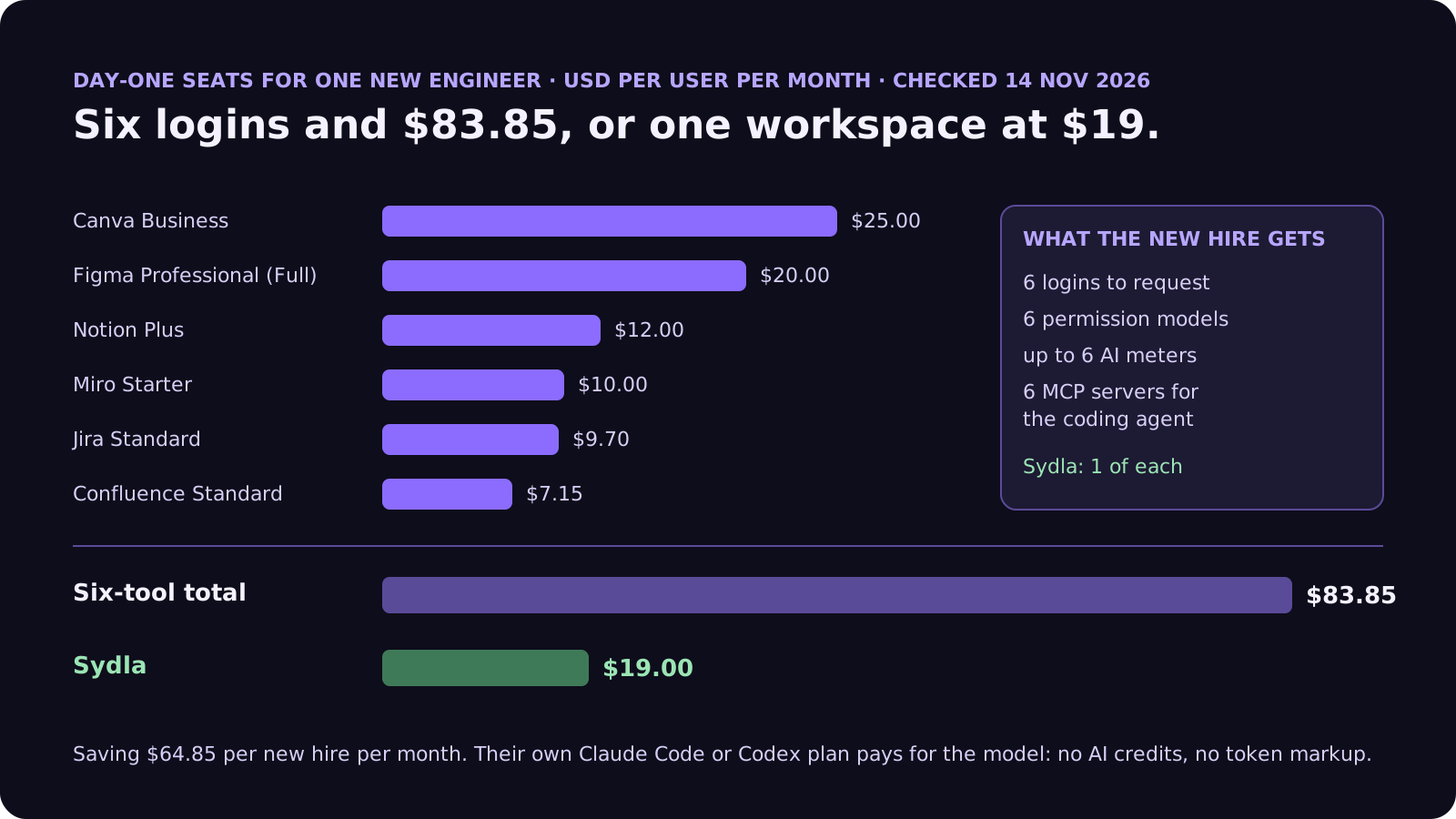
Here is what a team pays to give one new engineer a seat in each tool, what AI layer comes with each seat, and how many hand-offs the coding agent needs to collect the context for a first ticket:
| Tool and plan | Seat / month | AI layer | What the new hire looks for there |
|---|---|---|---|
| Jira Standard | $9.70 | Rovo credits, 25 per user per month on Standard | The starter ticket and its criteria |
| Confluence Standard | $7.15 | Rovo agents and templates on the same credits | Specs, decisions, the onboarding page |
| Notion Plus | $12.00 | Notion AI and Custom Agents on Notion credits | Team wiki and runbooks |
| Figma Professional, Full seat | $20.00 | AI credits per seat, MCP calls capped per day | Screens and states for the first ticket |
| Miro Starter | $10.00 | Create with AI on Miro credits | Flow diagrams and workshop notes |
| Canva Business | $25.00 | Canva AI usage per member | Launch assets for what they ship |
| Six-tool total | $83.85 | Up to six meters, six MCP servers | Context in six places |
| Sydla | $19.00 | None: their own Claude Code or Codex plan pays for the model | Brief, criteria, states and runs on one work item |
The comparison overview covers each tool in detail, and the pricing section lists the source for every price. If you are also the person paying for the agent, our cost per ticket guide shows how to budget it.
One seat, one connection, the whole story
Give the new hire the brief, the criteria, the states and the agent in one place for $19 per month instead of $83.85. That is $64.85 saved per new engineer, every month, and five fewer access requests on day one.
A five-day onboarding plan with your own coding agent
This plan assumes the new engineer already has, or is given, a Claude or ChatGPT plan for their coding agent. Each day has one goal and one artifact a buddy can check.
- Monday: set up and ask. Install the agent and connect it to the workspace. Paste the guide a teammate generated with /team-onboarding, or run /init if the repository has no CLAUDE.md yet. Then spend the afternoon on codebase questions: an overview, the main data flow, the tests to run, a glossary. Artifact: a one-page note in the team space with what they learned and three open questions.
- Tuesday: read the brief, not just the code. Pick a small starter ticket that already has a brief and numbered acceptance criteria. Have the new hire ask the agent to map each criterion to the files it touches. Every criterion the agent cannot map is a good question for the buddy. Our acceptance criteria guide explains how to write criteria an agent can check.
- Wednesday: first run, in learning mode. Open the approved screen states for the ticket and start the run with the Learning or Explanatory output style, so the agent explains its choices and leaves the real decisions to the person. Artifact: a branch and a list of the TODO(human) pieces they wrote themselves.
- Thursday: review the evidence together. The buddy reviews with them: which criteria passed, what the run cost, what changed and why. This is where the new hire learns the team's quality bar. Our four-pass review checklist is a good script for this session.
- Friday: first merge. Merge, deploy if your pipeline allows it, and close the loop: add one line to the brief or the onboarding note that would have saved them an hour this week.
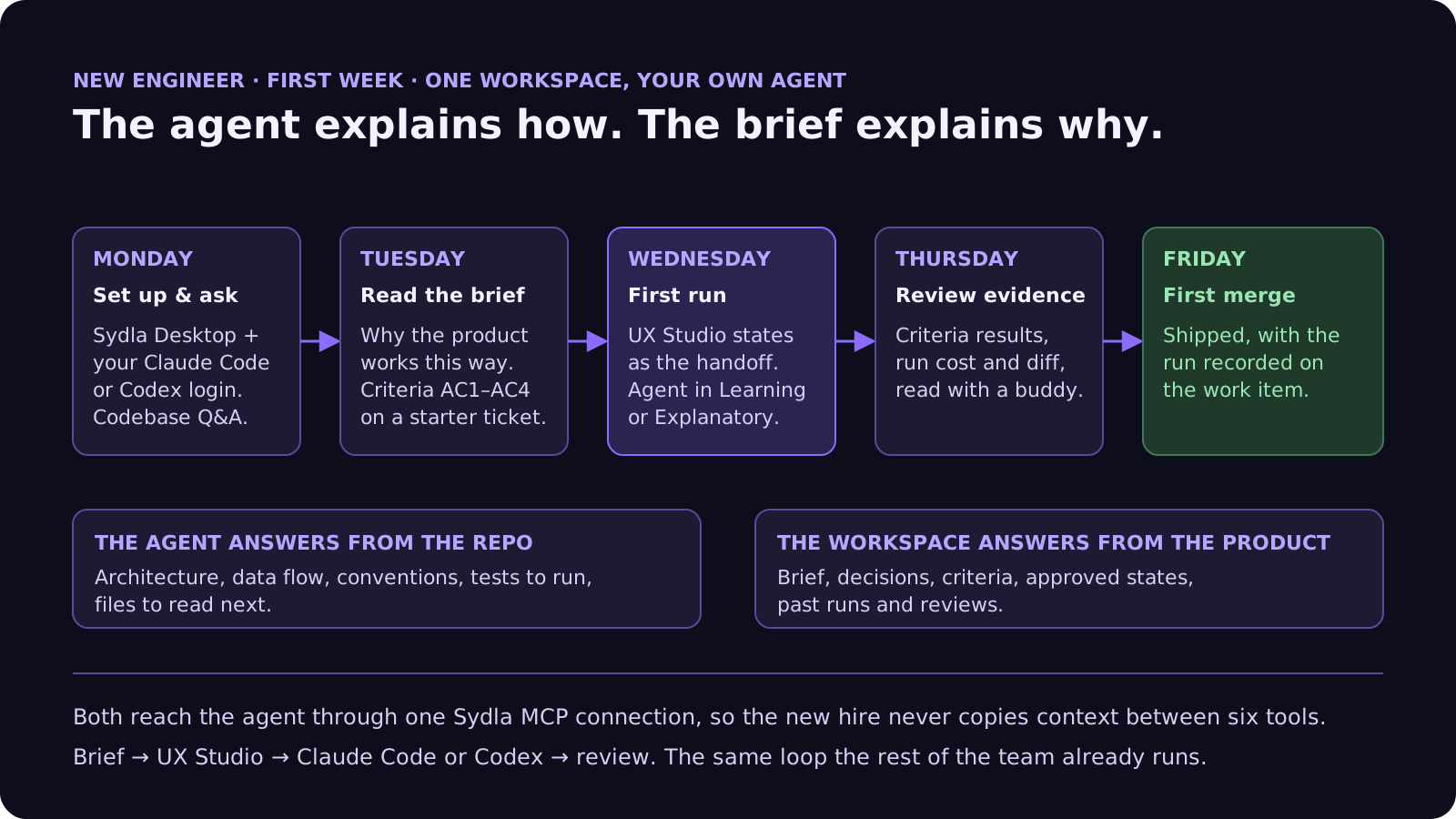
Two rules make this plan work. The starter ticket must be ready before Monday: brief, criteria and states, written by someone who knows the product. And the new hire should never have to copy context into the agent by hand. If they do, the context is in the wrong place.
How Sydla Desktop connects the agent to the brief
Sydla is built for exactly this hand-off. The flow is the same one the rest of the team runs: brief, then UX Studio, then the agent, then review.
- Bring the agent they already use. Sydla Desktop launches the Claude Code or Codex CLI on the engineer's machine, signed in with their own Anthropic or OpenAI account, in their local checkout. There are no Sydla AI credits and no token markup. The Desktop guide covers the first run step by step.
- One MCP connection for the product context. Through a single Sydla MCP server, the agent reads the work item, its brief in Sydla Docs, the numbered criteria and the UX Studio handoff at the version a person approved. That is one connection instead of six, as our MCP servers guide explains.
- States, not screenshots. UX Studio holds the screens with their empty, loading, error and done states, so the first run does not stop at the happy path. See the design-to-code handoff guide.
- Every run leaves a record. Cost, criterion results and the merge request are written back to the work item, so the buddy reviews evidence instead of a chat transcript, and the next new hire can read what was tried before.
- People choose who does the work. Agents can propose and estimate pieces of the plan, but only a person launches one. For a new engineer, that keeps the first week deliberate.
If you are setting up the team's first week before a hire starts, the sprint planning guide shows how to keep a few ready starter tickets in the plan, and start a workspace to put the first brief in place.
Common onboarding mistakes with AI agents
These come up in almost every team that adds agents to onboarding:
- Letting the agent replace the buddy. The agent answers questions; it does not set the quality bar. Keep a person in the Thursday review.
- A giant instruction file. A thousand-line CLAUDE.md or AGENTS.md is reread on every turn and still misses the product decisions. Keep the file about the repository and keep the why in the brief.
- Starter tickets without criteria. A new hire cannot tell a good run from a bad one without them, and neither can the agent.
- Untrusted pages in the context. Onboarding pages are often edited by many people. Treat tickets and pages as data, not instructions; our prompt injection guide lists seven guardrails.
- Measuring days to first commit. Measure days to first reviewed merge instead. A fast commit that fails review teaches the wrong lesson.
Frequently asked questions
Can Claude Code or Codex onboard a new engineer on their own?
No. Both can explain a codebase quickly: Claude Code documents codebase overview prompts and Codex documents a use case for new engineers that traces request flows and lists the files to read next. Neither knows why the product works the way it does unless the brief, acceptance criteria and design states are available to it. A person should still set the quality bar in the first review.
What does the Claude Code /team-onboarding command do?
It analyzes your Claude Code sessions, commands and MCP server usage from the past 30 days and produces a markdown guide a teammate can paste as their first message to get set up. On claude.ai Team and Enterprise plans it also returns a share link teammates can open directly in Claude Code.
Which Claude Code output style is best for a new engineer?
Explanatory adds short insight blocks that explain why Claude made each choice, without writing them into your files. Learning adds the same insights and leaves a TODO(human) marker at real design decisions, asking the person to write that piece. Learning suits a first ticket; Explanatory suits exploring a codebase. Both produce longer responses and use more output tokens.
How long should onboarding a new engineer take with AI coding agents?
A practical target is a first reviewed merge in the first week. That requires a starter ticket prepared in advance with a brief, numbered acceptance criteria and approved design states, plus a buddy for the first review. Measure days to first reviewed merge rather than days to first commit.
How much does Sydla cost per new engineer?
Sydla costs $19 per user per month and replaces one seat each of Jira Standard, Confluence Standard, Notion Plus, Figma Professional Full, Miro Starter and Canva Business, which together cost $83.85 per user per month. The new engineer brings their own Claude Code or Codex account, so their Anthropic or OpenAI plan pays for the model with no markup.
















