Accessibility audits with AI coding agents: WCAG 2.2 briefs, axe gates and human checks for Claude Code and Codex
A coding agent builds the invite dialog, axe reports zero violations and the merge goes green. Then a keyboard user tabs straight out of the modal and a screen reader never hears the error. Automated checks find about half of real issues. This playbook puts WCAG 2.2 criteria in the brief, gates every UI state in CI and keeps a person on the keyboard for the rest.

Zero axe violations. The dialog still traps nobody and tells nobody
The ticket says: add an invite teammate dialog. A coding agent builds it, adds labels to every field, runs an accessibility scan, reports zero violations and opens a green merge request. The reviewer sees a clean diff and a clean report and approves.
Then a keyboard user opens the dialog. Tab moves focus to the page behind it. Escape does nothing. When the email is invalid, a red message appears, and a screen reader says nothing at all. None of those failures show up in a scan, because a scanner reads the page once, in one state, and can't tell whether focus went to the right place after a click.
Agents make this both better and worse. Better, because they never forget a label or an alt attribute when you ask for them. Worse, because they produce a lot of UI fast, a passing scan feels like proof, and the context that would catch the rest is scattered. The ticket lives in Jira, the accessibility standard in a Confluence page, the customer's support request in Notion, the error and focus states in Figma, the user journey on a Miro board and the launch visuals in Canva. Six tools, six context hops for the agent, up to six AI credit meters. Our AI credit fatigue piece adds up what that costs.
This playbook does four things: it sorts UI changes by accessibility risk, writes WCAG 2.2 criteria into the brief, makes CI scan every state rather than one, and keeps a person on the keyboard and screen reader for what machines can't judge.
What changed for accessibility in 2026
Accessibility moved from good intention to contract term for many software teams, and the tooling started talking to agents directly. The facts worth knowing:
- The web got worse, not better. The WebAIM Million 2026 found detectable WCAG failures on 95.9% of the top million home pages, up from 94.8% in 2025, with 56.1 detected errors per page on average, up from 51. The same six error types, led by low contrast text, missing alt text and unlabelled form fields, have topped the list for seven years.
- Europe: the European Accessibility Act applies. Since 28 June 2025 it covers e-commerce, banking, e-books, transport and other consumer services sold in the EU. Penalties are set by each member state, and so far authorities have mostly asked for fixes rather than fined.
- The European standard moved to WCAG 2.2. EN 301 549 V4.1.1 was published on 2 September 2026 and aligns web requirements with WCAG 2.2 Level A and AA. Until the Commission cites it in the Official Journal, V3.2.1, based on WCAG 2.1, remains the baseline for presumed conformity. Building to 2.2 now covers both.
- United States: Title II deadlines slipped a year. A Department of Justice interim final rule of 20 April 2026 moved the web and mobile deadlines for state and local governments to 26 April 2027 for those serving 50,000 people or more, and 26 April 2028 for smaller ones. The standard is still WCAG 2.1 AA, and vendors selling to the public sector inherit it.
- Scanners became MCP tools. Deque's Axe MCP Server gives Claude Code, Cursor, GitHub Copilot and other MCP clients an analyze tool that scans a rendered page and a remediate tool that proposes code fixes. Since 16 November 2026 a free plan runs unlimited scans with the open-source axe-core engine; remediation guidance stays in paid plans.
One number should frame everything that follows. In Deque's own study of more than 2,000 first-time audits, automated tests found 57% of issues by volume, and only 16 of the 50 WCAG 2.1 AA success criteria produced any automated finding. Scanning is necessary. It is not an audit.
Step 1: sort every UI change by its accessibility risk
Not every ticket needs a screen reader session. A person picks one of four lanes when the ticket is written, and the lane decides what evidence the agent owes:
- Content. Copy, images and static pages. The automated gate plus a quick check that alt text says something useful.
- Component change. A new form field, a table column, a styled button. Automated gate on every state, plus a keyboard pass by the reviewer.
- New interaction pattern. Dialogs, menus, comboboxes, drag and drop, anything with focus management or live updates. Automated gate, a written keyboard contract in the brief, and a screen reader pass recorded by a person.
- Design system. Tokens, shared components, colour or spacing scales. Every product screen inherits the result, so contrast and target sizes are checked across the whole catalogue, and a named person owns the sign-off.
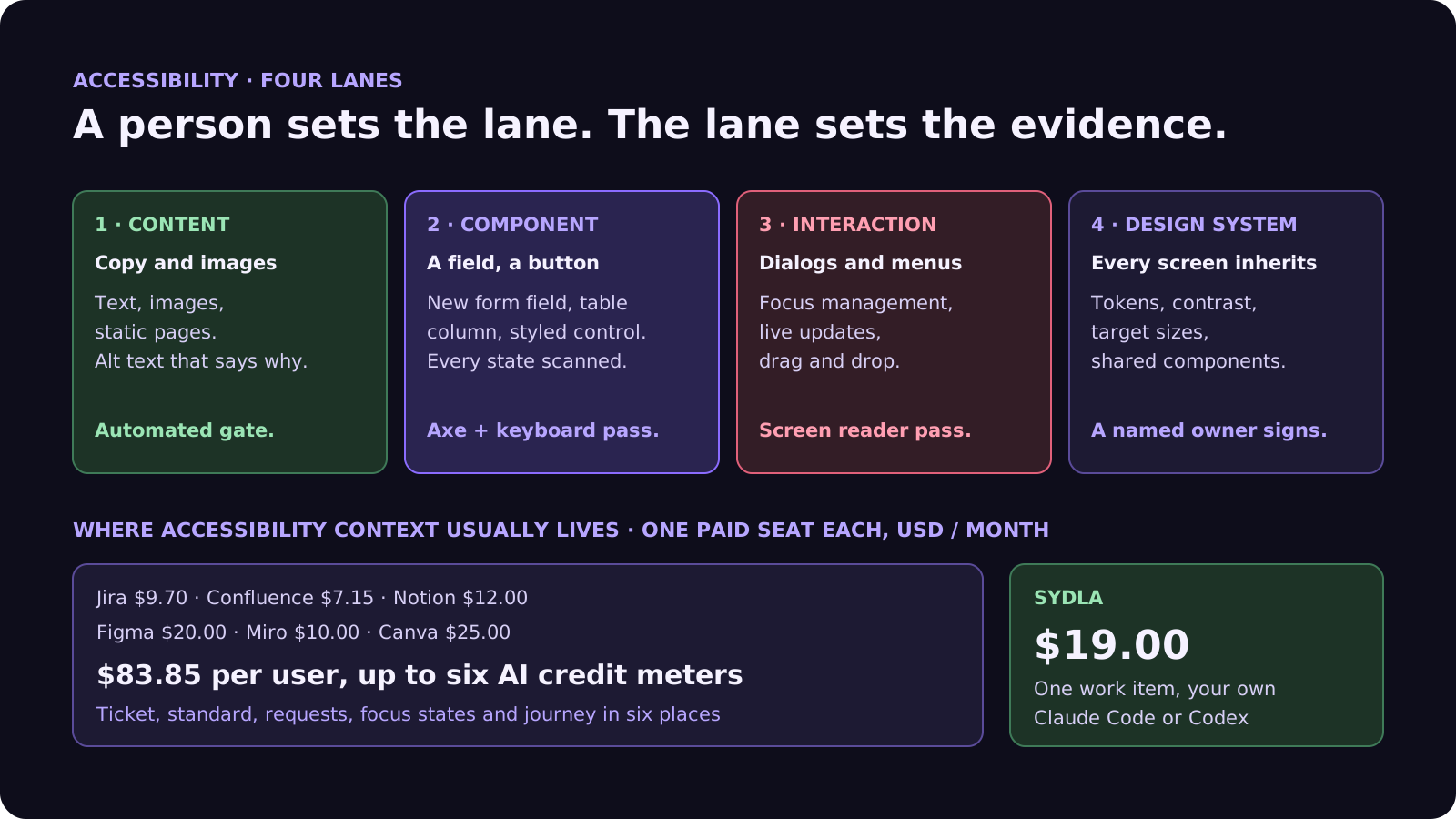
Agents misjudge lanes in a predictable way: a modal looks like a small component, not a new interaction pattern. Make the lane a field on the ticket, let the agent suggest raising it, and only let a person lower it.
Step 2: the seven-field accessibility brief
For component changes, new interaction patterns and design system work, add these seven fields next to the acceptance criteria:
- 1. Standard and level. WCAG 2.2 Level AA unless a contract says otherwise. Name the criteria most at risk: for a dialog, keyboard access, focus order, focus not obscured and error identification.
- 2. Users and assistive tech. Keyboard only, a screen reader such as NVDA or VoiceOver, 200% zoom, a 320 pixel wide viewport. If the agent doesn't know who it is building for, it builds for a mouse.
- 3. States to cover. Default, focus, error, loading, empty and success. A scanner only sees the state it is pointed at, so each state needs its own URL, story or test step.
- 4. Interaction contract. For anything interactive, the keyboard map: where focus goes on open, what Tab and Shift+Tab cycle through, what Escape does, where focus returns on close, and what gets announced.
- 5. Automated gate. The exact command, for example an axe scan in Playwright on each state, and the rule: zero serious or critical violations.
- 6. Out of bounds. No aria-hidden or role changes to silence a finding, no disabled rules, no edits to the scan config, no positive tabindex, no overlay widget in place of a fix.
- 7. Done means. Gate green on every state, the keyboard contract demonstrated, and a person's manual check recorded on the work item.
Field 6 matters more with agents than with people. A model asked to make a scan report go to zero will find the shortest path, and sometimes that path is hiding the element from assistive tech. Write the forbidden shortcuts down. Our acceptance criteria guide explains why agents need criteria they can check.
Where accessibility context lives today, and what it costs
An accessibility brief pulls from every tool the team uses. Here is what one paid seat of each costs, and how each one bills for its built-in AI:
| Tool and plan | Seat / month | Built-in AI billing | Accessibility context it holds |
|---|---|---|---|
| Jira Standard | $9.70 | Rovo credits: 25 per user per month on Standard, 70 on Premium, 150 on Enterprise; $0.01 per extra credit from 3 December 2026 | The ticket, often without criteria |
| Confluence Standard | $7.15 | Rovo, same credit pool | The accessibility statement and standard |
| Notion Plus | $12.00 | Notion AI and Custom Agents on Notion credits | Customer requests and support notes |
| Figma Professional, Full seat | $20.00 | AI credits per seat, MCP reads capped per day | Focus, error and empty states |
| Miro Starter | $10.00 | Create with AI on Miro credits | The user journey |
| Canva Business | $25.00 | Canva AI usage per member | Launch visuals and their alt text |
| Six-tool total | $83.85 | Up to six meters, plus your coding agent | Six places to look |
| [Sydla](/) | $19.00 | None: your own Claude Code or Codex plan pays for the model, with no markup | One work item: brief, criteria, states, runs and evidence |
That is a saving of $64.85 per user per month, and one MCP server for the agent to read instead of six. See the full comparison and Sydla pricing for the details.
Step 3: make CI scan every state, not one page
An agent's claim that a screen is accessible is a hypothesis. CI makes the automatable part a fact. Three gates cover most teams:
- State scans in end-to-end tests. Run axe inside Playwright after each step that changes the screen: dialog open, error shown, list empty. Fail on serious and critical findings. Keep the scan config owned by people through code owners, so the agent can propose a rule change but can't merge one.
- Component scans in the design system. Run the same rules on every story in the component catalogue, including the focus and error variants. One fixed button fixes every screen that uses it.
- Keyboard tests as code. A short test that presses Tab, Escape and Enter and asserts where focus lands catches the classic agent regression, the modal that leaks focus, without any visual judgment.
Then give the agent the scanner too. With an axe MCP server or the same Playwright command in the brief, Claude Code or Codex can scan, fix and scan again before anyone reviews. Our failing CI guide covers what to do when a gate goes red.
Step 4: a person checks what scanners can't
Roughly half of real issues need human judgment. On every interaction pattern and design system change, a reviewer spends ten minutes on four checks:
- Keyboard only. Unplug the mouse. Every action reachable, focus always visible and never hidden under a sticky header, the order makes sense, Escape closes what it should.
- Screen reader. Names, roles and states read correctly, errors and status messages are announced, nothing decorative is read out.
- Zoom and reflow. At 200% zoom and 320 pixels wide nothing overlaps or scrolls sideways, and targets are at least 24 by 24 CSS pixels, as WCAG 2.2 asks.
- Meaning. Alt text describes the purpose, not the pixels; link text makes sense out of context; errors say how to fix the problem.
A fresh agent session can help with a first read, without the first session's reasoning, looking for focus handling, live regions and ARIA misuse in the diff. It doesn't replace the person on the keyboard. This is the same evidence-first review we describe in how to review AI-generated pull requests, and the visual side is covered in our design QA guide.
Walkthrough: brief, UX Studio, your agent in Sydla Desktop, review
Here is how an accessible UI change moves through Sydla on one work item, with the coding agent you already pay for.
- Brief on the work item. The ticket carries the lane, the acceptance criteria and the seven accessibility fields, written once and read by every agent and person.
- States in UX Studio. Accessibility lives in states: the focus ring, the error message, the empty list, the loading announcement. Designing them up front gives the agent something to build and the scanner something to point at. Our design handoff guide explains why states beat screenshots.
- Run in Sydla Desktop with your own agent. Sydla Desktop launches the Claude Code or Codex CLI on your machine, signed in with your own Anthropic or OpenAI account. The agent reads the work item through the Sydla MCP server, builds each state, opens it in the thread's headless browser, scans it, fixes what it finds and attaches the clean reports to the run. There are no Sydla AI credits and no token markup. The Desktop guide walks through the first run.
- Review and sign-off. The CI gates run, a person does the keyboard and screen reader pass, and records the result on the work item before the merge.
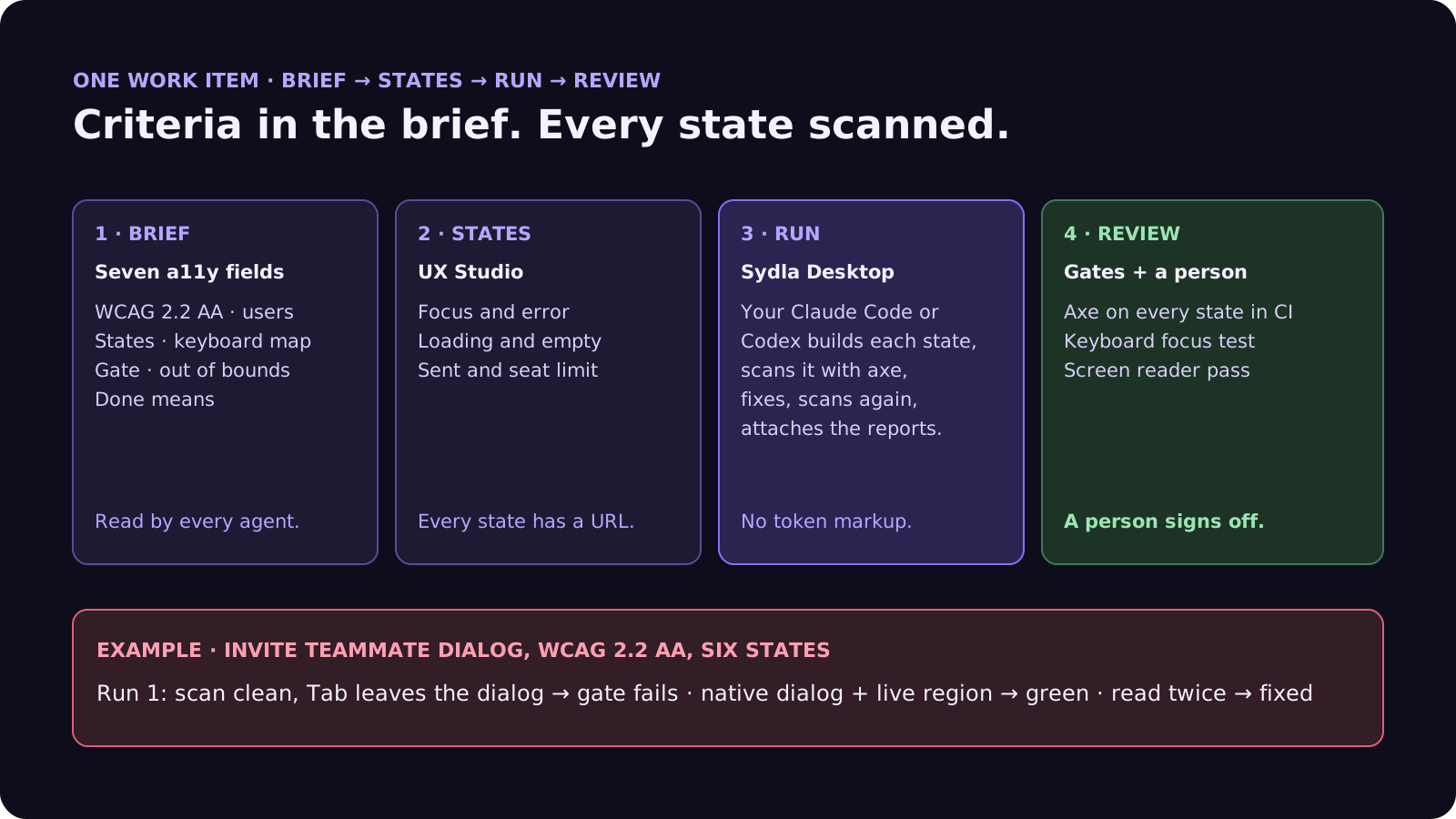
Agents write the markup and run the scans. CI enforces the rules. People judge whether it actually works for the people using it.
A filled-in example: the invite teammate dialog
Here is the opening ticket, rewritten as an accessibility brief. The component and details are illustrative:
- Lane: New interaction pattern. It is the first modal in the settings area.
- Standard: WCAG 2.2 AA; at risk: keyboard, focus order, focus not obscured, error identification, status messages.
- Users: keyboard only, NVDA on Windows and VoiceOver on macOS, 200% zoom.
- States: closed, open, invalid email, sending, sent, seat limit reached.
- Keyboard contract: focus moves to the email field on open; Tab cycles inside the dialog; Escape closes; focus returns to the Invite button; errors and the sent message are announced.
- Gate: axe in Playwright on all six states, zero serious or critical, plus a focus test for open, Tab past the last button, and Escape.
- Out of bounds: no aria-hidden on the page to fake a trap, no disabled axe rules, no positive tabindex.
In this example the agent's first run does what the agent in the opening did: labelled fields, a clean scan on the open state. The focus test fails at once, because Tab leaves the dialog, and the axe scan of the invalid state flags the error text's contrast. The agent switches to the native dialog element, ties the error to its field and puts the messages in a live region. Gate green on six states. The person's screen reader pass then finds the sent message is read twice, once from the live region and once from the toast. One more fix, and the owner approves with the reports and the manual check on the work item. Our bug report template shows how to brief a barrier that slips through anyway.
Frequently asked questions
Can AI coding agents make a website accessible?
Partly. Claude Code and Codex reliably add labels, alt text, roles and contrast fixes when the brief asks for them, and they can scan and fix in a loop with axe. They can't judge whether focus order, announcements and wording work for real users, so a person still does a keyboard and screen reader check.
How much of WCAG can automated testing catch?
About half of real issues by volume. Deque's study of more than 2,000 first-time audits found automated tests caught 57% of issues, but only 16 of the 50 WCAG 2.1 AA success criteria produced automated findings. Keyboard behaviour, focus order, meaningful alt text and announcements need a person.
Which WCAG version should a product team target in 2026?
WCAG 2.2 Level AA. EN 301 549 V4.1.1, published on 2 September 2026, aligns with WCAG 2.2 for the European Accessibility Act, and building to 2.2 also satisfies WCAG 2.1 AA, which the US ADA Title II rule uses. The new criteria include focus not obscured, a 24 by 24 pixel minimum target size and accessible authentication.
What is the axe MCP server?
Deque's Model Context Protocol server for axe. It lets MCP clients such as Claude Code, Cursor and GitHub Copilot scan a rendered page and, on paid plans, get code-level fix suggestions. Since 16 November 2026 a free plan runs unlimited scans with the open-source axe-core engine.
How much does Sydla cost compared with Jira, Confluence, Notion, Figma, Miro and Canva?
Sydla costs $19 per user per month. One paid seat each of Jira Standard, Confluence Standard, Notion Plus, Figma Professional Full, Miro Starter and Canva Business costs $83.85 per user per month, so the saving is $64.85 per user per month. You bring your own Claude Code or Codex account, so your Anthropic or OpenAI plan pays for the model with no markup.































