Fix failing CI with AI coding agents: a triage-first playbook for Claude Code and Codex
Every coding agent now has a "fix CI" button. Pressed blindly, it turns a flaky test into a deleted assertion and a network blip into a retry loop. Here is a triage-first playbook that tells Claude Code and Codex which red builds to fix, which to quarantine, and what evidence a person needs before the fix is merged.

The fix-CI button is everywhere. The triage is not.
In 2026, every coding agent can be pointed at a red pipeline. Claude Code runs inside GitHub Actions and can read CI results on a pull request. CircleCI added a "Fix with Claude Code" button to failing workflows in August. OpenAI publishes a Codex autofix workflow that opens a pull request when CI fails. GitLab's Fix CI/CD Pipeline Flow is generally available, even on the Free tier with GitLab Credits. GitHub Copilot can start a session from a failing Actions run.
The button works. The problem is what you ask it to fix. A study of 1,960 open-source Java projects on GitHub Actions, published in February 2026, found that 67.73% of rerun builds were flaky, and that flaky tests, network issues and dependency resolution were the most common causes. Hand that kind of failure to an agent with the instruction "make CI green", and the shortest path to green is a longer timeout, a retry, a skipped test or a deleted assertion. The pipeline passes. The bug ships.
The context the agent needs is also scattered. The failing ticket is in Jira, the runbook for the build in Confluence, the known-flaky list in Notion, the expected screen state in Figma, the release flow on a Miro board and the release graphic in Canva. That is six context hops and, with each vendor's own AI, up to six credit meters. Our AI credit fatigue piece adds those meters up.
This playbook gives you a triage step before any agent touches code, a seven-field CI fix ticket written for an agent reader, guardrails for automated runs, and a walkthrough where the fix comes back with evidence a reviewer can trust.
What Claude Code, Codex, GitLab and Copilot do with a red build
The vendor guides are short, and they say more about permissions than about judgment. Read them closely:
- Claude Code GitHub Actions. The anthropics/claude-code-action runs Claude Code in your workflows, either when someone mentions @claude on a pull request or issue, or in automation mode on any GitHub event. The docs give it actions: read so it can read CI results on pull requests. Every run uses GitHub Actions minutes and API tokens; the docs say to cap iterations with --max-turns and workflow timeouts, and to review Claude's changes before merging.
- Claude Code from CircleCI. Since 6 August 2026 the wrench icon on a failing workflow offers "Fix with Claude Code". It opens Claude Code in your terminal with a prompt that pulls the failure report, so the run happens on your machine, under your own plan.
- Codex autofix. OpenAI's cookbook triggers a workflow when CI completes with a failure, runs Codex on the branch and opens a pull request with the fix. The original version is now archived with a warning that it exposed the API key to the whole job. The current workflow separates patch generation from pull request publication: the Codex job can only read the repository and never sees the key, and a second job applies the patch and opens the pull request.
- GitLab Fix CI/CD Pipeline Flow. It reads the failed job logs, the merge request changes and the repository, then suggests inline fixes on a merge request pipeline or opens a new merge request. When context is insufficient or the failure is security-sensitive, it posts a comment instead. It only processes the last 150 KiB of job logs, and it runs from the GitLab UI.
- GitHub Copilot cloud agent. Sessions can start from a failing GitHub Actions run, and automations can start them on repository events. Automation runs consume AI credits with per-run, daily, weekly and monthly limits.
None of these tools decides whether the failure is the code's fault. GitLab's flow comes closest by stopping on security-sensitive failures. Everyone else assumes the red build deserves a code change. That decision is yours, and it is the first step of the playbook.
Step 1: triage the red build before the agent touches code
Sort every failure into one of five lanes. Only one lane goes straight to a coding agent for a code fix. The agent can help you sort; it should not be the one who decides that a test is flaky.
- Real regression. The test fails on every rerun, and it started with a specific change. This is the agent's lane: fix the code, not the test.
- Flaky test. It passes on rerun with no code change. Quarantine it, open a ticket with the failure history and fix the cause later, with a test that proves the race or timing bug is gone. Never let an agent fix a flaky test by adding a retry or raising a timeout on its own initiative.
- Network or service. A registry, an API or a runner could not be reached. Retry the job. If it keeps happening, it is an infrastructure ticket for a person, not a code change.
- Dependency. A new version upstream broke the build, or resolution failed. An agent can propose a pin or an upgrade, but a person approves any version change, because it changes what you ship.
- Config or secrets. Missing variables, expired tokens, wrong permissions, runner images. Agents should not be reading or rotating secrets. A person fixes these.
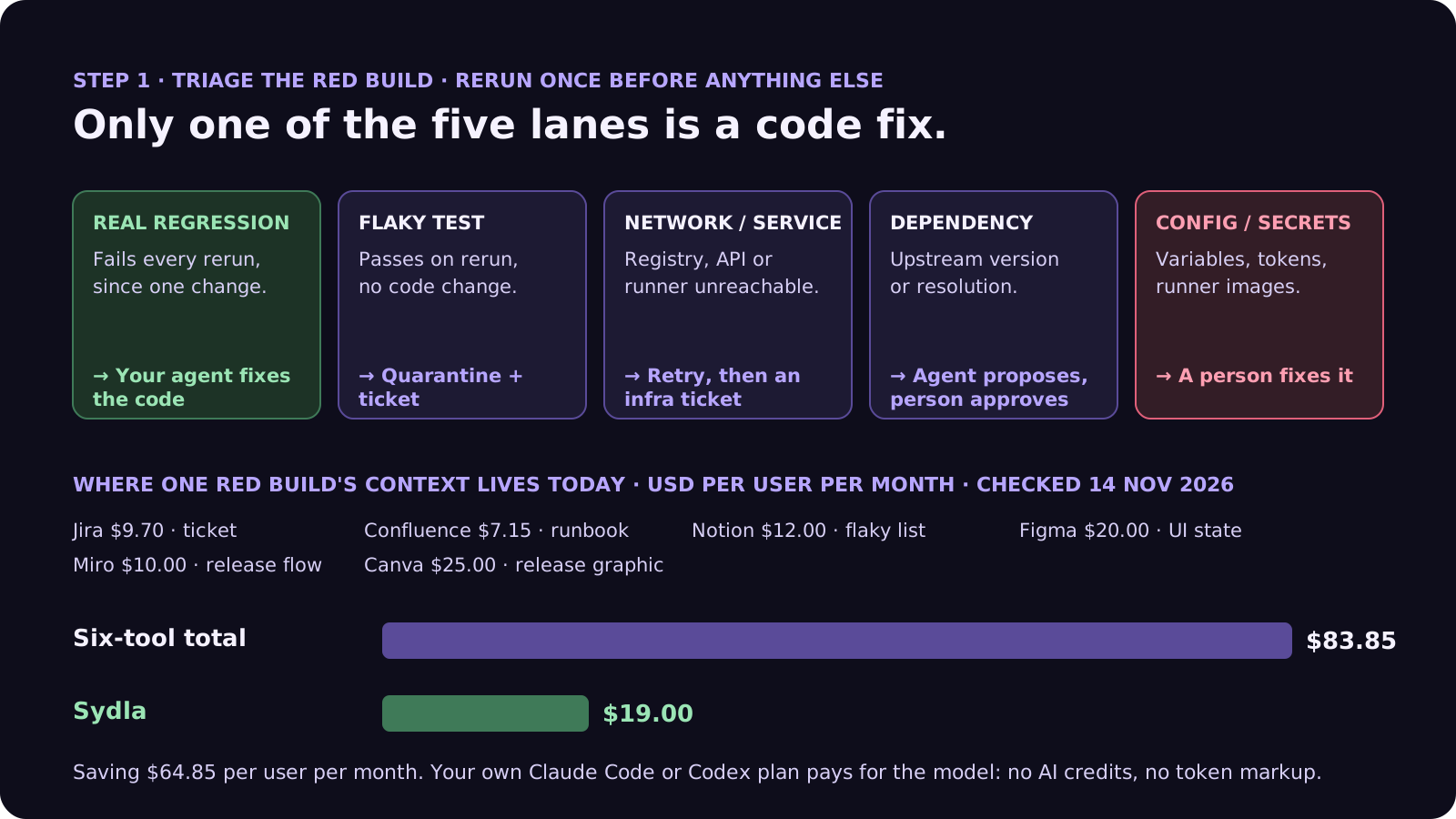
A simple rule makes this work: rerun once before anything else. If the rerun is green, the failure is not a regression, and the agent's job is to write the flaky-test ticket with the evidence, not to change code.
Step 2: the seven-field CI fix ticket
When a failure lands in the regression lane, the agent gets a ticket, not a log dump. Seven fields, each written for an agent reader:
- 1. Failing job and first bad commit. The job name, the pipeline link and the commit where it started. If you do not know the commit, ask the agent to find it with a bisect, and report it before fixing.
- 2. The failure, trimmed. The failing test and the 50 to 200 lines of log that matter, not the whole job log. GitLab's flow reads only the last 150 KiB for a reason: logs drown the signal.
- 3. Expected behaviour. What the test protects, in one sentence, with a link to the acceptance criteria or the UX state. Our acceptance criteria guide shows how to write them so an agent can check them.
- 4. Frozen files. Tests, CI configuration, lockfiles and snapshots the agent may not change. If the agent believes a test is wrong, it stops and says why.
- 5. Allowed fixes. Code under a named path. No new retries, no longer timeouts, no skipped tests, no deleted assertions, no dependency changes, unless the ticket says so.
- 6. Proof. The failing test passes, it still fails on the commit before the fix, and the full suite is green on two consecutive runs.
- 7. Done means. A merge request with the root cause in two sentences, the diff, the test output before and after, and the run cost. A person merges.
Our bug report template uses the same idea for bugs that users find. A CI failure is a bug report that your pipeline wrote; it just needs the same care.
Where CI fix context lives in 2026, and what it costs
The ticket is short. The context behind it usually sits in six subscriptions, and the agent has to reach each one:
| Tool and plan | Seat / month | AI layer and limits | CI fix context usually kept there |
|---|---|---|---|
| Jira Standard | $9.70 | Rovo, 25 credits per user per month on Standard (70 Premium, 150 Enterprise), $0.01 per extra credit from 3 Dec 2026 | The failing ticket and the bug history |
| Confluence Standard | $7.15 | Same pooled Rovo credits | Build runbooks and release checklists |
| Notion Plus | $12.00 | Custom Agents on credits, Business and Enterprise only | Known-flaky lists and on-call notes |
| Figma Professional, Full seat | $20.00 | 3,000 AI credits per Full seat per month; MCP reads 200 per day on Full and Dev, 20 per month on View and Collab | The UI state a failing end-to-end test checks |
| Miro Starter | $10.00 | Create with AI on Miro credits | The release flow |
| Canva Business | $25.00 | Canva AI usage per member | Release graphics |
| Six-tool total | $83.85 | Up to six meters, six MCP servers | One red build, six places |
| Sydla | $19.00 | None: your own Claude Code or Codex plan pays for the model | Brief, criteria, UX states, run and evidence on one work item |
On top of the seats, CI agents add their own meters: GitHub Actions minutes and API tokens for Claude Code in Actions, AI credits for Copilot automations, GitLab Credits for the Fix Pipeline flow. A fix loop that reruns a 15-minute suite three times costs more in runner minutes than in tokens. The comparison overview covers each tool, and the pricing section lists the source for every price.
Fix red builds without a second AI bill
Keep the brief, the criteria and the UX states next to the run, and let your own coding agent read them through one connection, for $19 per month instead of $83.85. That is $64.85 saved per user, every month, with no credit meter to watch while the agent bisects, fixes and reruns.
Step 3: guardrails for automated CI fixes
Once triage and the ticket are in place, automation is safe enough to try. These rules come straight from the vendor docs and from the ways teams get burned:
- Separate the patch from the publish. The agent job reads the repository and produces a patch. A second job with write access applies it and opens the merge request. This is OpenAI's current Codex design, and it works for any agent.
- Keep secrets out of the agent job. Use the official actions, which keep the API key away from the agent's shell, and never give the fix job deploy credentials. A failing log is untrusted input; our prompt injection guide explains why.
- Cap the loop. Set --max-turns for Claude Code, a job timeout, and a limit of one automated attempt per failure. A second failure goes to a person.
- Never let the fix trigger itself. Exclude the agent's own branches from the trigger, and keep bots out of the allowed actors unless you mean it. Claude Code's action rejects bot actors by default.
- Never merge automatically. Every vendor says to review before merging. The merge request is the output; a person is the gate.
- Record the cost. Runner minutes, tokens and credits per fix, on the ticket. Our cost per ticket guide shows how to estimate it.
Walkthrough: brief, UX Studio, your agent in Sydla Desktop, review
Here is how a regression moves through Sydla on one work item, with the coding agent you already pay for.
- Brief on the work item. The failure becomes a work item in Sydla with the seven fields. The acceptance criteria the failing test protects are already on the original ticket, so the agent reads why the test exists, not just that it failed.
- States in UX Studio. When an end-to-end test fails on a screen, the expected state is a UX Studio screen, built from the workspace's published components and tokens. The agent compares what the test sees with the state the team agreed on, instead of guessing which one is wrong. Our design-to-code handoff guide explains why states beat screenshots.
- Run in Sydla Desktop with your own agent. Sydla Desktop launches the Claude Code or Codex CLI on your machine, signed in with your own Anthropic or OpenAI account, in your local checkout. The agent reads the work item through the Sydla MCP server, reruns the failing test, bisects to the first bad commit, fixes the code inside the allowed paths and runs the suite twice. If the failure is in a browser test, it can open the app in Desktop's own headless Chrome for the thread and screenshot the state. There are no Sydla AI credits and no token markup. The Desktop guide walks through the first run.
- Review the evidence. The root cause, the diff, the test output before and after, and the run cost land on the work item. A person reviews the merge request with our four-pass review checklist and merges.
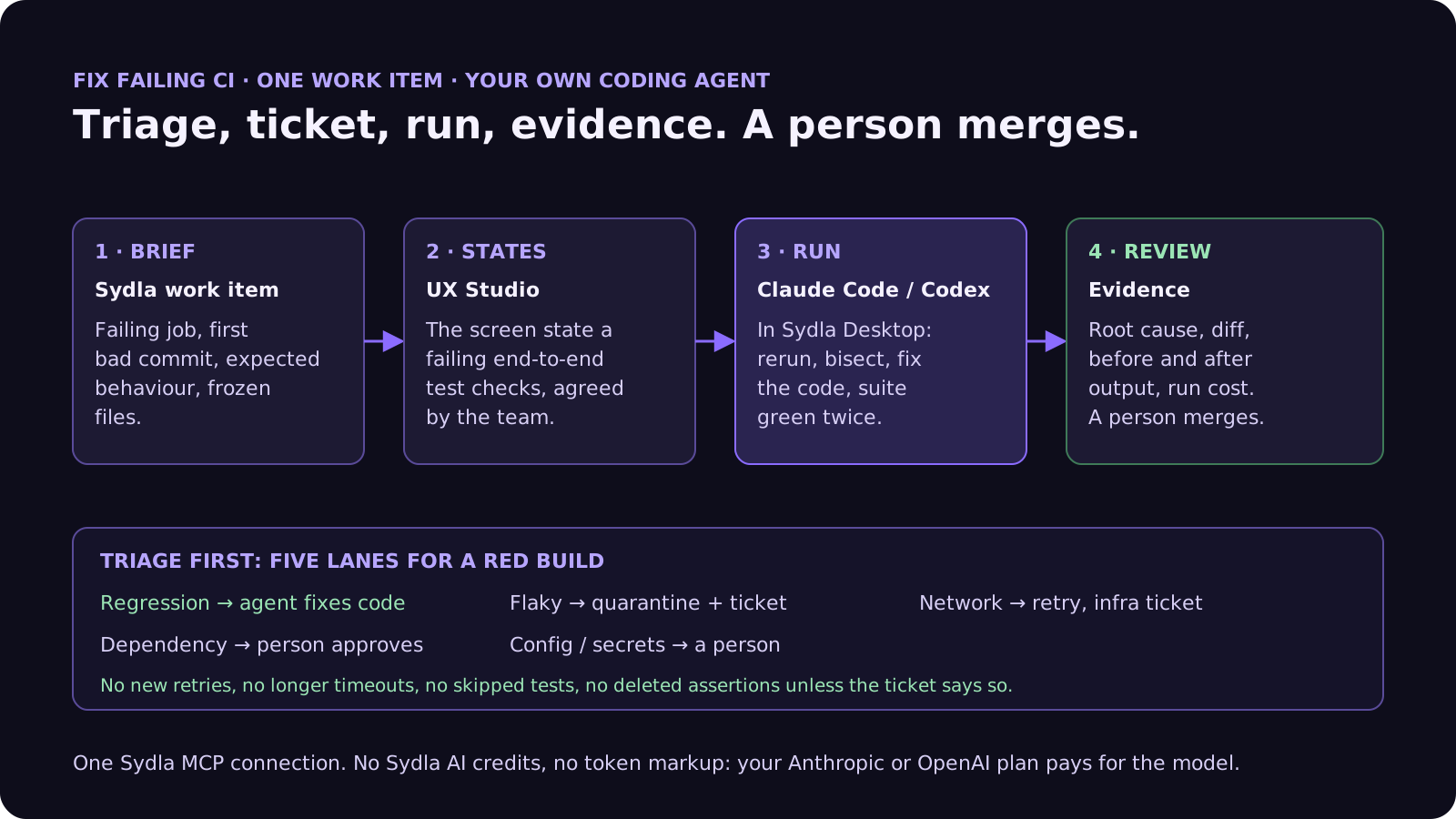
If the agent decides the test, not the code, is wrong, it stops. The question goes to the person who owns the behaviour: change the criteria, or keep the test and fix the code. Agents propose. People decide.
A filled-in example: the invoice total that went red
Here is the ticket for a real-sized failure, at the length we recommend:
- Failing job: unit-tests, test "invoice total rounds each line before tax", red since the commit that moved currency formatting into a shared helper.
- Failure: expected 107.10, received 107.11; 40 lines of log attached.
- Expected behaviour: acceptance criterion AC3 of the invoicing ticket: each line is rounded to cents before tax is added.
- Frozen: every test file, the CI configuration and the lockfile.
- Allowed: code under the billing and currency helpers only. No retries, no tolerance on the assertion.
- Proof: the test fails on the parent commit and passes after the fix; the full suite is green twice in a row.
- Done means: a merge request with the root cause in two sentences, before and after output, and the run cost. The billing owner merges.
That is about 120 words. An agent asked only to "fix CI" could widen the assertion to accept 107.11 and be done in a minute. With the ticket, it has to find that the helper rounds after tax, and prove it. Our guide to writing tests with agents covers the other direction: tests that fail for the right reason in the first place.
Frequently asked questions
Can AI coding agents fix failing CI builds?
Yes. Claude Code runs in GitHub Actions and can read CI results on pull requests, CircleCI offers Fix with Claude Code on failing workflows, OpenAI publishes a Codex autofix workflow, GitLab's Fix CI/CD Pipeline Flow is generally available, and Copilot can start from a failing Actions run. They work best on real regressions. Triage first: flaky tests, network errors, dependency changes and secrets need a different fix or a person.
Should an AI agent fix flaky tests?
Not by making them pass. A flaky test passes on rerun with no code change, so an agent asked to make CI green will tend to add a retry, raise a timeout or skip the test. Quarantine the test, open a ticket with the failure history, and ask the agent to find the race or timing cause and prove it with a test, with a person approving the fix.
How common are flaky builds?
A February 2026 study of 1,960 open-source Java projects on GitHub Actions found that 3.2% of builds are rerun and 67.73% of those reruns are flaky, affecting about half of the projects. Flaky tests, network issues and dependency resolution were the most common of 15 categories of flaky failures.
How do I run an AI CI fix safely?
Separate patch generation from publication: the agent job reads the repository and produces a patch without write access or secrets, and a second job opens the merge request. Cap the loop with a turn limit and a timeout, allow one automated attempt per failure, exclude the agent's own branches from the trigger, record the cost, and never merge automatically.
How much does Sydla cost compared with Jira, Confluence, Notion, Figma, Miro and Canva?
Sydla costs $19 per user per month. One paid seat each of Jira Standard, Confluence Standard, Notion Plus, Figma Professional Full, Miro Starter and Canva Business costs $83.85 per user per month, so the saving is $64.85 per user per month. You bring your own Claude Code or Codex account, so your Anthropic or OpenAI plan pays for the model with no markup.































