A bug report template for AI coding agents: eight fields Claude Code and Codex can fix from
"Export is broken" is enough for a teammate who can walk over and ask. A coding agent will guess, and a confident wrong fix costs tokens and a review. Here is an eight-field bug report template that Claude Code or Codex can reproduce, fix and prove, and how to keep it in one place.

"Export is broken" is not a bug report an agent can fix
Most bug reports are written for a teammate who can ask a follow-up question. "CSV export is broken for some customers, see screenshot" works when the developer can message the support agent, open the customer's account and click around until it fails. A coding agent cannot do most of that. It reads the ticket, reads the code, and fixes whatever bug it can find that fits the words. Often that is a different bug from the one you meant.
In 2026 that guess also costs more than it used to. The report sits in Jira, the runbook in Confluence, the investigation notes in Notion and the expected screen in Figma. Each is a separate connection for the agent, and each has its own AI meter if you use the vendor's built-in agent instead. Our AI credit fatigue piece counts those meters. A vague report makes the agent open more of them, run more often, and hand the reviewer a fix nobody can verify.
This guide gives you an eight-field bug report template written for an agent reader. It shows what Claude Code, Codex and the 2026 bug tools already expect, and where each field should live so the agent reads one page, not six.
What coding agents already ask for when they fix a bug
The vendors' own documentation is consistent. Agents fix bugs well when they can reproduce them and check the fix themselves, and badly when they cannot.
- Claude Code. Anthropic's best practices compare "fix the login bug" with a report that names the symptom and the likely location, and then asks Claude to write a failing test that reproduces the bug before it fixes it. The docs say that if you give Claude something that comes back pass or fail, it can close that loop itself. They also say to ask for evidence: the command it ran and its output, or a screenshot. The common workflows page adds three tips for bugs: give the command that reproduces the issue and the stack trace, list the steps to reproduce, and say whether the error is intermittent or consistent.
- Codex. Codex works the same way in the CLI, the IDE extension and the cloud. It reads AGENTS.md for repository conventions, including the test command. It can plan with /plan before it edits. A report that includes the reproduction command lets it run that command in its sandbox before and after the change.
- Sentry Seer. Seer Autofix runs root cause analysis on an error it already captured, with the stack trace, breadcrumbs and release. It can then hand the implementation to Claude Code, Cursor Cloud Agents or GitHub Copilot. Two changes come on 8 December 2026: Seer moves from active-contributor pricing to usage-based credits, and Seer Code Review is removed. Autofix stays.
- GitHub Copilot. You can assign an issue to Copilot and it opens a pull request. Each session that runs on GitHub Actions is capped at 59 minutes, and its compute comes out of your Actions allowance, separate from AI credits. The issue text is the only brief it gets.
- Jira with Rovo. Jira's automation template library includes a bug triage rule that uses a Rovo agent to read a new bug and comment when details are missing. That helps, but every check spends Rovo credits: 25 per user per month on Standard, 70 on Premium, 150 on Enterprise, with pay-as-you-go at $0.01 per credit from 3 December 2026.
The pattern is the same across all five: a symptom, a way to reproduce it, the evidence, and a definition of fixed that a machine can check. Error trackers like Sentry supply the evidence automatically for crashes. They cannot supply the expected behaviour, the business impact or the parts of the code the agent must not touch. A person has to write those.
The eight-field bug report template for AI coding agents
Copy this into your bug work item. Each field answers a question the agent would otherwise guess at. For most bugs it fits in 120 to 200 words.
- 1. Symptom. One sentence in the user's words: what they did and what went wrong. "Admins on the Team plan download an empty CSV from Usage when the period has more than 10,000 rows." Not "export is broken".
- 2. Expected versus actual. Two lines. Expected: what should happen, ideally a link to the approved screen and state. Actual: what happens instead, with the exact error text if there is one. Agents treat expected behaviour as the target, so a missing expected line makes them invent one.
- 3. Reproduction. The shortest path to the failure, as numbered steps or, better, one command: a test name, a curl call, a seed script and a URL. Say whether it fails every time or only sometimes, and how often. An intermittent bug needs a different investigation, and the agent should know before it starts.
- 4. Evidence. The full stack trace, not the last line. The relevant log lines with timestamps. Request, trace or account IDs. A screenshot or short screen recording if the bug is visual. Paste the text rather than a picture of the text, because the agent can search text.
- 5. Environment. Version or commit, environment (production, staging, local), browser or OS when it matters, feature flags, plan or role. Many bugs that "cannot be reproduced" turn out to depend on a flag nobody mentioned.
- 6. Impact and frequency. Who is affected, how many, since when, and whether there is a workaround. This is how a person decides priority, and it tells the agent how careful to be: a fix to billing deserves more caution than a fix to a tooltip.
- 7. Suspects and out of bounds. What you already know or suspect: the release where it started, the file or module you would look at first, the hypothesis you ruled out. Then what the agent must not change: the public API, the schema, a shared component other teams depend on. This field keeps a one-line fix from turning into a refactor.
- 8. Fixed means. The evidence a reviewer needs to merge: a failing test that reproduces the bug and passes after the fix, the full test suite green, the root cause in one sentence, and a screenshot of the corrected state if the bug was visible. This field turns the report into the review script.
Add one line at the end: open questions. If the agent cannot reproduce the bug with fields 3 to 5, it should stop and say so, not fix something nearby. In Claude Code, say this in the prompt or in CLAUDE.md. In Codex, put it in AGENTS.md. Our CLAUDE.md vs AGENTS.md guide explains where each rule belongs.
Where a bug's context lives in 2026, and what it costs
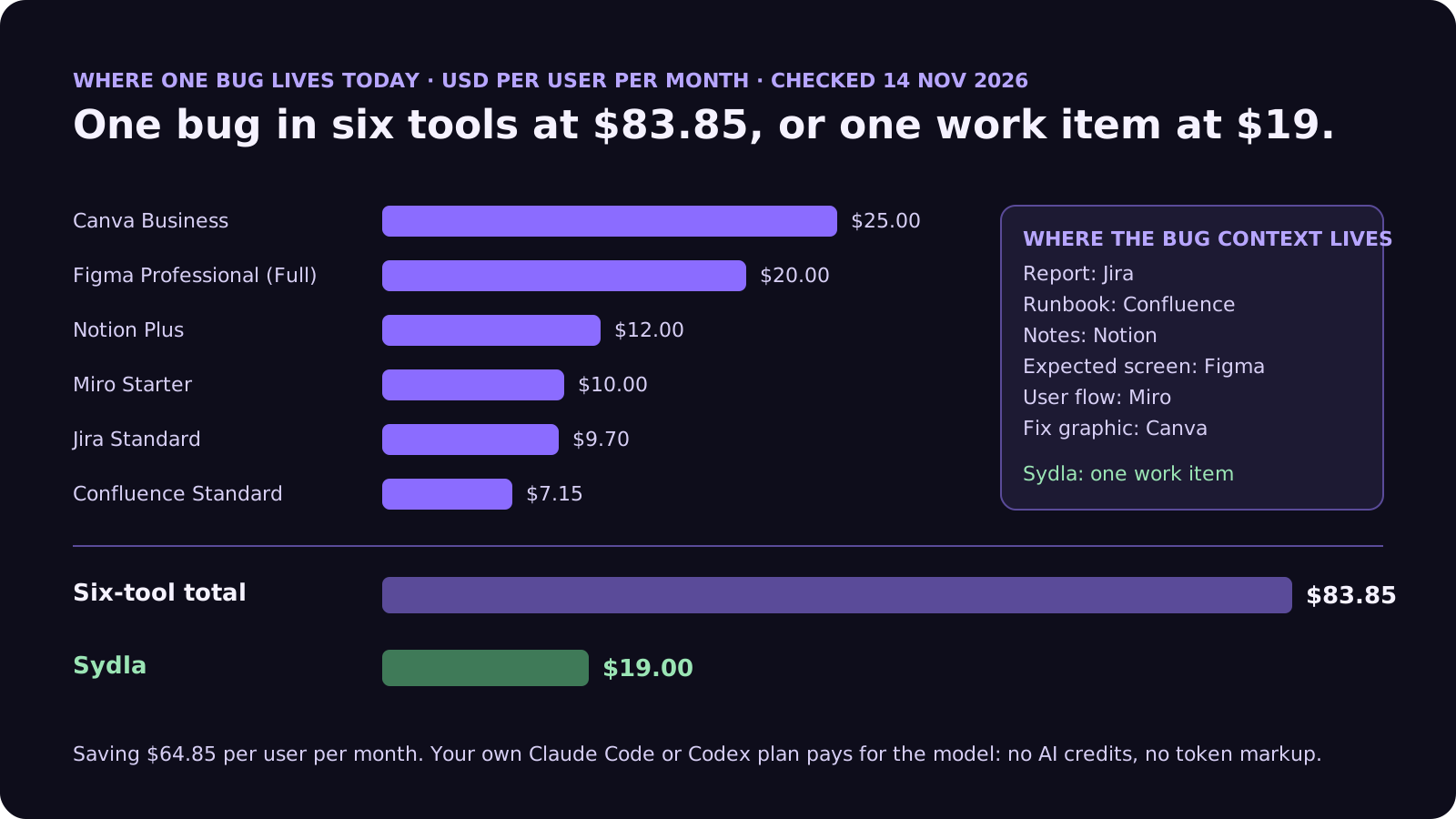
The template is the easy part. In most teams, the eight fields of one bug are spread across six subscriptions, and the agent has to visit each one:
| Tool and plan | Seat / month | AI layer and limits | Bug context usually kept there |
|---|---|---|---|
| Jira Standard | $9.70 | Rovo, 25 credits per user per month on Standard (70 Premium, 150 Enterprise), $0.01 per extra credit from 3 Dec 2026 | The report, often without repro or expected behaviour |
| Confluence Standard | $7.15 | Same pooled Rovo credits | Runbooks, known issues, postmortems |
| Notion Plus | $12.00 | Custom Agents on credits, Business and Enterprise only | Investigation notes and hypotheses |
| Figma Professional, Full seat | $20.00 | 3,000 AI credits per Full seat per month, MCP calls capped per day | The expected screen and state |
| Miro Starter | $10.00 | Create with AI on Miro credits | The user flow the bug breaks |
| Canva Business | $25.00 | Canva AI usage per member | The "fixed" graphic for the changelog |
| Six-tool total | $83.85 | Up to six meters, six MCP servers | One bug in six places |
| Sydla | $19.00 | None: your own Claude Code or Codex plan pays for the model | Report, expected state, run and evidence on one work item |
An error tracker adds a seventh place, and from December Seer adds a seventh meter. Keep it. Sentry is the best source for field 4 on crashes. What matters is that its trace lands on the same work item as the symptom, the expected state and the definition of fixed. Otherwise the agent works from two half-reports. The comparison overview covers each tool, and the pricing section lists the source for every price.
Keep the whole bug in one place
Write the report once, attach the expected state, and let your own coding agent read it through one connection, for $19 per month instead of $83.85. That is $64.85 saved per user, every month, with no AI credits to ration on triage.
From report to merged fix: work item, UX Studio, agent, review
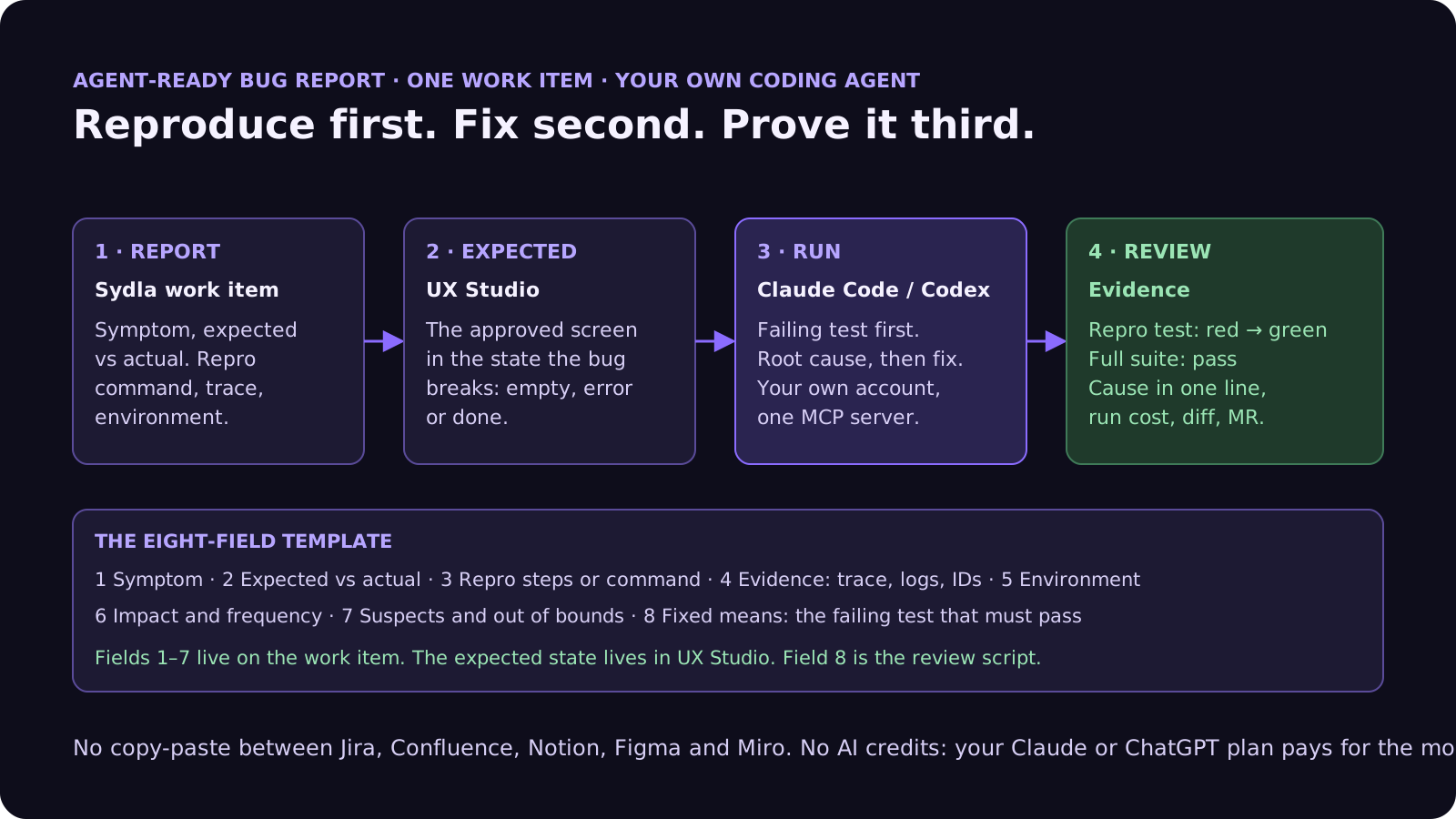
Here is how the eight fields travel through Sydla on one work item, with the coding agent you already pay for.
- Report on the work item (fields 1 to 7). Whoever finds the bug, whether support, a product manager or the founder, fills in the template on a bug work item in Sydla. Paste the Sentry trace or the log lines straight into field 4. An agent can propose missing fields and estimate the work. A person approves the report before anything runs.
- Expected state in UX Studio. If the bug is visible, link the approved UX Studio screen in the state it breaks: the empty state, the error state, the done state. The agent then has a target that is not a moving canvas. Our design-to-code handoff guide explains why states beat screenshots.
- Run in Sydla Desktop with your own agent. Sydla Desktop launches the Claude Code or Codex CLI on your machine, signed in with your own Anthropic or OpenAI account, in your local checkout. Through one Sydla MCP server the agent reads the report and the handoff. It writes the failing test from field 3, confirms it fails, finds the cause, fixes it and runs the suite. There are no Sydla AI credits and no token markup. The Desktop guide walks through the first run.
- Review against field 8. The run writes its evidence back to the work item: the repro test red before and green after, the suite result, the root cause in one sentence, the run cost, the diff and the merge request. The reviewer checks evidence instead of reading a chat transcript, using the four-pass review checklist.
If the fix needs a product decision, such as a new empty state or different copy, the run stops and the open question goes back to the person who owns the work item. Agents propose. People decide.
A filled-in example: the empty CSV export
Here is the template applied to a real-sized bug, at the length we recommend:
- Symptom: admins on the Team plan download an empty CSV from the Usage page for October. Support has 6 reports since 4 November.
- Expected versus actual: expected one row per member, matching the Usage table (approved Usage screen, done state). Actual: a file with the header row only, HTTP 200, no error shown.
- Reproduction: run the usage export integration test with the large-workspace seed (12,500 rows). It fails every time above 10,000 rows and never below.
- Evidence: worker log shows "stream closed before first chunk" at 09:14:03 UTC on request 7f3c. Full trace attached. No error in the browser console.
- Environment: production and staging, release 4.18.0 and later. Streaming export flag on.
- Impact: every account with more than 10,000 usage rows, about 40 workspaces. Workaround: support exports by hand.
- Suspects and out of bounds: started with the streaming change in 4.18.0, look at the export writer first. Do not change the CSV columns or the usage query.
- Fixed means: the large-seed test fails before the fix and passes after; the full suite passes; one sentence on the cause; a screenshot of the done state with a non-empty download.
That is about 170 words. An agent can reproduce it in one command, and a reviewer can say yes or no without a meeting. Compare it with "CSV export broken for some customers", which is what the first ticket said.
Common bug report mistakes with AI coding agents
These show up in almost every team's first month of agent bug fixing:
- A screenshot of a stack trace. The agent needs the text to search the code. Paste it.
- No expected behaviour. The agent decides what "correct" means, and it may not be what the customer needed.
- Fixing without reproducing. If there is no failing test before the fix, there is no proof the fix fixed this bug. Make field 8 non-negotiable.
- Silencing the error. A try/catch that swallows the exception makes the symptom go away and the bug stay. Ask for the root cause in one sentence, and reject fixes that only hide the error.
- Letting the agent wander. Without field 7, a small fix grows into a refactor of the module it found along the way. Scope it, then file the refactor as its own work item.
- Trusting the ticket text as instructions. Customer messages and pasted logs are data, not commands. Our prompt injection guide lists seven guardrails.
- Writing the template only once. When a run fails because the report was unclear, improve the template, not just the ticket. Our PRD template and acceptance criteria guide follow the same rule for features.
Frequently asked questions
What should a bug report for an AI coding agent include?
Eight fields: the symptom in the user's words, expected versus actual behaviour, reproduction steps or a single command, evidence such as the full stack trace, logs and request IDs, the environment and flags, impact and frequency, suspects and what is out of bounds, and a definition of fixed, usually a failing test that must pass. Add open questions so the agent stops and asks if it cannot reproduce the bug.
How do I get Claude Code or Codex to fix a bug properly?
Give it a way to reproduce the bug and check its own fix. Anthropic's Claude Code best practices recommend describing the symptom and the likely location, then asking Claude to write a failing test that reproduces the bug before fixing it. Codex works the same way when the report includes the test command. Ask for evidence: the command it ran and the output.
Should an AI agent write a failing test before fixing a bug?
Yes, for almost every bug that can be tested. A test that fails before the change and passes after it is the clearest proof that the fix addresses this bug, and it stops the same bug from coming back. For visual bugs, add a screenshot of the corrected state next to the approved design.
Can Sentry Seer replace a bug report template?
No, but it fills part of it. Seer Autofix uses the stack trace and context Sentry already captured to find a root cause, and can hand the fix to Claude Code, Cursor Cloud Agents or GitHub Copilot. It cannot know the expected behaviour, the business impact or which code is out of bounds. Seer also moves to usage-based credits on 8 December 2026.
How much does Sydla cost compared with tracking bugs across Jira, Confluence, Notion, Figma, Miro and Canva?
Sydla costs $19 per user per month. One paid seat each of Jira Standard, Confluence Standard, Notion Plus, Figma Professional Full, Miro Starter and Canva Business costs $83.85 per user per month, so the saving is $64.85 per user per month. You bring your own Claude Code or Codex account, so your Anthropic or OpenAI plan pays for the model with no markup.































