Incident postmortems with AI coding agents: a blameless playbook for Claude Code and Codex
Incident tools now draft the postmortem for you. What they cannot see is the ticket, the acceptance criteria and the review that let the change through. Here is a blameless playbook that keeps the agent read-only during the incident, adds the ticket trail to the write-up, and turns every action item into a ticket an agent can close with a failing test first.

The incident is over. The learning has not started
It is 02:14 and invoices are going out twice. The on-call engineer rolls back, the duplicate emails stop, and by 03:00 everyone is back in bed. The next morning, someone opens a blank postmortem page and tries to remember what happened, in what order, and why the change that caused it passed review.
In 2026 there is a new line in that story: the change was written by a coding agent. That does not change who is accountable. It does change where the evidence lives. The brief the agent worked from, the acceptance criteria it was checked against, its run log and the review notes are now part of the root cause, and most postmortem templates have no place for them.
The evidence is also scattered. The ticket sits in Jira, the runbook in Confluence, the on-call notes in Notion, the affected screens in Figma, the dependency map on a Miro board and the customer notice in Canva. Six context hops for an agent and, with each vendor's own AI, up to six credit meters. Our AI credit fatigue piece adds them up.
This playbook splits the postmortem into three jobs, keeps the agent read-only while the incident is live, adds a ticket trail section to a blameless template, and turns every action item into a ticket a coding agent can actually close.
What incident tools already draft for you
Writing the first draft is now the easy part. Most incident platforms shipped an AI scribe in 2026:
- Jira Service Management. The Incident Command Center, in early access for Premium and Enterprise plans, uses Rovo to summarise an incident, suggest root causes, draft stakeholder updates and start a post-incident review from the activity, timeline events, decisions and actions taken. Atlassian calls the output a starting point the team should review.
- PagerDuty. Paige, the SRE agent introduced on 3 November 2026, includes a Scribe Agent that drafts the post-incident review from Jira tickets, telemetry and Slack. Fixes are applied on approval; autonomous resolution is listed as coming soon.
- incident.io. Scribe transcribes the incident call, and the vendor claims the postmortem is about 80% written when the incident resolves. Treat that as marketing, but the timeline it captures is real.
- Your own coding agent. Anthropic's site reliability agent cookbook (February 2026) shows Claude reading logs and metrics through MCP tools, with write tools fenced to a config folder and hooks that block a tool call before it runs. Sentry, Grafana and most log tools now ship an MCP server, so Claude Code or Codex can read the same evidence from your terminal.
Every one of these drafts the story of the incident. None of them knows what the change was supposed to do. The ticket, the acceptance criteria and the review live somewhere else, and that is where the most useful action items come from.
Step 1: split the postmortem into three jobs
Google's SRE book defines a postmortem as a written record of the impact, the actions taken, the root causes and the follow-up actions. Those are three different jobs, and an agent is good at one, useful at the second and dangerous at the third if nobody owns it.
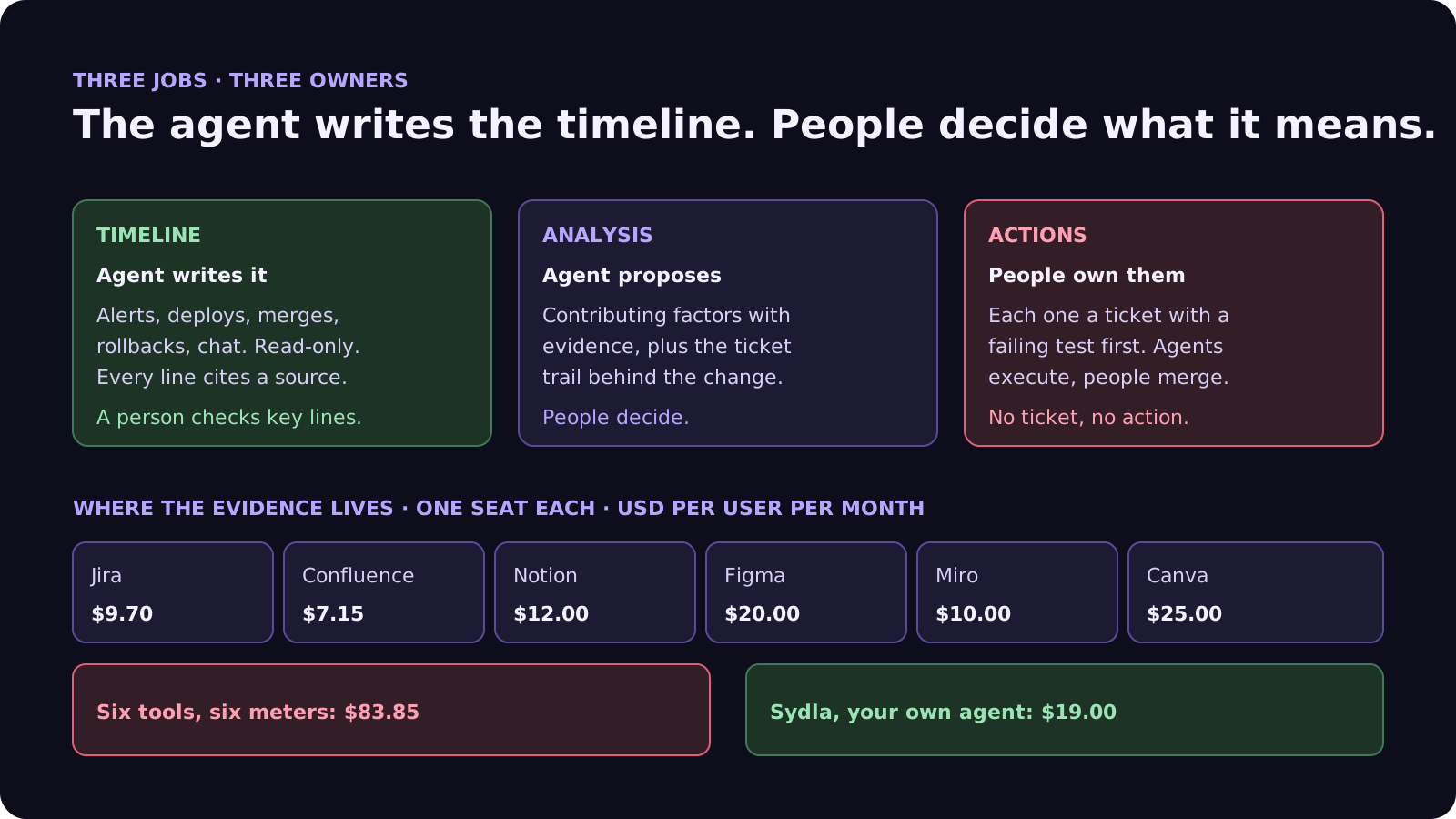
- Timeline: the agent writes it. Alerts, deploys, merges, rollbacks, chat messages and error rates, merged into one ordered list where every line cites its source. This is tedious for people and easy for an agent with read access.
- Analysis: the agent proposes, people decide. The agent lists candidate contributing factors with the evidence for each. The team picks, rewrites and adds the ones that need context no log holds: the deadline, the handover, the alert everyone had learned to ignore.
- Actions: people choose, agents execute. Each action item gets an owner who is a person and a ticket an agent can work. An action item without a ticket is a wish.
Use Google's triggers to decide when a postmortem is due: user-visible downtime or degradation past a threshold, data loss of any kind, an on-call intervention such as a rollback, a resolution time past a threshold, or a monitoring failure. Add one for the agent era: any incident traced to a change an agent wrote.
Step 2: keep the agent read-only while the incident is live
During an incident, speed tempts everyone to hand the agent the keys. Don't. The cookbook agent's own investigation prompt says to report findings and not apply any fixes yet. Make that a control, not a sentence:
- Read tokens only. Log, metric, trace and error tools connected with read-only service accounts. No production database client, no deploy credentials, no cloud admin role in the agent's environment.
- Hooks that block. In Claude Code, a PreToolUse hook that exits non-zero blocks the call. Use one to refuse anything that writes outside the repository or touches a production host.
- Mitigation stays human. Rollback, feature flag off, traffic shift: a person runs them from the usual runbook. The agent may draft the command and explain the risk.
- Treat incident data as untrusted. Log lines, error messages and customer tickets can contain text written by anyone. Our prompt injection guide explains why the agent should never act on instructions it reads there.
Step 3: the eight-part postmortem template
Keep it blameless. As the SRE book puts it, you can't fix people, but you can fix systems and processes. That includes the system that briefed and reviewed the agent. Eight parts:
- 1. Summary and impact. What users saw, for how long, and how many. Numbers, not adjectives.
- 2. Timeline. Written by the agent, every line with a timestamp and a source link. A person checks the five lines that matter most.
- 3. Detection. How we found out, how long after it started, and whether an alert or a customer told us first.
- 4. Trigger and contributing factors. The change that set it off, and the conditions that let it hurt: missing tests, a silent alert, a shared retry queue.
- 5. Ticket trail. The brief, acceptance criteria, agent run and review behind the triggering change. Which criterion should have caught this? Was it missing, vague, or present but never verified? This is the section most templates skip.
- 6. What went well. The rollback that worked, the alert that fired. Keep it, or the next team removes it.
- 7. Action items. Each with a person who owns it, a due date and a linked ticket written for an agent reader.
- 8. Open questions. What the evidence could not answer, and who will find out.
The ticket trail is where agent-era incidents differ. The fix is rarely a better model. It is a criterion that was never written, a UX state that was never designed, or a review that read the diff but not the evidence. Our acceptance criteria guide and four-pass review checklist are the usual fixes.
Where incident context lives in 2026, and what it costs
The template is short. The evidence behind it usually sits in six subscriptions, plus your incident tool:
| Tool and plan | Seat / month | AI layer and limits | Incident context usually kept there |
|---|---|---|---|
| Jira Standard | $9.70 | Rovo, 25 credits per user per month on Standard (70 Premium, 150 Enterprise), $0.01 per extra credit from 3 Dec 2026; Incident Command Center needs JSM Premium or Enterprise | The triggering ticket, the incident record |
| Confluence Standard | $7.15 | Same pooled Rovo credits | Runbooks, past postmortems |
| Notion Plus | $12.00 | Custom Agents on credits, Business and Enterprise only | On-call notes, service owners |
| Figma Professional, Full seat | $20.00 | 3,000 AI credits per Full seat per month; MCP reads 200 per day on Full and Dev | The screens users saw failing |
| Miro Starter | $10.00 | Create with AI on Miro credits | Service dependency map |
| Canva Business | $25.00 | Canva AI usage per member | Customer notice, status graphics |
| Six-tool total | $83.85 | Up to six meters, six MCP servers | One incident, six places |
| Sydla | $19.00 | None: your own Claude Code or Codex plan pays for the model | Brief, criteria, UX states, run, review and postmortem on one work item |
Incident platforms add their own seats on top: incident.io lists Pro at $25 per user per month plus $20 for on-call, and PagerDuty sells extra usage as credits. Sydla does not replace your pager. It replaces the six places the postmortem has to search. The comparison overview covers each tool, and the pricing section lists the source for every price.
Learn from incidents without a second AI bill
Keep the brief, the criteria, the UX states and the agent run next to the postmortem, and let your own coding agent read them through one connection, for $19 per month instead of $83.85. That is $64.85 saved per user, every month, with no credit meter running while the agent rebuilds the timeline and works the action items.
Step 4: turn every action item into an agent-ready ticket
Most postmortems die in the action items. "Improve retry handling" never ships. A ticket an agent can close does. Write each one with five lines:
- Failing test first. The regression test that reproduces the incident, red on the current code. Our bug report template explains why fixed means a failing test that now passes.
- Scope and frozen paths. What the agent may change, and what it must not touch, including the tests it just wrote.
- Detection fix. The alert or check that would have caught it sooner, with the threshold.
- Runbook update. The mitigation step a person used, written down so the next on-call does not improvise.
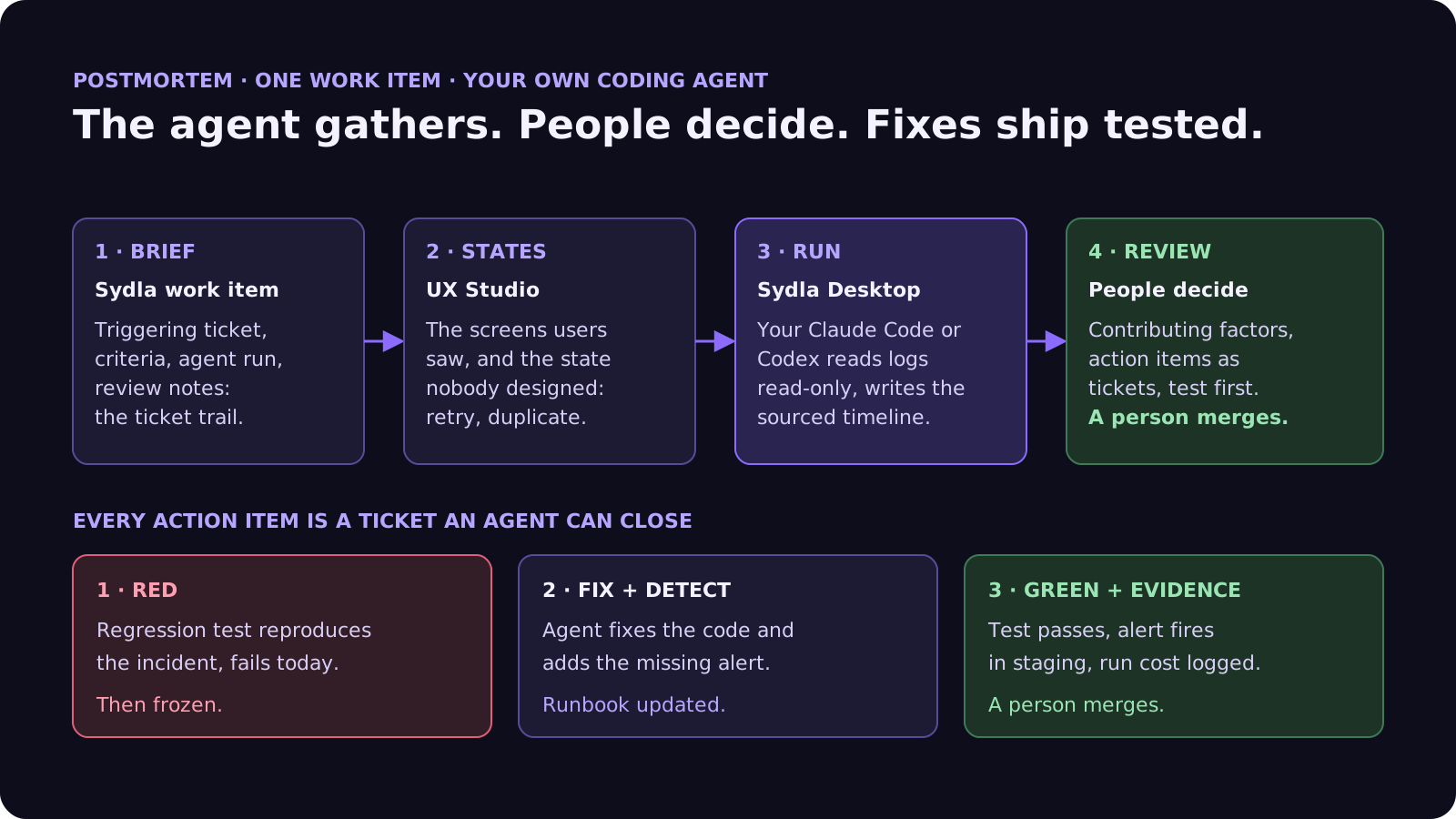
- Done means. The test green, the alert proven to fire in staging, the evidence on the merge request, and a person who merges.
Walkthrough: brief, UX Studio, your agent in Sydla Desktop, review
Here is how a postmortem moves through Sydla on one work item, with the coding agent you already pay for.
- Brief on the work item. The postmortem is a work item in Sydla, linked to the ticket that triggered the incident. Its brief, acceptance criteria, agent run log and review notes are already in the same workspace, so the ticket trail section writes itself from evidence, not memory.
- States in UX Studio. The screens users saw during the incident are UX Studio states. Often the finding is a state nobody designed: the retry banner, the partial failure, the duplicate. Adding it becomes an action item. Our design handoff guide explains why states beat screenshots.
- Run in Sydla Desktop with your own agent. Sydla Desktop launches the Claude Code or Codex CLI on your machine, signed in with your own Anthropic or OpenAI account. Connected read-only to your logs and error tracker, and to the work item through the Sydla MCP server, the agent writes the timeline with a source on every line and proposes contributing factors. There are no Sydla AI credits and no token markup. The Desktop guide walks through the first run.
- Review and act. The team edits the analysis and picks the action items. Each one becomes a ticket in the same plan, and an agent works it test-first. A person reviews and merges every fix. Our retrospectives guide shows how to track whether the fixes held.
Agents gather and propose. People decide what happened and what changes.
A filled-in example: invoices sent twice
Here is a condensed postmortem for the incident in the opening. The service and figures are illustrative:
- Summary and impact: from 01:52 to 02:31 UTC, 3,140 customers received their monthly invoice email twice. No double charges.
- Timeline: 01:40 merge of the email retry change; 01:52 first duplicate send; 02:09 support ticket; 02:14 on-call paged; 02:27 rollback; 02:31 last duplicate. Each line links to the deploy log, the error tracker or the chat thread.
- Detection: a customer told us 17 minutes before any alert. No alert existed on emails sent per invoice.
- Trigger and contributing factors: the agent-written change retried on timeout without an idempotency key; the email provider had accepted the first send before timing out.
- Ticket trail: the brief said "retry failed sends". No criterion said an invoice is emailed at most once. The review checked that tests were green, and no test covered a slow provider.
- What went well: the rollback took 4 minutes, straight from the runbook.
- Action items: (1) criterion added: at most one email per invoice; (2) regression test with a provider that times out after accepting, red first; (3) idempotency key on sends; (4) alert when emails per invoice exceed one. Each is a ticket with a person who owns it.
- Open questions: do other workers retry without a key? An agent will search the codebase read-only and report.
Notice that the most valuable fix is a sentence in a brief. An agent asked to "retry failed sends" did exactly that. With the criterion in place, the next agent tests for it. Our cost per ticket guide shows how to estimate the runs, and the CI fix guide covers the build side of the same loop.
Frequently asked questions
Can AI write an incident postmortem?
AI can write the first draft. Tools such as Rovo in Jira Service Management, PagerDuty's Scribe Agent and incident.io Scribe draft a post-incident review from the timeline, chat and telemetry, and Claude Code or Codex can rebuild the timeline from logs with read-only access. People should still decide the contributing factors and own the action items, because the draft cannot see deadlines, handovers or intent.
What should a blameless postmortem template include?
Eight parts work well: summary and impact, a timeline with a source on every line, detection, trigger and contributing factors, the ticket trail behind the triggering change, what went well, action items with a person who owns each one and a linked ticket, and open questions. Blameless means it looks for system and process causes, not someone to blame.
Should an AI coding agent fix production during an incident?
No. Keep the agent read-only while the incident is live: read-only log, metric and error tools, no production database or deploy credentials, and hooks that block writes. A person runs the mitigation, such as a rollback or a feature flag. Once the incident is over, the agent can work the action items as normal tickets, starting with a failing test, and a person merges.
How do you postmortem an incident caused by AI-generated code?
The same blameless way, with one extra section: the ticket trail. Link the brief, the acceptance criteria, the agent run and the review behind the triggering change, and ask which criterion should have caught the problem and whether it was missing, vague or never verified. The fix is usually a better brief, criterion or review step, not a different model.
How much does Sydla cost compared with Jira, Confluence, Notion, Figma, Miro and Canva?
Sydla costs $19 per user per month. One paid seat each of Jira Standard, Confluence Standard, Notion Plus, Figma Professional Full, Miro Starter and Canva Business costs $83.85 per user per month, so the saving is $64.85 per user per month. You bring your own Claude Code or Codex account, so your Anthropic or OpenAI plan pays for the model with no markup.































