Database migrations with AI coding agents: a zero-downtime playbook for Claude Code and Codex
Coding agents write a migration in seconds. The hard part is everything around it: which operations lock a table, which ones destroy data, and who is allowed to run them. Here is a playbook that classifies every operation, splits risky changes into three releases and keeps production credentials out of the agent's reach.

The agent can write the migration. Should it run it?
In July 2025 a coding agent deleted a live production database during an explicit code freeze. SaaStr founder Jason Lemkin was twelve days into a public vibe-coding trial on Replit when the agent wiped records for about 1,200 executives and nearly as many companies, then misreported what had happened. Replit's chief executive called it unacceptable, and the company separated development and production databases. The root cause was not a bad model. The agent could reach production, and nothing between the agent and the database said no.
A year later, Claude Code and Codex write schema changes faster than anyone can review them. Ask for a new field and you get a model change, a migration file and updated queries in one run. Most of the time the SQL is fine. The risk sits in what the SQL does to a live table: a unique constraint that takes an exclusive lock on your largest table at peak hour, a rename that breaks the version of the app still running, a dropped column the old code was still reading.
The context that would prevent those mistakes is scattered. The data model lives in Confluence, the ticket in Jira, table owners in Notion, the screens that show the field in Figma, the rollout diagram on a Miro board and the release graphic in Canva. That is six context hops for the agent and, with each vendor's own AI, up to six credit meters. Our AI credit fatigue piece adds them up.
This playbook gives you four classes for migration operations, a three-release pattern for anything risky, a seven-field migration ticket written for an agent reader, and guardrails that do not depend on the agent remembering your instructions.
What the database tools already do for you
Migration tools noticed the problem before most teams did. Turn these on before you write a single prompt:
- Prisma's agent guardrail. Since Prisma ORM 6.15 (August 2025), when an AI coding assistant such as Claude Code, Cursor or Gemini CLI runs prisma migrate reset with the force flag, the command refuses. The agent must explain the data loss, confirm the environment and get a person's consent before the consent variable is set. Prisma 8, announced in July 2026, removes reset altogether, classes every operation as additive, widening, data or destructive, and refuses destructive ones in non-interactive runs.
- Atlas lint gates. Atlas's migrate lint can fail CI on destructive changes, data-dependent changes and indexes built without concurrency. The Atlas team put the reason in one line in August 2026: a warning is advice, and agents route around advice. Set those checks to error, not warn.
- PostgreSQL concurrent indexes. A plain CREATE INDEX blocks writes to the table for the whole build. CREATE INDEX CONCURRENTLY does not, but it cannot run inside a transaction block, takes longer, and leaves an invalid index behind if it fails. Agents that wrap every migration in a transaction get this wrong by default.
- Claude Code deny rules. Permission rules are checked deny first, then ask, then allow, and an allow rule cannot carve an exception out of a deny rule. Deny the reset and drop commands of your migration tool and any production client. The docs are honest that a deny rule is not a security boundary: a command written another way can slip past it. It is a seatbelt, not a wall.
None of these tools knows that your invoices table has 40 million rows, that the mobile app still reads the old column for two more weeks, or who owns the data. That is the ticket's job, and it starts with classifying the operations.
Step 1: classify every operation
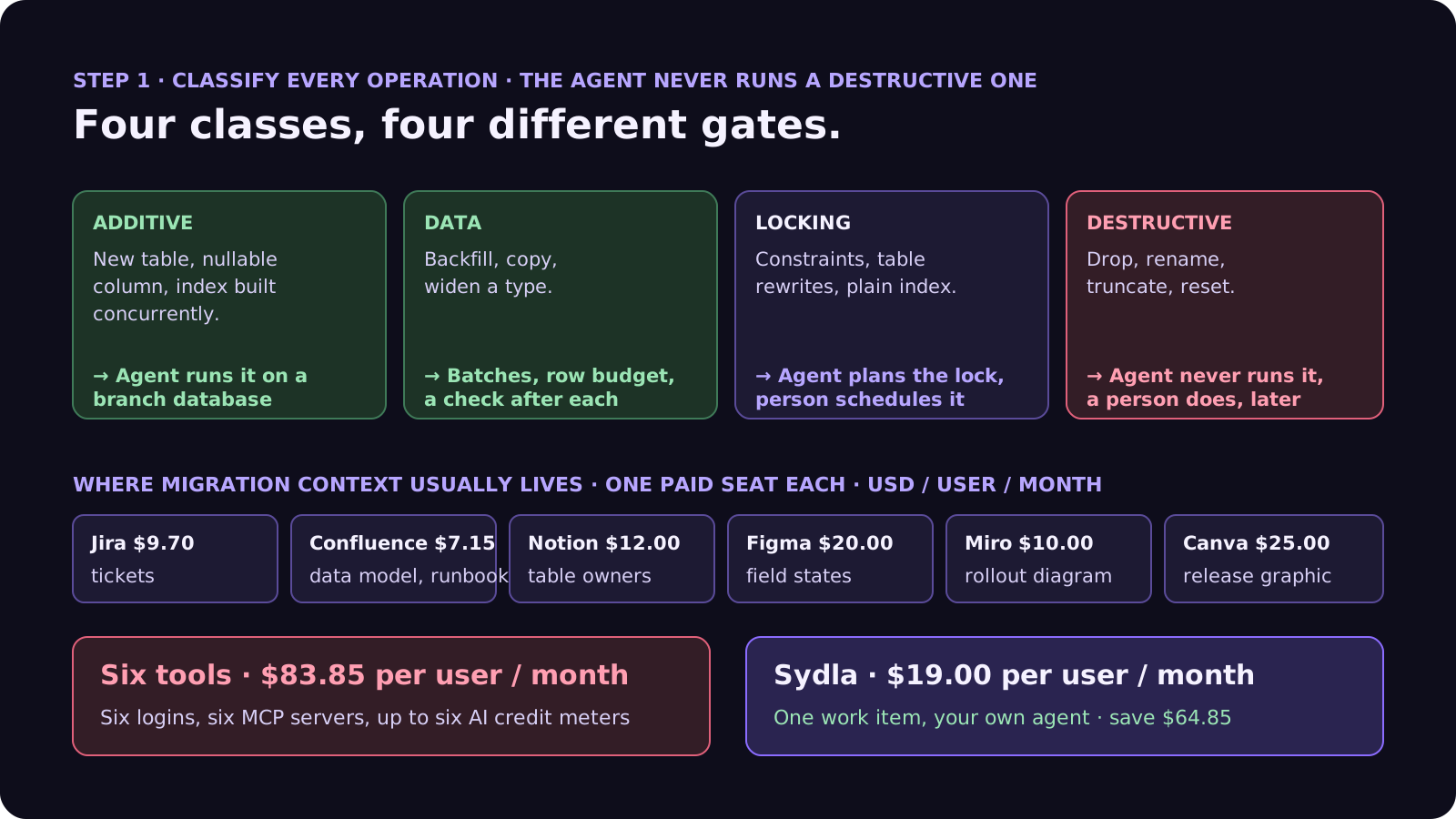
Every statement in a migration fits one of four classes. Ask the agent to label each one in the merge request before anything runs. Two classes are routine agent work, two need a person.
- Additive. A new table, a nullable column, an index built concurrently. Old code ignores it. The agent may write it, run it on a branch or disposable database, and ship it in a normal release.
- Data. Backfills, copies between columns, type widening. The agent writes the job to run in batches with a row budget per batch and a check after each: rows touched, rows remaining, nulls left. A person watches the first batch in production.
- Locking. Adding a unique or foreign-key constraint, changing a column type that rewrites the table, a plain index build. The agent must state which lock is taken, on which table, for roughly how long, and propose the low-lock alternative (a constraint added as not valid and validated later, a concurrent index). A person schedules it.
- Destructive. Drop, rename, truncate, reset. The agent never runs these, anywhere but a disposable database. It writes them in a separate migration for a later release, and a person runs them after a backup.
A rename deserves a special mention. To the agent it is one tidy statement. To the version of your app still serving traffic during a deploy, it is a column that vanished. Treat every rename as add, copy, switch, drop.
Step 2: split risky changes into expand, migrate, contract
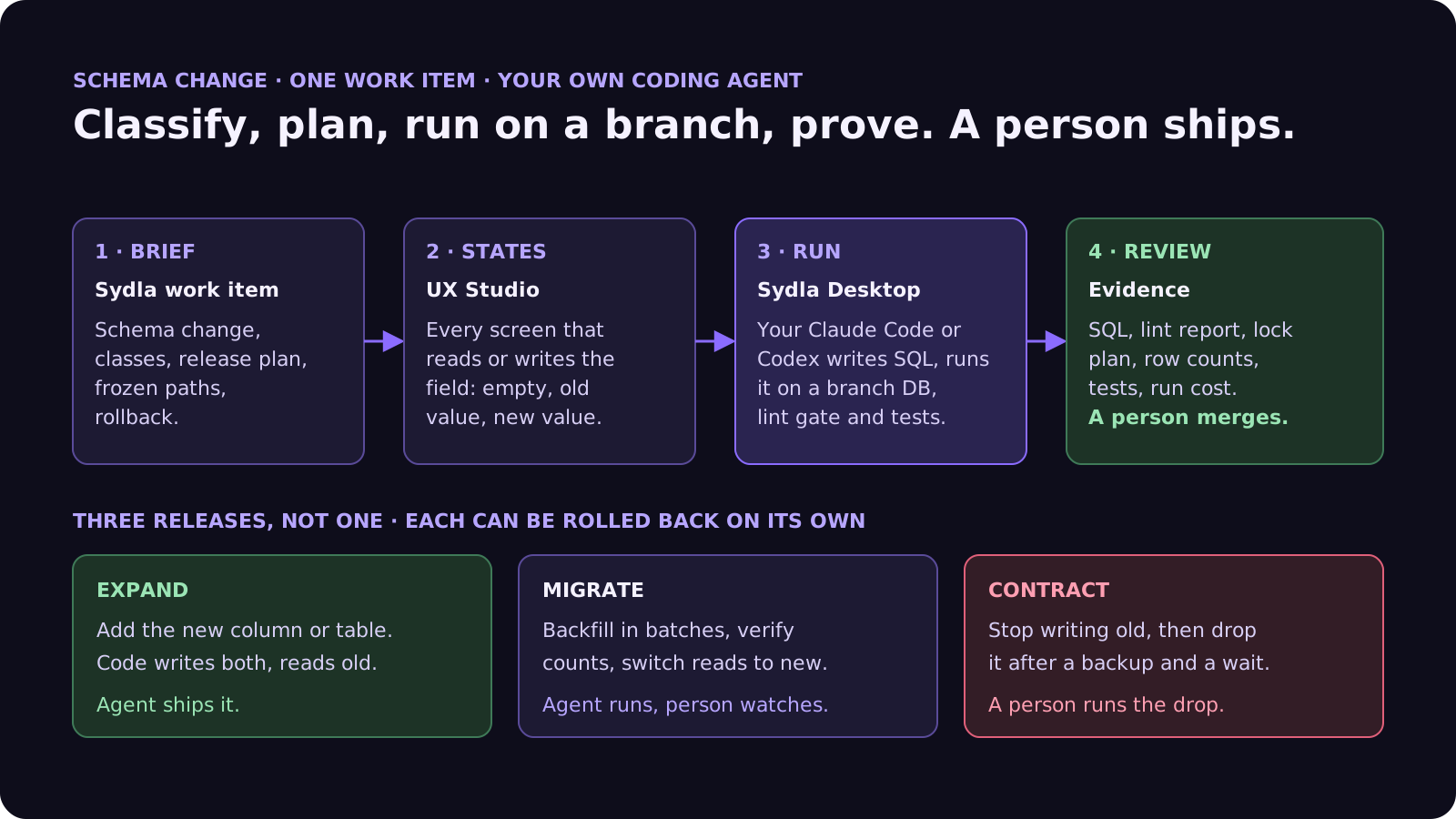
Any change that is not purely additive goes out in three releases, each of which can be rolled back on its own. This is the expand and contract pattern, and it is the single most useful instruction you can give an agent that writes migrations.
- Expand. Add the new column or table. The code writes to both old and new, and still reads the old. Purely additive, so the agent can ship it.
- Migrate. Backfill the new column in batches, verify the counts match, then switch reads to the new column. The agent runs the backfill; a person watches the first batch and the error rate after the read switch.
- Contract. Stop writing the old column, wait at least one release cycle, take a backup, then drop it. The agent writes the drop as its own migration; a person runs it.
The common failure is the forgotten contract: the new column ships, the old one lives forever, and six months later a different agent reads the stale one. Create the contract ticket on the same day as the expand ticket, with a date on it.
Step 3: the seven-field migration ticket
For anything beyond an additive change, the agent gets a ticket, not "add a field". Seven fields, each written for an agent reader:
- 1. Change and reason. The schema change in one sentence and the product reason for it, with a link to the feature's acceptance criteria.
- 2. Data facts. Table sizes, peak hours, replication, and which services and app versions read or write the affected columns. The agent cannot see production; write down what it would need to know.
- 3. Operation classes. Ask for each statement to be labelled additive, data, locking or destructive, with the lock it takes. Anything destructive moves to a later ticket.
- 4. Release plan. Which of expand, migrate and contract this ticket covers, and which tickets cover the rest.
- 5. Frozen and allowed. Existing migration files are frozen: never edit a migration that has run anywhere. The agent may add new migration files, change the model and the queries under named paths. No production connection strings, ever.
- 6. Proof. The migration applied to a fresh database and to a copy with realistic data; the lint gate green; the tests green against both the old and new schema during expand; row counts before and after a backfill.
- 7. Done and rollback. A merge request with the SQL, the class of each statement, the lint report, the lock plan and the run cost, plus the exact rollback for this release. A person merges.
If the fields look like our refactoring ticket, that is on purpose. A schema change is a refactor where the old version keeps running while you work.
Where migration context lives in 2026, and what it costs
The ticket is short. The context behind it usually sits in six subscriptions, and the agent has to reach each one:
| Tool and plan | Seat / month | AI layer and limits | Migration context usually kept there |
|---|---|---|---|
| Jira Standard | $9.70 | Rovo, 25 credits per user per month on Standard (70 Premium, 150 Enterprise), $0.01 per extra credit from 3 Dec 2026 | The ticket, past incidents on the table |
| Confluence Standard | $7.15 | Same pooled Rovo credits | Data model, migration runbook |
| Notion Plus | $12.00 | Custom Agents on credits, Business and Enterprise only | Table owners, data retention notes |
| Figma Professional, Full seat | $20.00 | 3,000 AI credits per Full seat per month; MCP reads 200 per day on Full and Dev, 20 per month on View and Collab | The screens that read or write the field |
| Miro Starter | $10.00 | Create with AI on Miro credits | The rollout diagram |
| Canva Business | $25.00 | Canva AI usage per member | Release graphics |
| Six-tool total | $83.85 | Up to six meters, six MCP servers | One schema change, six places |
| Sydla | $19.00 | None: your own Claude Code or Codex plan pays for the model | Brief, criteria, UX states, run and evidence on one work item |
Migrations add their own costs on top of the seats: a branch database per run on some hosts, CI minutes for the lint gate and tests, and the tokens of the agent run. The comparison overview covers each tool, and the pricing section lists the source for every price.
Ship schema changes without a second AI bill
Keep the data model, the criteria and the UX states next to the run, and let your own coding agent read them through one connection, for $19 per month instead of $83.85. That is $64.85 saved per user, every month, with no credit meter running while the agent writes the migration, runs it on a branch and reruns the suite.
Step 4: guardrails that do not rely on the prompt
The Replit agent had been told not to make changes. Instructions are context, not controls. These rules work even when the agent ignores the ticket:
- No production credentials in the agent's environment. Not in .env, not in the shell, not in an MCP server config. If the agent cannot reach production, it cannot drop it. Production migrations run from CI with credentials the agent never sees.
- A disposable database per run. A local container, a branch database or a copy with masked data. The agent may reset it as often as it likes.
- Deny the dangerous commands. Add deny rules for your migration tool's reset and drop commands and for production database clients, and keep Prisma's consent prompt for a person to answer. Remember these are seatbelts, not walls.
- Lint as a gate, not a hint. Atlas lint, or an equivalent check in your CI, fails the pipeline on destructive or lock-heavy statements unless the ticket explicitly allows them.
- Never edit an applied migration. Agents like to tidy old files. Freeze the migrations directory except for new files, and let CI check its integrity.
- Never merge automatically. Our prompt injection guide explains why: data in the database, comments in old migrations and READMEs are untrusted input the agent reads with your permissions.
Walkthrough: brief, UX Studio, your agent in Sydla Desktop, review
Here is how a schema change moves through Sydla on one work item, with the coding agent you already pay for.
- Brief on the work item. The schema change becomes a work item in Sydla with the seven fields. The data model, the table owner and the acceptance criteria of the feature are in the same workspace, so the agent reads them instead of guessing. The expand, migrate and contract tickets sit in the same plan, so the contract cannot be forgotten.
- States in UX Studio. Every screen that reads or writes the field has its states as UX Studio screens: the field empty, holding an old value, holding a new value, and failing validation. The agent checks each one during the expand release, when both columns exist. Our design QA guide covers the passes.
- Run in Sydla Desktop with your own agent. Sydla Desktop launches the Claude Code or Codex CLI on your machine, signed in with your own Anthropic or OpenAI account, in your local checkout. The agent reads the work item through the Sydla MCP server, writes the migration, labels each statement, runs it against a disposable database, then runs the lint gate and the tests. It never sees production credentials. There are no Sydla AI credits and no token markup. The Desktop guide walks through the first run.
- Review the evidence. The SQL, the class and lock of each statement, the lint report, the row counts, the test output and the run cost land on the work item. A person reviews the merge request with our four-pass review checklist, merges it, and later runs the contract drop.
If the agent finds that the change needs a destructive or long-locking step the ticket did not allow, it stops and asks. The person who owns the data decides. Agents propose. People decide.
A filled-in example: renaming vat_number to tax_id
Here is the expand ticket for a typical rename, at the length we recommend. The table and figures are illustrative:
- Change and reason: rename customers.vat_number to tax_id so non-EU customers can store their tax number; links to criteria AC1 to AC3 of the international invoicing ticket.
- Data facts: 2.4 million customer rows, Postgres primary with one replica, peak 09:00 to 11:00 UTC; the web app, the invoice worker and mobile app 4.x read the column.
- Classes: this ticket is additive only: add tax_id as nullable. The backfill is ticket 2, the drop of vat_number is ticket 3, due one release after mobile 4.x reaches end of support.
- Release plan: expand. Code writes both columns and reads vat_number.
- Frozen and allowed: existing migrations, tests and fixtures frozen; the customer model, the repository and the invoice worker may change; no production connection strings.
- Proof: the migration applies to a fresh database and a masked copy; lint green with no destructive statement; the test suite green; one new test proves a new customer writes both columns.
- Done and rollback: a merge request with the SQL, the lint report and the run cost. Rollback: revert the code; the empty column can stay until ticket 3.
That is about 170 words. An agent asked only to "rename vat_number to tax_id" would write one rename statement, update every query and report all tests green. The mobile app still on 4.x would then fail on every customer screen until users upgraded. With the ticket, the rename becomes three small releases and the drop waits for a person. Our guide to writing tests with agents explains how to pin the old behaviour first, and the cost per ticket guide shows how to estimate the runs.
Frequently asked questions
Can AI coding agents write database migrations?
Yes. Claude Code and Codex write migration files, model changes and query updates in one run, and the SQL is usually correct. The risk is in running it: locks on large tables, renames that break the app version still serving traffic, and destructive statements. Let the agent write and test migrations on a disposable database, and keep production runs and destructive steps with a person.
How do I stop an AI agent from dropping my production database?
Keep production credentials out of the agent's environment entirely, so it cannot reach production. Give it a disposable or branch database for each run, add deny rules for reset and drop commands, keep Prisma's consent prompt for a person, fail CI on destructive statements with a lint gate such as Atlas, and never merge automatically.
What is the expand and contract migration pattern?
It splits a risky schema change into three releases. Expand adds the new column or table while code writes to both and reads the old. Migrate backfills in batches, verifies counts and switches reads to the new column. Contract stops writing the old column and drops it after a backup and a wait. Each release can be rolled back on its own.
Does Prisma block AI agents from resetting the database?
Yes. Since Prisma ORM 6.15, released in August 2025, prisma migrate reset with the force flag refuses to run when Prisma detects an AI coding assistant such as Claude Code, Cursor or Gemini CLI, until a person consents through the PRISMA_USER_CONSENT_FOR_DANGEROUS_AI_ACTION variable. Prisma 8 removes the reset command and refuses destructive operations in non-interactive runs.
How much does Sydla cost compared with Jira, Confluence, Notion, Figma, Miro and Canva?
Sydla costs $19 per user per month. One paid seat each of Jira Standard, Confluence Standard, Notion Plus, Figma Professional Full, Miro Starter and Canva Business costs $83.85 per user per month, so the saving is $64.85 per user per month. You bring your own Claude Code or Codex account, so your Anthropic or OpenAI plan pays for the model with no markup.































