Writing tests with AI coding agents: a test ticket Claude Code and Codex cannot game
"Get coverage to 80%" is the easiest ticket a coding agent will ever finish. It will hit the number, and the tests may catch almost nothing. Here is a six-field test ticket that makes Claude Code and Codex write tests that can actually fail, and a reviewer can trust.

"Get coverage to 80%" is the easiest ticket an agent will ever finish
Writing tests looks like the safest job you can hand a coding agent. Nothing ships to users, the work is repetitive, and the result is easy to measure. So the ticket says "Add tests to the discount module, target 80% coverage", and an hour later the number is green.
The trouble is what the number measures. Coverage only says a line ran during a test. It does not say anything checked the result. A 2026 study accepted in IEEE Transactions on Software Engineering found an LLM-generated test suite with 100% line and branch coverage and a mutation score of 4%: plant a bug in the code and the tests almost never noticed. An agent that is asked for coverage will produce coverage, and tests that assert very little are the fastest way to get it.
The context a good test needs is also scattered in 2026. The acceptance criteria are in Jira, the test strategy in Confluence, the QA checklist in Notion, the screen states in Figma and the risk map on a Miro board. Each one is another connection for the agent and, with the vendor's own AI, another credit meter. Our AI credit fatigue piece adds those meters up.
This guide gives you a six-field test ticket written for an agent reader, shows what Claude Code, Codex and Copilot already say about tests, and walks through a run where every new test has to prove it can fail before it counts.
What Claude Code, Codex and Copilot already say about tests
The vendors' guidance is short, and it points the same way:
- Claude Code: work with tests. The common workflows page has a four-step recipe: find functions that are not covered by tests, add tests, add test cases for edge conditions, then run the new tests and fix any failures. The tips matter more than the steps: be specific about what behaviour you want to verify, and ask Claude to name edge cases you might have missed, such as error conditions, boundary values and unexpected inputs. Claude reads your existing test files to match their style, framework and assertion patterns.
- Claude Code: evidence over claims. The best practices page says to give Claude something it can run that comes back pass or fail, and to ask for evidence: the command it ran and its output. Its own words: "All tests pass" on its own tells you very little. For a bug, the suggested prompt is to write a failing test that reproduces it, then fix it. It also shows a read-only reviewer subagent, limited to Read, Grep and Glob, whose job includes checking that the listed edge cases have tests.
- Codex: a tested pull request. OpenAI's use case for turning an issue into a tested pull request asks for tests that tell the new behaviour from the old one and, where practical, fail against the original code. It says not to remove assertions or weaken authorization to make checks pass, and that checks which are blocked or have not run cannot count as passing.
- GitHub Copilot. GitHub's tutorial on writing tests says to be specific about test requirements, and warns that generated tests may not cover all scenarios, so you should always review them and add what is missing.
Read together, this is a ticket template waiting to be written: name the behaviour, list the cases, see each test fail, never weaken an old one, and bring back the output. What the vendors cannot know is which behaviour matters to your users and which bugs your team has shipped before. That is the part a person writes.
The six-field test ticket for AI coding agents
Copy this into your test work item. Each field closes a gap an agent would otherwise fill with the easiest option. Most test tickets fit in 120 to 200 words.
- 1. Behaviour to pin. What the code must do, written as rules a person would recognise: "A coupon and a member discount never stack; the larger one wins." Not "cover discount.ts". If the rules are already acceptance criteria, link them; our acceptance criteria guide shows how to write them so an agent can check them.
- 2. Risks and cases. The cases that would hurt if they broke: boundaries, empty and huge inputs, rounding, time zones, permissions, and every bug this module has shipped before. Ask the agent to add the edge cases it can find, but write the ones only your team knows. A past incident is the best test case you have.
- 3. Test level and style. Unit, integration or end to end, which framework, where the files go, and what to fake. "Unit tests next to the module, real pricing tables, fake the clock, no network." Without this an agent will happily mock the very function it is supposed to test.
- 4. Frozen tests. Existing tests and assertions the agent must not change, delete, skip or loosen. If an existing test fails, the agent stops and reports it; it does not edit it to pass. Put the same rule in CLAUDE.md or AGENTS.md so it holds for every ticket; our CLAUDE.md vs AGENTS.md guide explains where it goes.
- 5. Proof it can fail. Every new test must be seen failing once. For a bug, it fails on the current code. For existing behaviour, the agent plants a small bug, such as flipping a comparison or dropping a rounding step, shows the test failing, then removes the bug. If a mutation testing tool runs in your stack, ask for its score on the changed files instead.
- 6. Done means. The evidence a reviewer needs: the command run and its output, red then green for each new test, the planted-bug or mutation result, three clean reruns to catch flaky tests, no changes to frozen tests, and a short list of cases the agent thought of but left out, with the reason. Coverage can be reported, but it is not the goal.
Add one stop condition: if the agent finds that the code is wrong while writing a test, it writes the failing test, marks it as a known bug, and does not fix the code in the same change. A test ticket that also changes behaviour can no longer prove what the behaviour was. File the bug with our bug report template.
Where a test ticket's context lives in 2026, and what it costs
The template is the easy part. In most teams, the six fields of one test ticket are spread across six subscriptions, and the agent has to visit each one:
| Tool and plan | Seat / month | AI layer and limits | Test context usually kept there |
|---|---|---|---|
| Jira Standard | $9.70 | Rovo, 25 credits per user per month on Standard (70 Premium, 150 Enterprise), $0.01 per extra credit from 3 Dec 2026 | Acceptance criteria and bug history |
| Confluence Standard | $7.15 | Same pooled Rovo credits | Test strategy and test plans |
| Notion Plus | $12.00 | Custom Agents on credits, Business and Enterprise only | QA checklists |
| Figma Professional, Full seat | $20.00 | 3,000 AI credits per Full seat per month, MCP calls capped per day | Screen states each test should cover |
| Miro Starter | $10.00 | Create with AI on Miro credits | Risk map and user flows |
| Canva Business | $25.00 | Canva AI usage per member | Release and QA sign-off graphics |
| Six-tool total | $83.85 | Up to six meters, six MCP servers | One test ticket in six places |
| Sydla | $19.00 | None: your own Claude Code or Codex plan pays for the model | Criteria, states, run and evidence on one work item |
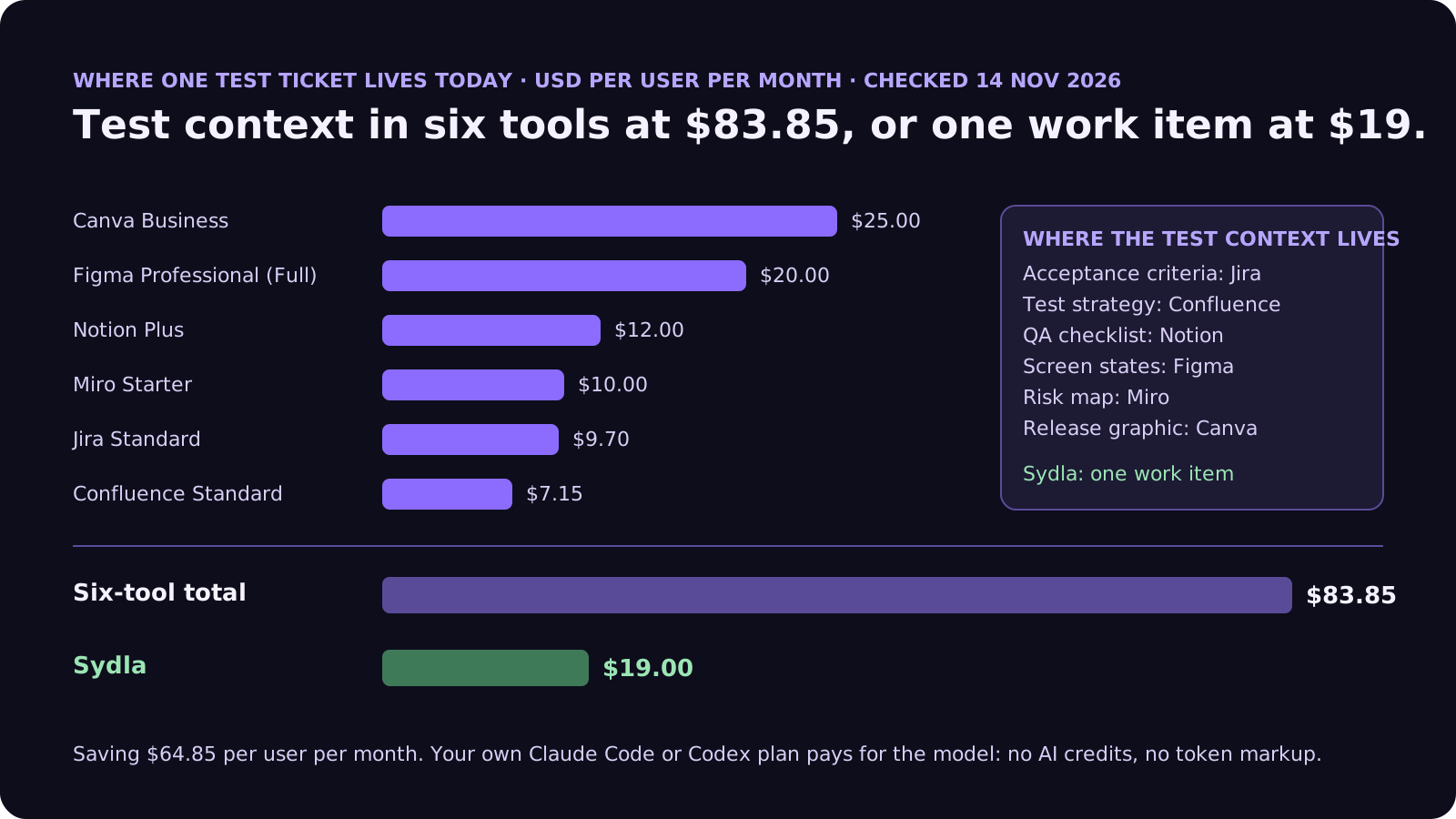
Test runs are also token-heavy: the agent reads the code under test, the existing tests and their fixtures, then runs the suite several times. Every extra hop to fetch context makes that longer. The comparison overview covers each tool, and the pricing section lists the source for every price.
Test what matters without a second AI bill
Write the behaviour once, keep the states next to it, and let your own coding agent read both through one connection, for $19 per month instead of $83.85. That is $64.85 saved per user, every month, with no AI credits to ration while the agent reruns the suite.
From brief to trusted tests: work item, UX Studio, agent, review
Here is how the six fields move through Sydla on one work item, with the coding agent you already pay for.
- Brief on the work item (fields 1 to 4). The engineer or product owner writes the behaviour and the risks on a work item in Sydla. An agent can draft the case list from the code and the bug history, and estimate the run. A person approves it before anything runs, because deciding which behaviour matters is a product decision. Our PRD template covers the brief that usually sits above it.
- States in UX Studio. For anything a user sees, link the UX Studio screens in every state the code renders: empty, loading, error, done. Each state is a test case the agent can read, instead of a frame on a canvas someone may still be editing. Our design-to-code handoff guide explains why states beat screenshots.
- Run in Sydla Desktop with your own agent. Sydla Desktop launches the Claude Code or Codex CLI on your machine, signed in with your own Anthropic or OpenAI account, in your local checkout. Through one Sydla MCP server the agent reads the brief and the states, writes each test, shows it failing on the old code or a planted bug, then shows it passing. There are no Sydla AI credits and no token markup. The Desktop guide walks through the first run.
- Review against field 6. The run writes its evidence back to the work item: commands and output, red then green per test, the planted-bug result, three reruns, the list of frozen files untouched and the run cost. A reviewer can then use the four-pass review checklist and spend their time on the cases, not on rerunning the suite.
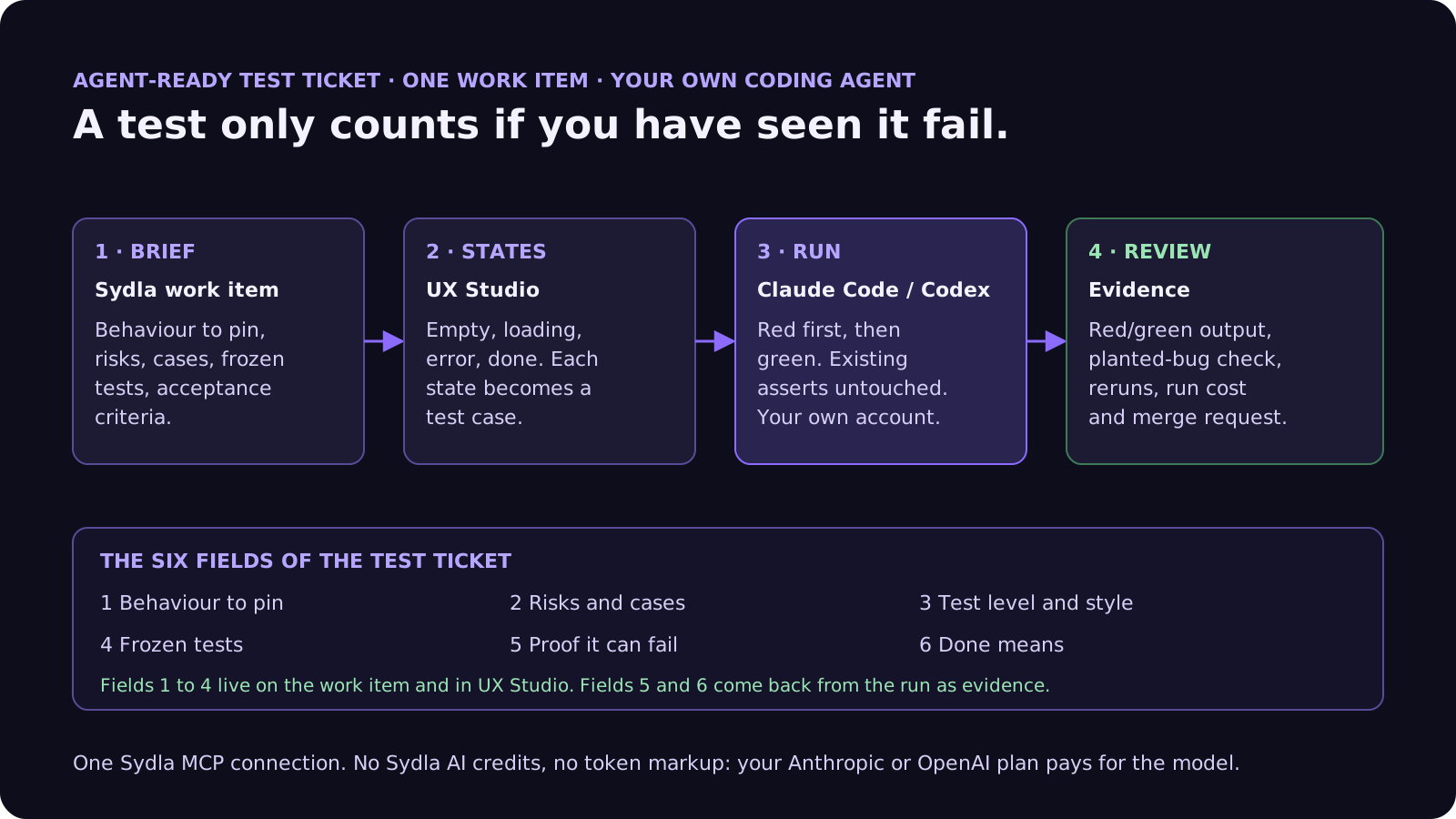
If a new test exposes a real bug, the run stops and the question goes back to the person who owns the work item: fix it now, or ship the known-bug test and file a ticket. Agents propose. People decide.
A filled-in example: tests for discount rules
Here is the template applied to a typical test ticket, at the length we recommend:
- Behaviour to pin: a coupon and a member discount never stack, the larger one wins; discounts never take a line below zero; totals round half up to the cent after discounts, not before.
- Risks and cases: a 100% coupon, a coupon on a zero-price item, a discount equal to the line total, currencies with no minor unit, the expired-at-midnight coupon from last March's incident, and a basket of 500 lines.
- Level and style: unit tests in the existing Vitest suite next to discounts.ts, real tax tables, a fake clock, no network. Match the current naming pattern.
- Frozen tests: nothing under the checkout tests folder may be edited, skipped or deleted. If one fails, stop and report it.
- Proof it can fail: for each new test, show it failing with a planted bug (stacking allowed, rounding before discount, clock one second past midnight), then passing after the bug is removed.
- Done means: the test command and output, red then green per test, three clean reruns, frozen files untouched, and a list of cases considered and skipped. No coverage target.
That is about 170 words. The agent knows what to test and how to prove each test works, and the reviewer can see the proof without trusting a percentage. Compare it with "Add tests to the discount module, target 80% coverage", which an agent can satisfy with tests that check nothing.
Common mistakes when AI coding agents write tests
These show up in almost every team's first month of agent-written tests:
- Asking for a coverage number. The agent will reach it. Ask for behaviour, cases and proof that each test can fail; report coverage as a side note.
- Tests that copy the code. A test that computes the expected value with the same formula as the code will pass forever. Ask for literal expected values written from the rule, not from the implementation.
- Mocking the thing under test. Heavy mocks make tests fast and meaningless. Field 3 says what to fake; everything else runs for real.
- Editing old tests to pass. If an existing test fails, either the new code is wrong or the behaviour changed on purpose. Both are a person's call. Freeze old tests in the ticket and check the diff for it.
- Accepting "all tests pass". Without the command and its output, it is a claim. Ask for evidence, three reruns for flaky tests, and keep it on the work item. Our cost per ticket guide shows what those runs cost, and our refactoring guide shows how the same tests become the safety net for the next cleanup.
Frequently asked questions
Can AI coding agents write good unit tests?
Yes, if you ask for behaviour instead of coverage. Give the agent the rules to pin, the risky cases, the test style and a list of tests it must not change, and require each new test to be seen failing once, on the old code or on a planted bug. A 2026 study in IEEE Transactions on Software Engineering found an LLM-generated suite with 100% coverage but a 4% mutation score, so coverage alone proves little.
What should a test ticket for Claude Code or Codex include?
Six fields: the behaviour to pin, the risks and cases including past incidents, the test level and style, the frozen tests that must not change, proof that each new test can fail, and a definition of done with the command, its output, red then green per test and three clean reruns. Most test tickets fit in 120 to 200 words.
How do I stop an AI agent from changing tests to make them pass?
Say it in the ticket and in CLAUDE.md or AGENTS.md: existing tests and assertions must not be edited, skipped or deleted, and a failing existing test means stop and report. OpenAI's Codex guidance says not to remove assertions to make checks pass. Then check the diff for any change to test files outside the new ones.
Is test coverage a good target for AI-generated tests?
No. Coverage shows that a line ran, not that a test checked it. Use mutation testing, or have the agent plant small bugs and show each new test failing, then report coverage only as a side note. Mutation-guided generation in the same 2026 study reached an 89.5% mutation score on HumanEval-Java.
How much does Sydla cost compared with tracking tests across Jira, Confluence, Notion, Figma, Miro and Canva?
Sydla costs $19 per user per month. One paid seat each of Jira Standard, Confluence Standard, Notion Plus, Figma Professional Full, Miro Starter and Canva Business costs $83.85 per user per month, so the saving is $64.85 per user per month. You bring your own Claude Code or Codex account, so your Anthropic or OpenAI plan pays for the model with no markup.































