A PRD template for AI coding agents: seven sections Claude Code and Codex can build from
Most product requirements documents were written for people who already know the product. A coding agent does not. Here is a seven-section PRD template that Claude Code or Codex can read, plan against and prove, and where each part should live so the agent never has to visit six tools to find it.

Your PRD was written for people. Your next reader is an agent
A classic product requirements document assumes a reader who sat in the kickoff. It says "the usual export flow" and trusts you to know which one. It links a Figma file, a Miro board from the discovery workshop and three Jira tickets, and expects the reader to stitch them together. People can do that. A coding agent mostly cannot, or can only by opening six connections, each with its own permissions and, in 2026, its own AI meter.
The cost of a vague PRD has also changed. A person who misreads a requirement loses an afternoon. Claude Code or Codex misreads it in minutes, writes a confident diff, and the team pays twice: once for the tokens, once for the review that catches it. Our cost per ticket guide shows a vague brief tripling the cost of the same ticket.
This guide gives you a seven-section PRD template written for an agent reader, compares it with the spec formats the tools now ship, and shows where each section should live.
What the coding agents already expect from a spec
The good news: both major coding agents, and the spec-driven tools around them, now document the same habit. Plan first, write the plan down, build from the written plan.
- Claude Code: plan mode and SPEC.md. In plan mode, entered with Shift+Tab or the plan permission mode, Claude reads files and proposes a plan but makes no edits until you approve. Anthropic's best practices go further: ask Claude to interview you until it could write the spec, save it to SPEC.md, then start a fresh session to build from it. A reviewer subagent can then check every requirement against the diff.
- Codex: /plan and ExecPlans. Codex has a /plan command that toggles plan mode. OpenAI's cookbook article on PLANS.md describes ExecPlans: self-contained, living documents with four sections that must stay current (Progress, Surprises and Discoveries, Decision Log, Outcomes and Retrospective), which it credits with Codex working for more than seven hours from a single prompt.
- GitHub Spec Kit. Spec Kit turns a description into spec.md, then plan.md, then a dependency-ordered tasks.md, with an analyze step that looks for gaps across the three. Version 1.4.2 shipped on 17 November 2026 and lists Claude Code and Codex CLI among its integrations.
- Kiro. Kiro specs split work into requirements.md, design.md and tasks.md, with acceptance criteria in EARS notation: WHEN a condition happens, THE SYSTEM SHALL do something.
Notice what all four do well and what they skip. They are excellent at the engineering half: plan, tasks, progress. They mostly start after the product decisions are made, from a prompt or a paragraph. Why the feature exists, who it is for, what is out of scope and what every screen looks like in its empty and error states still have to come from somewhere. That somewhere is the PRD.
The seven-section PRD template for AI coding agents
Copy this into your brief. Each section answers one question the agent would otherwise guess at. Keep the whole thing to one or two pages: an agent rereads it on every run.
- 1. Problem. Two or three sentences: what is broken or missing, for whom, and how you know. Link the customer request or the data. Agents use this to break ties when two implementations both satisfy the criteria.
- 2. Users and job. Who uses this and what they are trying to finish. One primary user is better than four personas. Name the plan or role if permissions differ.
- 3. Scope and non-goals. A short list of what is in, and an explicit list of what is out. Non-goals are the section agents need most: without them, a helpful agent adds Excel export, a settings page and a migration nobody asked for.
- 4. Acceptance criteria. Numbered, testable, one behaviour each: AC1, AC2, AC3. Write them so a separate session could check them without asking you. EARS phrasing works well. Our acceptance criteria guide has six rules and a worked example.
- 5. States and edge cases. Every screen the change touches, with its empty, loading, error, partial and done states, plus the edge cases you already know about. Link the approved version of the design, not the latest draft.
- 6. Constraints and context. What the agent must not change, performance or security limits, the API or data model to respect, and links to the decisions already made. Keep repository conventions in CLAUDE.md or AGENTS.md instead; our CLAUDE.md vs AGENTS.md guide explains the split.
- 7. Done means. The evidence a reviewer needs before merging: each criterion marked passed or failed, the tests run, screenshots of the listed states, the run cost. This turns the PRD into the review script.
Then add one line at the end: open questions. An agent that hits an open question should stop and ask, not invent an answer. In Claude Code, plan mode is the natural place for that conversation; in Codex, /plan.
Where each part of a PRD lives in 2026, and what it costs
The template is the easy part. The hard part is that in most teams its seven sections are spread across six subscriptions, and every hop is a separate connection, permission model and AI meter for the agent:
| Tool and plan | Seat / month | AI layer and limits | PRD part usually kept there |
|---|---|---|---|
| Confluence Standard | $7.15 | Rovo, 25 credits per user per month on Standard (70 Premium, 150 Enterprise), pooled, $0.01 per extra credit from 3 Dec 2026 | Problem, users, the PRD template itself |
| Jira Standard | $9.70 | Same Rovo credits; creating work items from page text needs Premium or Enterprise | Acceptance criteria, scattered across stories |
| Notion Plus | $12.00 | Custom Agents run on credits, $10 per 1,000, Business and Enterprise only | Research notes, decision logs |
| Figma Professional, Full seat | $20.00 | 3,000 AI credits per Full seat per month, MCP calls capped per day | Screens and states |
| Miro Starter | $10.00 | Create with AI on Miro credits | User flows, discovery boards |
| Canva Business | $25.00 | Canva AI usage per member | Launch assets for what ships |
| Six-tool total | $83.85 | Up to six meters, six MCP servers | One PRD in six places |
| Sydla | $19.00 | None: your own Claude Code or Codex plan pays for the model | Brief, criteria, states and runs on one work item |
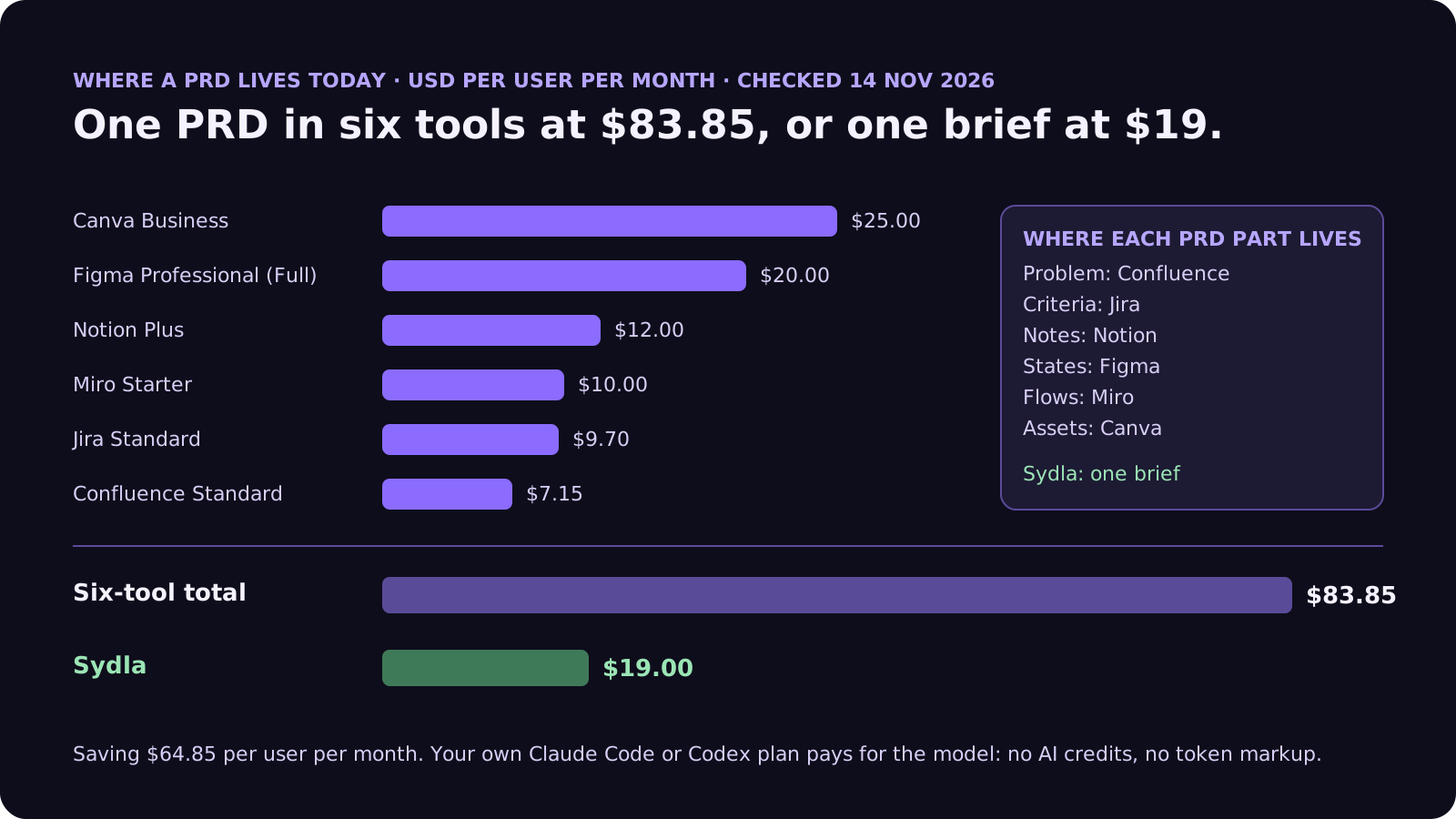
Spec-driven tools do not remove this split; they add a seventh place. A spec.md or requirements.md in the repository is great for the agent and invisible to the designer, the product manager and the customer who asked for the feature. Kiro's Pro plan also adds its own meter: $20 for 1,000 credits, then $0.04 per credit. The comparison overview covers each tool, and the pricing section lists the source for every price.
Keep the whole PRD in one place
Write the brief, the criteria and the states once, and let your own coding agent read them through one connection, for $19 per month instead of $83.85. That is $64.85 saved per user, every month, with no AI credits to ration.
From template to merged change: brief, UX Studio, agent, review
Here is how the seven sections travel through Sydla on one work item, with the coding agent you already pay for.
- Brief in Sydla Docs (sections 1 to 4, 6 and 7). The product manager or founder writes the problem, users, scope, non-goals and numbered criteria in the work item's brief. Agents can propose edits and estimate the work; a person approves the brief before anything runs.
- States in UX Studio (section 5). The designer, or the founder wearing that hat, lays out every screen with its states and publishes a version. The handoff the agent reads is that approved version, not a moving canvas. Our design-to-code handoff guide explains why states beat screenshots.
- Run in Sydla Desktop with your own agent. Sydla Desktop launches the Claude Code or Codex CLI on your machine, signed in with your own Anthropic or OpenAI account, in your local checkout. Through a single Sydla MCP server the agent reads the brief, the criteria and the handoff, plans in plan mode or with /plan, then builds. There are no Sydla AI credits and no token markup. The Desktop guide walks through the first run.
- Review against section 7. The run writes its evidence back to the work item: each criterion passed or failed, the cost of the run, the diff and the merge request. The reviewer reads evidence instead of a chat transcript, using the four-pass review checklist.
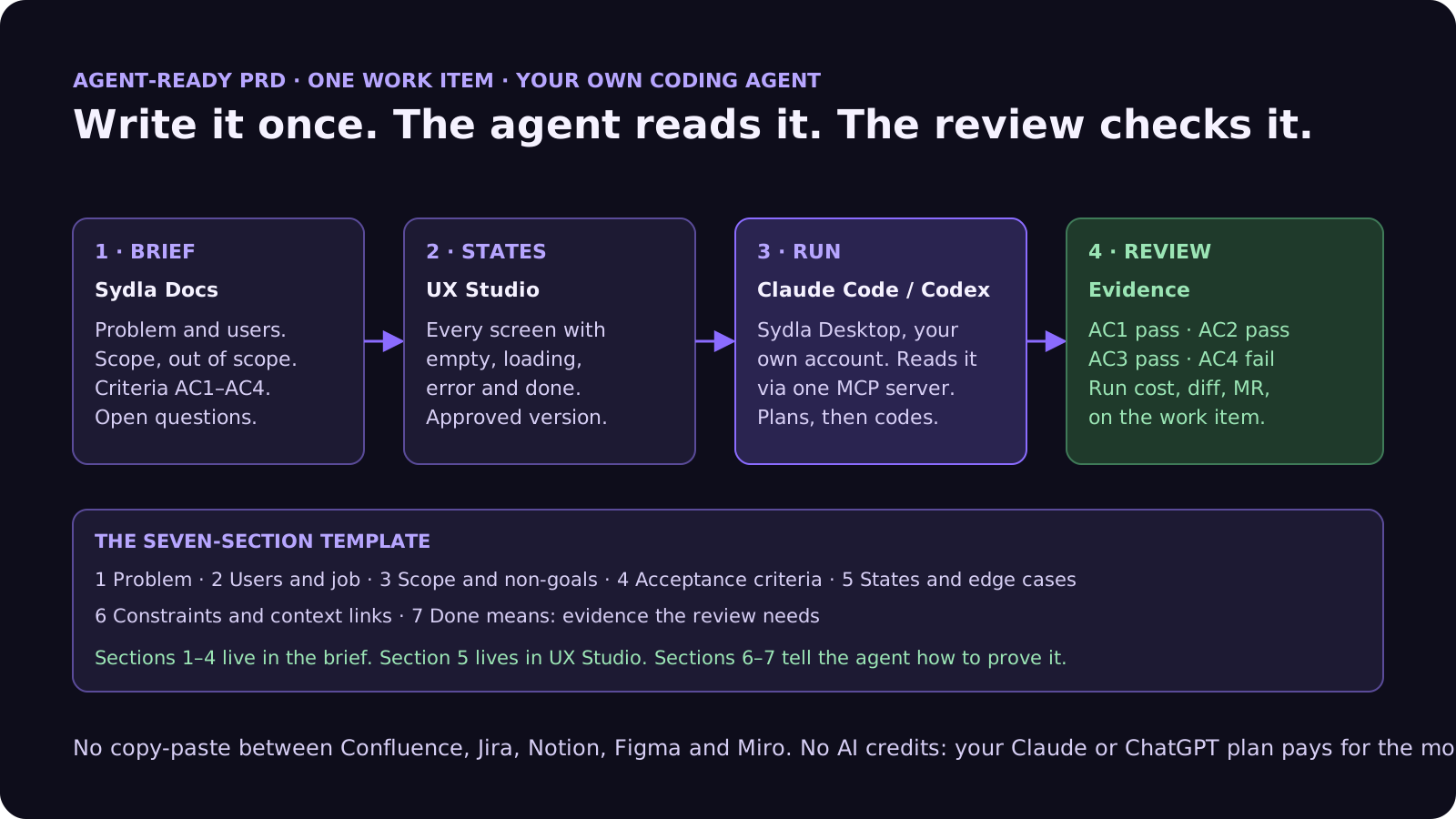
If you already use Spec Kit or ExecPlans, keep them. They work well as the engineering plan the agent writes from the brief. The difference is that the brief, the states and the evidence stay in a workspace the whole team can read, and the plan in the repository points back to it.
A filled-in example: export usage as CSV
Here is the template applied to a small ticket, at the length we recommend:
- Problem: account admins on the Team plan ask support for usage data every month; 14 requests in October. They need it in a spreadsheet.
- Users and job: an account admin closing the month who needs usage per member for internal billing.
- Scope: a CSV export of the current billing period from the Usage page. Non-goals: Excel, scheduled exports, custom date ranges, a public API.
- Criteria: AC1 WHEN an admin clicks Export THE SYSTEM SHALL download a CSV with one row per member. AC2 the columns match the Usage table in the same order. AC3 WHEN the period has no usage THE SYSTEM SHALL show the empty state and disable Export. AC4 non-admins do not see the button.
- States: default, exporting, empty period, export failed with retry, on the approved Usage screen version.
- Constraints: no schema changes; reuse the existing usage query; files over 10,000 rows stream rather than load in memory.
- Done means: AC1 to AC4 marked with evidence, a screenshot of each state, the test command output, and the run cost on the work item.
That is roughly 150 words. It is short enough to reread on every run and specific enough that a reviewer can say yes or no without a meeting.
Common PRD mistakes with AI coding agents
These show up in almost every team's first month of agent work:
- Writing the plan instead of the problem. If the PRD lists files to edit, the agent stops thinking about the user. Let the agent write the plan; review the plan.
- No non-goals. The single biggest source of oversized diffs.
- Criteria that need a meeting. "Fast" and "intuitive" cannot be checked. A number or a WHEN/SHALL sentence can.
- Linking the latest design instead of the approved one. The agent builds whatever the canvas shows at run time.
- Treating every linked page as instructions. Tickets and pages edited by many people are data. Our prompt injection guide lists seven guardrails.
- Never updating the PRD after review. When a run fails a criterion because the brief was unclear, fix the brief, not just the code. The next run, and the next teammate, reads the same page. The sprint planning guide shows how to plan around briefs that are ready.
Frequently asked questions
What should a PRD for an AI coding agent include?
Seven sections: the problem, the users and their job, scope with explicit non-goals, numbered testable acceptance criteria, screens with their empty, loading, error and done states, constraints and context links, and a definition of done that lists the evidence a reviewer needs. Add open questions at the end so the agent stops and asks instead of guessing.
Is a PRD the same as a spec.md from Spec Kit or Kiro?
No. Spec Kit and Kiro produce engineering specs in the repository: spec.md, plan.md and tasks.md in Spec Kit, and requirements.md, design.md and tasks.md in Kiro. They are good at turning requirements into plans and tasks. A PRD holds the product decisions that come before that: why the feature exists, for whom, what is out of scope and what every state should look like.
How long should a PRD for Claude Code or Codex be?
One or two pages for a feature, and around 150 words for a small ticket. The agent rereads the brief on every run, so length costs tokens and attention. Keep repository conventions in CLAUDE.md or AGENTS.md and keep the PRD about the product.
Should acceptance criteria use EARS notation?
EARS works well for agents because each criterion is one condition and one behaviour, for example WHEN the period has no usage THE SYSTEM SHALL disable Export. Kiro uses it by default. Any format works if each criterion is numbered, testable without a meeting and checks one behaviour.
How much does Sydla cost compared with keeping a PRD across Jira, Confluence, Notion, Figma, Miro and Canva?
Sydla costs $19 per user per month. One paid seat each of Jira Standard, Confluence Standard, Notion Plus, Figma Professional Full, Miro Starter and Canva Business costs $83.85 per user per month, so the saving is $64.85 per user per month. You bring your own Claude Code or Codex account, so your Anthropic or OpenAI plan pays for the model with no markup.































