Security review for AI-generated code: a playbook for Claude Code and Codex
Coding agents write working code fast, and in Veracode's tests insecure code in 45% of cases. Scanners help, but they don't know your threat model. This playbook puts abuse cases in the brief, splits review into three independent layers and keeps the evidence on one work item.

Your agent passed every test. It also let org A read org B's invoices
A coding agent turns a ticket into a green merge request in twenty minutes. The export works, the tests pass, the reviewer skims the diff and approves. Two weeks later a customer notices they can download another company's invoices by changing one number in the URL. Nobody asked the agent to check who was allowed to call the endpoint, so it didn't.
This is the usual shape of AI security bugs. Veracode's GenAI Code Security Report tested more than 100 models on the same coding tasks and found risky security flaws in 45% of them. Its October 2025 update adds the uncomfortable part: larger, newer models didn't improve security. Agents write code that works. Working and safe are different properties, and only one of them shows up in a happy-path test.
The context a reviewer needs is also scattered. The ticket sits in Jira, the threat model in Confluence, the security checklist in Notion, the permission screens in Figma, the data-flow diagram on a Miro board and the customer notice in Canva. That is six context hops for an agent and up to six AI credit meters. Our AI credit fatigue piece adds them up.
This playbook fixes the brief first, then splits review into three layers that don't share the same blind spot, and keeps the proof where an auditor can find it.
What security tools give your agent in 2026
Agent vendors and code hosts now ship security review built for AI-written code:
- Claude Code. The /security-review command checks pending changes before you commit, for SQL injection, XSS, authentication and authorization flaws, insecure data handling and vulnerable dependencies. A GitHub Action runs the same review on every pull request and comments inline. It is open source and needs an API key. Its README warns that it is not hardened against prompt injection and should only review trusted pull requests.
- Codex Security. OpenAI's scanner, formerly Aardvark, launched as a research preview in March 2026. The CLI became open source under Apache 2.0 in July (still beta), and Codex Security Cloud, a research preview since October, scans connected GitHub repositories on a schedule for ChatGPT Pro, Business, Enterprise and Edu customers, with token-based billing.
- GitHub. Agentic autofix reached general availability on 15 October 2026: it explores the code, proposes a fix and reruns CodeQL to confirm the alert is closed before it opens a pull request. It handles up to 25 alerts per pull request and draws on AI Credits plus Actions minutes, on top of Code Security at $30 and Secret Protection at $19 per active committer per month.
These tools are good at patterns: an unescaped string, a hard-coded key, a known vulnerable package. None of them knows that invoices are tenant data, that only admins may export, or that the support role must never see card details. That is your threat model, and it belongs in the brief, not in a scanner's guess.
Step 1: sort every ticket into a risk lane
Not every change needs a security review. Reviewing everything the same way trains people to skim. Put each ticket in one of four lanes when it is written:
- Low. Copy, styles, internal refactors with good tests. The scanner in CI is enough.
- Data. Reads or writes customer data: new queries, exports, logs, analytics events. Needs abuse cases and a fresh-session review.
- Trust boundary. Authentication, permissions, payments, file uploads, webhooks, anything that parses outside input. Needs all three layers and a named person who signs off.
- Supply chain and infrastructure. New dependencies, CI files, secrets, IAM, network rules. Same as trust boundary, and the agent never edits secrets or production access itself.
The lane is a field on the ticket, set by a person. An agent may suggest raising it. It never lowers it.
Step 2: the seven-field security brief
For Data, Trust boundary and Supply chain tickets, add these seven fields next to the acceptance criteria. Each one replaces a guess:
- 1. Assets. What this change touches that someone would want: tenant data, personal data, money, credentials.
- 2. Entry points and trust boundaries. Who can call it, from where, with which role. Name the boundary the change crosses.
- 3. Abuse cases as acceptance criteria. Written like any criterion, but for the attacker: a member of org A cannot export org B's invoices; a viewer cannot trigger an export; a 50 MB upload is refused.
- 4. Required controls. The rules that must hold: tenant scoping from the session, never from the request; parameterised queries; output encoding; rate limits.
- 5. Out of bounds. No new dependencies without approval, no secrets in code or logs, no disabled checks, no changes to CI or permissions files.
- 6. Evidence required. A negative test for every abuse case, the scanner output, and the self-check report attached to the run.
- 7. Reviewer. The person who signs off for this lane, by name.
Field 3 does most of the work. An agent will make a criterion pass because a test checks it. Abuse cases turn security from advice into tests. Our acceptance criteria guide explains how to write criteria an agent can't satisfy by accident.
Step 3: three review layers that don't share a blind spot
A model reviewing its own work in the same session tends to approve its own reasoning. Split review into layers that fail differently:
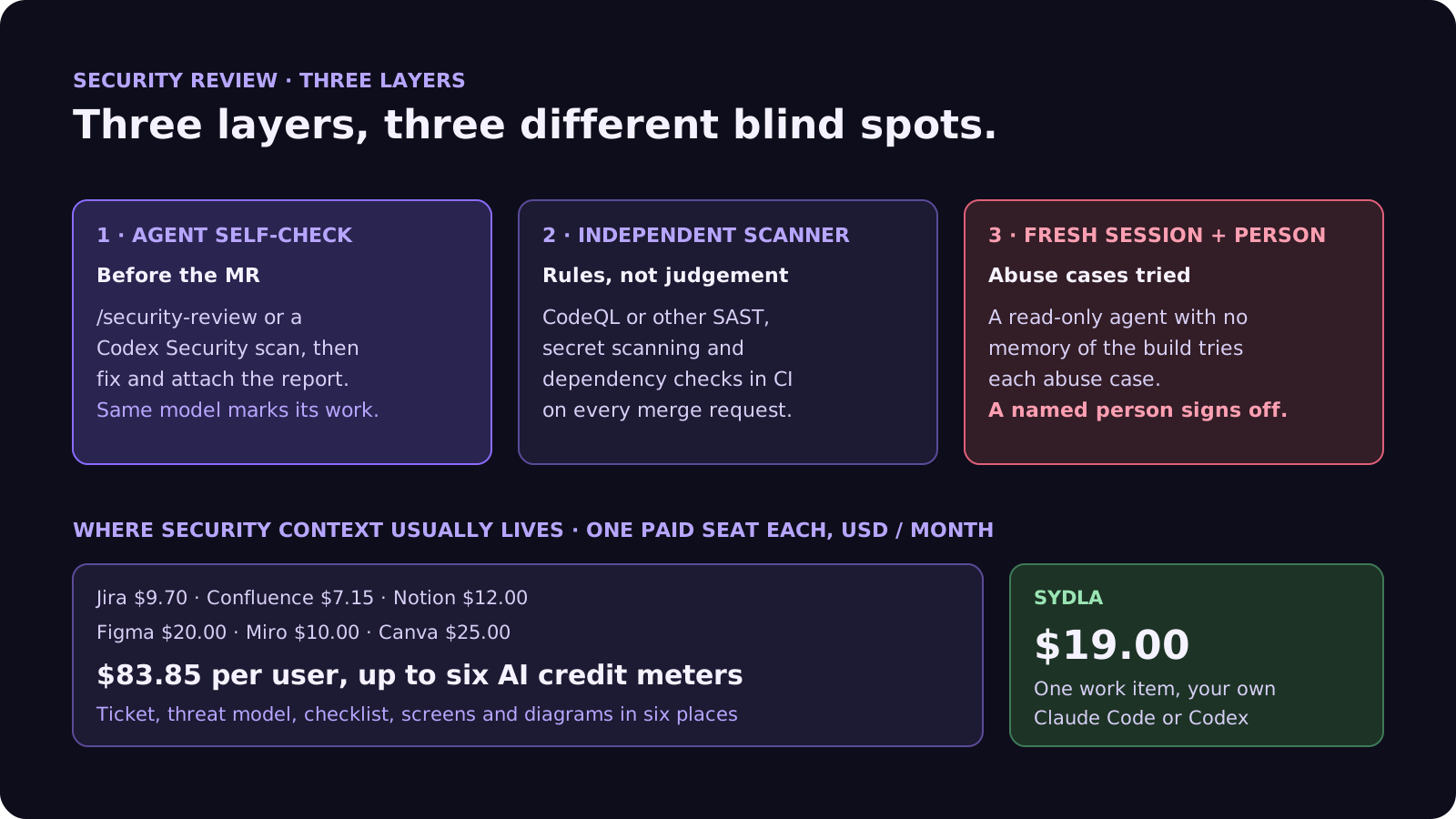
- Layer 1, agent self-check. Before it opens the merge request, the agent runs /security-review in Claude Code or a Codex Security scan, fixes what it finds and attaches the report. Cheap and fast, but the same model is marking its own work.
- Layer 2, independent scanner. CodeQL or another SAST tool, secret scanning and dependency checks run in CI on every merge request. Rules, not judgement, so they catch what the model talks itself out of.
- Layer 3, fresh-session reviewer and a person. A second agent session with read-only tools and no memory of the build reads the brief and the diff, and tries each abuse case. For trust-boundary and supply-chain tickets, the named reviewer reads its report and signs off.
Two guardrails matter here. Run automated review only on trusted pull requests: a review agent that reads untrusted code can be steered by it, which our prompt injection guide covers in depth. And never let an agent dismiss a scanner alert or mark one a false positive. It can argue the case; a person closes it. Our four-pass review checklist covers the rest of the review.
Where security context lives in 2026, and what it costs
A security review needs the ticket, the threat model, the checklist, the screens and the diagrams. Before any scanner, that is usually six subscriptions:
| Tool and plan | Seat / month | AI layer and limits | Security context usually kept there |
|---|---|---|---|
| Jira Standard | $9.70 | Rovo, 25 credits per user per month on Standard (70 Premium, 150 Enterprise), $0.01 per extra credit from 3 Dec 2026 | The ticket and the security label |
| Confluence Standard | $7.15 | Same pooled Rovo credits | Threat model, security policy |
| Notion Plus | $12.00 | Custom Agents on credits, Business and Enterprise only | Review checklist, owners |
| Figma Professional, Full seat | $20.00 | 3,000 AI credits per Full seat per month; MCP reads 200 per day on Full and Dev | Permission and error screens |
| Miro Starter | $10.00 | Create with AI on Miro credits | Data-flow and trust-boundary diagram |
| Canva Business | $25.00 | Canva AI usage per member | Customer and incident notices |
| Six-tool total | $83.85 | Up to six meters, six MCP servers | One review, six places |
| Sydla | $19.00 | None: your own Claude Code or Codex plan pays for the model | Brief, abuse cases, states, run, evidence and sign-off on one work item |
Your scanner stays: Sydla does not replace CodeQL or secret scanning. It replaces the six places a reviewer has to rebuild the threat model from. The comparison overview covers each tool, and the pricing section lists the source for every price.
Keep the threat model where the agent works, without a second AI bill
Keep the brief, the abuse cases, the UX states, the agent run, the scanner output and the sign-off on one work item, and let your own coding agent read them through one connection, for $19 per month instead of $83.85. That is $64.85 saved per user, every month, with no credit meter running while the agent builds, checks and fixes.
Step 4: fix findings one ticket at a time
Findings are where agents shine, if each one is briefed like a bug:
- Triage first, by a person. True positive, false positive or accepted risk. Only true positives become tickets.
- One finding per ticket. The alert, the file, the abuse case it enables and the lane.
- Exploit as a failing test. The agent writes a test that reproduces the attack and fails on the current code, then fixes it until the test passes. GitHub's agentic autofix follows the same idea: it reruns CodeQL to prove the alert is closed.
- Rescan, then review. The scanner runs again on the fix, and the fresh-session reviewer checks the fix didn't move the hole somewhere else.
Vulnerable dependencies follow the same loop. Our dependency upgrade guide covers cooldowns, lockfile diffs and why install scripts stay off.
Step 5: keep the evidence for the audit you'll have later
Security frameworks such as SOC 2 and ISO 27001 ask how changes are reviewed and approved. When an agent writes the change, the honest answer is a trail: who asked for what, what the agent did, what checked it and who approved. Keep it on the work item, not in six tools:
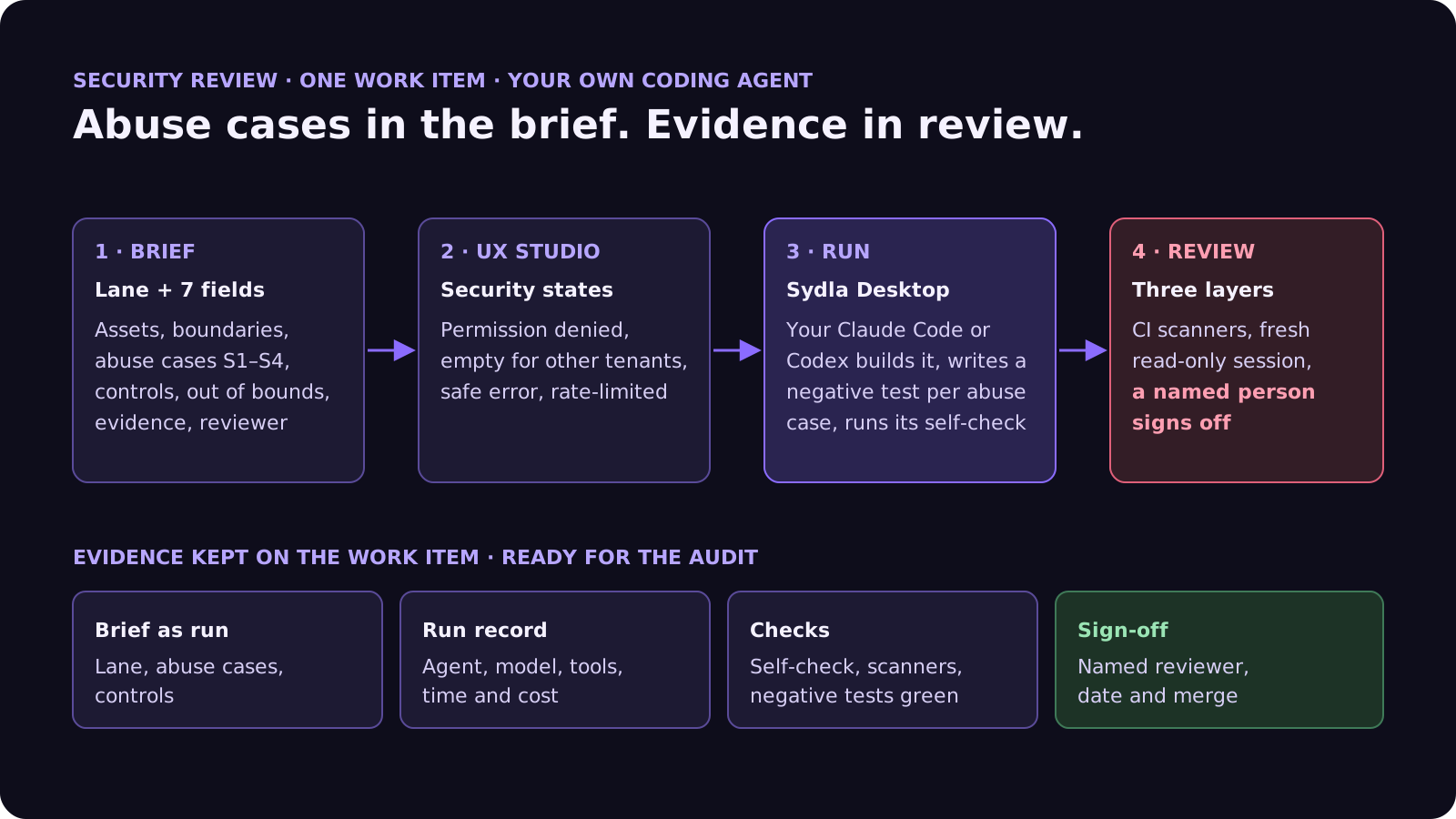
- The brief with its lane and abuse cases, as it was when the run started.
- The run record: which agent, which model, how long, what it cost, which tools it was allowed.
- The evidence: self-check report, scanner results and the negative tests passing.
- The sign-off: the named reviewer, the date and the merge.
Our release notes guide shows how the same run data becomes the changelog.
Walkthrough: brief, UX Studio, your agent in Sydla Desktop, review
Here is how a trust-boundary change moves through Sydla on one work item, with the coding agent you already pay for.
- Brief on the work item. The ticket in Sydla carries the lane, the acceptance criteria and the seven security fields, written once and read by every agent and person.
- States in UX Studio. Security has screens too: permission denied, the empty state another tenant would see, the error that must not leak a stack trace, the rate-limit message. Our design handoff guide explains why states beat screenshots.
- Run in Sydla Desktop with your own agent. Sydla Desktop launches the Claude Code or Codex CLI on your machine, signed in with your own Anthropic or OpenAI account. The agent reads the work item through the Sydla MCP server, builds the change, writes a negative test for each abuse case and runs its self-check. There are no Sydla AI credits and no token markup. The Desktop guide walks through the first run.
- Review and sign-off. CI scanners run, a fresh read-only session tries the abuse cases, and the named reviewer signs off on the work item before the merge.
Agents build and check. Scanners catch patterns. People own the threat model and the sign-off.
A filled-in example: a tenant invoice export
Here is a condensed security brief. The service and figures are illustrative:
- Lane: Trust boundary. A new endpoint returns invoice data as CSV.
- Assets: tenant invoices, customer names and VAT numbers.
- Entry point: authenticated users with the admin or billing role, from the web app only.
- Abuse cases: S1, a member of org A requesting org B's export gets a 404; S2, a viewer gets a 403; S3, a cell starting with an equals sign is escaped so the CSV can't run formulas in a spreadsheet; S4, more than 10 exports per minute per user are refused.
- Controls: the organisation comes from the session, never from the query string; every export is logged without the invoice contents.
- Out of bounds: no new CSV library, no changes to the auth middleware.
- Reviewer: the billing tech lead signs off.
In this example the agent's first run passes every functional criterion and fails S1: the endpoint trusted the org id in the URL. The negative test catches it before review, the agent switches to the session's organisation, and the self-check then flags S3, formula injection, which no one had thought about until it was written down. The scanner finds nothing, because both bugs were logic, not patterns. That is why abuse cases live in the brief. The bug report template shows how to brief a finding that slips through anyway.
Frequently asked questions
Is AI-generated code secure?
Not by default. Veracode's GenAI Code Security Report found risky security flaws in 45% of tests across more than 100 models, and larger, newer models didn't improve security. AI-generated code can be made safe with a brief that lists abuse cases, an independent scanner in CI and a review in a fresh session, with a person signing off on trust-boundary changes.
How do you do a security review with Claude Code?
Run /security-review in Claude Code before you commit; it checks pending changes for SQL injection, XSS, authentication and authorization flaws, insecure data handling and vulnerable dependencies. Anthropic's open-source GitHub Action runs the same review on every pull request. Use it on trusted pull requests only, and pair it with a scanner such as CodeQL and a human reviewer.
What is Codex Security?
Codex Security is OpenAI's vulnerability scanner, formerly called Aardvark. It launched as a research preview in March 2026, its CLI became open source under Apache 2.0 in July 2026, and Codex Security Cloud scans connected GitHub repositories on a schedule for ChatGPT Pro, Business, Enterprise and Edu customers, with token-based billing.
Should an AI agent review its own code for security?
As a first layer only. A model reviewing its own work in the same session tends to approve its own reasoning. Add an independent scanner in CI, a second agent session with read-only tools and no memory of the build, and a named person who signs off on authentication, permission, payment and supply-chain changes. Never let an agent dismiss a scanner alert.
How much does Sydla cost compared with Jira, Confluence, Notion, Figma, Miro and Canva?
Sydla costs $19 per user per month. One paid seat each of Jira Standard, Confluence Standard, Notion Plus, Figma Professional Full, Miro Starter and Canva Business costs $83.85 per user per month, so the saving is $64.85 per user per month. You bring your own Claude Code or Codex account, so your Anthropic or OpenAI plan pays for the model with no markup.































