Leaving Jira, Confluence, Notion and Figma: a 30-day migration plan for small product teams
Most teams that want to leave six tools never do, because the migration looks like a quarter of work. It is not, if you move only what is alive and let your own coding agent do the copying. Here is a 30-day plan, week by week, with every export limit we checked.

Why teams stay on six tools they want to leave
Ask a founding engineer what they would change about their stack and you hear the same list. The backlog is in Jira, the specs are in Confluence, the real plan is in Notion, the screens are in Figma, the flow from last month's workshop is on a Miro board, and the launch graphic is in Canva. That is six logins, six bills and, in 2026, six AI meters: Rovo credits pooled across Atlassian, Figma credits per Full seat, Notion agent credits on top of Business, Miro credits, Canva AI usage.
It is also six hops for your coding agent. When Claude Code or Codex picks up a ticket, it has to reach into each of those tools through a separate MCP server to find the brief, the decision, the states it must build and the acceptance criteria. Our AI credit fatigue piece adds up the meters, and our MCP servers guide counts the connections.
So why does nobody leave? Because a migration looks like a quarter of work: years of tickets, hundreds of pages, design files nobody wants to rebuild. That estimate is wrong for one reason. You do not need to move history. You need to move what is alive, archive the rest, and let the coding agent you already pay for do the copying. A team of two to fifteen people can do that in four weeks, next to normal work.
Rule one: move what is alive, archive everything else
Before any export, sort every item into one of three piles. This is the step that turns a quarter into a month.
- Move. Open tickets, anything closed in the last 90 days, the specs and decisions for work in progress, the screens being built now or next, and the brand assets you use every week. In most small teams this is 10 to 20 percent of what the tools hold.
- Archive. Everything else: closed tickets, old specs, past design explorations, workshop boards. Export it once, in the richest format each tool offers, and keep it read-only in storage you control. You will search it a few times a year, and a folder of HTML, CSV and .fig files does that job.
- Delete. Duplicates, empty templates and the five abandoned Notion workspaces. If nobody can say what a page is for, it goes in the archive, not the new workspace.
Write the rule into the plan as a sentence the whole team agrees with: "We move what we touched in the last 90 days or will touch in the next 90. Everything else is archived, not migrated." It ends most arguments before they start.
What each tool lets you export, and what it costs to keep
Every tool in the stack has an export, and each has limits worth knowing before week one. The seat prices are for one paid seat each; the export notes come from each vendor's help pages.
| Tool and plan | Seat / month | Export path and limits | What usually moves |
|---|---|---|---|
| Jira Standard | $9.70 | CSV from the issue navigator, up to 10,000 work items per export; split larger sets with JQL | Open and recent tickets, epics, labels |
| Confluence Standard | $7.15 | Space export to HTML, PDF, CSV or XML; Word per page; published content only; blogs not in HTML | Live specs and decision records |
| Notion Plus | $12.00 | Whole workspace as HTML or Markdown with CSV databases; link valid 7 days; workspace PDF retired in 2026 | The plan, meeting notes, roadmaps |
| Figma Professional, Full seat | $20.00 | Save a local copy as .fig, one file at a time; no version history or comments | Screens for current and next work |
| Miro Starter | $10.00 | Board export to PDF, image or CSV | Flows and maps still in use |
| Canva Business | $25.00 | Download each design as PDF, PNG or SVG | Logo, colours, recurring templates |
| Six-tool total | $83.85 | Six exports, six archives | 10 to 20 percent of the content |
| Sydla | $19.00 | Your own Claude Code or Codex does the import through one MCP server | Briefs, docs, tickets, UX states, assets |
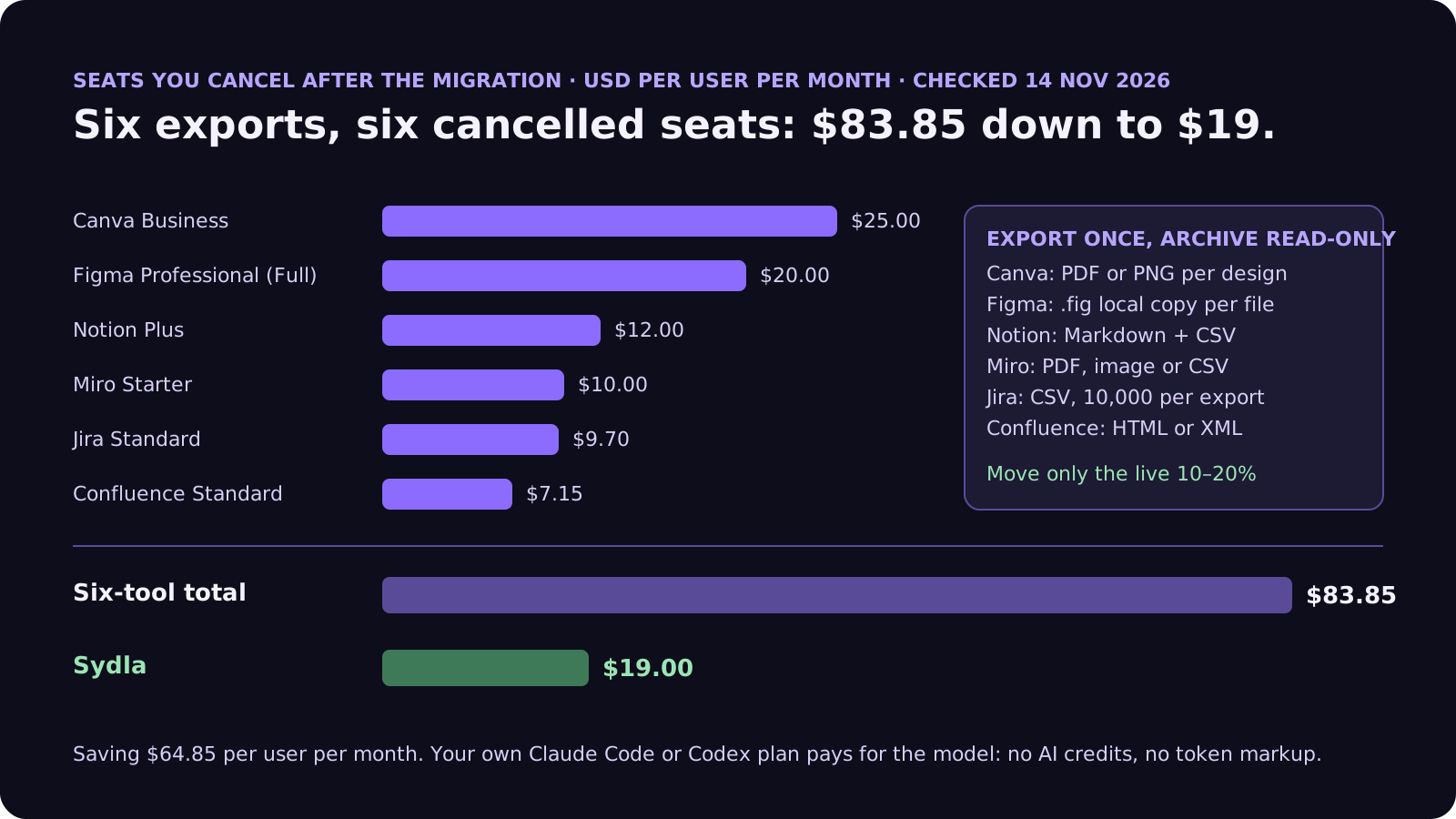
Two notes on timing. If you are on Atlassian Data Center, the end of life is 28 March 2029, so you are planning a migration either way; the question is only where to. And Rovo credits move to pay-as-you-go at $0.01 per extra credit from 3 December 2026, which is a good date to have fewer meters running. The comparison overview covers each tool, and the pricing section lists the source for every price.
Cut the stack without cutting your coding agent
Move the live work into one workspace and keep the Claude Code or Codex plan you already pay for, at $19 per user per month instead of $83.85. That is $64.85 saved per user, every month, with no AI credits and no token markup.
The 30-day plan, week by week
Each week ends with something the team can use, so you can pause after any of them without leaving work stranded in between.
- Week 1: inventory and archive. List every space, project, file and board, and put each in the move, archive or delete pile. Then export everything once: Jira to CSV, Confluence spaces to HTML (XML too if you want a full-fidelity copy), the Notion workspace to Markdown and CSV, Figma files as .fig local copies, Miro boards to PDF, Canva designs to PDF or PNG. Check every archive opens before you go further. Notion's download link expires after seven days and Figma has no bulk save, so start those two first.
- Week 2: docs. Create the spaces you actually need, usually Product and Engineering, in Sydla. Give your coding agent the Markdown and HTML exports of the live pages and ask it to rewrite them as Sydla documents: one document per spec or decision, in the right folder, with links to the epics they describe. Miro flows still in use become diagrams inside the document, written as Mermaid or as Sydla's own boxes and arrows. A person reviews each space before the team switches its bookmarks.
- Week 3: work and screens. Filter Jira to open work plus the last 90 days, export it to CSV, and have the agent create the matching initiatives, epics and tickets, keeping the old key in each ticket so links in commits still make sense. For screens, do not try to convert .fig files. Rebuild only the screens for current and next work as UX Studio states (empty, loading, error, done), which is what an agent needs anyway; our design-to-code handoff guide explains why states beat screenshots.
- Week 4: one real feature, then cancel. Run one real feature through the new setup from brief to merge, with the acceptance criteria on the work item and the agent reading everything through one connection. If it works, set the old tools to read-only and cancel each seat at its renewal date, Canva last if marketing still uses it for a launch. If something is missing, you find out on one feature, not on the whole backlog.
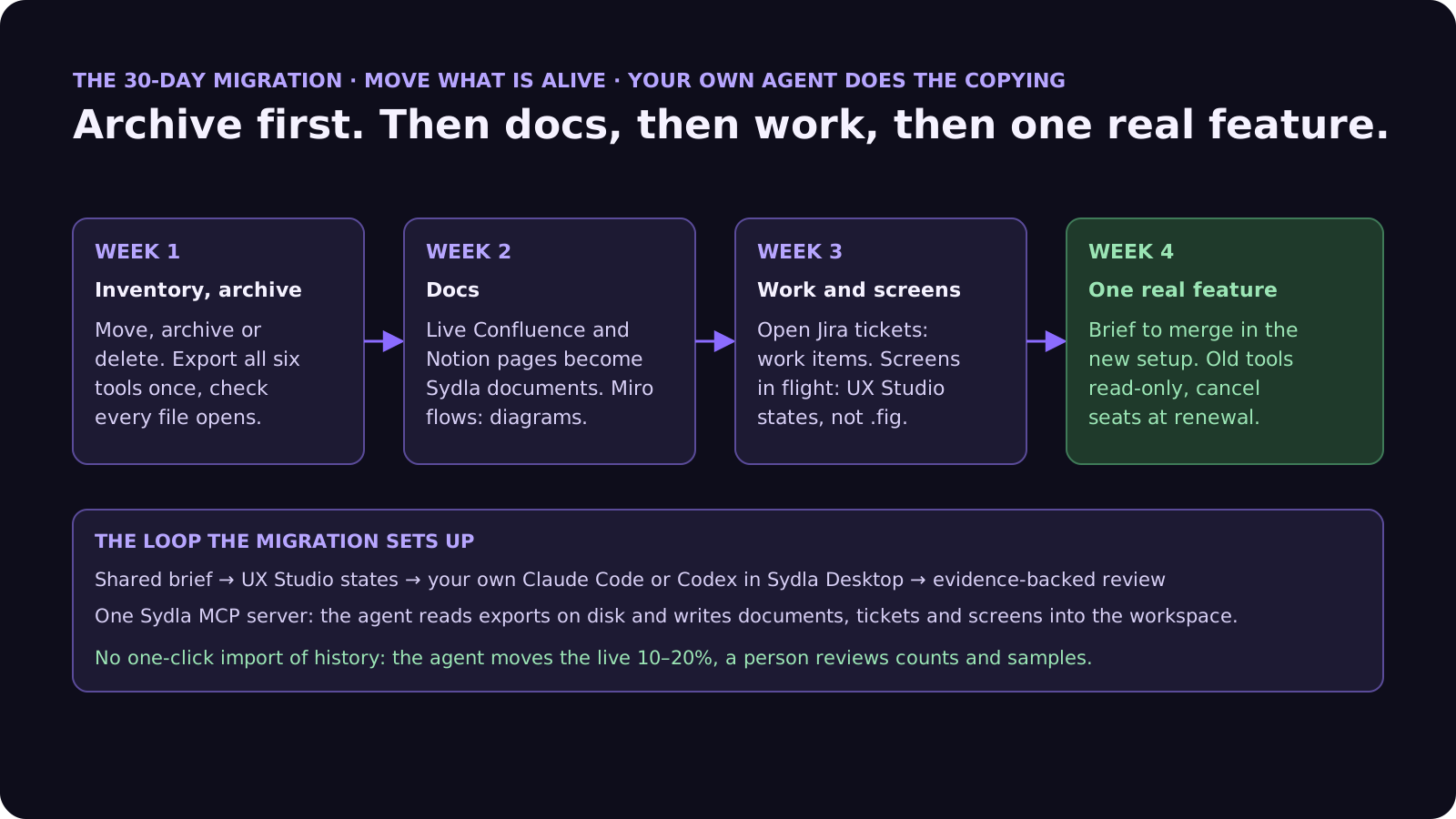
A word on what we do not do: Sydla has no one-click Jira or Figma importer. We think that is the right call for a small team, because a one-click import moves the 80 percent you meant to leave behind. The agent-driven import is slower per item and much faster overall, because it only touches what is alive.
How your own Claude Code or Codex does the copying
The import work in weeks 2 and 3 is exactly the kind of tedious, checkable job coding agents are good at. Here is how it runs in Sydla Desktop.
- Connect your own agent. Sydla Desktop launches the Claude Code or Codex CLI on your machine, signed in with your own Anthropic or OpenAI account. Your plan pays for the model; Sydla adds no AI credits and no token markup. The Desktop guide walks through the first connection.
- One MCP server, both directions. The agent reads the export files on your disk and writes into the workspace through one Sydla MCP server: documents in Markdown, initiatives, epics and tickets, acceptance criteria, UX screens and images. The same connection it will later use to read a brief is the one it uses to build the workspace.
- Write the import as a brief. Treat each import as a small ticket: the source folder, the move rule (open or touched in the last 90 days), the mapping (Jira epic to Sydla epic, Confluence page to document, story points to estimate), what to skip, and what done means: a count of items moved per type and a list of anything the agent was unsure about. Our PRD template for agents has the same shape.
- Review like any agent run. The run writes its evidence back: counts, skipped items, open questions, run cost. A person spot-checks ten items per type, then approves. Use the same habits as our guide to reviewing AI pull requests: check intent, evidence and risk, not every line.
From then on, the loop the team runs every day is the one the migration set up: shared brief, UX Studio states, your own agent implementing, evidence-backed review, and GitLab merge requests linked to the work item. Agents propose. People decide.
Five migration mistakes to avoid
These cost the most time in the migrations we have seen:
- Migrating history. Five years of closed tickets do not help anyone build next week. Archive them, keep the CSV, and move on.
- Running two systems for months. A long overlap means every update happens twice or, more often, once in the wrong place. Pick a switch date per space and stick to it; the old tool goes read-only that day.
- Converting design files instead of rebuilding states. Pixel-perfect conversion of a .fig file is a rabbit hole. The agent needs states and rules, not layers. Rebuild the few screens in flight and keep the .fig copies in the archive.
- Cancelling before checking the archive. Open every export before you cancel anything. Remember that Confluence HTML exports leave out blog posts and Figma local copies drop comments and version history.
- Skipping the real feature. A migration is not done when the content is copied. It is done when one feature has gone from brief to merge in the new setup without anyone opening an old tool. Our solo founder stack guide shows what that weekly loop looks like.
Frequently asked questions
How long does it take to migrate off Jira and Confluence?
For a team of two to fifteen people, about four weeks next to normal work, if you move only what is alive: open tickets, work closed in the last 90 days, and the specs and decisions for current work. Archive everything else as Jira CSV and Confluence HTML or XML exports instead of migrating it.
How do I export everything from Jira Cloud?
Use the CSV export in the issue navigator. It handles up to 10,000 work items per export. For larger projects, split the search into non-overlapping JQL batches, for example by created date, export each batch and merge the files. Confluence spaces export separately to HTML, PDF, CSV or XML from Space settings.
Can I move Figma designs to another tool without losing them?
Save a local copy of each file as .fig from the File menu and keep it in your archive. Local copies do not include version history or comments, and Figma saves one file at a time. For the new tool, rebuild only the screens for current and next work as states, such as empty, loading, error and done, rather than converting every file.
Does Sydla import from Jira, Notion or Figma automatically?
No one-click importer. Your own Claude Code or Codex agent reads the export files on your machine and writes documents, tickets and UX screens into Sydla through its MCP server, following a short import brief. A person reviews counts and samples before approving. This moves only the live work, which is usually 10 to 20 percent of what the old tools hold.
How much does Sydla save compared with Jira, Confluence, Notion, Figma, Miro and Canva?
Sydla costs $19 per user per month. One paid seat each of Jira Standard, Confluence Standard, Notion Plus, Figma Professional Full, Miro Starter and Canva Business costs $83.85 per user per month, so the saving is $64.85 per user per month. You bring your own Claude Code or Codex account, so your Anthropic or OpenAI plan pays for the model with no markup.































