Feature flags with AI coding agents: a rollout playbook for Claude Code and Codex
Coding agents now merge faster than most teams can release safely. Feature flags fix that, if the rules are clear: the agent writes the flag and tests both paths, people turn the dial in production, and every flag ships with a cleanup ticket an agent can close.

Your agent merges in minutes. Your release still happens all at once
A coding agent can turn a clear ticket into a reviewed merge request before lunch. Then the change ships to every user at the next deploy, all at once. If the new tax calculation is wrong, every checkout is wrong until someone rolls back the whole release, along with the four other changes that went out with it.
That gap is getting wider. The DORA research team keeps finding that delivery stability tends to drop as AI use goes up. Unleash put it bluntly in February 2026 after building a feature with Claude Code: at no point did the agent ask whether the change should sit behind a feature flag. Agents do what the ticket says. If the ticket says nothing about how the change reaches users, nobody plans the release.
The plan is also scattered. The ticket sits in Jira, the rollout plan in Confluence, the launch checklist in Notion, the flag-on and flag-off screens in Figma, the dependency map on a Miro board and the announcement in Canva. That is six context hops for an agent and, with each vendor's own AI, up to six credit meters. Our AI credit fatigue piece adds them up.
This playbook gives the agent and the team clear jobs. The agent writes the flag and tests both paths. People turn the dial in production. Every flag ships with a cleanup ticket that an agent can close.
What flag tools already give your agent in 2026
The big feature flag platforms all ship an MCP server now, so Claude Code or Codex can read and change flags from your terminal:
- LaunchDarkly. A hosted MCP server covers feature management, AgentControl and observability. URL parameters choose which toolsets the agent sees and whether it can write. A removal-readiness tool reports whether a flag is safe, needs caution or is blocked, with evidence. Federal and EU instances use a local server instead.
- Unleash. Version 2 of its MCP server replaced one tool per API call with tools built around outcomes: release, kill switch, experiment, search, inspect and manage flag. If an environment needs change requests, the server submits a request and a person approves it. The remote server is an Enterprise feature; the local one installs with a single claude mcp add command.
- GrowthBook. Its MCP server is open source, hosted with OAuth sign-in or run on your own servers. Its suggested prompts include a weekly stale-flag cleanup.
- Statsig. OpenAI announced it was buying Statsig in September 2025 for about $1.1 billion in stock, which shows how central rollout control has become to AI product teams.
These servers handle the mechanics well. None of them knows why a change needs a flag, what the safe default is, which metric proves it works, or when it should be removed. That belongs in the ticket, and most tickets leave it out.
Step 1: decide which changes need a flag
Not every change needs a flag. Flag too much and the code fills with branches that nobody removes. Use four kinds and say which one the ticket wants:
- Release flag. A new behaviour reaches users in stages. Temporary: it is removed once the change is fully live.
- Kill switch. It turns off a risky path quickly, such as a new payment provider or a heavy query. It can stay longer, but a person owns it and it is tested.
- Experiment. Two versions are compared against a metric. Remove it as soon as the decision is made.
- Permission or plan flag. Who can see what, for example beta customers or a paid tier. It is long-lived, so treat it as product configuration, not release work.
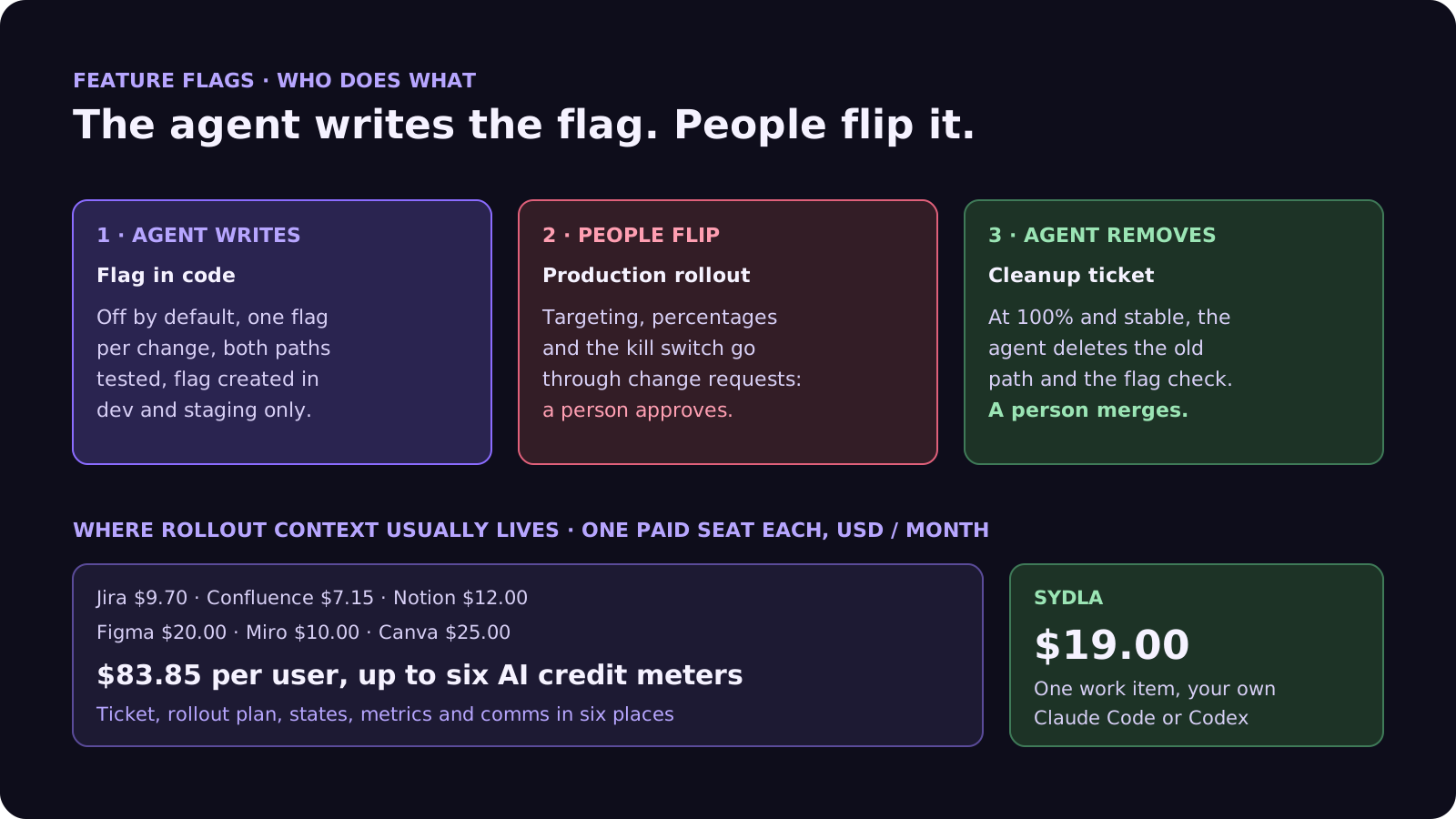
Use a simple rule. Anything that touches money, data shape, authentication or a shared screen goes behind a release flag. Copy changes and internal refactors with good tests usually don't need one.
Step 2: the seven-field rollout ticket
Add these seven fields to the ticket, next to the acceptance criteria. Each one answers a question the agent would otherwise guess:
- 1. Flag name and kind. For example checkout-tax-v2, a release flag. One flag per change, named after the behaviour, not the ticket number.
- 2. Default and fallback. Off by default in every environment. When the flag is off, users get the current behaviour exactly, and a test proves it.
- 3. Both paths tested. Acceptance criteria apply with the flag on. A regression test proves nothing changed with the flag off.
- 4. Rollout stages. Who sees it first and how long each stage holds: 1% internal, 10% one region, 50%, 100%.
- 5. Guardrails. The metrics that must hold before the next stage, with numbers: error rate, latency, a business number such as tax totals matching the old engine.
- 6. Kill criteria and owner. What breach turns the flag off, and the person who does it. A person, not the agent.
- 7. Cleanup date. When the flag and the old path are removed, as a linked ticket created now, not someday.
Fields 2 and 3 matter most for agents. An agent will happily make the new path pass and quietly change the old one. Our acceptance criteria guide explains how to write criteria an agent can't satisfy by accident.
Step 3: the agent writes the flag, people flip it
Connecting your agent to a flag platform's MCP server lets it create flags. Set up permissions so it can't release anything to production:
- Writes in dev and staging only. Give the agent a token scoped to non-production environments. On LaunchDarkly, leave writes switched off for any session that does not need them.
- Change requests in production. Turn on approvals for production in Unleash or LaunchDarkly. An agent that tries to change a production flag files a request instead, and a person approves it.
- Merge dark. The merge request lands with the flag off. Reviewers check the evidence for both paths, not just the new one. Our four-pass review checklist covers the rest.
- Hooks as a backstop. In Claude Code, a PreToolUse hook that exits non-zero blocks the tool call. Use one to refuse flag writes outside the environments the ticket allows.
Where rollout context lives in 2026, and what it costs
A rollout needs a ticket, a plan, screens, metrics and an announcement. Before your flag platform, that usually means six subscriptions:
| Tool and plan | Seat / month | AI layer and limits | Rollout context usually kept there |
|---|---|---|---|
| Jira Standard | $9.70 | Rovo, 25 credits per user per month on Standard (70 Premium, 150 Enterprise), $0.01 per extra credit from 3 Dec 2026 | The ticket and the release version |
| Confluence Standard | $7.15 | Same pooled Rovo credits | Rollout plan, runbook |
| Notion Plus | $12.00 | Custom Agents on credits, Business and Enterprise only | Launch checklist, owners |
| Figma Professional, Full seat | $20.00 | 3,000 AI credits per Full seat per month; MCP reads 200 per day on Full and Dev | Flag-on and flag-off screens |
| Miro Starter | $10.00 | Create with AI on Miro credits | Dependency and rollout map |
| Canva Business | $25.00 | Canva AI usage per member | Announcement and changelog visuals |
| Six-tool total | $83.85 | Up to six meters, six MCP servers | One rollout, six places |
| Sydla | $19.00 | None: your own Claude Code or Codex plan pays for the model | Ticket, rollout fields, UX states, run, review and cleanup on one work item |
Your flag platform stays: Sydla does not serve flags. It replaces the six places the rollout plan has to be pieced together from. The comparison overview covers each tool, and the pricing section lists the source for every price.
Plan the rollout where the agent works, without a second AI bill
Keep the brief, the seven rollout fields, the UX states, the agent run and the cleanup ticket on one work item, and let your own coding agent read them through one connection, for $19 per month instead of $83.85. That is $64.85 saved per user, every month, with no credit meter running while the agent wraps, tests and later removes the flag.
Step 4: turn the dial in stages, with guardrails
Each stage holds until its guardrails pass. A person decides when to move on. The agent can help, read-only:
- 1% internal. Staff accounts only, for a few hours. Watch errors and the business guardrail.
- 10%, one region. Hold 24 hours. This is where real data shapes show up.
- 50%. All regions, 24 to 48 hours. Compare the flag-on and flag-off groups directly.
- 100%. Everyone, for at least one full business cycle, such as a billing run, before cleanup starts.
Between stages, ask the agent for a short report built from read-only metrics, logs and the flag's evaluation data. If a guardrail is breached, the owner turns the flag off first and asks questions later. Our incident postmortem playbook explains why the agent stays read-only while users are affected.
Step 5: make flag cleanup a ticket, not a chore
Stale flags are technical debt that compounds. Every flag left in place doubles the paths a future agent has to understand. Flag platforms now help: LaunchDarkly's removal-readiness check and code references, Unleash's cleanup guidance and GrowthBook's stale-flag prompts all point at flags that are done. Write the removal as a normal ticket:
- Proof it is done. The flag has served 100% for the agreed period, and the platform reports it ready to remove.
- Scope. Delete the flag check, the old path and its tests, but keep the tests for the new behaviour.
- Done means. The suite is green, no references to the flag are left in code, the flag is archived in the platform, and a person merges.
This is ideal agent work: mechanical, well bounded and easy to verify. Our refactoring guide covers the safety net, and the cost per ticket guide shows why small, clear tickets like this are cheap to run.
Walkthrough: brief, UX Studio, your agent in Sydla Desktop, review
Here is how a flagged change moves through Sydla on one work item, with the coding agent you already pay for.
- Brief on the work item. The ticket in Sydla carries the acceptance criteria and the seven rollout fields. The cleanup ticket is created in the same plan, linked and dated.
- States in UX Studio. The flag-on and flag-off screens are both UX Studio states, along with loading, error and the fallback users see if the flag is turned off mid-session. Our design handoff guide explains why states beat screenshots.
- Run in Sydla Desktop with your own agent. Sydla Desktop launches the Claude Code or Codex CLI on your machine, signed in with your own Anthropic or OpenAI account. The agent reads the work item through the Sydla MCP server and your flag platform through its own MCP server with a non-production token, then wraps the change and tests both paths. There are no Sydla AI credits and no token markup. The Desktop guide walks through the first run.
- Review and release. A person checks the evidence for both paths and merges with the flag off. The flag owner turns the dial stage by stage, and the cleanup ticket waits in the plan for its date.
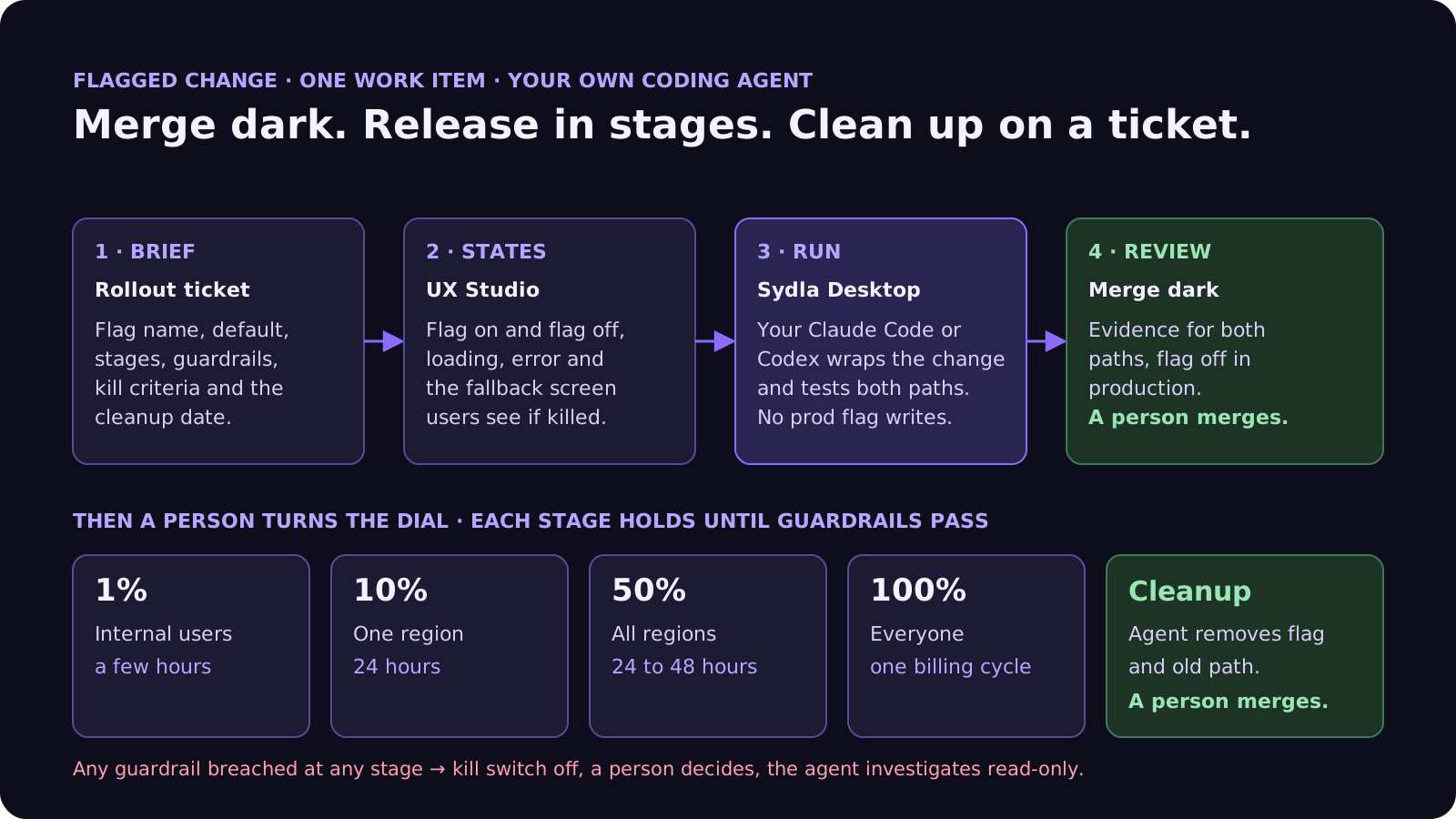
Agents write and remove flags. People decide who sees what, and when.
A filled-in example: a new tax engine at checkout
Here is a condensed rollout ticket. The service and figures are illustrative:
- Flag: checkout-tax-v2, release flag, off by default in every environment.
- Both paths: with the flag on, criteria AC1 to AC4 cover the new rates and rounding. With it off, a golden-file test proves 500 recorded baskets get exactly the old totals.
- Stages: 1% staff for 4 hours; 10% in one country for 24 hours; 50% for 48 hours; 100% through one monthly billing run.
- Guardrails: checkout errors under 0.5%, p95 latency within 50 ms of baseline, tax totals within 0.01 of the old engine on the shadow comparison.
- Kill criteria and owner: any guardrail breached for 10 minutes; the payments lead turns the flag off.
- Agent permissions: flag writes in dev and staging; production changes go through change requests.
- Cleanup: linked ticket dated two weeks after 100%: remove the old engine, the flag check and the golden-file test for the old path.
In this example the 10% stage catches a rounding difference on baskets with mixed tax rates. The owner turns the flag off and an agent reproduces the problem with a failing test. The fix ships dark, behind the same flag. No rollback and no hotfix release. The bug report template shows how to brief that fix, and the CI fix guide covers the build side.
Frequently asked questions
Should AI coding agents use feature flags?
Yes, for any change that touches money, data shape, authentication or a shared screen. The agent wraps the change in a flag that is off by default and tests both paths. People control the production rollout. Agents merge faster than most teams can release safely, and flags let you release in stages and turn a change off without a rollback.
Can Claude Code or Codex change feature flags directly?
Yes. LaunchDarkly, Unleash and GrowthBook all ship MCP servers that Claude Code and Codex can connect to. Give the agent write access only in dev and staging, and require change requests or approvals in production, so a person releases every change to users. Unleash submits a change request instead of applying the change when an environment needs one.
What should a feature flag rollout plan include?
Seven fields work well: the flag name and kind, the default and fallback, tests for both paths, rollout stages with hold times, guardrail metrics with numbers, kill criteria with a person who owns the switch, and a dated cleanup ticket. Put them in the ticket next to the acceptance criteria so the agent doesn't guess.
How do you clean up stale feature flags with AI?
Make removal a normal ticket created when the flag is created. Once the flag has served 100% for the agreed period and the platform reports it ready to remove (for example LaunchDarkly's removal readiness or Unleash's cleanup guidance), an agent deletes the flag check, the old path and its tests, and a person merges.
How much does Sydla cost compared with Jira, Confluence, Notion, Figma, Miro and Canva?
Sydla costs $19 per user per month. One paid seat each of Jira Standard, Confluence Standard, Notion Plus, Figma Professional Full, Miro Starter and Canva Business costs $83.85 per user per month, so the saving is $64.85 per user per month. You bring your own Claude Code or Codex account, so your Anthropic or OpenAI plan pays for the model with no markup.































