PII in logs with AI coding agents: logging briefs, redaction layers and canary tests for Claude Code and Codex
A coding agent fixes a flaky password reset by adding debug logs. The bug is gone, and every reset email and token is now in your log vendor, your error tracker and, the next time an agent reads the logs, your model's context. This playbook keeps personal data out with a logging brief, three redaction layers and a test that can fail.

The bug was fixed. The emails were in the logs
The ticket says: password reset fails for some users, add logging to find out why. A coding agent does exactly that. It logs the incoming request body, the user record it found, the outgoing email payload and the response from the mail provider. The next morning the cause is obvious, a trailing space in some addresses, and the fix is one line. The merge request with both changes is green and gets approved.
What nobody removed is the logging. Every reset now writes the user's email, name and a live reset token to the log vendor. The error tracker attaches the same request body to every exception. Retention is 30 days, three teams can search the index, and an export job copies it to a data warehouse. A week later another agent, debugging something else, reads those logs through an MCP server, and a few hundred email addresses travel into a model's context window.
The agent was not careless. Nobody told it what must never be logged, where redaction happens or how to prove it. That knowledge is scattered: the ticket in Jira, the data policy in Confluence, the privacy notes in Notion, the reset screens in Figma, the data flow on a Miro board and the customer notice template in Canva. Six tools, six context hops, up to six AI credit meters. Our AI credit fatigue piece adds up what that costs.
This playbook sorts logged data into four classes, gives the agent a seven-field logging brief, puts redaction in three layers, and makes a planted canary value the proof that it works.
Why this matters more in 2026
Logging personal data was always a risk. Agents change two things: they write far more log lines, and they now read logs too. The facts worth knowing:
- Regulators fine logging mistakes. On 27 September 2024 the Irish Data Protection Commission fined Meta 91 million euros over user passwords stored in plaintext on internal systems. Data that nobody meant to keep still counts as data you process.
- Agents read logs directly. Datadog's MCP server, generally available since March 2026, gives Claude Code, Codex and other clients live logs with the signed-in user's own permissions. Datadog says it does not send your data to a third-party AI provider itself, but your coding agent does send what it reads to its model. Whatever is in the log is now in the prompt.
- Vendors scrub, within limits. Datadog's Sensitive Data Scanner can redact logs, APM spans, RUM events and Agent Observability traces. Sentry's newer SDKs leave PII out unless send-default-pii is on, and its server-side scrubbing is on by default, but only for a set list of fields, and rule changes apply to new events only, not to what is already stored.
- The pipeline can enforce an allow list. The OpenTelemetry Collector's redaction processor, in the contrib distribution, drops every attribute that is not on an allow list and masks values that match blocked patterns. The transform processor handles free-text log bodies.
- Secret scanning moved into the agent loop. GitHub's MCP server lets agents check code for secrets before a commit, generally available since May 2026, and push protection for AI-detected secrets beyond the known patterns entered public preview on 28 October 2026, billed in AI credits once you opt in.
- Coding agents redact their own telemetry by default. Claude Code's OpenTelemetry export leaves prompt text out unless OTEL_LOG_USER_PROMPTS is set, and tool arguments and bodies need their own opt-in. Keep those off for teams that work on customer data.
Each layer helps, and none of them knows your data. A scanner does not know that a field called ref holds a customer's tax id. That knowledge belongs in the brief.
Step 1: sort logged data into four classes
The OWASP Logging Cheat Sheet lists what to keep out of logs: session ids, access tokens, passwords, connection strings, keys, payment card data and sensitive personal data. Turn that into four classes the agent can apply field by field:
- Never. Passwords, tokens, API keys, session cookies, authorization headers, card numbers, full request and response bodies, file contents. No layer is allowed to let these through, not even at debug level.
- Restricted. Personal data such as email, name, address, phone and IP address. Hash or pseudonymize it, or keep it on traces with short retention. Never put it on a metric label.
- Internal ids. Your own user, account, order and trace ids. Allowed, and the right way to find a person's records without logging who they are.
- Operational. Status, step, duration, error codes, versions, plan and region. Log freely.
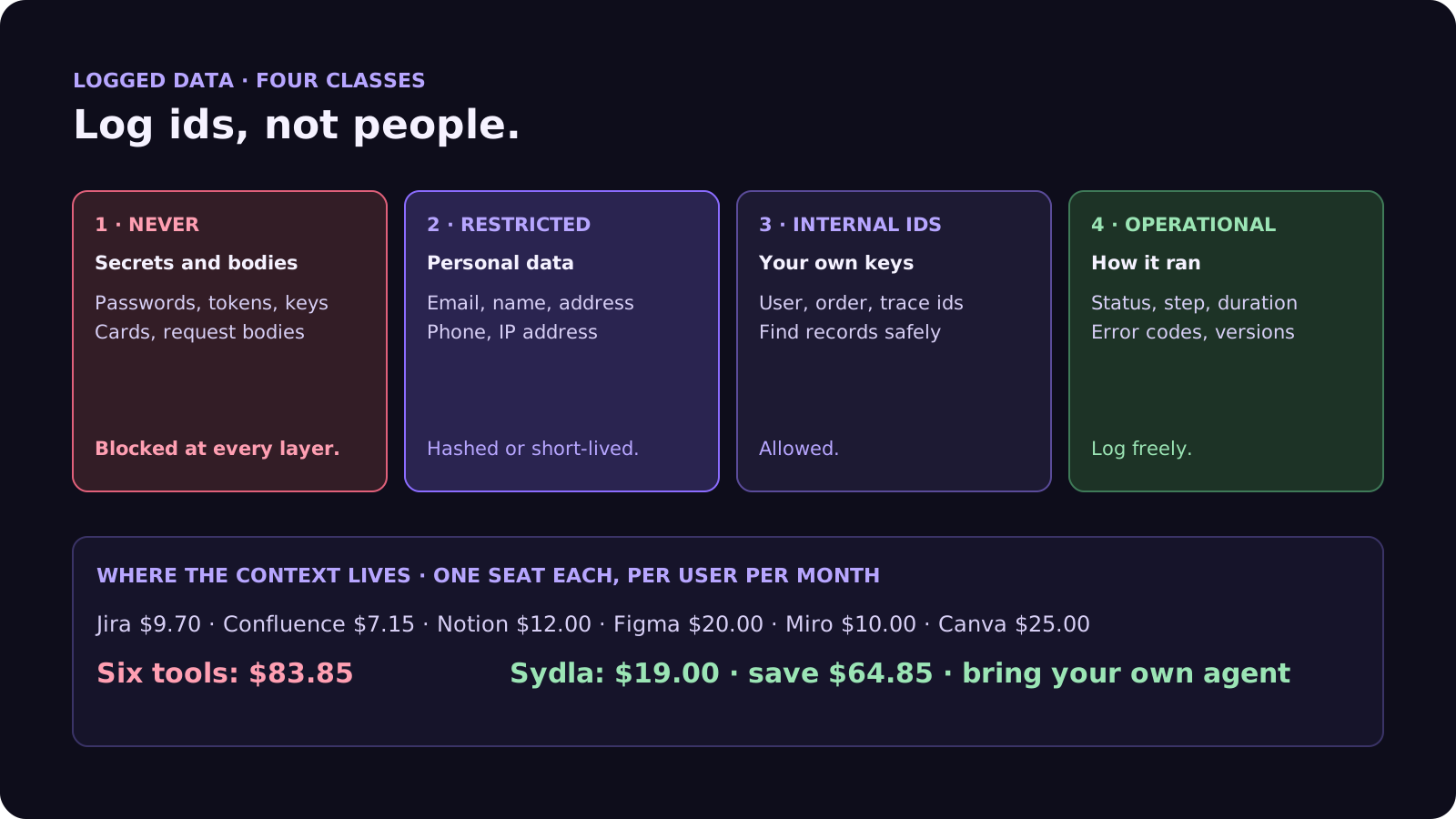
Agents need the classes written down because a model asked to make debugging easier will log everything it can reach: more context looks more helpful. Our observability guide applies the same idea to metric labels, and the prompt injection guide explains why text that users wrote and that ends up in logs is untrusted input when an agent reads it back.
Step 2: the seven-field logging brief
For any ticket that adds or changes logging, error reporting or analytics events, add these seven fields next to the acceptance criteria:
- 1. The question. What should someone be able to answer from these logs? Logging without a question becomes logging everything.
- 2. Events and levels. Which events, at which level, and which debug logs must be removed before merge. Temporary logging gets an end date.
- 3. Field allow list. The exact fields each event may carry, by class. Anything not on the list is not logged.
- 4. Redaction layer. Where each restricted field is handled: in code, in the collector or at the vendor. At least two layers for anything in the Never class.
- 5. Retention and access. How long the logs live, who can search them and which exports copy them elsewhere.
- 6. Agent access. Which indexes an agent may read through MCP, read-only, and whether it reads a scrubbed view. No agent reads raw auth or payment logs.
- 7. Done means. A canary test passes: known fake values are pushed through the code path and none appears in the log output, the error event or the exported span.
Field 7 is the one that changes behaviour. A rule an agent can test is a rule it follows; a rule in a policy page is a rule it never sees. Our acceptance criteria guide explains why criteria must be checkable, and the writing tests guide shows how to prove a test can fail.
Step 3: three redaction layers and a canary
No single layer catches everything, so put one in each place data passes:
- In code. A structured logger with a typed event per log line and an allow list of fields, plus helpers such as maskEmail and hashId. Ban logging whole request objects in review and in lint where you can. This is the layer the agent writes, and the only one that knows your field names.
- In the pipeline. The OpenTelemetry Collector's redaction processor with an allow list of attribute keys and blocked patterns for emails, card numbers and bearer tokens, and the transform processor for log bodies. This catches what code review missed, before data leaves your network.
- At the vendor. Datadog's Sensitive Data Scanner, Sentry's server-side and advanced scrubbing, or your vendor's equivalent, set to redact rather than only flag. This is the last net, and it does not clean data already stored.
- The canary. A test that sends a fake user with a recognizable email, token and card number through the changed path, then asserts that none of these strings appears in captured log output or error events. Make it fail first by adding a bad log line on purpose.
Then protect the agent's own side. In Claude Code, deny reads of .env files and secrets folders in the permissions settings, and keep prompt and tool content out of its telemetry. In Codex, keep the default workspace-write sandbox with network off for logging work. Our security review guide covers the review that follows.
Where data-handling context lives today, and what it costs
Before the log vendor itself, the agent's rules are spread across the usual stack. Here is one paid seat of each next to Sydla. Compare them one by one on our comparison pages.
| Tool and plan | Seat / month | Built-in AI billing | Data-handling context it holds |
|---|---|---|---|
| Jira Standard | $9.70 | Rovo credits: 25 per user per month on Standard, 70 on Premium, 150 on Enterprise; $0.01 per extra credit from 3 December 2026 | The ticket and the clean-up follow-ups |
| Confluence Standard | $7.15 | Rovo, same credit pool | Data classification and retention policy |
| Notion Plus | $12.00 | Notion AI and Custom Agents on Notion credits | Privacy notes and processor list |
| Figma Professional, Full seat | $20.00 | 3,000 AI credits a month | Forms and screens that collect personal data |
| Miro Starter | $10.00 | Create with AI on Miro credits | Data flow diagrams |
| Canva Business | $25.00 | Canva AI usage per member | Customer notice and incident graphics |
| Six-tool total | $83.85 | Up to six meters, plus your coding agent and log vendor | Six places to look |
| [Sydla](/) | $19.00 | None: your own Claude Code or Codex plan pays for the model, with no markup | One work item: brief, field rules, states, runs and evidence |
That is $64.85 per user per month less than the six-tool stack, before any AI overage. Your log vendor and error tracker stay where they are; the agent reaches them through their own MCP servers. The pricing section has the details.
Walkthrough: brief, UX Studio, your agent in Sydla Desktop, review
Here is how a logging change moves through Sydla on one work item, with the coding agent you already pay for.
- Brief on the work item. The ticket carries the acceptance criteria and the seven logging fields, written once and read by every agent and person.
- States in UX Studio. The reset form, the email sent screen, the expired link and the error states. Each screen shows which fields it collects, so the agent knows which inputs are personal data before it writes a log line. Our design handoff guide explains why states beat screenshots.
- Run in Sydla Desktop with your own agent. Sydla Desktop launches the Claude Code or Codex CLI on your machine, signed in with your own Anthropic or OpenAI account. The agent reads the work item through the Sydla MCP server, adds the structured events, runs the canary test, and attaches the captured log output to the run. There are no Sydla AI credits and no token markup. The Desktop guide walks through the first run.
- Review and sign-off. A reviewer compares every logged field with the allow list, checks that temporary debug logs are gone, and records the sign-off on the work item before merge. Our AI pull request review guide covers the rest of the review.
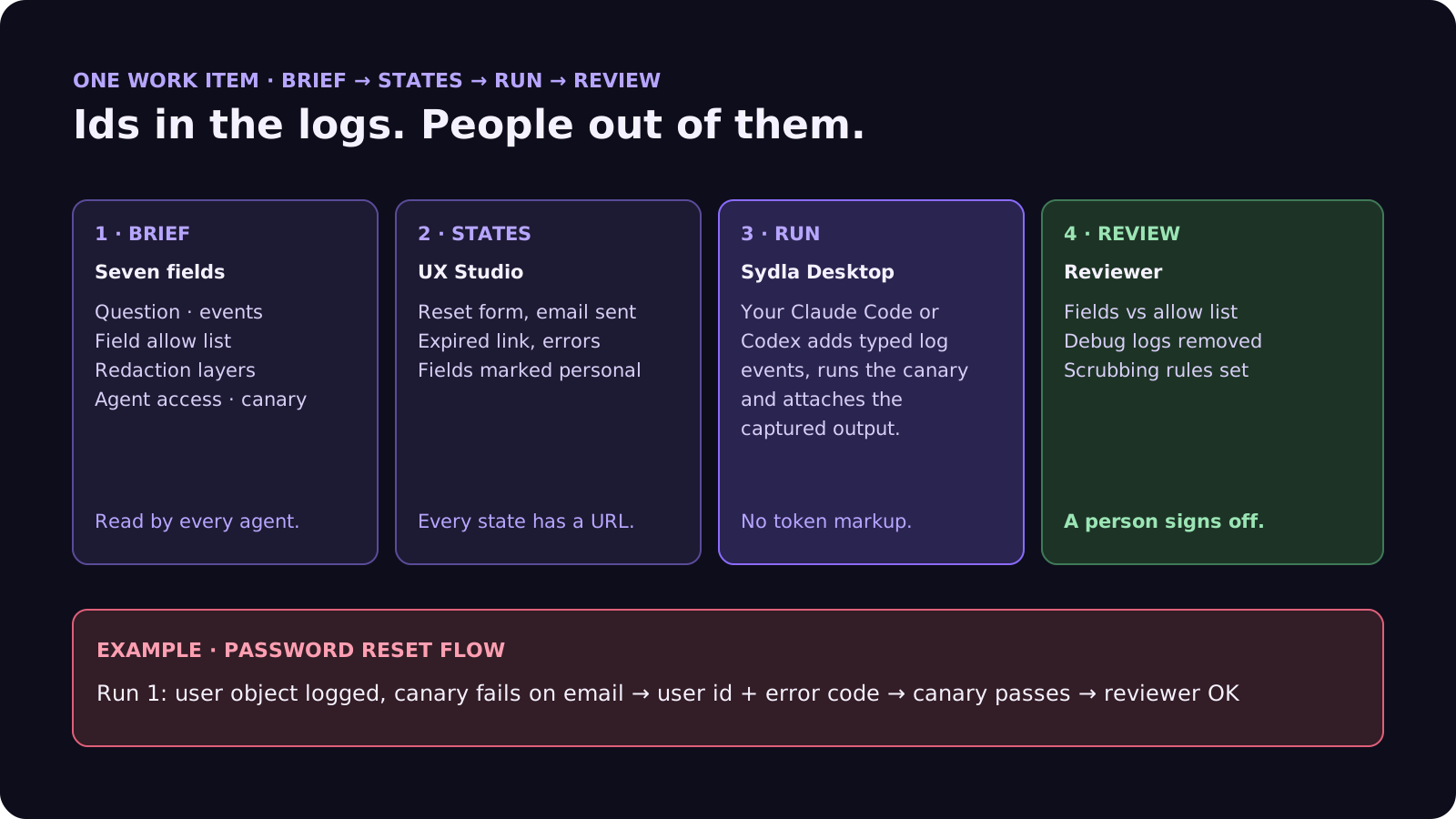
Agents write the log lines. The brief says which fields exist. The canary proves it. A person signs off.
A filled-in example: the password reset flow
Here is the opening ticket, rewritten as a logging brief. The service and numbers are illustrative:
- Question: At which step does a reset fail: lookup, token creation, email send or link use?
- Events: reset.requested, reset.email_sent, reset.failed and reset.completed at info; one temporary debug event removed by 1 December.
- Allow list: user id, step, result, error code, mail provider status, duration. No email, no token, no body.
- Redaction: typed events in code; collector allow list plus email and bearer patterns; vendor scanner set to redact.
- Retention and access: 30 days, support and platform teams, no warehouse export for auth logs.
- Agent access: read-only on the application index, no access to auth and payment indexes.
- Done means: canary user [email protected] with a known token goes through all four steps; neither string appears in logs, error events or spans.
In this example the agent's first run logs the user object on reset.failed for convenience, and the canary test fails on the email address. The agent switches to the user id and an error code, and the test passes. The reviewer spots a Sentry breadcrumb that still carries the request body, and adds the field to the scrubbing rules. The trailing-space bug is fixed in the same merge request, and nothing about the people who reset their passwords is stored anywhere new. Our bug report template shows how to brief the next failure with the user id instead of the address.
Frequently asked questions
How do I stop AI coding agents from logging personal data?
Give the agent a field allow list in the ticket, sort data into classes such as never, restricted, internal ids and operational, and add a canary test that pushes fake personal data through the code path and fails if any of it appears in logs or error events. Back it up with redaction in the log pipeline and at the vendor.
Is it safe to let Claude Code or Codex read production logs?
Read-only access to scrubbed application logs is usually fine and very useful for debugging. Keep agents away from raw auth and payment logs, because anything the agent reads is sent to its model provider as part of the prompt, and treat log text written by users as untrusted input.
What is the OpenTelemetry redaction processor?
A processor in the OpenTelemetry Collector contrib distribution that removes span and log attributes not on an allow list and masks values matching blocked regular expressions, such as email addresses or card numbers, before data is exported. The transform processor handles free-text log bodies.
Does Sentry or Datadog scrub personal data automatically?
Partly. Sentry's newer SDKs do not send PII unless send-default-pii is turned on, and server-side scrubbing is on by default for a set list of fields. Datadog's Sensitive Data Scanner can redact logs, spans and RUM events once rules are configured. Neither cleans data that is already stored, so redact before sending.
How much does Sydla cost compared with Jira, Confluence, Notion, Figma, Miro and Canva?
Sydla costs $19 per user per month. One paid seat each of Jira Standard, Confluence Standard, Notion Plus, Figma Professional Full, Miro Starter and Canva Business costs $83.85 per user per month, so the saving is $64.85 per user per month. You bring your own Claude Code or Codex account, so your Anthropic or OpenAI plan pays for the model with no markup.


































