Figma AI credits in 2026: what Make, the Figma agent and MCP really cost a product team
Since 6 October 2026 the Figma agent draws on the same AI credits as Figma Make. A Full seat brings 3,000 a month, a Dev seat 500, and none of them can be shared or rolled over. Here is the rate card, a worked example for a five-person team, what your coding agent's Figma MCP calls cost, and where a bring-your-own-agent workspace fits.

Every AI click in Figma now has a price
For most of 2025, Figma's AI features felt free. That ended in two steps. On 18 March 2026 Figma started enforcing the monthly AI credit limit on every seat. Then on 6 October 2026 the agent in Figma Design and the Weave tools left beta and began drawing on the same credits as Figma Make. A five-screen checkout flow from the agent now costs 300 credits or more. A Full seat brings 3,000 a month.
The credits are also strict in a way other meters are not. Seat credits belong to one person. They reset monthly, do not roll over and cannot be shared or transferred. When a designer runs out on the 14th, the product manager's unused credits cannot help, and AI actions stop until an admin buys more or the month resets.
For teams working with coding agents, Figma is now one meter among several. Your agent reads the ticket from Jira, the spec from Confluence or Notion, and the screens from Figma, and each hop has its own allowance. Our AI credit fatigue piece mapped all six. Our Rovo credits breakdown covered the Atlassian one. This post covers Figma.
How Figma AI credits work, in seven facts
Everything below comes from Figma's help center, pricing page and developer docs, checked on 20 November 2026:
- Allowances follow the seat. A Full seat gets 3,000 credits a month on Professional, 3,500 on Organization and 4,250 on Enterprise. Dev, Collab and View seats get 500 on every paid plan. The free Starter plan gets 500 a month, capped at 150 a day.
- Seat credits are personal. They are assigned to one user and cannot be shared, transferred or pooled with anyone else's.
- Nothing rolls over. Seat credits reset monthly and unused ones expire.
- Zero means stop. With no credits left, a user cannot complete AI actions. They can request more from an admin, who can add credits or raise a limit.
- Add-ons are shared. Admins can buy extra credits for the whole plan, as a monthly subscription or pay as you go with a monthly spending limit. Pay as you go is charged on the next invoice.
- Add-ons got bigger on 25 August 2026. Figma kept the prices and put 2x the credits in each add-on on Professional and 1.6x on Organization and Enterprise. Seat allowances did not change.
- One budget for everything. Make, the agent, Weave tools inside Figma, image edits and code layers all spend the same credits. Weave on its own site has a separate pool.
What each action costs
Figma publishes approximate costs per action. Most are floors, written as 30+ or 300+, because the real cost depends on the prompt, the file and the model.
| Action | Credits | Where |
|---|---|---|
| Change the font in a prototype | 30+ | Figma Make |
| Make an attached design interactive | 75+ | Figma Make |
| Generate an app from scratch | 100+ | Figma Make, plus more for the Build step after Plan mode |
| Summarize the canvas | 100+ | Agent in Figma Design |
| Five-screen mobile checkout flow | 300+ | Agent in Figma Design |
| Draft a product brief | 150+ | Agent in Specs |
| Ten-slide deck | 250+ | Agent in Figma Slides |
| Code layers from frames | 250+ | Figma Design |
| Make or edit an image | 2, 6 or 16 | Depends on the image model |
| Rename layers, AI search, sticky summaries | 0 | Free |
Two details matter in practice. In Make, fixes suggested by Figma do not use credits, but every new prompt does, so iterating by chat on a prototype adds up fast. And Plan mode in Make costs credits for the plan and again for the build.
A worked example: a five-person product team
Take a team on Figma Professional: a designer and a product manager on Full seats, and three developers on Dev seats who use Claude Code or Codex every day. The usage below is an assumption for illustration, using Figma's published floors, not Figma data.
- Designer, 3,000 credits. Six agent flows at 300, four Make apps from scratch at 100, thirty Make prompts to make designs interactive at 75 and forty image edits at 6: 4,690 credits. Short by 1,690.
- Product manager, 3,000 credits. Six product briefs at 150, twelve spec summaries at 75, four FigJam summaries at 50 and two decks at 250: 2,500 credits. 500 left over, which nobody else can use.
- Each developer, 500 credits. Two code layer runs from frames at 250 and two updates at 175: 850 credits. Short by 350 each, 1,050 for the three.
- Total. 2,740 credits a month must come from add-ons. At Figma's December 2025 pay-as-you-go rate of $0.03 a credit that is $82.20 a month. If the 2x Professional multiplier applies to pay as you go at the same price, as Figma's FAQ says, it is about $41.10. The smallest add-on subscription, 5,000 credits for $120 a month before the change, now holds about 10,000 on Professional. Check the AI credits page in your admin settings for your exact numbers.
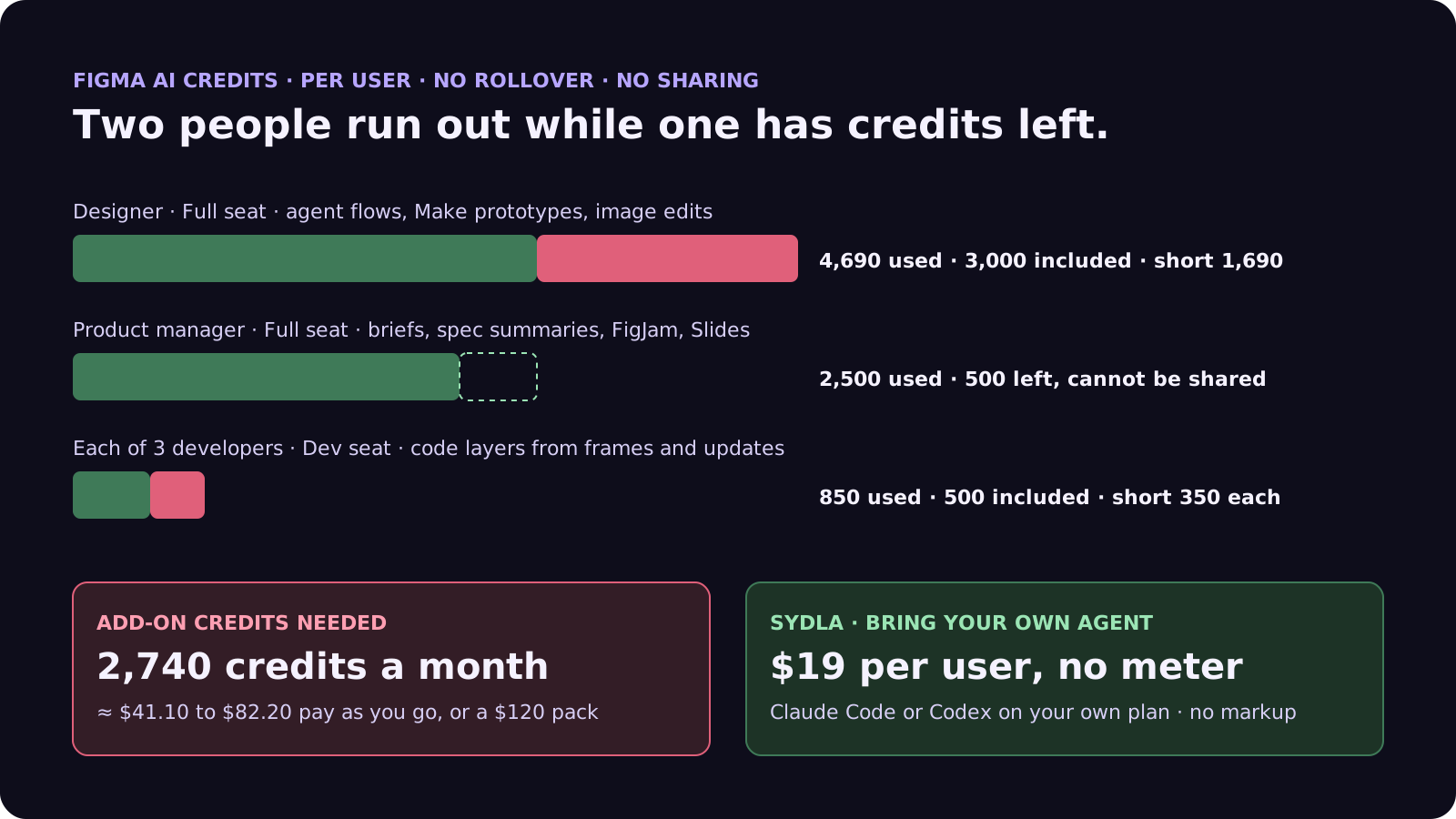
The money is modest next to seat prices. The friction is not. The designer hits zero mid-month, the developers hit it after two code layer runs, and both have to ask an admin. On Organization and Enterprise the Full seat allowance is higher, but Dev seats stay at 500.
None of this counts the model your developers already pay Anthropic or OpenAI for. Our cost per ticket breakdown covers that side.
What your coding agent's Figma MCP calls cost
Claude Code and Codex read designs through the Figma MCP server. Most of those reads do not use AI credits, but they are rate limited by seat, and the limits are tight for anyone without a Full or Dev seat.
- View and Collab seats: up to 20 tool calls a month, on every plan. That is enough to try the server, not to build with it.
- Full and Dev seats: 200 calls a day and 10 a minute on Professional, 200 and 15 on Organization, 600 and 20 on Enterprise.
- Credit tools: generate_image, generate_vector_illustration and send_prompt spend AI credits instead of counting toward the rate limit.
- Write to canvas: free during the beta, and Figma says it will become a usage-based paid feature. No price has been published.
In practice, a developer who wants their agent to read Figma needs a Dev or Full seat, and every agent session that walks a large file spends part of a 200-call day. Our MCP servers guide compares these limits with Jira, Notion and Miro, and our design handoff guide explains why agents build better from named states than from frames.
Five settings to change this week
If you stay on Figma, these steps in the admin settings take fifteen minutes:
- Read the usage page. The AI credits page under Admin shows who used what. Organization and Enterprise admins can also download the CSV of beta-period usage from before 6 October as a baseline.
- Set a spending limit before turning on pay as you go. Pick a monthly cap someone approved, then enable it. Without add-ons, people simply stop at zero.
- Decide who gets add-on credits. Add-ons are shared by default. Use custom limits so one heavy user cannot spend the whole pool.
- Match seats to work. A developer on a Collab seat gets 20 MCP calls a month. If their agent reads Figma daily, a Dev seat is the cheaper fix.
- Write prompts once. In Make, put the full brief in the first prompt rather than iterating by chat. Every follow-up prompt is a new charge.
Six tools, six meters: the stack next to Sydla
Figma is one meter. Most product teams run several, each with its own allowance and admin page. Here is one paid seat of each tool next to Sydla. Each has its own page on our comparison hub.
| Tool and plan | Seat / month | Built-in AI billing | What the agent needs from it |
|---|---|---|---|
| Jira Standard | $9.70 | 25 Rovo credits per user per month, pooled; $0.01 per extra credit from 3 December 2026 | The ticket and acceptance criteria |
| Confluence Standard | $7.15 | 25 Rovo credits per user per month, same pool | The spec and decisions |
| Notion Plus | $12.00 | Notion AI and Custom Agents on Notion credits | Notes and research |
| Figma Professional, Full seat | $20.00 | 3,000 AI credits a month, personal, no rollover; MCP 200 calls a day | Screens and states |
| Miro Starter | $10.00 | Create with AI on Miro credits | Flows and diagrams |
| Canva Business | $25.00 | Canva AI usage per member | Launch and marketing visuals |
| Six-tool total | $83.85 | Up to six meters, plus your coding agent | Six context hops per ticket |
| [Sydla](/) | $19.00 | None: your own Claude Code or Codex plan pays for the model, with no markup | One work item: brief, criteria, states, runs and evidence |
That is $64.85 per user per month less than the six-tool stack before any add-on credits. The Figma price is the monthly-billed Full seat; billed annually it is $16. Details are in the pricing section.
Walkthrough: brief, UX Studio, your own agent, review
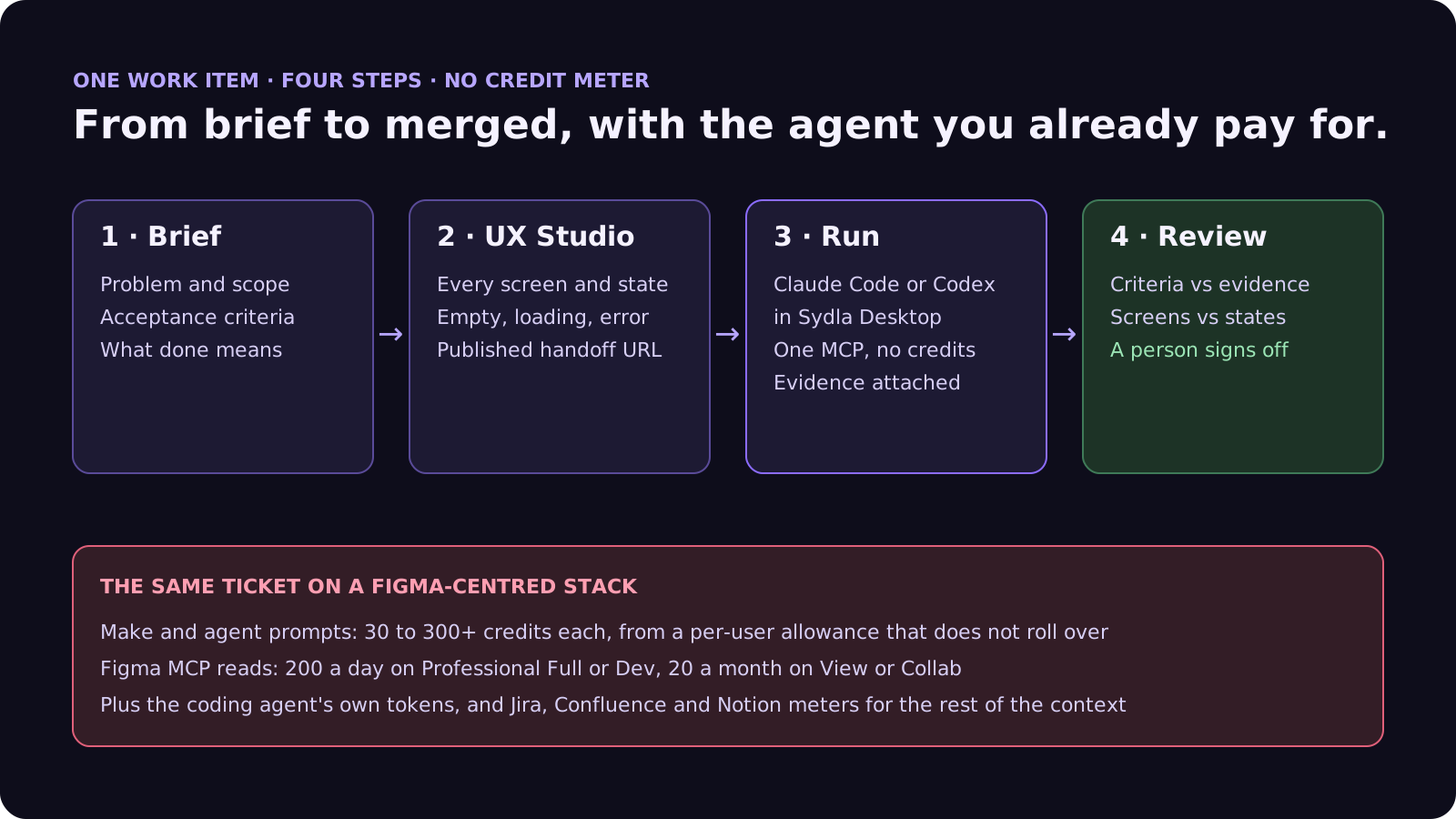
In Sydla, the screens live next to the brief on one work item, and reading them is not billed per call or capped per day. Here is how a ticket moves from brief to merge with the agent you already pay for.
- Brief on the work item. Problem, scope, acceptance criteria and what done means, written once and read by every person and agent. Our PRD template for agents shows the seven sections.
- States in UX Studio. Every screen and state, including empty, loading and error, with its own URL and a published handoff. The agent builds from named states rather than screenshots, and a person can edit them without spending credits.
- Run in Sydla Desktop with your own agent. Sydla Desktop launches the Claude Code or Codex CLI on your machine, signed in with your own Anthropic or OpenAI account, in your local checkout. The agent reads the brief and the states through one Sydla MCP connection, builds, runs the tests and attaches the evidence to the run. There are no Sydla AI credits and no token markup. The Desktop guide walks through the first run.
- Review and sign-off. A reviewer checks each criterion against the evidence and the screens against the states, then signs off on the work item. Our design QA guide covers the six passes for AI-built UI.
If you are leaving Figma rather than buying add-ons, our 30-day migration plan covers exports and when to cancel. If you are still choosing an agent, see Claude Code vs Codex for product teams. When you are ready, start your workspace.
Frequently asked questions
How many AI credits does a Figma seat include?
A Full seat includes 3,000 AI credits a month on Professional, 3,500 on Organization and 4,250 on Enterprise. Dev, Collab and View seats include 500 a month on every paid plan. The free Starter plan includes 500 a month with a daily limit of 150. Seat credits reset monthly, do not roll over and cannot be shared.
How many credits does Figma Make use?
Figma's published approximations are about 30 or more credits to change a font, 75 or more to make an attached design interactive and 100 or more to generate an app from scratch. Plan mode costs credits for the plan and more for the build. Every new prompt uses credits; fixes suggested by Figma do not.
What happens when I run out of Figma AI credits?
You cannot complete more AI actions until your credits reset or an admin adds more. Admins can buy add-on credits that anyone on the plan can use, as a monthly subscription or pay as you go with a monthly spending limit charged on the next invoice. Since 25 August 2026, add-ons carry 2x the credits on Professional and 1.6x on Organization and Enterprise for the same price.
Does the Figma MCP server use AI credits?
Most read tools do not use credits but are rate limited: 20 calls a month on View and Collab seats, and 200 a day on Full and Dev seats on Professional and Organization, 600 a day on Enterprise. Tools that generate images or send prompts use AI credits instead. Write to canvas is free during the beta and will become a usage-based paid feature.
How much does Sydla cost compared with Jira, Confluence, Notion, Figma, Miro and Canva?
Sydla costs $19 per user per month with no AI credit meter. One paid seat each of Jira Standard, Confluence Standard, Notion Plus, Figma Professional Full, Miro Starter and Canva Business costs $83.85 per user per month, so the saving is $64.85 per user per month before any add-on credits. You bring your own Claude Code or Codex account, so your Anthropic or OpenAI plan pays for the model with no markup.




































