Notion Custom Agents credits in 2026: Standard, Select and what a shared agent really costs
Since 2 November 2026 a Notion Custom Agent spends its owner's 500 Select credits, even when the whole team uses it. Here is how Standard, Select and paid Notion credits fit together, what each kind of agent run costs, a worked example for an eight-person team, and why your coding agent reading Notion is a different bill.

The agent everyone uses is billed to one person
Notion Custom Agents are the agents that work without being asked: they triage a request database, write the Friday status update, answer questions from the wiki or route new tasks. They were free while in beta. Then Notion put them on credits at $10 per 1,000, and on 2 November 2026 it changed who pays. A new Custom Agent now spends its owner's Select credits first, even when the whole team uses it.
Every member on Business and Enterprise gets 500 Select credits a month. They are personal: they cannot be pooled, transferred or rolled over. So the person who builds the triage agent for the team quietly carries the team's usage, and when their 500 run out, the agent pauses unless an owner has funded it from paid workspace credits.
That is the third meter in our series. Our AI credit fatigue piece mapped all six tools of a typical product stack, our Rovo credits breakdown covered Jira and Confluence, and our Figma AI credits guide covered Figma. This post covers Notion.
How Notion credits work, in seven facts
Everything below comes from Notion's help center, pricing page and agents page, checked on 20 November 2026:
- Custom Agents need Business or Enterprise. Paid Notion credits are only sold on those plans. Downgrade to Free or Plus and every Custom Agent is switched off, not deleted.
- Two allowances come with each seat. Each member gets 1,500 Standard credits and 500 Select credits a month. Notion notes the amounts may vary by plan and purchase arrangement.
- Standard is for Auto, Select is for choice. When Notion picks the model (Auto), Notion Agent spends Standard credits. When you pick the model yourself, or run a Custom Agent, it spends Select credits.
- Allowances are personal. Both reset at the start of the billing cycle, do not roll over and cannot be pooled across the workspace or moved between members.
- Paid credits are shared. Notion credits cost $10 per 1,000. Owners buy them for the workspace, with no purchase cap, and get alerts at 80% and 100% of usage.
- A Custom Agent spends in a fixed order. First its owner's Select credits, then the owner's extra Notion credit allowance, then shared workspace credits if an owner allows it. Agents created before 2 November 2026 keep drawing from shared workspace credits.
- Zero means pause. When the source an agent draws on is empty, the agent stops until credits reset or someone adds more. Agents on high-consumption models pause too.
What a Custom Agent run costs
Notion does not publish a fixed price per action. Credits depend on the work each run needs, and advanced models cost more. It does publish ranges for typical agents, at $10 per 1,000 credits:
| Agent | Cost per run | Runs per 1,000 credits |
|---|---|---|
| Q&A agent, answers questions from your pages | $0.03 to $0.11 | about 90 to 333 |
| Mail triage agent | $0.04 to $0.10 | about 100 to 250 |
| Task routing agent | $0.05 to $0.15 | about 65 to 190 |
| Status update agent | $0.08 to $0.18 | about 57 to 133 |
| Daily brief agent | $0.10 to $0.30 | about 33 to 100 |
Notion's credits page gives a simpler rule of thumb: about 5 credits for a simple task, 10 for a medium one and 25 for a complex one. Its own example, a status update agent that runs 60 times a month, comes to about $4.80 to $10.80. Notion says it expects these estimates to go down over time.
Two things are not in the per-run ranges. Custom Agent Autofill uses credits, while basic Autofill does not. And from December, AI Meeting Notes starts using the Standard allowance, at about 10 credits for a one-hour meeting.
A worked example: four shared agents on an eight-person team
Take an eight-person product team on Notion Business. The engineering lead builds four Custom Agents after 2 November and shares them with everyone. The run counts below are an assumption for illustration, priced with Notion's published per-run ranges, not Notion data.
- Task routing agent. Sorts every new request into the right project: 200 runs a month at 5 to 15 credits, so 1,000 to 3,000 credits.
- Q&A agent on the specs. Answers the team's questions about decisions and requirements: 300 runs at 3 to 11 credits, so 900 to 3,300 credits.
- Status update agent. Writes the daily update from the task database: 22 runs at 8 to 18 credits, so 176 to 396 credits.
- Daily brief agent. Summarises yesterday's changes for the lead: 22 runs at 10 to 30 credits, so 220 to 660 credits.
- Total. 2,296 to 7,356 credits a month, all charged to the lead first. The lead's 500 Select credits cover the first few days. The other 1,796 to 6,856 credits, about $17.96 to $68.56 a month, must come from paid workspace credits, or the agents pause.
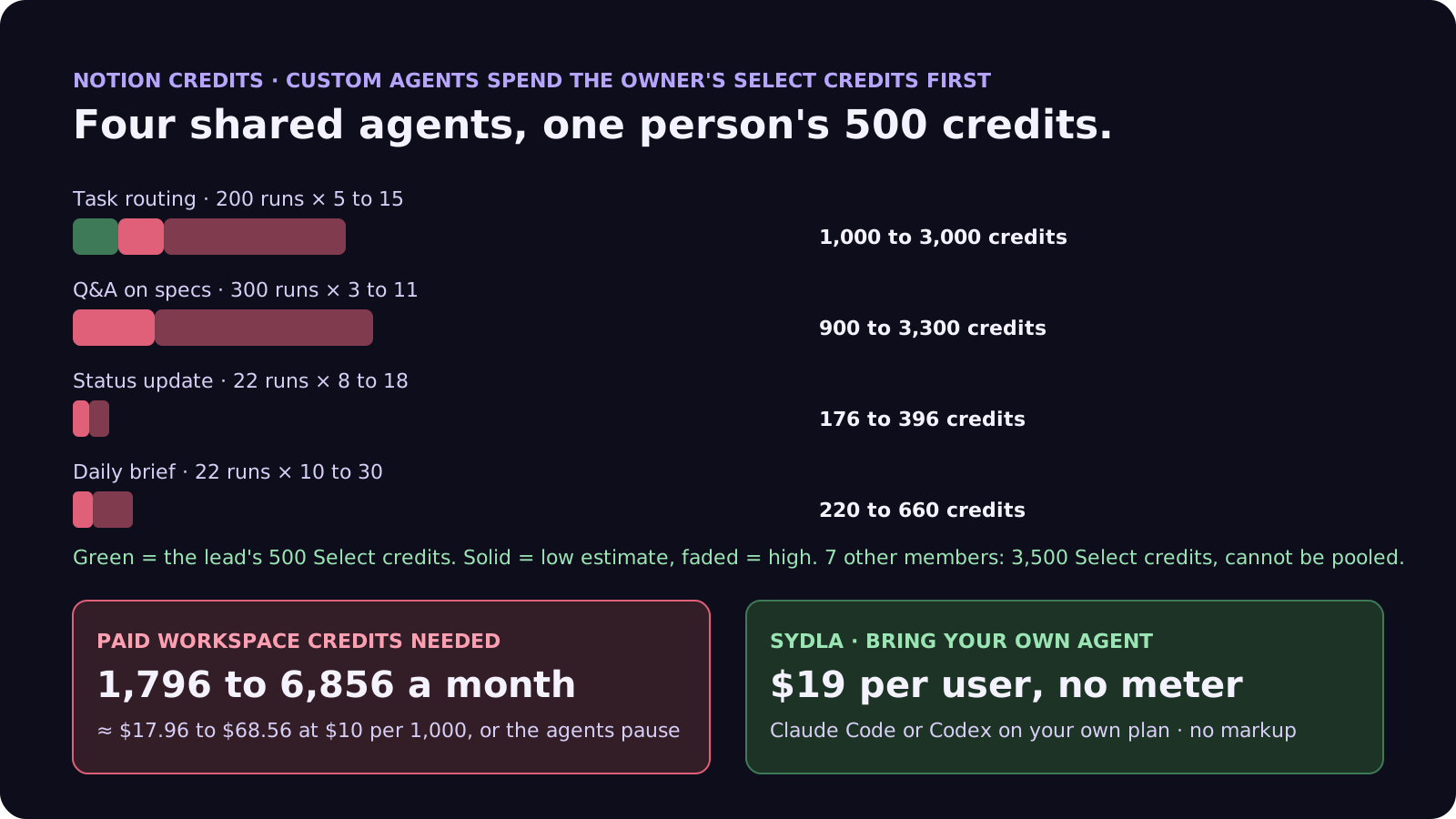
The dollar amount is small next to eight seats. The friction is in who carries it. The lead's own model-picked chats in Notion Agent share the same 500 Select credits, so they run out even sooner. And the cost moves with how much the team leans on the agents, not with anything the lead controls, so a busy sprint can pause the triage agent mid-week.
None of this counts the model your developers already pay Anthropic or OpenAI for. Our cost per ticket breakdown covers that side.
Your coding agent reading Notion is a different bill
Many teams now connect Claude Code or Codex to Notion through the Notion MCP server, so the coding agent can read the spec before it builds. Notion's credits page draws a clear line here:
- Reading and writing through the API or a connected app does not use credits when no Notion agent runs. It is subject to rate limits instead.
- Running Notion Agent or a Custom Agent through a connected app or the API does use credits, from the same allowances as in the app.
- So the model cost sits with your coding agent. When Claude Code reads a Notion page over MCP, your Anthropic plan pays for the tokens. Notion only charges when its own agent does the thinking.
The catch is context. Your agent reads the spec from Notion, the ticket from Jira and the screens from Figma, each over its own MCP server with its own limits and permissions. Our MCP servers guide compares those limits, and our prompt injection guide explains why every extra source an agent reads is also an extra place for untrusted text to enter.
Five settings to change this week
If you stay on Notion, these steps take fifteen minutes in Settings:
- Find the shared agents. Owners can see every agent in the workspace and its credit use per agent. Any agent the team relies on should not live on one person's Select credits.
- Move team agents to workspace credits. Switch the credit source of shared agents to workspace Notion credits and give each one a monthly budget, so usage lands on the team and not on its builder.
- Cap each agent. Set a spending cap per agent and a Notion credit limit per member, so one runaway trigger cannot drain the pool.
- Leave models on Auto. Advanced models cost more and draw Select credits. Pick a model by hand only where Auto is clearly not good enough.
- Watch the 80% alert. Owners get an in-app and email alert at 80% of workspace credits. Decide in advance who tops up and by how much, rather than letting agents pause.
Six tools, six meters: the stack next to Sydla
Notion is one meter. Most product teams run several, each with its own allowance and admin page. Here is one paid seat of each tool next to Sydla. Each has its own page on our comparison hub.
| Tool and plan | Seat / month | Built-in AI billing | What the agent needs from it |
|---|---|---|---|
| Jira Standard | $9.70 | 25 Rovo credits per user per month, pooled; $0.01 per extra credit from 3 December 2026 | The ticket and acceptance criteria |
| Confluence Standard | $7.15 | 25 Rovo credits per user per month, same pool | The spec and decisions |
| Notion Plus | $12.00 | Limited AI trial; Custom Agents need Business or Enterprise, then 500 Select credits per member and $10 per 1,000 | Notes and research |
| Figma Professional, Full seat | $20.00 | 3,000 AI credits a month, personal, no rollover; MCP 200 calls a day | Screens and states |
| Miro Starter | $10.00 | Create with AI on Miro credits | Flows and diagrams |
| Canva Business | $25.00 | Canva AI usage per member | Launch and marketing visuals |
| Six-tool total | $83.85 | Up to six meters, plus your coding agent | Six context hops per ticket |
| [Sydla](/) | $19.00 | None: your own Claude Code or Codex plan pays for the model, with no markup | One work item: brief, criteria, states, runs and evidence |
That is $64.85 per user per month less than the six-tool stack before any add-on credits, and the Notion line uses the Plus seat. Custom Agents need the more expensive Business seat. Details are in the pricing section.
Walkthrough: brief, UX Studio, your own agent, review
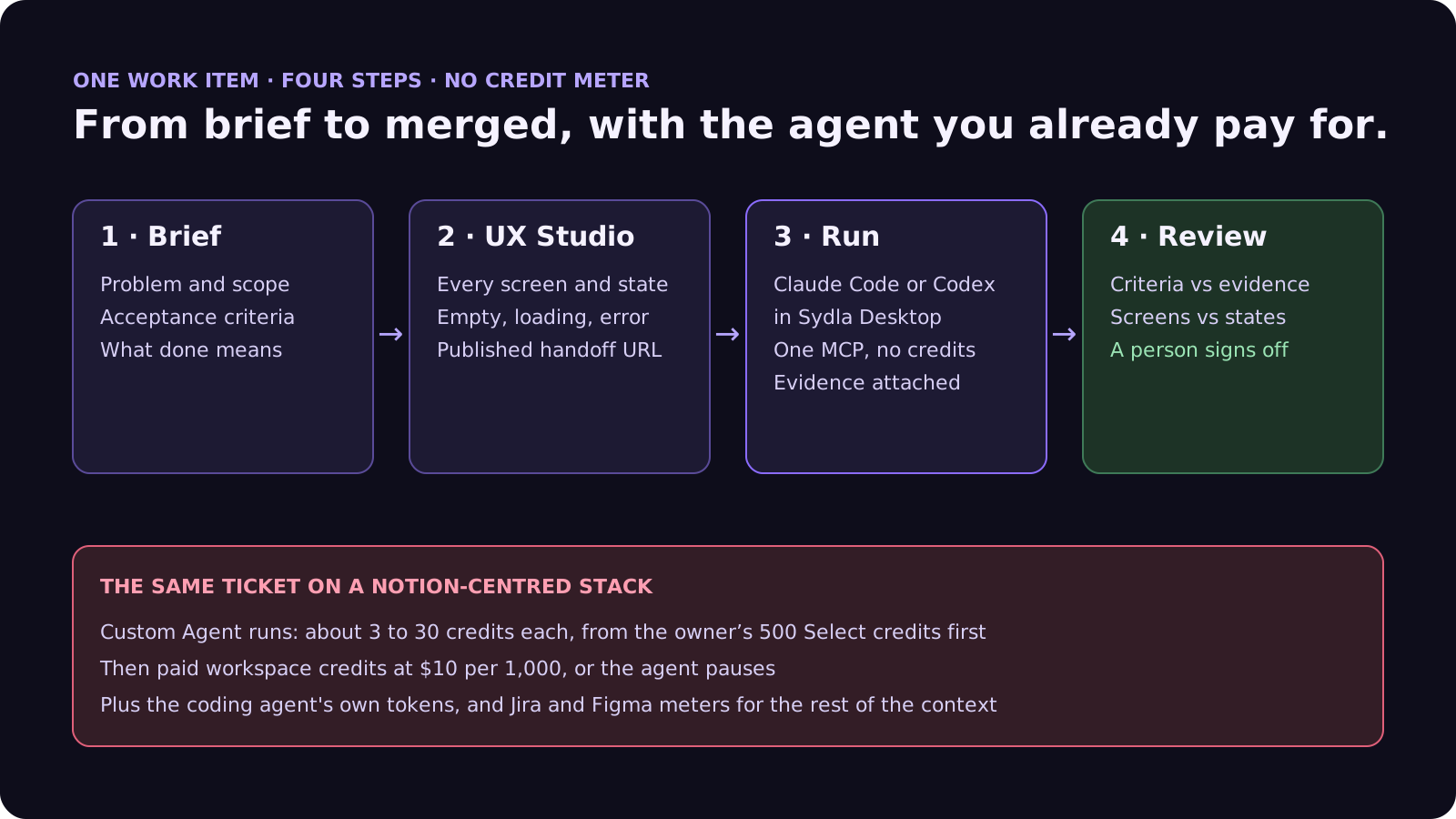
In Sydla, the brief, the screens and the agent runs live on one work item, and the agent doing the work is the one you already pay for. There is no agent allowance tied to whoever set it up. Here is how a ticket moves from brief to merge.
- Brief on the work item. Problem, scope, acceptance criteria and what done means, written once and read by every person and agent. Our PRD template for agents shows the seven sections.
- States in UX Studio. Every screen and state, including empty, loading and error, with its own URL and a published handoff. The agent builds from named states, not screenshots pasted into a page.
- Run in Sydla Desktop with your own agent. Sydla Desktop launches the Claude Code or Codex CLI on your machine, signed in with your own Anthropic or OpenAI account, in your local checkout. The agent reads the brief and the states through one Sydla MCP connection, builds, runs the tests and attaches the evidence to the run. There are no Sydla AI credits and no token markup. The Desktop guide walks through the first run.
- Review and sign-off. A reviewer checks each criterion against the evidence and the screens against the states, then signs off on the work item. Our guide to reviewing AI pull requests covers the four passes.
If you are leaving Notion rather than funding agents, our 30-day migration plan covers exports and when to cancel. If you are still choosing an agent, see Claude Code vs Codex for product teams. When you are ready, start your workspace.
Frequently asked questions
How much do Notion Custom Agents cost?
Custom Agents run on Notion credits, which cost $10 per 1,000 and are sold only on Business and Enterprise plans. Notion's published ranges are about $0.03 to $0.11 per run for a Q&A agent, $0.05 to $0.15 for task routing, $0.08 to $0.18 for a status update and $0.10 to $0.30 for a daily brief. A status update agent that runs 60 times a month costs about $4.80 to $10.80.
What is the difference between Standard and Select credits in Notion?
Each Business and Enterprise member gets 1,500 Standard and 500 Select credits a month. Standard credits pay for work where Notion picks the model, such as Notion Agent on Auto. Select credits pay for work where you pick the model yourself and for Custom Agents you set up. Both are personal, reset monthly and cannot be pooled or rolled over.
Who pays when a Custom Agent is shared with the team?
Since 2 November 2026, a new Custom Agent uses its owner's Select credits by default, even when other people run it. After that it uses the owner's extra Notion credit allowance, then shared workspace credits if an owner allows it. Owners can switch an agent to workspace credits and give it a monthly budget. Agents created before 2 November 2026 keep drawing from shared workspace credits.
Does the Notion MCP server use Notion credits?
Reading or writing Notion through the API or a connected app does not use credits when no Notion agent runs; it is rate limited instead. Running Notion Agent or a Custom Agent through a connected app or the API does use credits. When Claude Code or Codex reads a Notion page over MCP, your Anthropic or OpenAI plan pays for the model.
How much does Sydla cost compared with Jira, Confluence, Notion, Figma, Miro and Canva?
Sydla costs $19 per user per month with no AI credit meter. One paid seat each of Jira Standard, Confluence Standard, Notion Plus, Figma Professional Full, Miro Starter and Canva Business costs $83.85 per user per month, so the saving is $64.85 per user per month before any add-on credits. You bring your own Claude Code or Codex account, so your Anthropic or OpenAI plan pays for the model with no markup.





































