Jira alternatives for teams that ship with Claude Code and Codex (2026)
Every issue tracker now lets you hand a ticket to an AI coding agent. They differ on who pays for that agent, what context it receives and where the meter sits. Here is Jira next to Linear, GitHub Issues with Copilot, Plane, ClickUp and Sydla, with prices and credit rules checked in November 2026.

The tracker became the place agents get their work
A year ago, choosing a Jira alternative was about speed, boards and how much admin your team could stand. In 2026 the question changed. Jira lets you assign a work item to Claude Code, Cursor or GitHub Copilot. Linear Agent writes code with Claude Code and Codex. GitHub lets you pick Claude or Codex from the Assignees dropdown. The issue tracker is now the front door for AI coding agents.
That makes the old comparison grids misleading. Every tracker has a board and an API. They differ on three things that decide your monthly bill and the quality of the pull request: who pays for the agent's tokens, what context the agent receives with the ticket, and which meter runs out first. Add the AI meters already running in Confluence, Notion, Figma, Miro and Canva, and you have the AI credit fatigue most product teams feel today.
This guide compares Jira with five alternatives on those terms: Linear, GitHub Issues with Copilot, Plane, ClickUp and Sydla. Every price and limit below comes from the vendor's own page, checked on 20 November 2026.
Four questions to ask before you switch
Feature lists look alike, so start with how the agent gets and pays for its work:
- Whose model account pays for the run? Some trackers bill agent work in their own credits, some pass provider token prices through a prepaid balance, and some let you use the Claude or ChatGPT plan you already pay for. The same ticket can cost very different amounts.
- What context travels with the ticket? A title and three lines of description produce guesswork. The agent needs the brief, the acceptance criteria and the screens with every state. Count how many tools it has to read to get them.
- Where does the meter live, and who hits zero? Pooled credits stop the whole team at once. Personal allowances strand unused credits. Prepaid balances need someone to top them up.
- Can a person see the evidence and sign off? A pull request is not proof. Look for a place where test output, screenshots and the criteria sit together and a named reviewer approves. Our review guide explains what that should include.
Jira and five alternatives, side by side
The table lists the entry paid plan each team would realistically buy, in USD per user per month before tax. Where a vendor only shows an annual price, the table says so.
| Tracker and plan | Seat / month | AI billing | How Claude Code or Codex gets the work | What the agent still reads elsewhere |
|---|---|---|---|---|
| Jira Standard | $9.70 | Rovo: 25 credits per user per month, pooled across the organisation; $0.01 per extra credit from 3 December 2026 | Agents in Jira: assign a work item to Claude Code, Cursor or GitHub Copilot, Codex coming soon; Jira Coding Agent on every paid plan; Rovo MCP | Specs in Confluence, screens in Figma, flows in Miro |
| Linear Basic | $10 (billed yearly) | Linear Agent and MCP included; coding sessions and Loops draw on a prepaid USD balance: provider token rates with no markup, plus sandbox runtime | Assign the issue to Linear; a cloud coding session runs Claude Code or Codex and returns a diff | Design states and long specs |
| GitHub Issues + Copilot Business | $19 | 1,900 GitHub AI credits per user per month in a shared pool, plus Actions minutes | Pick Claude or Codex in the Assignees dropdown (public preview), running on your Copilot plan; a draft pull request comes back | Product brief, design states, decisions |
| Plane Pro | $6 yearly, $8 monthly | 500 AI credits per seat a month; agents draw from a separate workspace pool | Open-source MCP server (MIT), hosted or self-hosted, 30 tools; bring your own agent | Screens and states |
| ClickUp Business | $17 yearly, $25 monthly | Brain included; 1,500 credits per user per month, pooled; $10 per 10,000 extra | MCP connections are listed on the $100 Max plan | Screens and states |
| [Sydla](/) | $19 | No Sydla AI credits: your own Claude Code or Codex plan pays for the model, with no markup | Sydla Desktop runs the Claude Code or Codex CLI on your machine, signed in to your own account, with brief and UX states over one MCP connection | Nothing: brief, criteria, UX states, runs and evidence share one work item |
Read the last two columns before the prices. Every alternative now gives an agent a way in. The difference is whether the agent arrives with a full brief and the screens it must build, or with a ticket title and a list of other tools to search.
Four ways to pay for the same agent run
Behind the table sit four billing models. The same 20-minute bug fix lands on a different bill in each one:
- Tracker credits. Jira's Rovo, Plane's agents and ClickUp's Brain spend the tracker's own credits from a pool. Rovo moves to pay-as-you-go at $0.01 per credit on 3 December 2026, on by default. Our Rovo credits guide shows how a team of eight can overrun its pool.
- Pass-through on a prepaid balance. Linear bills coding sessions at the model provider's published token rates with no markup, plus sandbox time, from a balance an admin tops up (minimum $10, funds expire after 12 months). Bringing your own API key or linking a Claude organization moves the tokens to your provider, but sandbox time still uses Linear credits.
- Bundled seat credits. GitHub counts each Claude, Codex or Copilot session against Copilot AI credits by model and tokens, and against Actions minutes. Within the allowance it costs nothing extra. Your personal Claude or ChatGPT plan is not used.
- Your own plan. In Sydla the agent is the Claude Code or Codex you already run, signed in with your own Anthropic or OpenAI account. Sydla adds no credits and no markup, so the run costs what your plan already covers. Our cost per ticket breakdown shows what that is on API prices.
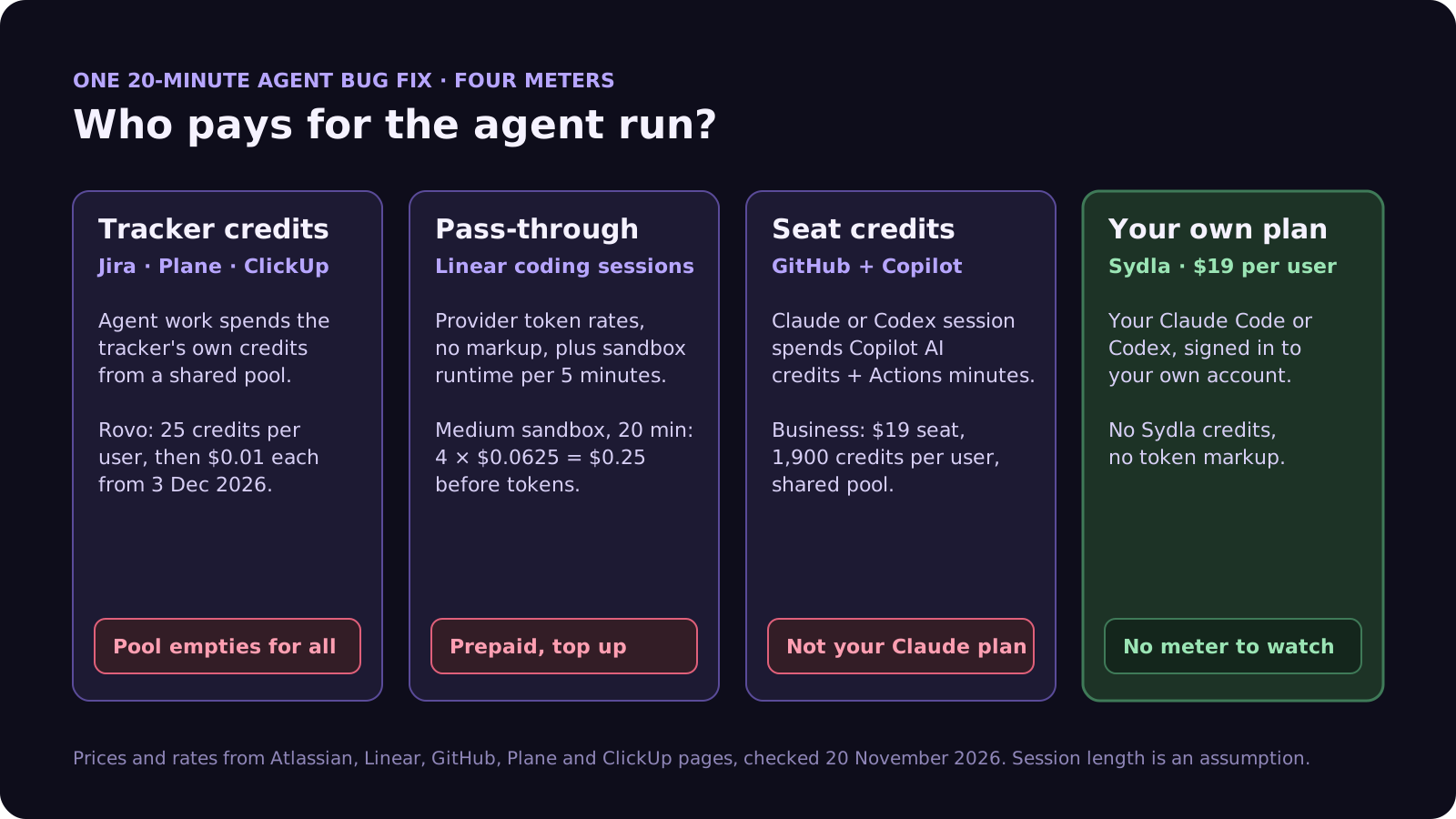
To make the pass-through model concrete: Linear charges $0.0625 per 5 minutes for a Medium sandbox (2 vCPUs, 16 GB). A 20-minute session is 4 increments, or $0.25 of runtime before tokens. Forty such sessions in a month add $10 of sandbox time on top of the model tokens. Session length and count here are our assumptions; the rate is Linear's.
Switching trackers fixes one meter out of six
Moving off Jira changes where tickets live. It does not change where the spec, the screens, the flows and the launch assets live, and each of those tools runs its own AI meter. Here is one paid seat of the typical stack next to Sydla. Each tool has a page on our comparison hub.
| Tool and plan | Seat / month | Built-in AI billing | What the agent needs from it |
|---|---|---|---|
| Jira Standard | $9.70 | 25 Rovo credits per user per month, pooled | The ticket and acceptance criteria |
| Confluence Standard | $7.15 | 25 Rovo credits per user per month, same pool | The spec and decisions |
| Notion Plus | $12.00 | Custom Agents need Business or Enterprise, then $10 per 1,000 credits | Notes and research |
| Figma Professional, Full seat | $20.00 | 3,000 AI credits a month, personal, no rollover | Screens and states |
| Miro Starter | $10.00 | 25 AI credits per seat a month, pooled, pauses at zero | Flows and diagrams |
| Canva Business | $25.00 | Personal allowance; top-ups or AI Pass at $100 | Launch visuals |
| Six-tool total | $83.85 | Six meters, plus your coding agent | Six context hops per ticket |
| [Sydla](/) | $19.00 | None: your own Claude Code or Codex plan pays for the model | One work item: brief, criteria, states, runs and evidence |
That is $64.85 per user per month less than the six-tool stack, before any extra credits. Swapping Jira for a $10 tracker saves less than a dollar a seat and leaves five meters running. The pricing section has the details.
Which alternative fits which team
There is no single winner. Each option suits a different shape of team:
- Stay on Jira if you depend on Jira Service Management, heavy workflow schemes or Atlassian Marketplace apps, and your organisation already budgets for Rovo. Agents in Jira will reach Claude Code and Cursor today.
- Pick Linear if your engineers want the fastest tracker and you are happy to let agents run in Linear's cloud on a prepaid balance. Its pass-through pricing is clear, and MCP is on every plan.
- Pick GitHub Issues with Copilot if the code, the reviews and the CI already live on GitHub and a light issue model is enough. Agent sessions come out of Copilot AI credits rather than your personal Claude or ChatGPT plan.
- Pick Plane if you need to self-host or want an open-source tracker with a wiki. Its MCP server is MIT-licensed and imports from Jira come on every plan.
- Pick ClickUp if most users are outside engineering and you want tasks, docs and chat in one app. Check which plan includes MCP before you plan agent work around it.
- Pick Sydla if you want the brief, the UX states, the agent run and the review on one work item, with the Claude Code or Codex account your developers already have. It replaces the ticket tracker and the five tools around it, which is where the $64.85 comes from.
Walkthrough: from brief to merged with your own agent in Sydla
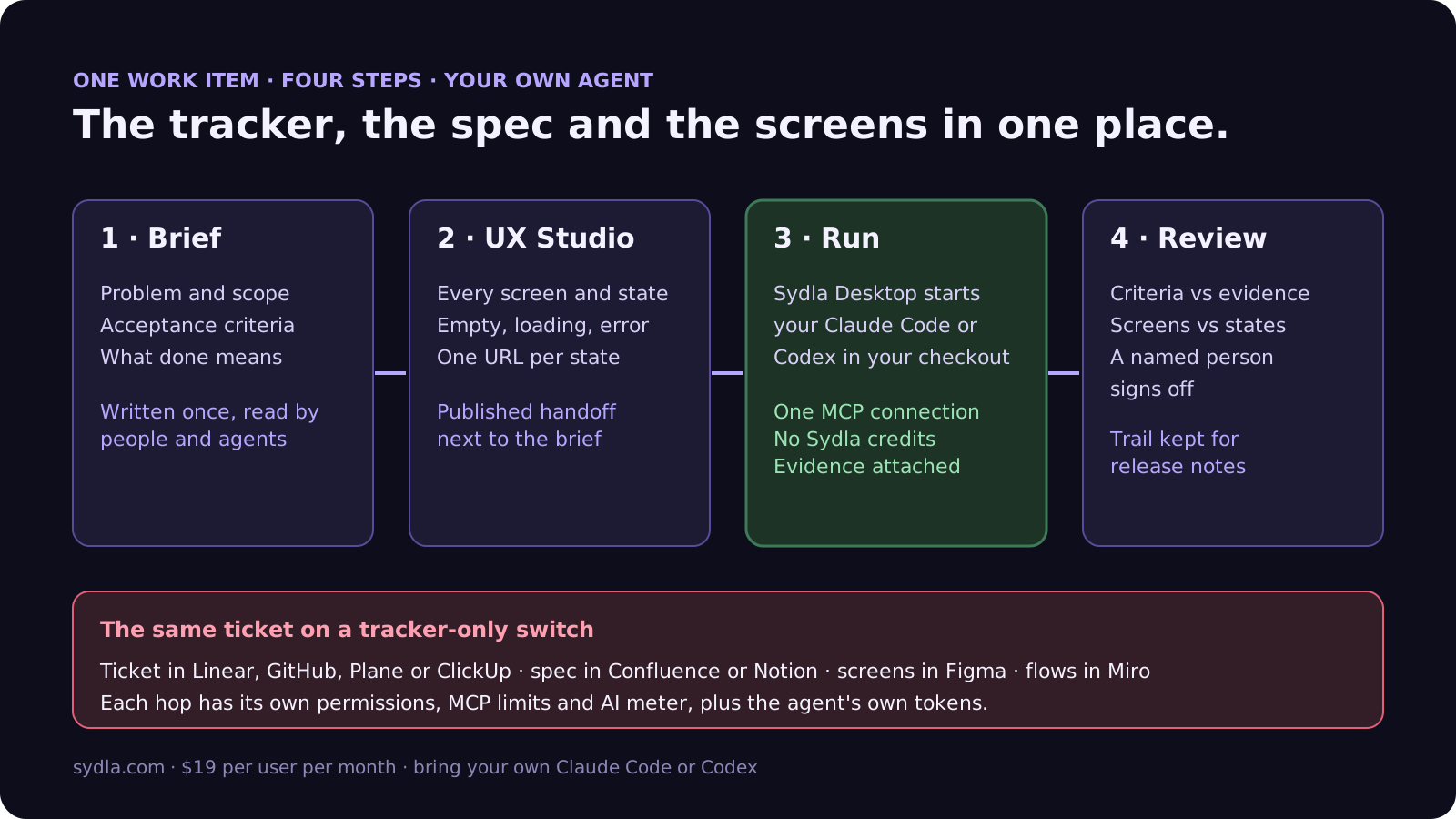
Here is what a ticket looks like when the tracker, the spec and the design tool are the same place, and the agent is the one already installed on your laptop.
- Write the brief on the work item. Problem, scope, acceptance criteria and what done means, written once and read by every person and agent. Our PRD template for agents gives the seven sections, and our acceptance criteria rules show how to make each one testable.
- Design the states in UX Studio. Every screen and state has its own URL and a published handoff, next to the brief instead of in a separate Figma file. Our design-to-code handoff guide explains why agents build better from states than from screenshots.
- Run it in Sydla Desktop. Desktop launches the Claude Code or Codex CLI on your machine, in your checkout, signed in with your own account. The agent reads the brief and the states through one Sydla MCP connection, builds, runs the tests and attaches the output to the run. The Desktop guide covers the first run.
- Review and sign off. A reviewer checks each criterion against the evidence and each screen against its state, then signs off. The work item keeps the whole trail for the release notes.
Moving over does not need a big-bang import. Our 30-day migration plan covers Jira CSV exports, which top out at 10,000 work items per export, and moving only the work that is still alive. If you work alone, the solo founder stack runs the same math for one person. When you are ready, start your workspace.
Frequently asked questions
What is the best Jira alternative for teams using Claude Code or Codex?
It depends on where you want the agent to run and who pays for it. Linear runs Claude Code or Codex in its cloud at provider token rates plus sandbox time. GitHub runs Claude or Codex sessions on Copilot AI credits. Plane and ClickUp connect over MCP to the agent you bring. Sydla runs your own Claude Code or Codex on your machine with your own account, and keeps the brief, UX states and review on the same work item, for $19 per user per month.
Can Jira assign tickets to Claude Code or Codex?
Yes, partly. Atlassian's Agents in Jira let teams assign work items directly to Claude Code, Cursor or GitHub Copilot, with Codex announced as coming soon. Jira also ships its own Jira Coding Agent on every paid plan, which returns a ready-to-review pull request. Rovo AI usage draws on pooled Rovo credits, with pay-as-you-go at $0.01 per credit from 3 December 2026.
How much do Linear coding sessions cost?
Linear bills coding sessions from a prepaid, workspace-level balance in US dollars. Each session costs the model tokens at the provider's published rates with no markup, plus sandbox runtime billed in 5-minute increments: $0.03125 Small, $0.0625 Medium, $0.125 Large and $0.25 XL. With your own API key or a linked Claude organization, the provider bills tokens directly but sandbox time still uses Linear credits.
Does GitHub charge extra to assign issues to Claude or Codex?
Claude and Codex coding agents on GitHub are in public preview and are powered by your Copilot subscription. Each session consumes GitHub AI credits, based on the model and tokens, and GitHub Actions minutes. Within your included allowance there is no extra charge. Copilot Business costs $19 per seat per month with 1,900 AI credits per user in a shared pool.
How much does Sydla cost compared with Jira and the rest of the stack?
Sydla costs $19 per user per month with no AI credit meter. One paid seat each of Jira Standard, Confluence Standard, Notion Plus, Figma Professional Full, Miro Starter and Canva Business costs $83.85 per user per month, so the saving is $64.85 per user per month before any extra credits. You bring your own Claude Code or Codex account, so your Anthropic or OpenAI plan pays for the model with no markup.







































