Miro and Canva AI credits in 2026: one pooled meter, one personal one
Miro gives your team one shared pot of AI credits that pauses everyone when it runs dry. Canva gives each person their own AI allowance that nobody else can top up from. Here is how both meters work in November 2026, what each AI action costs, a worked example for an eight-person team, and what happens when your coding agent calls them over MCP.

Two tools, two opposite meters
Miro and Canva are the last two tools in most product stacks to put AI on a meter, and they chose opposite designs. Miro pools its AI credits: every seat adds credits to one team balance, and when the balance hits zero, AI stops for everyone until it refreshes. Canva does the reverse: each member has a personal AI allowance that cannot be shared, so one heavy user runs dry while the rest of the team sits on unused allowance.
Neither design is wrong. Both mean one more admin page, one more renewal date and one more way for a sprint to stall. Our AI credit fatigue piece mapped the full six-tool stack. We then covered Rovo credits for Jira and Confluence, Figma AI credits for Figma and Notion Custom Agents credits for Notion. This post closes the series with Miro and Canva.
How Miro AI credits work, in six facts
Everything below comes from Miro's help center and pricing page, checked on 20 November 2026:
- Credits come per seat but land in one pool. Starter includes 25 credits per license a month, Business 50, Free 25 for the whole account and Education 100. Enterprise varies by license tier. Everyone on the team draws from the same balance.
- They refresh on your renewal date and never roll over. On Starter and Business the balance resets each month on the plan renewal date, even on annual plans. Unused credits are gone.
- Credits are spent when Miro generates, not when you keep the result. Each regeneration costs again, and discarding a result does not refund it.
- At zero, AI pauses for the whole team. Members can request more, which emails the admins. Only Billing and Company admins can buy.
- Extra credits come in bundles. Starter and Business can buy organization-wide bundles, for example 100 or 200 credits, prorated mid-cycle and reset monthly like the included ones. Miro does not show bundle prices on its pricing page, and you cannot buy during a Business trial.
- Guests and visitors cannot run AI, so they never consume credits.
What each Miro AI action costs
Unlike most tools in this series, Miro publishes a fixed rate card. Prompt-based features such as Sidekicks vary with the request, the context and the model, so their figure is a starting point:
| AI action | Credits | Uses from a Starter seat's 25 credits |
|---|---|---|
| AI search | 0 | unlimited |
| Sticky note, text, catch-up, dictation, remove background | 1 | 25 |
| Doc, Sidekick prompt, space summary | 2 (Sidekicks vary) | 12 |
| Image | 3 | 8 |
| Diagram, table, board layout | 5 | 5 |
| Prototype screen, slide | 5 each | 5 screens or slides |
The expensive actions are the ones product teams use most when they plan a feature: prototypes, slides and diagrams. A six-screen onboarding prototype costs 30 credits, more than one Starter seat brings in a month. Iterate on it twice and it costs 90.
How Canva AI allowances work, in six facts
Canva does not use the word credits. It measures an AI allowance, and its help center explains it in tiers, checked on 20 November 2026:
- Three tiers share one monthly allowance. Standard tools such as Magic Write and Translate, Premium tools such as Magic Layers, Canva Code and image or design generation, and Ultra tools: conversational design with Canva AI 2.0 and video clip generation.
- Standard is unmetered on paid plans. On Pro, Business and Enterprise, Standard tools do not count toward the allowance, under fair use limits. On Free and Pro Lite they do.
- The allowance is relative, not a number. Pro gets 10 times the Free allowance for Premium and Ultra tools, Business and Enterprise 20 times. Canva's help center no longer publishes fixed use counts, and the counts quoted by review sites differ.
- Every member has their own allowance. On Business, Nonprofits, Education and Enterprise, allowances are not shared or pooled across the team or organization.
- Canva AI 2.0 is the hungry one. It takes several design actions per prompt, so a 40-slide deck, a multi-step task, several tools or a stronger model each use more allowance than a single text-to-image.
- Running out means pauses or paying. Free accounts get short pauses between generations and lose Ultra until reset. Pro can keep going with short pauses or buy AI Pass. Business can buy a top-up or AI Pass.
Canva top-ups versus AI Pass
Canva sells two ways to get more AI, and they suit different people:
| Add-on | Price | What you get |
|---|---|---|
| AI top-up (Business only) | Shown in-product | One extra block equal to the monthly Business allowance, valid 30 days, one active at a time. Manual top-ups cannot be cancelled. Auto top-ups buy a new block when you run out, up to a spend cap per billing period |
| AI Pass (Pro, Teams, Business, Nonprofits) | $100 per person per month | 40 times the Pro allowance or 20 times the Business allowance, billed monthly or, on annual plans, yearly. Not on Free, Education, Enterprise, trials or app-store plans |
Both are bought per person by an owner or admin. A designer who lives in Canva AI 2.0 during a launch can need AI Pass, which costs four times their Business seat, while the engineers on the same team never touch their allowance.
A worked example: an eight-person team in a launch month
Take an eight-person product team on Miro Starter. The usage below is an assumption for illustration, priced with Miro's published rate card, not Miro data.
- Onboarding prototype. Six screens at 5 credits, generated three times while the flow settles: 90 credits.
- Two sprint review decks. Ten slides each at 5 credits: 100 credits.
- Architecture and flow diagrams. Six diagrams at 5 credits: 30 credits.
- Doc summaries. Fifteen research and interview summaries at 2 credits: 30 credits.
- Sidekick prompts. Twenty-five questions to Sidekicks at 2 credits or more: at least 50 credits.
- Sticky notes, text and catch-ups. Twenty one-credit actions: 20 credits.
- Total. About 320 credits against a pool of 200 (8 seats × 25). At an even pace the pool runs out around day 19, and AI pauses for all eight people until the renewal date. The fix is an extra bundle at a price Miro only shows in the Admin Console, or Business at $20 instead of $8 per member billed yearly, about $96 a month more for the team, to reach a 400-credit pool.
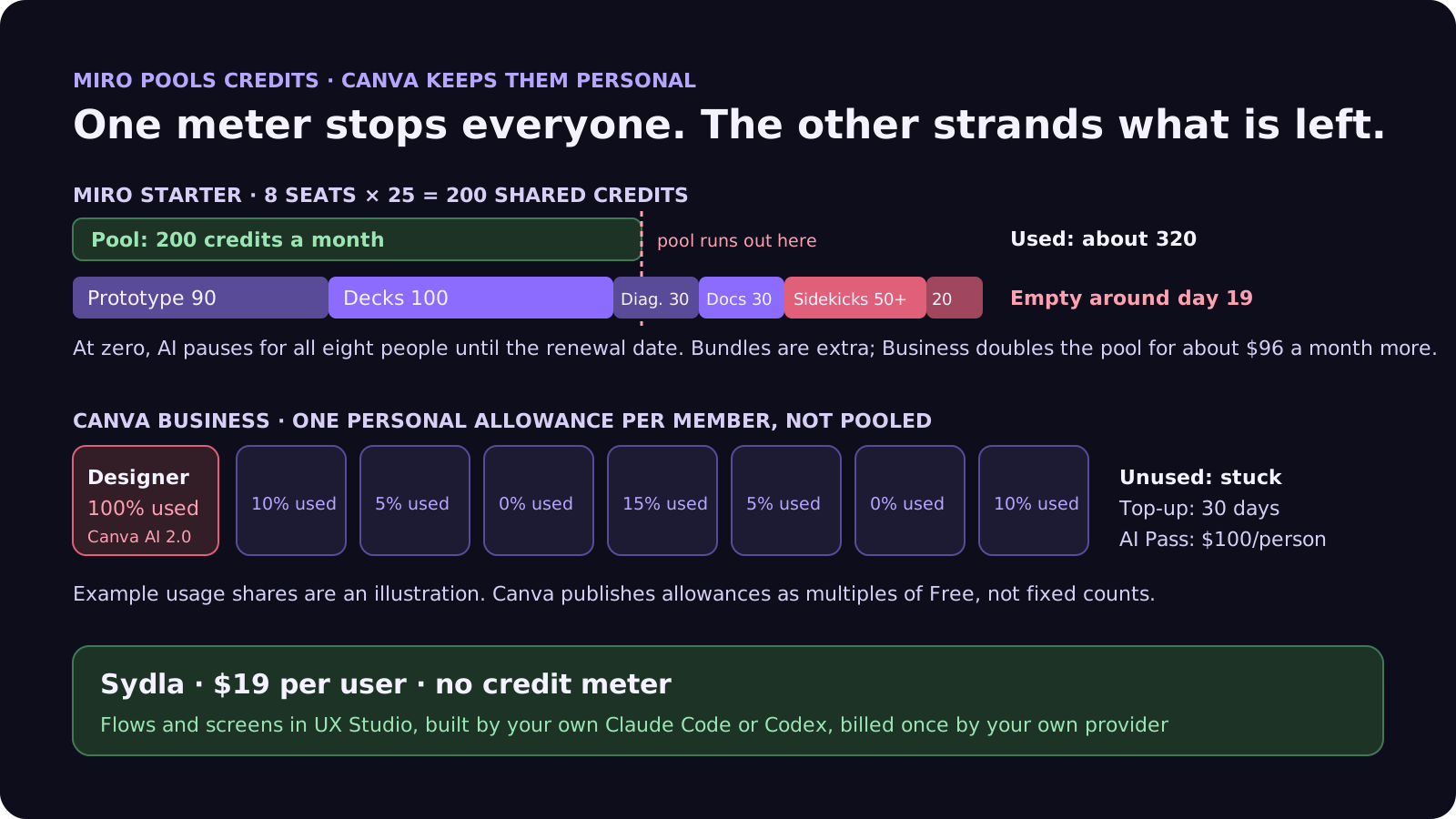
On Canva in the same month, the designer building launch visuals with Canva AI 2.0 burns through their own allowance while the seven others barely touch theirs. Nobody can hand over the unused part, so the team either waits through pauses or buys a top-up or AI Pass for one person.
Neither bill counts the model your developers already pay Anthropic or OpenAI for. Our cost per ticket breakdown covers that side.
Your coding agent calling Miro or Canva over MCP
Both tools ship MCP servers, so Claude Code or Codex can read a board or create a design. The billing rules differ:
- Miro MCP mostly skips credits but caps calls. Of the listed tools, only Summarize Board uses AI credits. Every plan has a daily call limit: 100 on Free, 500 on Starter, 2,000 on Business and 10,000 on Enterprise, where the server is off by default until an admin turns it on.
- Canva MCP spends the Canva allowance. Canva's help center says the allowance covers Canva tools used in a connected AI assistant. When Claude asks Canva to generate a design, you pay your Anthropic plan for the conversation and your Canva allowance for the generation.
- Either way, it is one more hop. The agent reads the ticket from Jira, the spec from Confluence or Notion, the screens from Figma and the flow from Miro, each with its own limits and permissions.
Our MCP servers guide compares those limits side by side, and our prompt injection guide explains why every extra source an agent reads is also an extra place for untrusted text to enter.
Five settings to change this week
If you stay on Miro and Canva, these steps take fifteen minutes:
- Check the Miro balance before a planning week. Admin Console, then Billing, shows the allowance, bundles and renewal date. Workshops and review decks are where the pool goes.
- Generate once, then edit by hand. Every Miro regeneration costs again. Fix a prototype screen or a slide manually rather than asking for a fresh one.
- Use AI search freely. It costs 0 credits in Miro. Summaries and Sidekick questions cost 2 or more.
- Find your heavy Canva users. Each member sees their own tracker under Settings, then Billing. Give AI Pass only to the person who needs it, rather than upgrading the whole team.
- Cap auto top-ups. If you turn on Canva auto top-ups, set a spend cap per billing period so a busy launch cannot run up an open-ended bill.
Six tools, six meters: the stack next to Sydla
Miro and Canva are two meters out of six. Here is one paid seat of each tool next to Sydla. Each has its own page on our comparison hub.
| Tool and plan | Seat / month | Built-in AI billing | What the agent needs from it |
|---|---|---|---|
| Jira Standard | $9.70 | 25 Rovo credits per user per month, pooled; $0.01 per extra credit from 3 December 2026 | The ticket and acceptance criteria |
| Confluence Standard | $7.15 | 25 Rovo credits per user per month, same pool | The spec and decisions |
| Notion Plus | $12.00 | Limited AI trial; Custom Agents need Business or Enterprise, then $10 per 1,000 credits | Notes and research |
| Figma Professional, Full seat | $20.00 | 3,000 AI credits a month, personal, no rollover | Screens and states |
| Miro Starter | $10.00 | 25 AI credits per seat a month, pooled, pauses at zero; bundles extra | Flows and diagrams |
| Canva Business | $25.00 | Personal allowance, 20x Free; top-ups or AI Pass at $100 | Launch and marketing visuals |
| Six-tool total | $83.85 | Six meters, plus your coding agent | Six context hops per ticket |
| [Sydla](/) | $19.00 | None: your own Claude Code or Codex plan pays for the model, with no markup | One work item: brief, criteria, states, runs and evidence |
That is $64.85 per user per month less than the six-tool stack before any bundles, top-ups or AI Pass. Details are in the pricing section.
Walkthrough: brief, UX Studio, your own agent, review
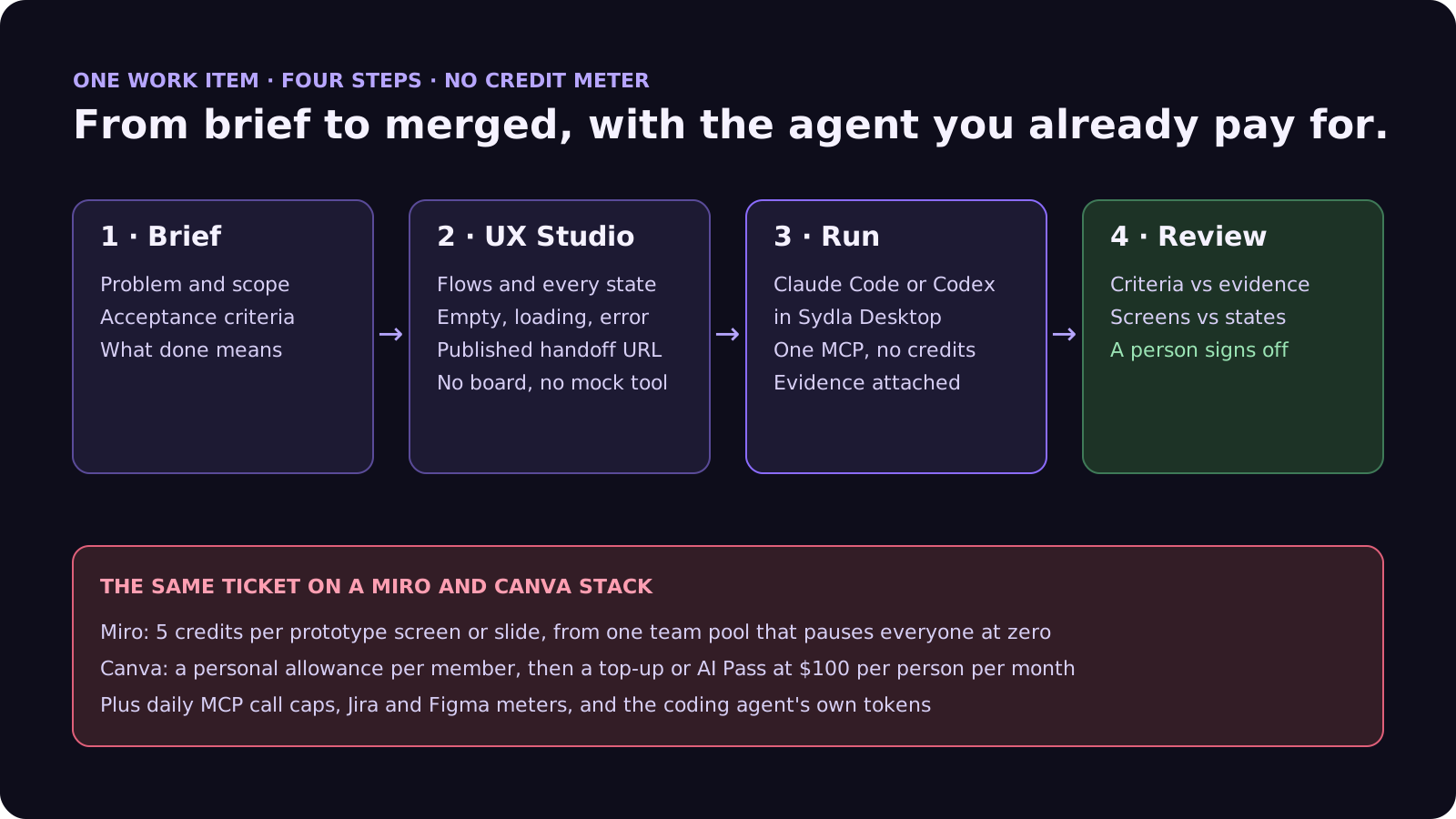
In Sydla, the brief, the flows, the screens and the agent runs live on one work item, and the agent doing the work is the one you already pay for. There is no team pool to run dry and no personal allowance to top up. Here is how a ticket moves from brief to merge.
- Brief on the work item. Problem, scope, acceptance criteria and what done means, written once and read by every person and agent. Our PRD template for agents shows the seven sections.
- States in UX Studio. Every screen and state, including empty, loading and error, with its own URL and a published handoff. This is where the flow you would sketch in Miro and the mock you would make in Canva live, next to the brief. Our design-to-code handoff guide explains why agents build better from states than screenshots.
- Run in Sydla Desktop with your own agent. Sydla Desktop launches the Claude Code or Codex CLI on your machine, signed in with your own Anthropic or OpenAI account, in your local checkout. The agent reads the brief and the states through one Sydla MCP connection, builds, runs the tests and attaches the evidence to the run. There are no Sydla AI credits and no token markup. The Desktop guide walks through the first run.
- Review and sign-off. A reviewer checks each criterion against the evidence and the screens against the states, then signs off on the work item. Our guide to reviewing AI pull requests covers the four passes.
If you are leaving the stack rather than buying more credits, our 30-day migration plan covers exports, including Miro boards, and when to cancel. If you work alone, our solo founder stack does the same math for one person. When you are ready, start your workspace.
Frequently asked questions
How many AI credits do you get on Miro?
Miro's help center lists 25 AI credits a month on Free, 25 per license on Starter, 50 per license on Business and 100 on Education. Enterprise varies by license tier. Credits are pooled across the team, refresh monthly on the renewal date for Starter and Business, and do not roll over. When the pool is empty, AI actions pause for everyone until it refreshes.
How much does each Miro AI action cost?
Miro publishes a fixed rate card: AI search 0 credits; sticky notes, text, catch-up and dictation 1; docs, Sidekick prompts and space summaries 2; images 3; diagrams, tables and board layout 5; prototypes 5 per screen and slides 5 per slide. Sidekicks and prompt-based flows can cost more depending on the request and model. Regenerating costs again and discarding does not refund.
Are Canva AI allowances shared across a team?
No. On Canva Business, Nonprofits, Education and Enterprise each member has their own AI allowance, and allowances are not shared or pooled. Pro gets 10 times the Free allowance for Premium and Ultra tools, Business and Enterprise 20 times. Standard AI tools are unmetered on paid plans under fair use limits.
How much is Canva AI Pass and what are AI top-ups?
AI Pass costs USD $100 per person per month and gives 40 times the Pro allowance or 20 times the Business allowance. AI top-ups are for Canva Business only: each adds one block equal to the monthly Business allowance, valid for 30 days, bought once or automatically up to a spend cap. Canva shows the top-up price in the product.
How much does Sydla cost compared with Jira, Confluence, Notion, Figma, Miro and Canva?
Sydla costs $19 per user per month with no AI credit meter. One paid seat each of Jira Standard, Confluence Standard, Notion Plus, Figma Professional Full, Miro Starter and Canva Business costs $83.85 per user per month, so the saving is $64.85 per user per month before any add-on credits. You bring your own Claude Code or Codex account, so your Anthropic or OpenAI plan pays for the model with no markup.







































